
ARREGUI 241150
ARREGUI Supra 241150 Electronic Wall Safe
Itọsọna olumulo
1. Ifihan
This manual provides detailed instructions for the installation, operation, and maintenance of your ARREGUI Supra 241150 Electronic Wall Safe. Please read this manual thoroughly before using the safe to ensure proper function and security. Keep this manual for future reference.
The ARREGUI Supra 241150 is a robust wall-mounted safe designed for securing valuables. It features an electronic combination lock, an emergency key override, and an extendable bottom for flexible storage capacity.
2. Alaye Aabo
- Always keep the emergency keys in a secure location away from the safe. Do not store them inside the safe.
- Ensure the safe is securely installed in a wall according to the installation instructions to prevent unauthorized removal. Professional installation is recommended.
- Ma ṣe fi ailewu han si awọn iwọn otutu to gaju tabi ọriniinitutu.
- Rọpo awọn batiri ni kiakia nigbati itọka batiri kekere ba han lati yago fun titiipa.
- Do not share your access codes with unauthorized individuals.
- This safe is not water-resistant. Avoid exposure to water.
3. Package Awọn akoonu
Jẹrisi pe gbogbo awọn ohun kan wa ninu package:
- ARREGUI Supra 241150 Wall Safe Unit
- Awọn bọtini pajawiri (2)
- Awọn batiri AA (4)
- Ilana Afowoyi (iwe yii)
4. Eto
4.1. Fifi sori Odi
The ARREGUI Supra 241150 is designed for flush wall mounting. Proper installation is crucial for the safe's security. It is highly recommended to have the safe installed by a qualified professional.
- Choose a suitable location within a wall that can support the safe's weight (13 kg) and dimensions (approximately 32 cm height x 42 cm width x 15-25 cm depth).
- Cut an opening in the wall slightly larger than the safe's body dimensions, ensuring sufficient depth for the extendable bottom.
- Insert the safe into the opening.
- Secure the safe to the wall structure using appropriate fasteners (not included) through the pre-drilled holes inside the safe. Ensure it is firmly anchored.
- Finish the wall around the safe for a flush and secure fit.

Image: The ARREGUI Supra 241150 wall safe seamlessly integrated into a grey wall, positioned above a wooden desk with various items.
4.2. Fifi sori batiri
The safe requires 4 AA batteries for the electronic lock. These are included in the package.
- Open the safe door using one of the emergency keys (refer to section 5.4 if needed).
- Wa yara batiri si inu ẹnu-ọna ailewu.
- Fi awọn batiri AA 4 sii, ni idaniloju polarity ti o pe (+/-).
- Pa ideri iyẹwu batiri naa.
- The safe is now powered and ready for code setting.
4.3. Eto Koodu Ibẹrẹ
Your safe comes with a factory default code. It is crucial to change this immediately to a personal code. The safe supports two codes: a User Code and a Master Code. Both can be 3 to 6 digits long.
Ṣiṣeto koodu olumulo:
- Pẹlu ilẹkun ti o ṣii, tẹ bọtini naa Tunto button located on the inside of the door. The indicator light will flash.
- Enter your desired 3-6 digit user code on the keypad.
- Tẹ awọn # button to confirm. The indicator light will flash again, confirming the new code is set.
- Test the new user code with the door open before closing it.
Ṣiṣeto koodu Titunto:
- Pẹlu ilẹkun ti o ṣii, tẹ bọtini naa 0 button twice, then press the Tunto button. The indicator light will flash.
- Enter your desired 3-6 digit master code on the keypad.
- Tẹ awọn # button to confirm. The indicator light will flash again, confirming the new master code is set.
- Test the new master code with the door open before closing it.

Aworan: A alaye view of the electronic keypad and emergency key slot on the ARREGUI Supra 241150 safe.
5. Awọn ilana Iṣiṣẹ
5.1. Opening the Safe with Electronic Code
- Enter your User Code or Master Code on the keypad.
- Tẹ awọn # bọtini.
- Tí kódì náà bá tọ́, ìmọ́lẹ̀ àfihàn aláwọ̀ ewé yóò tàn, ìwọ yóò sì gbọ́ ìró ohùn kan.
- Laarin iṣẹju-aaya 5, tan koko naa si ọna aago lati ṣii ilẹkun.
- If an incorrect code is entered three times, the system will lock for a short period.

Image: The ARREGUI Supra 241150 safe in its closed state, highlighting the electronic keypad and manual opening knob.
5.2. Títì Ààbò Pa
- Pa ẹnu-ọna ailewu duro.
- Yí bọ́tìnì náà padà sí ọ̀nà òdìkejì láti mú àwọn bọ́tìnì tí ó ń ti nǹkan mọ́ra.
- Ensure the door is fully secured.
5.3. Àyípadà Àwọn Kóòdù
Follow the steps in section 4.3 "Initial Code Setting" to change either the User Code or Master Code at any time. Remember to test the new code with the door open before closing it.
5.4. Emergency Key Override
In case of forgotten codes, battery failure, or electronic malfunction, the safe can be opened using the emergency key.
- Locate the emergency keyhole, usually concealed behind a cover on the keypad panel.
- Insert one of the emergency keys into the keyhole.
- Yí kọ́kọ́rọ́ náà sí apá ọ̀tún nígbà tí o bá ń yí kókó náà sí apá òsì láti ṣí ìlẹ̀kùn ààbò náà.
- Once open, you can replace batteries or reset codes as needed.

Image: The ARREGUI Supra 241150 safe with its door ajar, revealing the internal compartment and the electronic lock mechanism with an emergency key.
5.5. Adjustable Bottom / Extendable Depth
The ARREGUI Supra 241150 features an extendable bottom, allowing you to adjust the safe's internal depth. This provides flexible storage capacity.
- Ṣii ilẹkun ailewu.
- Locate the mechanism for the extendable bottom inside the safe.
- Carefully pull or push the bottom panel to extend or retract it to your desired depth. The mechanism typically has multiple fixed positions.
- Ensure the bottom is securely locked into place at the chosen depth before storing items.
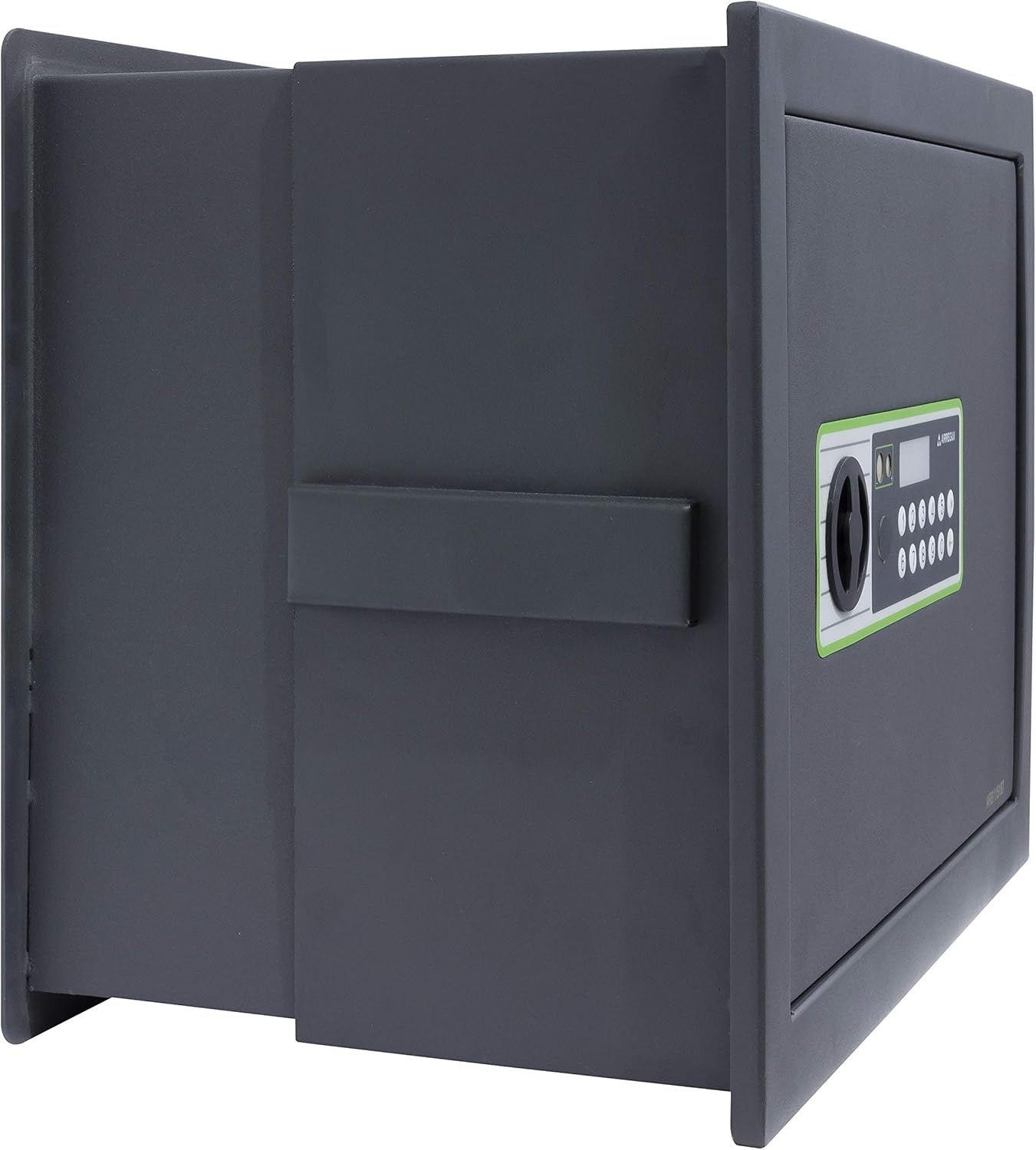
Aworan: Apa view of the ARREGUI Supra 241150 safe, showing the extendable bottom partially extended, increasing internal depth.

Aworan: Apa view of the ARREGUI Supra 241150 safe, with the extendable bottom fully extended to its maximum depth.

Image: The interior of the ARREGUI Supra 241150 safe, featuring an adjustable shelf and various items securely stored, demonstrating its capacity.
6. Itọju
6.1. Batiri Rirọpo
When the batteries are low, the visual alarm (indicator light) will flash, or the keypad may become unresponsive. Replace all 4 AA batteries promptly.
- Open the safe door (using the code or emergency key).
- Ṣii ideri iyẹwu batiri naa.
- Yọ awọn batiri atijọ kuro ki o si sọ wọn nù ni ifojusọna.
- Fi awọn batiri AA tuntun 4 sii, ni idaniloju polarity ti o pe.
- Pa ideri iyẹwu batiri naa.
6.2. Ninu
Nu ita ti ailewu pẹlu asọ, damp asọ. Ma ṣe lo abrasive ose tabi olomi, bi awọn wọnyi le ba ipari tabi itanna irinše.
7. Laasigbotitusita
| Isoro | Owun to le Fa | Ojutu |
|---|---|---|
| Ailewu ko ṣii pẹlu koodu. | Koodu ti ko tọ ti tẹ sii. Awọn batiri kekere. Itanna aiṣedeede. | Re-enter code carefully. Replace batteries (see section 6.1). Use emergency key (see section 5.4). |
| Bọtini foonu ko ṣe idahun. | Awọn batiri ti o ku. System lockout after multiple incorrect attempts. | Replace batteries (see section 6.1). Wait for the lockout period to expire (usually a few minutes). |
| Ilekun ko tii dada. | Idilọwọ ninu ẹnu-ọna fireemu. Locking bolts not fully retracted. | Ṣayẹwo fun eyikeyi awọn ohun kan dina ẹnu-ọna. Ensure the knob is turned fully to retract bolts before closing. |
8. Awọn pato
- Brand: ARREGUI
- Nọmba awoṣe: Súpù 241150
- Awọn iwọn Ọja (H x W x D): Approximately 32 cm x 42 cm x 15-25 cm (Height, Width, Depth - extendable)
- Titiipa Iru: Electronic Combination, Key Override
- Àwọ̀: Dark Grey (Black)
- Agbara: 19 Liters (approximate, may vary with extension)
- Ohun elo: Alloy Irin
- Front Thickness: 6 mm
- Sisanra ara: 2 mm
- Iru fifi sori: Ògiri Ògiri
- Ẹya Pataki: Adjustable/Extendable Bottom
- Ìwọ̀n Nkan: 13 kilo
- Orisun Agbara: 4 x AA batiri
- Itaniji: Visual (Low Battery Indicator)
- Omi Resistance: Ko Omi Resistant
9. Atilẹyin ọja ati Support
For warranty information or technical support, please refer to the documentation provided with your purchase or contact ARREGUI customer service directly. Contact details can typically be found on the manufacturer's webojula tabi lori rẹ rira ọjà.
Please have your model number (Supra 241150) and purchase date ready when contacting support.
Ask a question about this manual
Ask about setup, troubleshooting, compatibility, parts, safety, or missing instructions. Manuals+ will review the question and use this page’s manual context to help answer it.