
1. Ifihan
The RIGOL DS1202Z-E is a high-performance 200 MHz digital oscilloscope designed for a wide range of applications including research and development, maintenance, and educational laboratory settings. It offers advanced features such as a 1 GSa/s real-time sample rate, 24 Mpts memory depth, and a 7-inch high-definition display, providing clear and detailed waveform analysis.
2. Key Awọn ẹya ara ẹrọ
- Bandwidth and Sampling: 200 MHz bandwidth with 1 GSa/s real-time sample oṣuwọn.
- Ijinle Iranti: 24 Mpts memory for extended signal capture and detailed analysis.
- Iwọn Iṣẹ-pupọ: Integrates a frequency counter and supports protocol decoding for RS232/UART, I2C, and SPI. Includes FFT analysis and automatic measurement functions.
- Waveform Recording: Features waveform recording and playback to capture signal variations and identify faults or anomalies.
- Ifihan Itumọ Giga: Equipped with a 7-inch TFT display offering 256 gray levels, providing a visual effect similar to phosphor screens for clear waveform details.
- Remote Control & Development Support: USB and LAN ports enable remote control from a PC. Compatible with SCPI commands and integrates with LabVIEW, Visual Basic, and Visual C++.
3. Ọja Ipariview
3.1 Igbimọ iwaju
The front panel of the DS1202Z-E features a 7-inch color display, control buttons, and input connectors. The intuitive layout allows for easy access to all primary functions.

Figure 3.1: Front Panel of the DS1202Z-E Oscilloscope
3.2 ru Panel
The rear panel provides connectivity options for power, USB, and LAN for remote operation and data transfer.
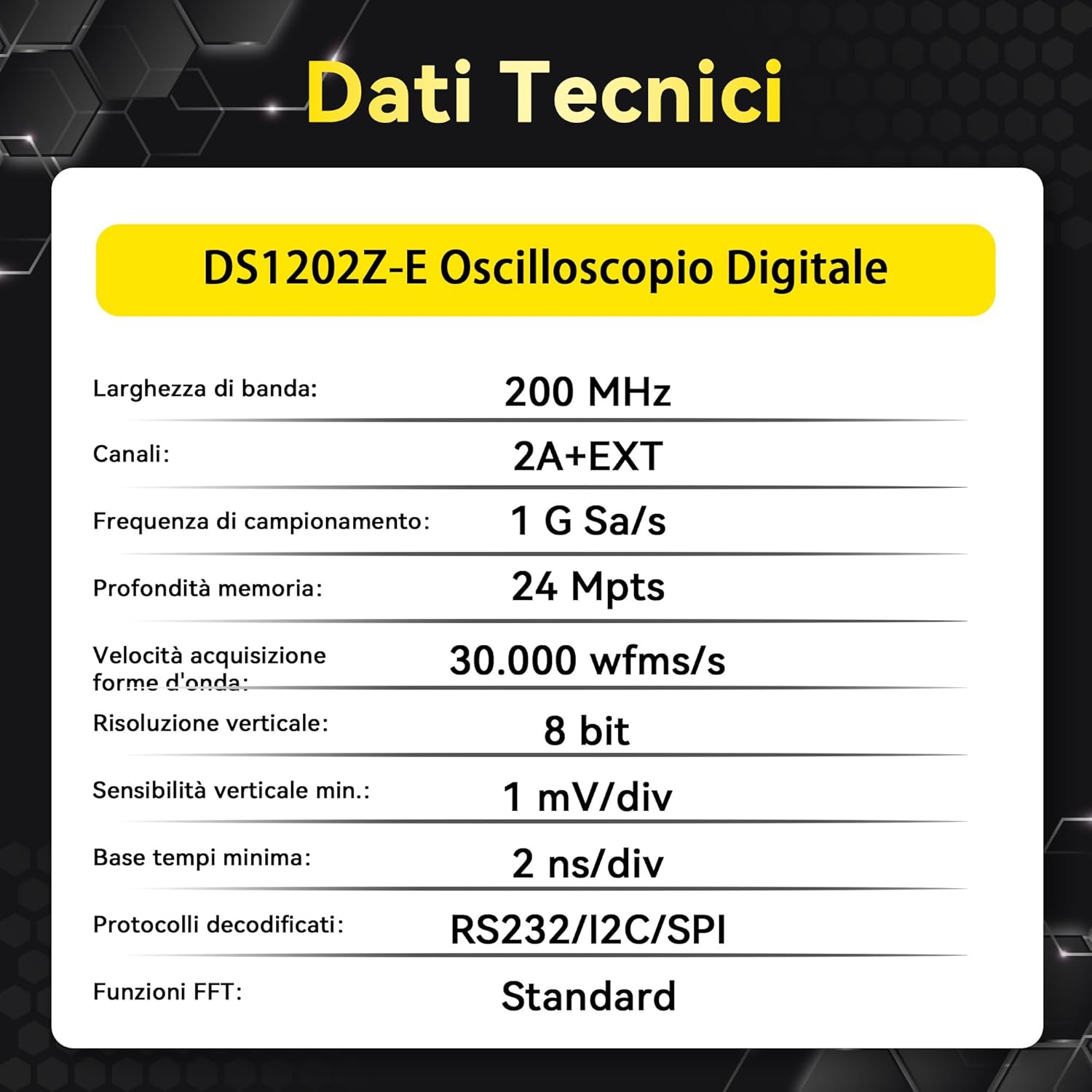
Figure 3.2: Rear Panel of the DS1202Z-E Oscilloscope
3.3 Awọn iwọn
The compact design of the oscilloscope makes it suitable for various workspaces.

Figure 3.3: DS1202Z-E Dimensions
4. Eto
- Ṣii silẹ: Carefully remove the oscilloscope and all accessories from the packaging.
- Asopọ agbara: Connect the provided power cord to the oscilloscope's power input on the rear panel and then to a suitable AC power outlet.
- Agbara Tan: Press the mechanical power button on the front panel to turn on the instrument.
- Asopọ Iwadi: Connect the oscilloscope probes to the CH1 and CH2 input connectors on the front panel. Ensure a secure connection.
- Idapada Iwadii: Perform probe compensation as described in the detailed user manual to ensure accurate measurements.
5. Awọn ilana Iṣiṣẹ
5.1 Ìfihàn Ìgbì Wíwọ́-ẹ̀rọ Ìpìlẹ̀
After powering on, connect a signal to one of the input channels. Use the vertical scale (Volts/Div) and horizontal scale (Time/Div) knobs to adjust the waveform display. The position knobs allow you to move the waveform vertically and horizontally.

Figure 5.1: Basic Waveform Display
5.2 Nfa
The trigger system stabilizes repetitive waveforms and captures single-shot events. Use the Trigger Level knob to set the trigger point. Various trigger modes (Edge, Pulse, Video, Slope, etc.) are available via the 'Trigger' menu.
5.3 Serial Bus Decoding
The DS1202Z-E supports decoding of common serial protocols. Access the 'Decode' menu to select the protocol (RS232/UART, I2C, SPI) and configure parameters. The decoded data will be displayed on the screen, simplifying debugging of serial communications.

Figure 5.3: Serial Bus Decoding (I2C Example)
5.4 Waveform Recording and Playback
Utilize the waveform recording feature to capture and store up to 5,000 frames of trigger events. This allows for later review and analysis of intermittent events or long-duration signals.

Figure 5.4: Waveform Recording and Playback Interface
5.5 FFT Analysis
The Fast Fourier Transform (FFT) function allows you to analyze signals in the frequency domain. This is useful for identifying harmonics, noise, and other frequency components. Access FFT from the 'Math' menu.

Figure 5.5: FFT Analysis Display
5.6 Product Features Overview Fidio
Video 5.6: A finifini loriview of the RIGOL DS1202Z-E oscilloscope's key features, including deep memory, capture rate, waveform tracking, and serial bus decoding capabilities.
6. Awọn pato
| Ẹya ara ẹrọ | Sipesifikesonu |
|---|---|
| Brand | Rigol |
| Orisun agbara | Okun Itanna |
| Ara | Oni-nọmba |
| Àwọ̀ | Funfun |
| Awọn iwọn Nkan (LxWxH) | 31.3 x 16.1 x 12.2 cm |
| Iwọn Išẹ ti o kere ju Voltage | 100 Volts |
| Upper Operating Temperature | 122 Iwọn Fahrenheit |
| Orisi wiwọn | Multimeter |
| Achieved Specifications | FCC, IEC 1010, IEC 61010-1:2000-1 |
| Awoṣe | DS1202Z-E |
| UPC | 764560091433 |
| Olupese | RIGOL |
| Nọmba Idanimọ Iṣowo Agbaye | 00764560091433 |
| Nọmba apakan | RIGOL DS1202Z-E |
| Ilu isenbale | China |
| Sales Unit Volume/Weight | 1.0 Iṣiro |
7. Ohun ti o wa ninu Apoti
The RIGOL DS1202Z-E package includes the following components:
- Main Unit (DS1202Z-E Digital Oscilloscope)
- 2 x Passive Probes (350MHz)
- Power Cord (EU)
- USB A-B Data Cable
- Kaadi atilẹyin ọja
- Ijẹrisi odiwọn
- Ikede Ibamu

Nọmba 7.1: Awọn akoonu Package
8. Laasigbotitusita
This section provides general guidance for common issues. For detailed troubleshooting steps, refer to the comprehensive user manual available on the Rigol webojula.
- Ko si Agbara: Ensure the power cord is securely connected to both the oscilloscope and the power outlet. Check the power button.
- Ko si Ifihan Waveform: Verify that probes are correctly connected to the input channels and the signal source. Adjust vertical and horizontal scales. Check trigger settings.
- Fọọmu Igbi Aiduro: Adjust the trigger level and trigger mode. Ensure the trigger source is correctly selected.
- Àwọn Ìwọ̀n Tí Kò Tọ́: Perform probe compensation. Check probe attenuation settings on the oscilloscope.
9. Itọju
Itọju to dara ṣe idaniloju gigun ati deede ti oscilloscope rẹ.
- Ninu: Use a soft, dry cloth to clean the exterior of the instrument. Do not use abrasive cleaners or solvents.
- Ibi ipamọ: Store the oscilloscope in a clean, dry environment away from direct sunlight and extreme temperatures.
- Iṣatunṣe: Regular calibration by authorized service centers is recommended to maintain measurement accuracy.
10. Atilẹyin ọja ati Support
The RIGOL DS1202Z-E Digital Oscilloscope comes with a 3-odun atilẹyin ọja. Rigol offers 24-wakati imọ support to assist with any product-related inquiries or issues. For service or support, please contact Rigol customer service or visit the official Rigol webojula.
Fun alaye diẹ sii, jọwọ ṣabẹwo Rigolna.com.