
Ọrọ Iṣaaju
This manual provides essential information for the safe and efficient operation of your ProfiCare PC-HT 3044 wall-mounted hair dryer. Please read these instructions carefully before use and keep them for future reference.
The ProfiCare PC-HT 3044 is a wall-mounted hair dryer designed for convenience and space-saving. It features 1800 Watts of power, two temperature/power levels, an extra-long spiral cable, a Cool Shot function, and an automatic safety shut-off when placed in its holder.
Awọn Itọsọna Aabo
IKILO: To reduce the risk of electric shock, fire, injury, or damage, always follow basic safety precautions when using electrical appliances.
- Ka gbogbo awọn ilana ṣaaju lilo ohun elo naa.
- Má ṣe lo ohun èlò yìí nítòsí omi (fún àpẹẹrẹ, nínú balùwẹ̀, ìwẹ̀, tàbí nítòsí síńkì).
- Nigbagbogbo yọọ ohun elo lẹsẹkẹsẹ lẹhin lilo.
- Maṣe de ọdọ ohun elo ti o ṣubu sinu omi. Yọọ kuro lẹsẹkẹsẹ.
- Ohun elo yii kii ṣe ipinnu fun lilo nipasẹ awọn eniyan (pẹlu awọn ọmọde) pẹlu idinku ti ara, imọlara tabi awọn agbara ọpọlọ, tabi aini iriri ati imọ, ayafi ti wọn ba ti fun wọn ni abojuto tabi itọnisọna nipa lilo ohun elo nipasẹ eniyan ti o ni iduro fun aabo wọn.
- Awọn ọmọde yẹ ki o wa ni abojuto lati rii daju pe wọn ko ṣere pẹlu ohun elo naa.
- Jeki okun agbara kuro lati awọn aaye ti o gbona.
- Maṣe dina awọn ṣiṣi afẹfẹ ti ohun elo tabi gbe si ori ilẹ rirọ, gẹgẹbi ibusun tabi ijoko, nibiti awọn ṣiṣi afẹfẹ le dina. Jeki awọn ṣiṣi afẹfẹ laisi lint, irun, ati iru bẹ.
- Maṣe lo lakoko sisun.
- Maṣe ju silẹ tabi fi ohunkan sinu ṣiṣi eyikeyi.
- Ma ṣe lo ita tabi ṣiṣẹ ni ibiti a ti nlo awọn ọja aerosol (sokiri) tabi nibiti a ti nṣakoso atẹgun.
- Maṣe lo okun itẹsiwaju pẹlu ohun elo yii.
- Ma ṣe taara afẹfẹ gbigbona si oju tabi awọn agbegbe ti o ni itara ooru.
- The appliance features an automatic safety shut-off when inserted into its wall mount. This is a safety feature to prevent overheating and conserve energy.
- Rii daju voltage itọkasi lori ohun elo ni ibamu si awọn mains agbegbe voltage ṣaaju ki o to so ẹrọ naa pọ.
Package Awọn akoonu
Jọwọ ṣayẹwo pe gbogbo awọn nkan wa ati ni ipo to dara:
- ProfiCare PC-HT 3044 Wall-Mounted Hair Dryer
- Wall Mount akọmọ
- Ohun elo fifi sori ẹrọ (awọn skru ati awọn pilogi ogiri)
- Ilana itọnisọna

Image: The ProfiCare PC-HT 3044 hair dryer, its wall mount, mounting screws, and the instruction manual are shown, illustrating the complete package contents. The image also indicates a product weight of 797 grams.
Eto ati fifi sori
The hair dryer comes with a wall mount for convenient storage and accessibility. The extra-long spiral cable provides maximum flexibility during use.
- Yan Ibi kan: Select a suitable location near a power outlet in your bathroom or desired area. Ensure the surface is sturdy enough to support the wall mount.
- Samisi Awọn aaye Liluho: Hold the wall mount bracket against the wall at the desired height and mark the positions for the drilling holes using a pencil.
- Awọn iho iho: Drill holes at the marked positions. Insert the provided wall plugs into the drilled holes.
- Attach Wall Mount: So àkọlé ìsopọ̀ ògiri mọ́ ògiri nípa lílo àwọn skru tí a pèsè.
- Sopọ si Agbara: Plug the hair dryer's power cord into a suitable electrical outlet.
- Place Hair Dryer: Insert the hair dryer into its wall mount. The device will automatically switch off when placed in the holder.

Image: The ProfiCare PC-HT 3044 hair dryer is shown mounted on a wall, with its spiral cable extending. The product packaging is visible next to it.
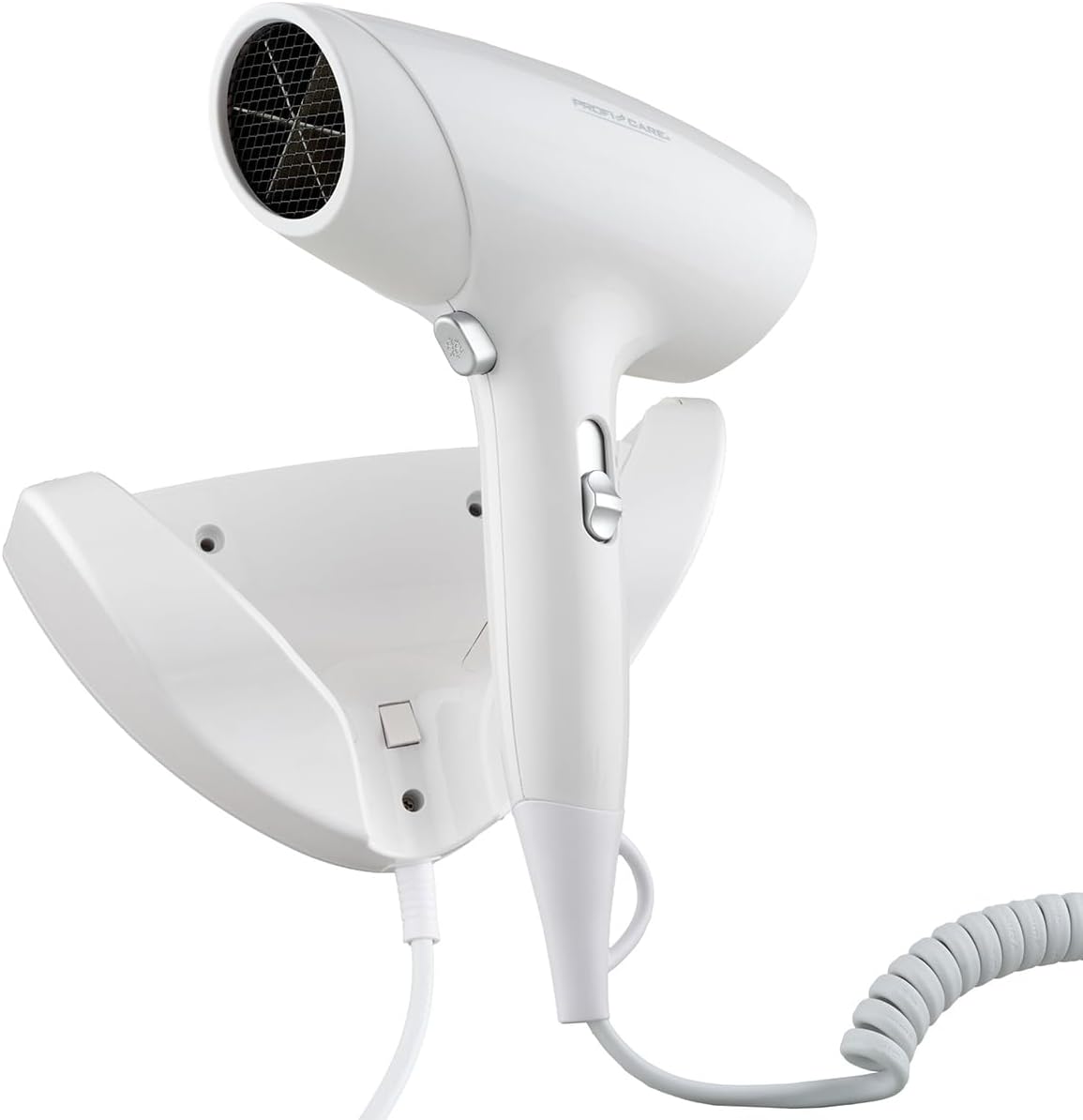
Aworan: A sunmọ-soke view of the ProfiCare PC-HT 3044 hair dryer resting in its wall-mounted holder, demonstrating its compact storage.
Awọn ilana Iṣiṣẹ
Follow these steps to use your ProfiCare PC-HT 3044 hair dryer:
- Agbara Tan: Remove the hair dryer from its wall mount. It will automatically power on.
- Select Temperature/Power: Use the slide switch on the handle to select your desired temperature and power level. The hair dryer offers two settings for optimal airflow and styling.
- Gbigbe: Direct the airflow towards your hair, maintaining a safe distance to prevent burns.
- Išẹ Shot Itura: For setting your hairstyle and providing a perfect finish, press and hold the "Cool Shot" button. This delivers a burst of cool air.
- Agbara Pa: When finished, return the hair dryer to its wall mount. The appliance will automatically switch off. Alternatively, you can manually switch it off using the slide switch before placing it back.

Image: A woman is shown using the ProfiCare PC-HT 3044 hair dryer, demonstrating its ease of use and the flexibility provided by the spiral cable. The image also highlights the 1800W power.

Image: This image depicts the hair dryer being inserted into its wall mount, with arrows indicating the direction. Text explains the automatic shut-off function upon docking.

Aworan: A alaye view of the hair dryer's control panel, highlighting the "Cool Shot" button for overheating protection and the two selectable speed/temperature settings for customized styling.
Itoju
Itọju to peye n ṣe idaniloju pe ẹrọ gbigbẹ irun ori rẹ yoo pẹ to ati pe yoo ṣiṣẹ daradara.
- Ninu: Ensure the appliance is unplugged and cool before cleaning. Wipe the exterior with a soft, damp asọ. Ma ṣe lo abrasive ose tabi epo.
- Asẹ afẹfẹ: Regularly check the air inlet grille at the back of the hair dryer for lint and dust accumulation. Clean it gently with a soft brush or vacuum cleaner to maintain airflow and prevent overheating.
- Ibi ipamọ: Store the hair dryer in its wall mount when not in use. This keeps it tidy and activates the automatic shut-off feature.
Laasigbotitusita
If you encounter issues with your hair dryer, refer to the following common problems and solutions:
- Hair dryer does not turn on:
- Rii daju pe okun agbara ti wa ni edidi ni aabo sinu iṣan itanna ti n ṣiṣẹ.
- Check if the hair dryer is fully removed from its wall mount, as it features an automatic shut-off when docked.
- Verify the slide switch is set to an ON position (I or II).
- Weak airflow or overheating:
- Check the air inlet grille for blockages (lint, dust, hair). Clean it as described in the Maintenance section.
- Rii daju pe iṣan afẹfẹ ko ni idinamọ.
- Cool Shot function not working:
- Ensure you are pressing and holding the Cool Shot button firmly.
Ti iṣoro naa ba wa lẹhin igbiyanju awọn solusan wọnyi, jọwọ kan si atilẹyin alabara.
Awọn pato
| Brand | ProfiCare |
| Nọmba awoṣe | PC-HT 3044 |
| Agbara | 1800 Wattis |
| Voltage | 220 Volts |
| Nọmba ti Awọn Eto Iyara | 2 |
| Nọmba Awọn Eto iwọn otutu | 2 |
| Pataki Awọn ẹya ara ẹrọ | Compact, Ionic Technology, Cool Shot, Automatic Safety Shut-off, Wall Mount |
| Orisun agbara | Okun Itanna |
| Awọn iwọn Ọja (D x W x H) | 10 x 24 x 26 centimeters |
| Iwọn Nkan | 980 giramu |
| Àwọ̀ | Funfun |
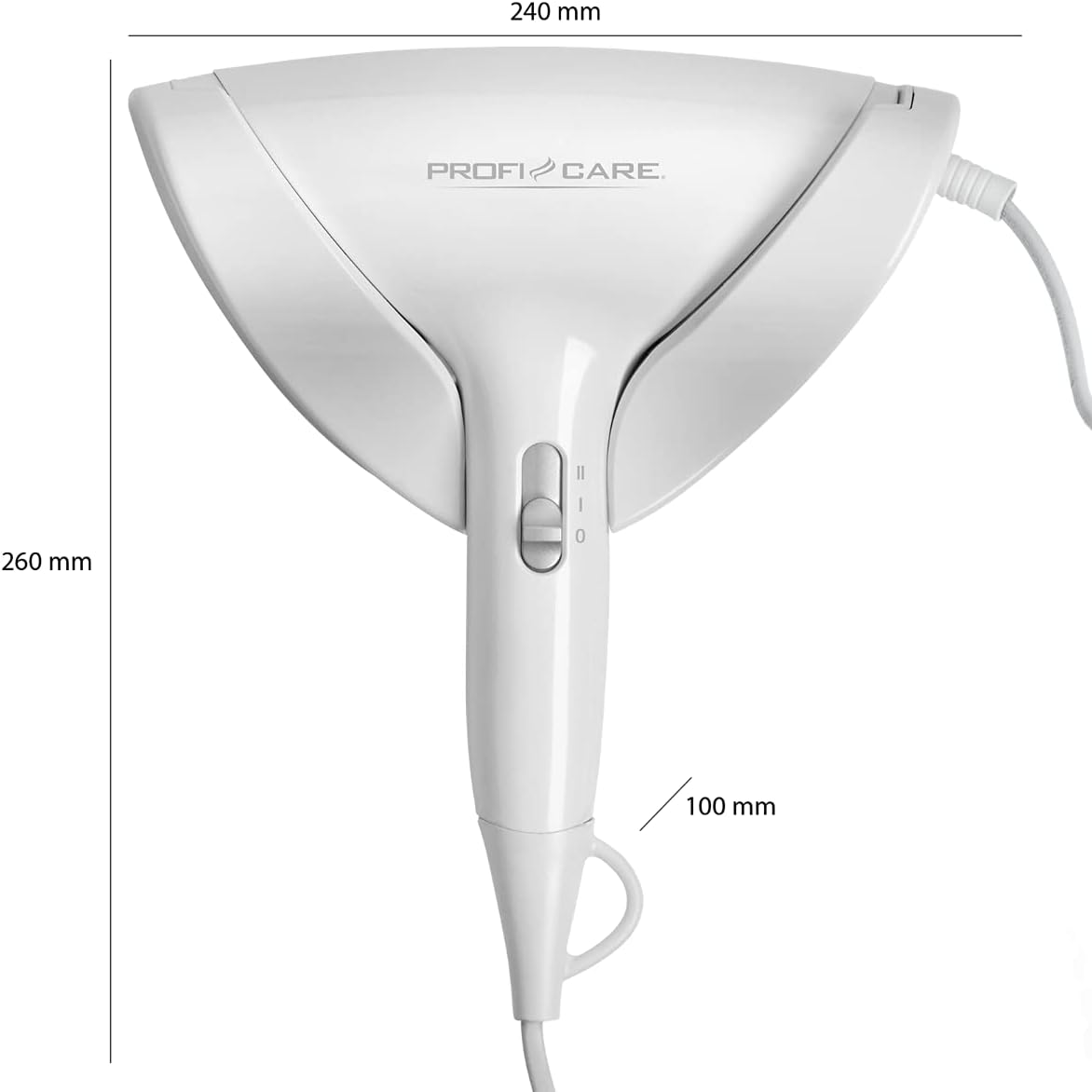
Image: A technical diagram of the ProfiCare PC-HT 3044 hair dryer showing its main dimensions: 240 mm width, 260 mm height, and 100 mm depth.
Atilẹyin ọja ati Support
For warranty information and customer support, please refer to the warranty card included in your product packaging or visit the official ProfiCare webojula. Jeki ẹri rira rẹ fun eyikeyi awọn ibeere atilẹyin ọja.
Olupese: ProfiCare
Webojula: www.proficare-germany.de