
Ajax Online Aj_WIFI_Alexa_Blind_Motor
Ajax Online Smart WiFi Blind Motor User Manual
Brand: Ajax Online | Awoṣe: Aj_WIFI_Alexa_Blind_Motor
1. Ifihan
The Ajax Online Smart WiFi Blind Motor is designed to automate your existing roller blinds, horizontal blinds, and curtains that operate with a drawstring or side mechanism. This device integrates seamlessly with smart home ecosystems like Amazon Alexa, Google Home, and Apple Siri via shortcuts, offering convenient control from anywhere in the world. This manual provides comprehensive instructions for installation, operation, maintenance, and troubleshooting to ensure optimal performance and longevity of your blind motor.
Awọn ẹya pataki:
- Easy installation, typically within 10-15 minutes.
- Compatible with Tuya or Smart Life App for remote control.
- Voice control support for Amazon Alexa, Google Home, and Apple Siri Shortcuts.
- Group control functionality to operate multiple blinds simultaneously.
- Enhances home security by allowing blind operation even when you are away.
- Offers convenience for individuals with limited mobility.
- Child safety feature.
2. Alaye Aabo
Jọ̀wọ́ ka gbogbo ìlànà ààbò dáadáa kí o tó fi sori ẹrọ àti ṣiṣẹ́. Àìtẹ̀lé àwọn ìlànà wọ̀nyí lè yọrí sí ìkọlù iná mànàmáná, iná, tàbí ìpalára ńlá.
- Rii daju pe ipese agbara ti ge asopọ ṣaaju fifi sori ẹrọ tabi itọju.
- This device is not battery-powered; ensure a power outlet is nearby for continuous operation.
- Do not expose the motor to water or excessive humidity.
- Keep children and pets away from the blind motor and moving blinds during operation.
- Lo okùn agbára àti àwọn ohun èlò mìíràn tí a pèsè nìkan.
- Do not attempt to disassemble or repair the motor yourself. Contact qualified personnel for service.
- Ensure the blind mechanism is free from obstructions before operating the motor.
3. Package Awọn akoonu
Please check the package contents upon opening to ensure all items are present and undamaged.
- 1 x Ajax Online Smart WiFi Blind Motor
- 1 x 2.5m Power Cable
- Mounting Screws (2 recommended)
- Connection Gears for beaded or corded blinds
- Afowoyi Olumulo (iwe-ipamọ yii)
4. Ọja Ipariview
Familiarize yourself with the components and dimensions of your Ajax Online Smart WiFi Blind Motor.

Nọmba 4.1: The Ajax Online Smart WiFi Blind Motor shown installed on a wall next to a window blind, demonstrating its compact design and integration with existing blind mechanisms.

Nọmba 4.2: Detailed dimensions of the blind motor, measuring approximately 17cm in height, 5.5cm in width, and 4.5cm in depth, aiding in planning installation space.
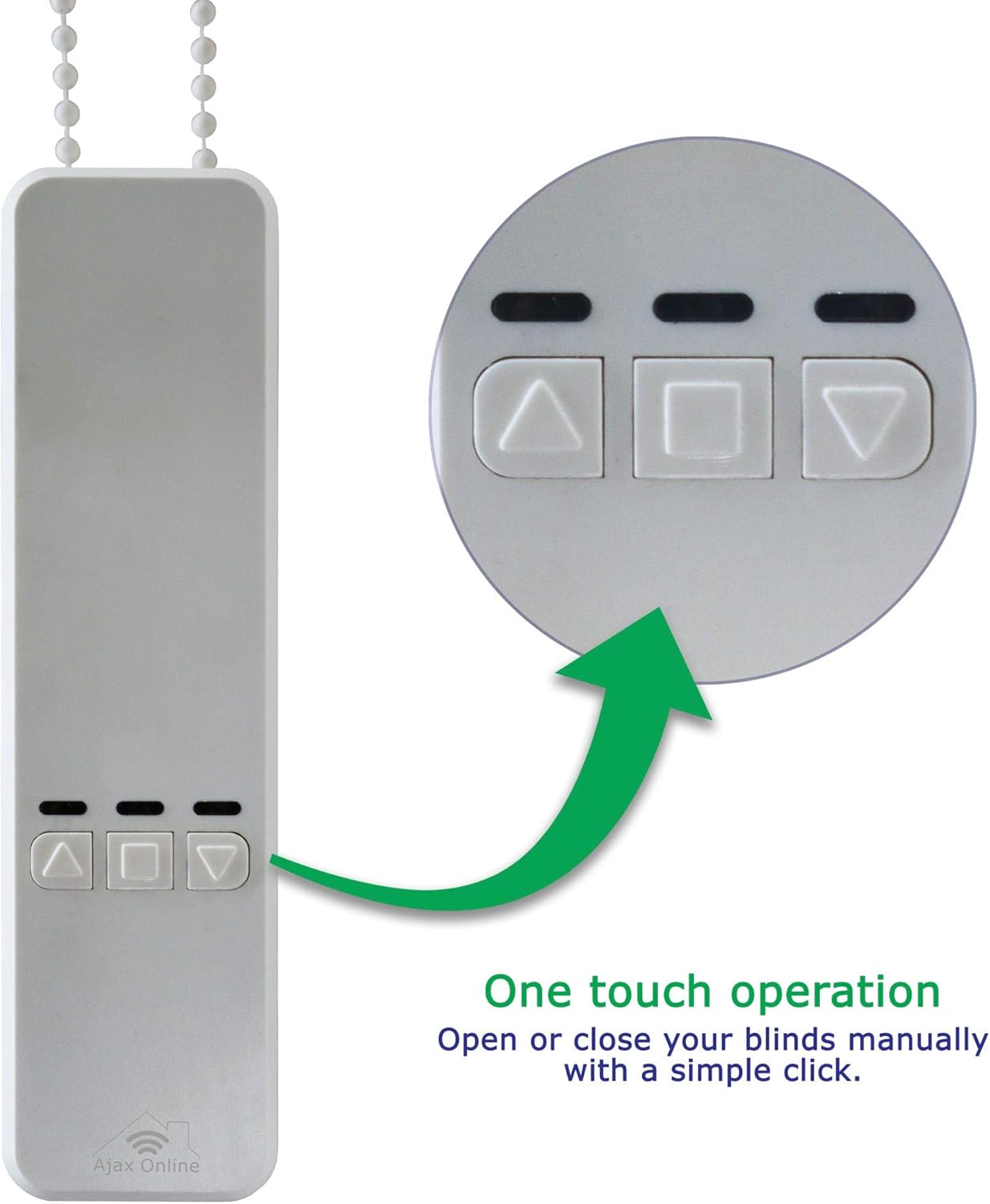
Nọmba 4.3: A sunmọ-soke view of the motor's control panel, highlighting the three buttons for one-touch operation: Up, Stop/Pause, and Down.
5. Fifi sori ẹrọ ati Oṣo
Follow these steps for a quick and easy installation of your blind motor.
5.1 Akojọ aṣyn fifi sori ẹrọ tẹlẹ
- Ensure your existing blinds have a side chain or cord mechanism.
- Verify a 2.4 GHz Wi-Fi network is available for smart home integration. The motor only connects to 2.4 GHz networks.
- Confirm a power outlet is within 2.5 meters of the installation location.
- Gather necessary tools: drill, screwdriver, pencil for marking.

Nọmba 5.1: An illustrative diagram emphasizing the ease of installation (10-15 minutes setup) and the critical requirement for a 2.4 GHz Wi-Fi frequency connection.
5.2 Ibamu
The Ajax Online Smart WiFi Blind Motor is compatible with a wide range of blinds that use a side chain or cord mechanism. Please refer to the compatibility guide below.

Nọmba 5.2: A visual guide illustrating the types of blinds compatible with the motor, including roller blinds, vertical blinds, horizontal blinds, and more, along with supported chain/cord sizes (2mm, 4mm, 6mm, 4.5x6mm, metal chain, beaded, 3.2mm).

Nọmba 5.3: An important notice indicating that the blind motor is NOT compatible with Venetian blinds that feature a tilt mechanism.

Nọmba 5.4: This image clarifies that the motor is exclusively compatible with blinds that operate via a side chain mechanism, whether beaded or corded.
5.3 iṣagbesori Aw
The motor offers flexible mounting options to suit your window setup.

Nọmba 5.5: This image demonstrates that the motor can be mounted either directly on the wall or on the window frame, providing versatility for installation.
5.4 Igbesẹ-nipasẹ-Igbese fifi sori
- Yan Ibi Igbesoke: Decide whether to mount the motor on the wall or the window frame. Ensure it is close to a power outlet and the blind's side mechanism.
- Mark Drill Iho: Hold the motor in the desired position and use a pencil to mark the two screw holes.
- Awọn iho iho: Lilu awọn ihò awaoko ni awọn ipo ti o samisi.
- Moto Abo: Attach the motor to the wall or window frame using the provided screws.
- Connect Blind Cord/Chain: Carefully feed your blind's existing cord or chain into the motor's mechanism. Select the appropriate connection gear if necessary.
- Wọle: Connect the 2.5m power cable to the motor and plug it into a power outlet.
- Idanwo Ibẹrẹ: Briefly press the Up or Down button on the motor to ensure the blind moves correctly.
6. Operating the Blind Motor
Your Ajax Online Smart WiFi Blind Motor offers multiple ways to control your blinds.
6.1 Manual Operation (One-Touch)
You can manually open or close your blinds directly from the motor unit.
Nọmba 6.1: A sunmọ-soke view of the motor's control panel, highlighting the three buttons for one-touch operation: Up, Stop/Pause, and Down. Simply press the desired button to control your blinds.
- Tẹ awọn Up button to raise the blind.
- Tẹ awọn Isalẹ button to lower the blind.
- Tẹ awọn Square/Stop button to pause the blind at any desired position.
6.2 Smart App Control (Tuya / Smart Life)
For remote control and advanced features, download the Tuya or Smart Life app on your smartphone.
- Ṣe igbasilẹ Ohun elo: Wa fun "Tuya Smart" or "Smart Life" in your app store (iOS/Android) and install it.
- Forukọsilẹ/Wọle: Ṣẹda akọọlẹ kan tabi wọle ti o ba ti ni ọkan tẹlẹ.
- Fi ẹrọ kun: Follow the in-app instructions to add a new device. Ensure your phone is connected to the 2.4 GHz Wi-Fi network.
- Ipo sisopọ: The motor should enter pairing mode (refer to app instructions for specific steps, usually involves holding a button on the motor).
- Set Limits: Once paired, use the app to set the upper and lower limits for your blinds. This is crucial for proper operation.
Through the app, you can:
- Open and close blinds remotely from anywhere.
- Set schedules for automatic opening and closing.
- Control multiple motors simultaneously (group control).
- Integrate with voice assistants.
Nọmba 6.2: This diagram illustrates the advanced functionalities available through the smart app, including convenient scheduling, control of multiple motors, enhanced home security features, and voice control compatibility.
6.3 Voice Control (Alexa, Google Home, Apple Siri)
Integrate your blind motor with popular voice assistants for hands-free control.
- Akọọlẹ Ọna asopọ: In your Alexa, Google Home, or Apple Home app, link your Tuya Smart/Smart Life account.
- Ṣawari Awọn ẹrọ: Nígbà tí o bá ti sopọ̀ mọ́ ọn, béèrè lọ́wọ́ olùrànlọ́wọ́ ohùn rẹ láti ṣàwárí àwọn ẹ̀rọ tuntun.
- Create Routines/Shortcuts: Set up custom commands or routines (e.g., "Alexa, open living room blinds," "Hey Google, close bedroom curtains," "Siri, good morning blinds").
This feature provides enhanced convenience, especially for users with limited mobility, allowing them to operate blinds effortlessly.
7. Itọju
The Ajax Online Smart WiFi Blind Motor requires minimal maintenance to ensure long-term performance.
- Ninu: Wipe the motor's exterior with a soft, dry cloth. Do not use abrasive cleaners or immerse the device in water.
- Ṣayẹwo ẹrọ: Periodically inspect the blind's cord or chain for any wear or damage. Ensure it moves freely without obstruction.
- Asopọ agbara: Verify that the power cable is securely plugged into both the motor and the wall outlet.
8. Laasigbotitusita
If you encounter issues with your blind motor, please refer to the following common problems and solutions.
| Isoro | Owun to le Fa | Ojutu |
|---|---|---|
| Motor keeps flashing. | Possible pairing issue or incorrect mode. | Try re-entering pairing mode as per app instructions. If issue persists, try resetting the device (refer to app or contact support). |
| App not working with the blind. | Limits not set, incorrect Wi-Fi frequency, or pairing issue. |
|
| Blind does not move or moves intermittently. | Power issue, obstruction, or incorrect chain/cord connection. |
|
| Iṣakoso ohun ko fesi. | Account not linked, device not discovered, or incorrect commands. |
|
If you continue to experience problems, please contact Ajax Online customer support. We can resolve 95% of issues with our dedicated support team.
9. Awọn pato
| Iwa | Ẹ̀kúnrẹ́rẹ́ |
|---|---|
| Brand | Ajax Online |
| Nọmba awoṣe | Aj_WIFI_Alexa_Blind_Motor |
| Àwọ̀ | Funfun |
| Awọn iwọn Ọja (L x W x H) | 16.99 x 5.51 x 0.01 cm (Note: 0.01cm for height seems incorrect, likely a data entry error, actual height is ~17cm from image) |
| Iwọn Nkan | 570 giramu |
| Agbara | 12 Wattis |
| Ohun elo | Ṣiṣu, Irin |
| Pataki Awọn ẹya ara ẹrọ | Smart Wi-Fi blind motor, Smart roller blinds and curtains, Compatible with Alexa and Google Home |
| Niyanju Lilo | Ninu ile |
| Ipo Isẹ | Laifọwọyi |
10. Atilẹyin ọja ati Support
Ajax Online is committed to providing high-quality products and excellent customer service.
10.1 atilẹyin ọja Alaye
Specific warranty details are not provided in this manual. Please refer to your purchase documentation or the Ajax Online webAaye fun okeerẹ atilẹyin ọja ofin ati ipo.
10.2 Onibara Support
For technical assistance, troubleshooting, or any other inquiries, please do not hesitate to contact our UK-based customer service team. We are available to help resolve any issues you may encounter.
Nọmba olubasọrọ: 01207 201989
We are dedicated to assisting you and can resolve a significant majority of customer issues with our support.