
1. Ifihan
Thank you for choosing the Philips Shaver S3134/51. This electric rotary shaver is designed for both wet and dry use, offering a comfortable and efficient shaving experience. Please read this user manual carefully before using the appliance and save it for future reference. This manual provides essential information on safe operation, setup, usage, maintenance, and troubleshooting.
2. Alaye Aabo pataki
To ensure safe operation and prevent injury, always follow these basic safety precautions:
- Unplug before use: This appliance is designed for cordless operation only. Always disconnect the shaver from the power outlet before use.
- Maṣe lo ohun elo ti o ba bajẹ.
- Keep the charging adapter dry. Do not immerse it in water or use it in wet conditions.
- Ohun elo yii le ṣee lo nipasẹ awọn ọmọde ti o jẹ ọdun 8 ati ju bẹẹ lọ ati awọn eniyan ti o dinku ti ara, ifarako tabi awọn agbara ọpọlọ tabi aini iriri ati imọ ti wọn ba ti fun wọn ni abojuto tabi itọnisọna nipa lilo ohun elo ni ọna ailewu ati loye awọn eewu ti o kan. .
- Awọn ọmọde ko gbọdọ ṣere pẹlu ohun elo naa. Ninu ati itọju olumulo ko le ṣe nipasẹ awọn ọmọde laisi abojuto.
- Only use the original Philips charger provided with the appliance.
- Ma ṣe ṣi ohun elo lati ropo batiri gbigba agbara.
3. Package Awọn akoonu
The Philips Shaver S3134/51 package typically includes:
- Philips Shaver S3134/51
- Ngba agbara Adapter
- Fila Idaabobo
- Fifọ Fẹlẹ
- Itọsọna olumulo
4. Bibẹrẹ (Eto)
4.1 Ngba agbara si Shaver
Before first use, or when the battery indicator shows low charge, fully charge your shaver. A full charge provides up to 60 minutes of cordless shaving time.
- Rii daju pe irun-ori ti wa ni pipa.
- Insert the small plug of the charging adapter into the shaver's charging socket.
- Pulọọgi ohun ti nmu badọgba sinu iṣan ogiri kan.
- The battery indicator light will illuminate to show charging status. When fully charged, the light may turn solid or switch off, depending on the model.
- Gbigba agbara ni kikun maa n gba to wakati kan.
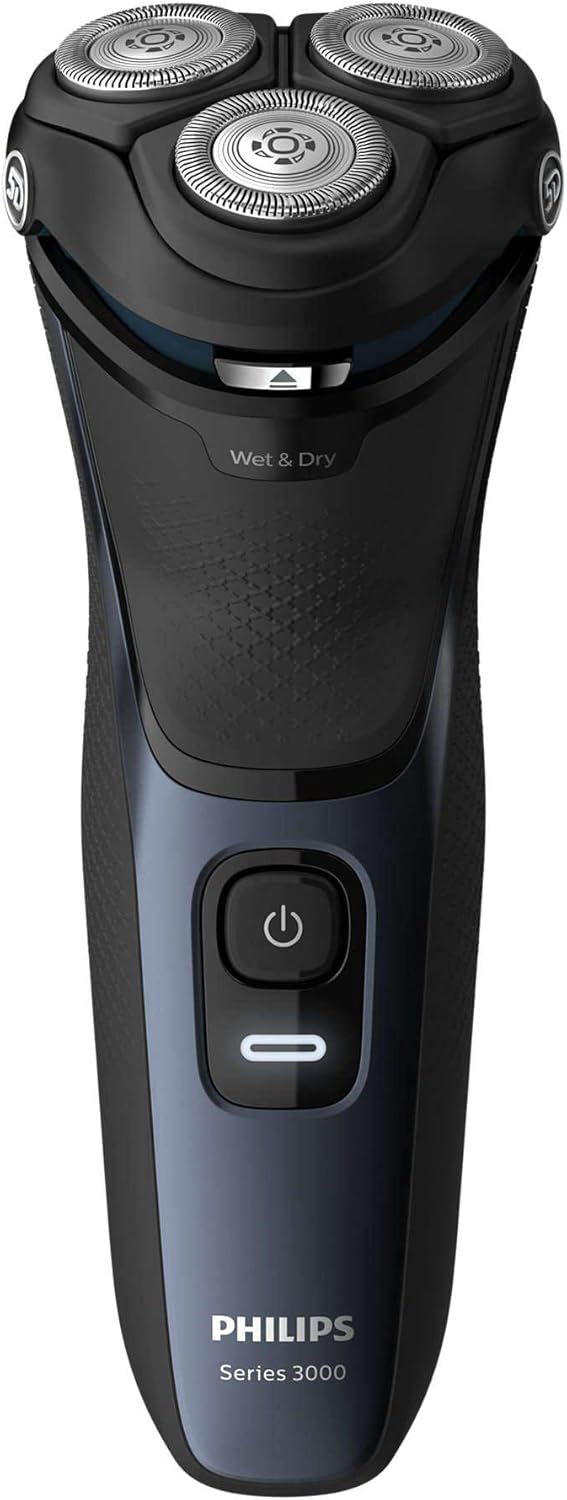
olusin 1: Iwaju view of the Philips Shaver S3134/51, showing the power button and 'Wet & Dry' indicator.
5. Ṣiṣẹ Shaver
5.1 Titan / Pa a
- Lati tan-an shaver, tẹ bọtini agbara ni ẹẹkan.
- To turn off the shaver, press the power button again.
5.2 Gbigbọn tutu
For a refreshing and comfortable shave, you can use the shaver with foam or gel.
- Rin oju rẹ ki o lo foomu irun tabi jeli.
- Tan ohun-irun.
- Move the shaver in slow, circular motions over your skin.
- Rinse the shaving heads under running water during and after shaving to prevent clogging.
5.3 Gbigbe gbigbẹ
Fun irun ti o yara ati irọrun, lo irun ori lori awọ gbigbẹ.
- Rii daju pe awọ ara rẹ mọ ati ki o gbẹ.
- Tan ohun-irun.
- Move the shaver in slow, circular motions over your skin.
5.4 Lilo Ige-ije Agbejade
The integrated pop-up trimmer is ideal for maintaining your mustache and sideburns.
- Ensure the shaver is turned on.
- Slide the trimmer release button upwards to activate the trimmer.
- Hold the trimmer perpendicular to your skin and move it gently to trim desired areas.
- Nigbati o ba pari, Titari trimmer pada si isalẹ titi ti o fi tẹ sinu aaye.

olusin 2: Apa view of the Philips Shaver S3134/51 with the precision pop-up trimmer extended.
6. Ninu ati Itọju
Ninu deede ṣe idaniloju iṣẹ ṣiṣe to dara julọ ati fa igbesi aye ti irun ori rẹ pọ.
6.1 Daily Cleaning
- After each use, turn off the shaver and unplug it from the charger.
- Open the shaving unit by pressing the release button (if applicable) or gently pulling the shaving head assembly upwards.
- Fi omi gbígbóná fọ̀ ẹ̀rọ ìfọ́ náà dáadáa.
- Gbọn omi ti o pọ ju ki o lọ kuro ni ibi-irun ni sisi lati gbẹ.
- Pa ẹyọ-irun.
6.2 Ìmọ́tótó Jìnjìn (Ọ̀sọ̀ọ̀sẹ̀/Oṣooṣù)
Fun ṣiṣe mimọ ni kikun diẹ sii:
- Ṣe awọn igbesẹ mimọ lojoojumọ.
- Yọ awọn ori irun kuro lati ibi-irun.
- Clean the individual cutters and guards with the provided cleaning brush. Do not clean more than one cutter and guard at a time, as they are matching sets.
- Fi omi ṣan gbogbo awọn ẹya labẹ omi ṣiṣan gbona.
- Gba gbogbo awọn ẹya laaye lati gbẹ patapata ṣaaju iṣakojọpọ.
6.3 Rirọpo Irun ori
For optimal shaving performance, it is recommended to replace the shaving heads every two years. Replacement heads can be purchased from authorized Philips retailers or the Philips website. Refer to your shaver's packaging or the Philips website for the correct replacement head type for model S3134/51.
7. Laasigbotitusita
| Isoro | Owun to le Fa | Ojutu |
|---|---|---|
| Shaver ko ni tan. | Batiri ti ṣofo. | Gba agbara si shaver fun o kere ju wakati kan. |
| Shaver ko gba agbara. | Adapter not properly connected or faulty. | Ensure the adapter is securely plugged into both the shaver and the wall outlet. Try a different outlet. If the issue persists, contact Philips support. |
| Irun irun ti ko dara. | Irun ori jẹ idọti tabi ti gbó. | Clean the shaving heads thoroughly. If performance does not improve, consider replacing the shaving heads. |
| Irun awọ ara lẹhin irun. | Ilana irun ti ko tọ tabi awọ ti o ni imọlara. | Ensure you are using gentle, circular motions. Try wet shaving with foam or gel. Allow your skin to adapt to the new shaver. |
If you encounter problems not listed here, or if the suggested solutions do not resolve the issue, please contact Philips Customer Support.
8. Awọn pato
- Nọmba awoṣe: S3134/51
- Brand: FILIPS
- Orisun Agbara: Agbara Batiri (Litiumu-ion gbigba agbara)
- Igbesi aye batiri: Titi di iṣẹju 60 gbigbẹ laisi okun
- Akoko gbigba agbara: O fẹrẹ to wakati 1 fun idiyele ni kikun
- Eto Gbigbe: Rotary, 5D Pivot & Flex Heads
- Ohun elo abẹfẹlẹ: Irin ti ko njepata
- Lilo: Ririn & Gbẹ
- Awọn eroja to wa: Shaver, Charger
- Awọn iwọn (L x W x H): 2.79 x 24.64 x 16.51 cm
- Ìwúwo: 281 giramu
- Àwọ̀: Iji Blue
9. Atilẹyin ọja ati Support
This Philips appliance comes with a standard manufacturer's warranty. Please refer to the warranty card included in your package or visit the official Philips webAaye fun awọn ofin atilẹyin ọja alaye ni pato si agbegbe rẹ.
Fun atilẹyin ọja, nigbagbogbo beere awọn ibeere, tabi lati forukọsilẹ ọja rẹ, jọwọ ṣabẹwo si atilẹyin Philips website or contact your local Philips customer service center. Contact information can typically be found on the Philips webaaye tabi ninu iwe ti a pese pẹlu ọja rẹ.
Atilẹyin Ayelujara: www.philips.com/support