
Ọrọ Iṣaaju
This manual provides detailed instructions for the safe and efficient use of your FONESTAR DOTS-N Bluetooth TWS Speaker. Please read this manual thoroughly before operating the device and retain it for future reference.
The FONESTAR DOTS-N is a portable Bluetooth TWS speaker featuring Bluetooth 4.2 and NFC connectivity. It offers powerful sound with enhanced bass, playback controls, and hands-free calling. Equipped with a rechargeable Li-Ion battery providing up to 10 hours of autonomy, it also includes a 3.5mm auxiliary input. Its compact design makes it suitable for home use.
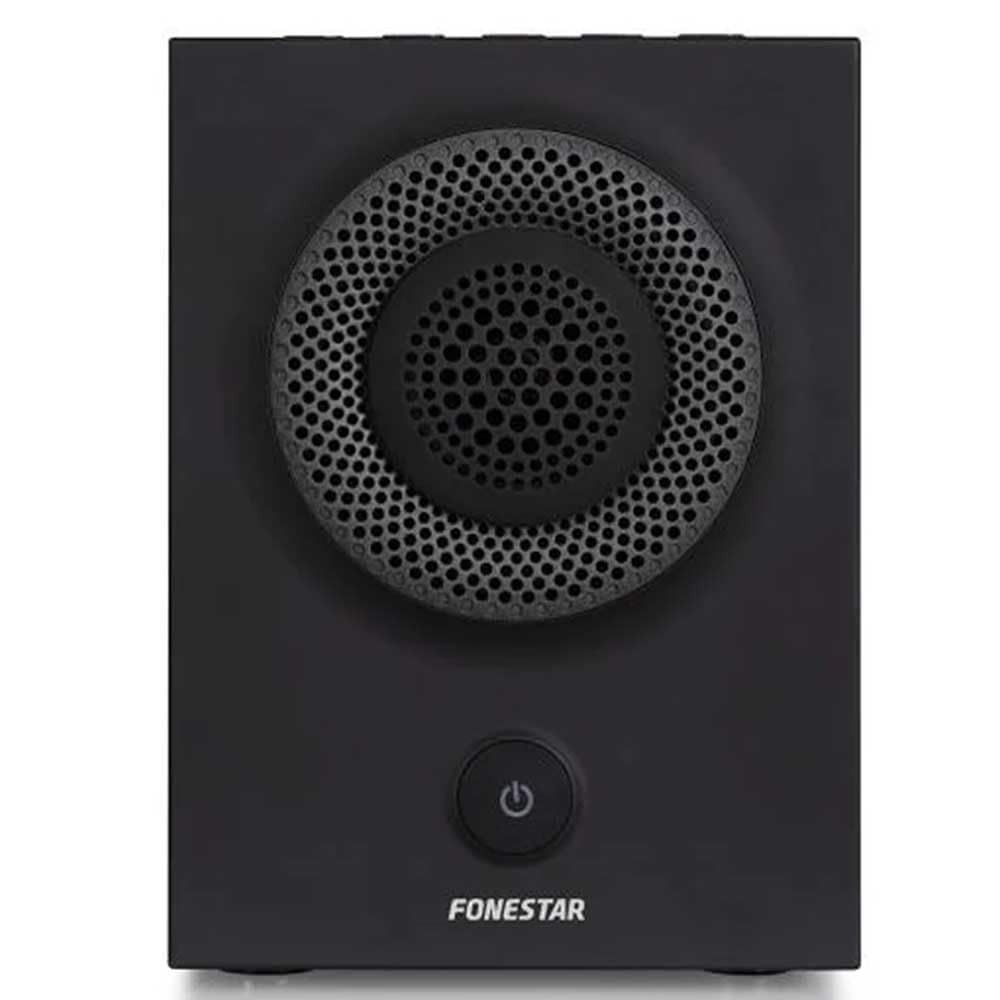
olusin 1: Iwaju view of the FONESTAR DOTS-N Bluetooth TWS Speaker.
Ṣeto
1. Unpacking
Ni ifarabalẹ yọ gbogbo awọn paati kuro ninu apoti. Rii daju pe gbogbo awọn nkan ti o wa ni isalẹ wa:
- FONESTAR DOTS-N Bluetooth TWS Speaker
- USB to Micro USB Ngba agbara Cable
- 3.5mm Sitẹrio Audio Cable
- Afowoyi Olumulo (iwe-ipamọ yii)
2. Gbigba agbara Agbọrọsọ
Before first use, fully charge the speaker. Connect the Micro USB end of the charging cable to the speaker's charging port and the USB-A end to a compatible USB power adapter (not included) or a computer's USB port.
- Ìmọ́lẹ̀ àmì ìgbóná yóò máa tàn nígbà tí a bá ń gba agbára.
- Akoko gbigba agbara jẹ isunmọ awọn wakati 3 fun idiyele ni kikun.
- Ina atọka naa yoo yipada tabi pa ni kete ti gbigba agbara ba pari.
3. Agbara lori / Paa
To power on the speaker, press and hold the power button (usually indicated by a ⏻ symbol) for a few seconds until you hear an audible prompt or see an indicator light. To power off, repeat the process.
Awọn ilana Iṣiṣẹ
1. Sisopọ Bluetooth
The speaker supports Bluetooth 4.2 for wireless audio streaming.
- Ensure the speaker is powered on and in pairing mode (usually indicated by a flashing LED). If not, press the Bluetooth pairing button or power button briefly to enter pairing mode.
- Lori foonuiyara rẹ, tabulẹti, tabi ẹrọ miiran ti o ni Bluetooth, lọ si awọn eto Bluetooth.
- Wa fun available devices and select "FONESTAR DOTS-N" from the list.
- Once paired, the speaker will emit an audible confirmation, and the LED indicator will typically become solid.
2. NFC Pípọ̀ (Ìbánisọ̀rọ̀ nítòsí pápá)
For devices with NFC, pairing can be done quickly:
- Ensure NFC is enabled on your device and the speaker is powered on.
- Tap your NFC-enabled device gently against the NFC area on the speaker (refer to product diagram for exact location, if available).
- Jẹrisi ibeere sisopọ lori ẹrọ rẹ.
3. Iṣẹ Sitẹrio Alailowaya otitọ (TWS).
The TWS function allows you to pair two FONESTAR DOTS-N speakers together for a stereo sound experience.
- Ensure both DOTS-N speakers are powered on and not connected to any other Bluetooth device.
- On one speaker (this will be the primary speaker), press and hold the TWS button (if available) or a designated button for TWS pairing.
- Agbọrọsọ akọkọ yoo wa agbọrọsọ keji. Ni kete ti a ba ti sopọ mọ wọn, awọn agbọrọsọ mejeeji yoo gbe ohùn idaniloju jade.
- Bayi, so ẹrọ Bluetooth rẹ pọ mọ agbọrọsọ akọkọ gẹgẹbi a ti ṣe apejuwe rẹ ni apakan "Bluetooth Pairing". Audio yoo ṣiṣẹ ni sitẹrio nipasẹ awọn agbohunsoke mejeeji.
4. Ìbáṣepọ̀ Olùrànlọ́wọ́ (AUX)
For non-Bluetooth devices, use the included 3.5mm stereo audio cable.
- So opin kan ti okun ohun afetigbọ 3.5mm si ibudo AUX-in lori agbọrọsọ.
- So ìpẹ̀kun kejì mọ́ ibi tí a ti ń gbé ohùn sókè tàbí ibi tí a ti ń gbọ́ ohùn ẹ̀rọ rẹ.
- The speaker will automatically switch to AUX mode or may require manual selection via a mode button.
5. Playback Control and Hands-Free Calls
The speaker features integrated controls for music playback and managing calls:
- Ṣiṣẹ/Daduro: Press the Play/Pause button (often combined with the power button or a dedicated button).
- Iwọn didun Soke/Isalẹ: Lo awọn bọtini iwọn didun (+ / -) on the speaker.
- Itele / Tẹlẹ Orin: Long press or double-press the volume buttons, or use dedicated track skip buttons if present.
- Idahun/Ipe Ipari: Press the Play/Pause button during an incoming call to answer, and again to end the call.
- Kọ Ipe: Tẹ mọlẹ Bọtini Dun/Daduro lakoko ipe ti nwọle.
Itoju
1. Ninu
- Máa pa agbọ́hùnsọ̀ náà kí o tó sọ ọ́ di mímọ́.
- Lo asọ ti o tutu, ti o gbẹ, ti ko ni lint lati nu awọn oju ita.
- Ma ṣe lo abrasive Cleaners, waxes, tabi epo bi wọn ṣe le ba ipari jẹ.
- Yago fun gbigba ọrinrin sinu eyikeyi awọn ṣiṣi.
2. Ibi ipamọ
- Tọju agbohunsoke ni itura, aye gbigbẹ kuro lati orun taara ati awọn iwọn otutu to gaju.
- Tí o bá ń tọ́jú rẹ̀ fún ìgbà pípẹ́, gba agbára bátìrì náà sí nǹkan bí 50% ní gbogbo oṣù díẹ̀ láti lè mú kí bátìrì náà ní ìlera tó dára.
3. Itọju batiri
- Do not expose the battery to excessive heat, fire, or direct sunlight.
- Yago fun gbigba agbara si batiri ni kikun nigbagbogbo, nitori eyi le dinku igbesi aye rẹ.
- Lo okun gbigba agbara ti a pese tabi iwe-ẹri deede.
Laasigbotitusita
| Isoro | Owun to le Fa | Ojutu |
|---|---|---|
| Agbọrọsọ ko ni agbara lori. | Batiri ti dinku. | Gba agbara si agbọrọsọ nipa lilo okun USB ti a pese. |
| Ko le so pọ nipasẹ Bluetooth. | Agbọrọsọ ko si ni ipo sisopọ; ẹrọ jẹ ju jina; kikọlu. | Ensure speaker is in pairing mode. Move device closer (within 10m). Turn off other Bluetooth devices. |
| Ko si ohun tabi iwọn kekere. | Volume too low on speaker or source device; incorrect input mode. | Increase volume on both speaker and source device. Check if the correct input (Bluetooth/AUX) is selected. |
| TWS sisopọ kuna. | Speakers are already paired to another device; incorrect TWS pairing procedure. | Rí i dájú pé àwọn agbọ́hùnsọ̀ méjèèjì ti so pọ̀ mọ́ àwọn ẹ̀rọ míì. Tẹ̀lé àwọn ìgbésẹ̀ ìsopọ̀ TWS pẹ̀lú ìṣọ́ra. |
| Iparun ohun. | Iwọn didun ga ju; batiri kekere; ifihan agbara ti ko dara. | Reduce volume. Charge the speaker. Move source device closer to the speaker. |
Imọ ni pato

Figure 2: Dimensions of the FONESTAR DOTS-N Bluetooth TWS Speaker.
| Orukọ awoṣe | DOTS-N |
| Brand | FONSTAR |
| Asopọmọra Technology | Bluetooth 4.2, NFC, AUX 3.5mm |
| Alailowaya Ibiti | Titi de awọn mita 10 (33 ẹsẹ) |
| Ipo Ijade Ohun | Sitẹrio (pẹlu TWS) |
| Agbọrọsọ Iru | 3" Coaxial Woofer with Tweeter, 3" Subwoofer, 4" Passive Radiator |
| Max Agbọrọsọ o wu Power | 12 Wattis RMS |
| Idahun Igbohunsafẹfẹ | 80 - 20,000 Hz |
| Ifihan Ibuwọlu-si-Noise | ≥ 75 dB |
| Orisun agbara | Agbara Batiri (Li-ion ti a le tun gba agbara) |
| Agbara Batiri | 2200 mAh, 7.4 V |
| Batiri Automoomi | Titi di awọn wakati 10 (ni iwọn 50%) |
| Akoko gbigba agbara | O fẹrẹ to awọn wakati 3 |
| Ọna Iṣakoso | Fọwọkan (Fọwọkan) |
| Pataki Awọn ẹya ara ẹrọ | High-res audio, Bluetooth, Integrated microphone, USB port (for charging) |
| Awọn ẹrọ ibaramu | Foonuiyara, Awọn tabulẹti |
| Iṣeduro Lilo | For home |
| Àwọ̀ | Dudu |
| Awọn iwọn (W x H x D) | 125 x 175 x 158 mm (isunmọ 4.9 x 6.9 x 6.2 inches) |
| Iwọn Nkan | Kg 1.82 (isunmọ 4.01 lbs) |
| Mabomire | Rara |
Note: Specifications are subject to change without prior notice. Battery autonomy may vary depending on usage, volume level, and music type.
Alaye atilẹyin ọja
FONESTAR products are designed and manufactured to the highest quality standards. This product is covered by a limited warranty against manufacturing defects from the date of purchase. The specific terms and duration of the warranty may vary by region and retailer.
Please retain your proof of purchase (receipt or invoice) as it will be required for any warranty claims. The warranty does not cover damage caused by misuse, accident, unauthorized modification, or normal wear and tear.
For detailed warranty terms and conditions, please refer to the warranty card included with your product or contact your local FONESTAR distributor or retailer.
Onibara Support
If you encounter any issues that are not resolved by the troubleshooting guide, or if you require further assistance, please contact FONESTAR customer support or your authorized retailer.
Nígbà tí o bá ń kàn sí olùrànlọ́wọ́, jọ̀wọ́ múra láti fún ọ ní àwọn ìwífún wọ̀nyí:
- Product Model: FONESTAR DOTS-N
- Ọjọ ti Ra
- Apejuwe ti oro
- Alaye olubasọrọ rẹ
For the most up-to-date support information, including contact details and FAQs, please visit the official FONESTAR webojula.