
1. Awọn Ilana Aabo pataki
Please read all instructions carefully before using the ProfiCare PC-BSR 3043 Robot Vacuum Cleaner. Keep this manual for future reference.
- Ohun elo yii jẹ ipinnu fun lilo ile nikan.
- Do not immerse the robot, charging station, or power adapter in water or other liquids.
- Jeki roboti kuro lati awọn ina ṣiṣi ati awọn orisun ooru.
- Ṣe idaniloju agbara voltage matches the rating label on the charging adapter.
- Má ṣe lo robot náà lórí ilẹ̀ tí ó tutu tàbí ní àwọn ibi tí omi ti dúró.
- Ṣe abojuto awọn ọmọde lati rii daju pe wọn ko ṣere pẹlu ohun elo.
- Only use original accessories and spare parts provided or approved by ProfiCare.
- The robot contains a lithium-ion battery. Do not expose it to high temperatures or direct sunlight.
- Ti okun agbara ba bajẹ, o gbọdọ paarọ rẹ nipasẹ olupese, aṣoju iṣẹ rẹ, tabi awọn eniyan ti o ni oye kanna lati yago fun ewu kan.
2. Package Awọn akoonu
Jẹrisi pe gbogbo awọn paati wa ati ni ipo ti o dara nigbati ṣiṣi silẹ:
- ProfiCare PC-BSR 3043 Robot Vacuum Cleaner
- Gbigba agbara gbigba agbara
- Adapter Agbara fun Ibudo Gbigba agbara
- Isakoṣo latọna jijin
- 2 x Side Brushes (one pair)
- 1 x HEPA Filter (pre-installed or spare)
- Ilana Afowoyi (iwe yii)

Image: The ProfiCare PC-BSR 3043 robot vacuum cleaner, showcasing its sleek design, along with its remote control and a smartphone displaying the companion app interface.
3. Ọja Ipariview
The ProfiCare PC-BSR 3043 is a high-quality robot vacuum cleaner designed for efficient and autonomous floor cleaning. It features rotating floor and side brushes to effectively remove dirt, dust, crumbs, and pet hair from various surfaces.
- Ìfọ̀kànbalẹ̀: Suitable for all hard floors and short-pile carpets.
- Lilọ kiri Smart: Utilizes gyroscope technology for systematic and efficient cleaning paths.
- Apẹrẹ Iwapọ: Extra-flat dimensions (only 7.5 cm high) allow cleaning under furniture.
- Asẹ to ti ni ilọsiwaju: Equipped with a HEPA filter for high-efficiency particle air filtration.
- Àwọn Iṣẹ́ Àìṣiṣẹ́: Automatic return to charging station, stair and obstacle detection.
- Awọn aṣayan Iṣakoso pupọ: Sensor touch display, multi-function remote control, and Wi-Fi app control.

Aworan: Apa view of the ProfiCare PC-BSR 3043 robot vacuum cleaner, highlighting its compact height of 75 mm and a diameter of 300 mm, ideal for cleaning under furniture.
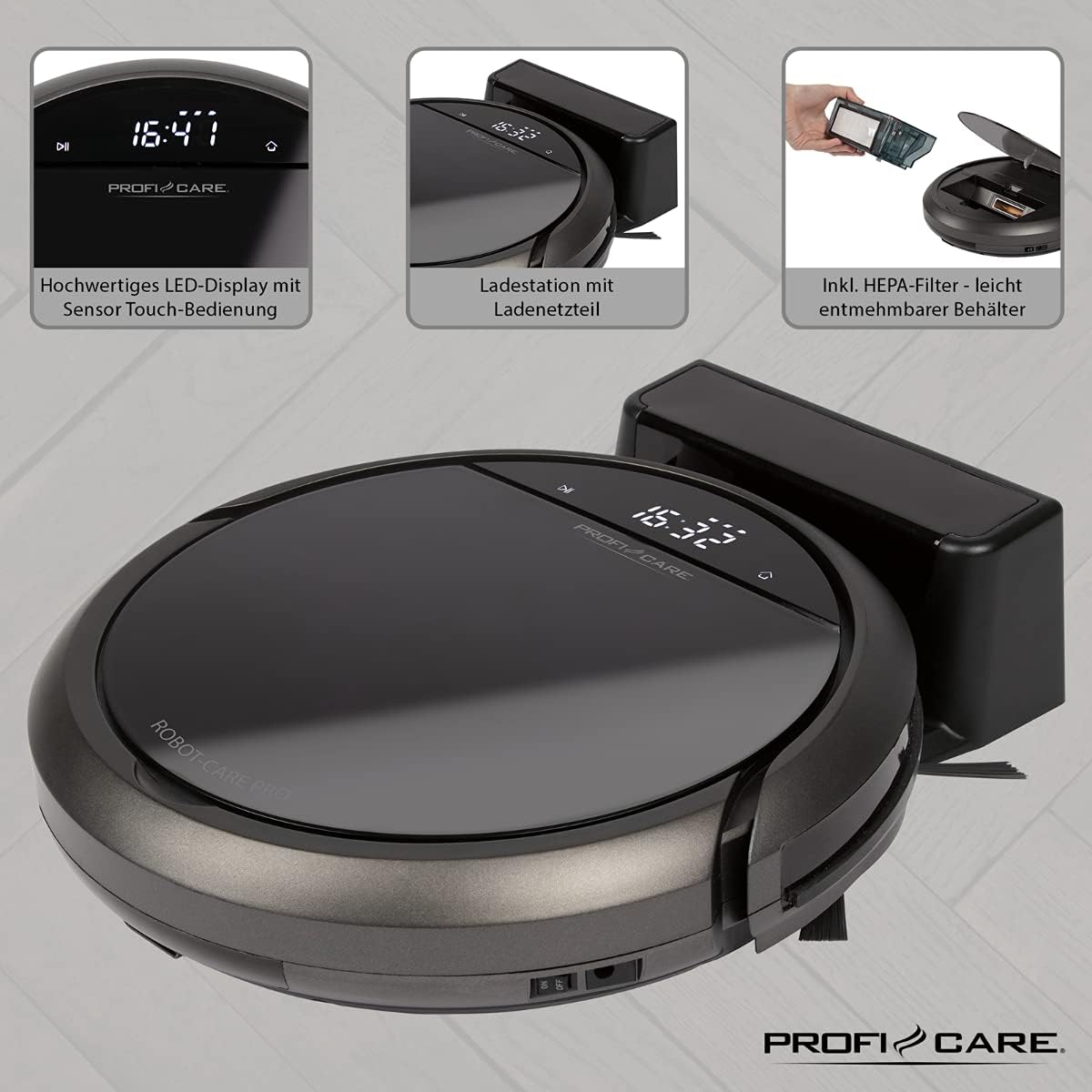
Aworan: Oke view of the ProfiCare PC-BSR 3043 robot vacuum cleaner with key features labeled, including LED display, sensor touch operation, Wi-Fi app control, auto-return function, 2600 mAh / 14.8 V Lithium-ion battery, and 120 minutes runtime.
4. Eto
4.1 Ngba agbara si Robot
- Gbe ibudo gbigba agbara si odi kan ni agbegbe ṣiṣi, ni idaniloju pe ko si awọn idiwọ laarin mita 1 si awọn ẹgbẹ ati awọn mita 2 ni iwaju.
- Connect the power adapter to the charging station and plug it into a power outlet. The indicator light on the charging station will illuminate.
- Place the robot vacuum onto the charging station. Ensure the charging contacts on the robot align with those on the station. The robot will emit a sound and the display will show charging status.
- Allow the robot to fully charge before first use (approximately 3 hours).

Image: The ProfiCare PC-BSR 3043 robot vacuum cleaner docked on its charging station, illustrating the automatic return and charging capability.
4.2 Fifi awọn gbọnnu ẹ̀gbẹ́ sori ẹrọ
Gently push the side brushes onto the square posts on the underside of the robot until they click into place.
4.3 Wi-Fi and App Setup
- Download the ProfiCare app from the Google Play Store (for Android 4.4 or higher) or Apple App Store (for iOS 9.0 or higher).
- Open the app and follow the on-screen instructions to register an account and add your PC-BSR 3043 robot.
- Ensure your Wi-Fi network is 2.4 GHz, as 5 GHz is not supported.
5. Ṣiṣẹ Robot Vacuum
5.1 Titan / Pa a
Press and hold the power button on the robot's display or the remote control to turn the robot on or off.
5.2 ninu awọn ipo
The robot offers four distinct cleaning programs:
- Ipo Aifọwọyi: The robot cleans systematically, covering the entire area.
- Ipo Aami: The robot cleans a concentrated area in a spiral pattern, ideal for heavily soiled spots.
- Corners Mode: The robot focuses on cleaning along walls and in corners.
- Systematic Mode (Gyroscope Controlled): Ensures independent orientation for faster and more efficient cleaning results.
5.3 Iṣakoso Aw
- Sensor Touch Display: Use the integrated LED display with touch controls for basic operations.
- Isakoṣo latọna jijin: The multi-function remote allows for timer settings, individual control, and recalling the robot to the charging station.
- Ohun elo Iṣakoso: The smartphone app provides advanced features like 2D map function, live tracking, remote control functions, cleaning plan creation (day, time, frequency), cleaning program selection, and battery status display.
- Iṣakoso ohun: The robot supports voice control for convenient operation.
5.4 Awọn Iṣẹ́ Àìfọwọ́ṣe
- Pada Aifọwọyi: The robot automatically returns to the charging station after completing a program or when the battery level is low.
- Ṣiṣawari Idiwo: Infrared sensors detect obstacles, allowing the robot to navigate around furniture and other items. Mechanical soft protection is also included for sensitive furniture.
- Stair Detection: Infrared sensors prevent the robot from falling down stairs.
- Atunto aifọwọyi: After recharging, the robot continues cleaning from the last cleaned position.

Image: The ProfiCare PC-BSR 3043 robot vacuum cleaner actively cleaning a wooden floor in a home environment, demonstrating its ability to navigate and clean open spaces.
6. Itọju
Itọju deede ṣe idaniloju iṣẹ ṣiṣe ti o dara julọ ati ki o fa igbesi aye ti ẹrọ igbale robot rẹ.
6.1 Ofo Dustbin
- Press the dustbin release button and pull out the 400 ml dirt tank.
- Ṣii ideri eruku ki o sọ awọn akoonu rẹ sinu apo idọti kan.
- Ti ideri apoti idoti naa ki o si tun fi sii sinu robot naa titi ti yoo fi tẹ sinu ipo rẹ.
6.2 Ninu Ajọ HEPA
The HEPA filter should be cleaned regularly and replaced periodically (e.g., every 3-6 months, depending on usage).
- Yọ apoti idoti kuro bi a ti salaye loke.
- Fi ìṣọ́ra yọ àlẹ̀mọ́ HEPA kúrò nínú àpótí ìdọ̀tí.
- Fọwọ ba àlẹmọ rọra lori apoti idọti kan lati yọ eruku alaimuṣinṣin kuro. Ma ṣe fọ àlẹmọ HEPA pẹlu omi.
- Brush off any remaining debris with a soft brush.
- Reinsert the clean filter and dustbin.
6.3 Cleaning Side Brushes and Main Brush
Regularly check the side brushes and main brush for tangled hair or debris. Use scissors to cut away any tangled hair and pull out debris.
6.4 Awọn sensọ mimọ ati Awọn olubasọrọ gbigba agbara
Wipe the infrared sensors (located around the robot's bumper and underside) and the charging contacts on both the robot and the charging station with a clean, dry cloth to ensure proper function.
7. Laasigbotitusita
If you encounter issues with your ProfiCare PC-BSR 3043, refer to the following common problems and solutions:
| Isoro | Owun to le Fa | Ojutu |
|---|---|---|
| Robot ko ni tan-an. | Batiri naa kere tabi ti dinku. | Place the robot on the charging station and allow it to fully charge. |
| Robot ko gba agbara. | Awọn olubasọrọ gbigba agbara jẹ idọti tabi aiṣedeede. | Clean the charging contacts on both the robot and the station. Ensure proper alignment. |
| Robot di nigbagbogbo. | Too many obstacles or tangled cables. | Clear the cleaning area of excessive clutter, cables, and small objects. |
| Iṣẹ ṣiṣe mimọ ti ko dara. | Dustbin is full, filter is clogged, or brushes are tangled. | Empty the dustbin, clean or replace the HEPA filter, and clean the side and main brushes. |
| Robot ko ni sopọ si Wi-Fi. | Incorrect Wi-Fi band (5 GHz not supported) or incorrect password. | Ensure your Wi-Fi network is 2.4 GHz. Re-enter Wi-Fi password carefully. Restart router and robot. |
| Robot falls down stairs. | Àwọn sensọ àtẹ̀gùn ti dọ̀tí tàbí wọ́n ti dí wọn lọ́wọ́. | Clean the stair sensors on the underside of the robot. |
For issues not listed here, or if problems persist, please contact ProfiCare customer support.
8. Imọ ni pato
| Ẹya ara ẹrọ | Sipesifikesonu |
|---|---|
| Nọmba awoṣe | PC-BSR 3043 |
| Brand | ProfiCare |
| Awọn iwọn (L x W x H) | 33 x 33 x 7 cm (approx. 31 x 22 x 13 cm packaged) |
| Iwọn | 2.5 kilo |
| Batiri Iru | Litiumu-dẹlẹ |
| Agbara Batiri | 14.8 V, 2600 mAh |
| Akoko Iṣiṣẹ | Isunmọ. 120 iṣẹju |
| Akoko gbigba agbara | Isunmọ. wakati meji 3 |
| Dustbin Agbara | 400 milimita |
| Àlẹmọ Iru | Àlẹmọ HEPA |
| Ariwo Ipele | Isunmọ. 61 dB |
| Asopọmọra | Wi-Fi 2.4 GHz (5 GHz not supported) |
| Iṣakoso Iru | App Control, Remote Control, Sensor Touch |
| Dada iṣeduro | Tiles, Hard Floors, Short-Pile Carpets |
9. Atilẹyin ọja ati Support
ProfiCare products are manufactured with high quality standards. For information regarding warranty terms and conditions, please refer to the warranty card included with your product or visit the official ProfiCare webojula.
If you require technical assistance, have questions about product operation, or need to order spare parts, please contact ProfiCare customer support. Contact details can typically be found on the product packaging, the official webojula, tabi nipasẹ rẹ alagbata.
Please note that information regarding the availability of spare parts for this specific model is currently unavailable through standard channels. It is recommended to contact ProfiCare directly for any spare part inquiries.