
1. Ifihan
This manual provides essential information for the installation, operation, maintenance, and troubleshooting of your Chieftec Polaris 650W 80Plus Certified Power Supply Unit (PSU). Please read this manual thoroughly before installing and using the product to ensure proper function and safety. The Chieftec Polaris 650W PSU is designed to provide stable and efficient power to your personal computer system.
2. Alaye Aabo
Nigbagbogbo ṣe akiyesi awọn iṣọra ailewu atẹle lati yago fun ipalara tabi ibajẹ si ohun elo rẹ:
- Maṣe ṣe open the PSU casing. Iwọn gigatages inside can cause electric shock. There are no user-serviceable parts inside.
- Maṣe ṣe insert any objects into the PSU's ventilation openings.
- Maṣe ṣe expose the PSU to water, moisture, or high humidity.
- Ensure the PSU is installed in a well-ventilated area, free from obstructions to airflow.
- Always disconnect the AC power cord from the wall outlet before installing, removing, or cleaning the PSU.
- Use only the modular cables provided with your Chieftec Polaris 650W PSU. Using incompatible cables may damage the PSU or connected components.
- Ensure all cable connections are secure before powering on the system.
3. Package Awọn akoonu
Daju pe gbogbo awọn nkan wa ninu apo rẹ:
- Chieftec Polaris 650W Power Supply Unit
- Modular Cable Set (e.g., 24-pin ATX, 8-pin EPS/CPU, PCIe, SATA, Molex)
- AC Agbara okun
- Iṣagbesori skru
- Afowoyi Olumulo (iwe-ipamọ yii)
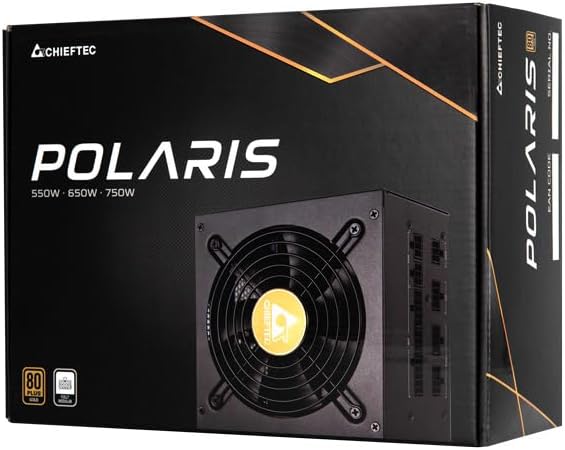
Image: The Chieftec Polaris 650W Power Supply Unit and its retail packaging.
4. Eto ati fifi sori
Follow these steps to install your Chieftec Polaris 650W PSU into your personal computer system:
- Mura Eto Rẹ: Rí i dájú pé kọ̀ǹpútà rẹ ti pa pátápátá àti pé ó ti yọ ìsopọ̀ mọ́ ògiri. Ṣí àpótí kọ̀ǹpútà rẹ láti wọ inú ibi tí a ti ń gbé PSU sí.
- Yọ PSU Atijọ kuro (ti o ba wulo): If replacing an existing PSU, disconnect all cables from the components and motherboard, then unscrew and remove the old PSU.
- Gbe PSU Tuntun naa: Carefully slide the Chieftec Polaris 650W PSU into the designated PSU bay in your computer case. Ensure the fan faces the correct direction (typically downwards for bottom-mounted PSUs, or as per case design for optimal airflow). Secure the PSU with the provided mounting screws.
- So awọn okun onirin pọ: Identify the necessary modular cables for your system components (motherboard, CPU, graphics card, storage drives). Connect these cables to the corresponding ports on the back of the PSU. Refer to the image below for connector identification.
- Sopọ si Awọn eroja: Connect the other end of the modular cables to your motherboard (24-pin ATX and 8-pin EPS/CPU), graphics card(s) (PCIe), and storage devices (SATA/Molex). Ensure all connections are firm and fully seated.
- Iṣakoso USB: Rọ awọn okùn naa ni ọna ti o tọ lati mu afẹfẹ ati ẹwa dara si ninu apo rẹ.
- Awọn ayẹwo Ipari: Double-check all connections. Ensure no loose cables are obstructing fans. Close your computer case.
- Sopọ agbara AC: Plug the AC power cord into the PSU's power inlet and then into a wall outlet.

Aworan: Ẹyin view of the Chieftec Polaris 650W PSU showing modular cable connection ports for M/B, SATA, PCIe, and CPU.

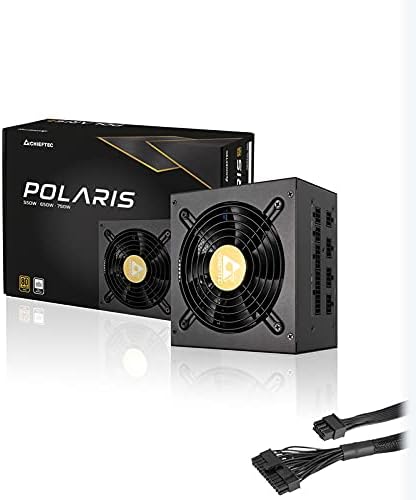
Image: The Chieftec Polaris 650W Power Supply Unit with its modular cables connected, ready for installation.
5. Awọn ilana Iṣiṣẹ
Once the Chieftec Polaris 650W PSU is correctly installed and all connections are secure:
- Agbara Tan: Locate the power switch on the back of the PSU (next to the AC power inlet). Ensure it is in the 'I' (On) position.
- Ibẹrẹ eto: Press the power button on your computer case. The system should power on, and the PSU fan will begin to spin, indicating normal operation.
- Isẹ Fan: The PSU features an air cooling method. The fan will operate to dissipate heat generated by the power supply components. Its speed may vary depending on the load and temperature to maintain optimal cooling and noise levels.
- Agbara Pa: To shut down your system, use the operating system's shutdown procedure. For a complete power cut, switch the PSU's power switch to the 'O' (Off) position and unplug the AC power cord.
Aworan: Oke-isalẹ view of the Chieftec Polaris 650W Power Supply, highlighting the cooling fan and protective grille.
6. Itọju
Itọju to dara ṣe idaniloju igbesi aye gigun ati iṣẹ aipe ti PSU rẹ:
- Pipa eruku: Periodically (e.g., every 3-6 months), power off your computer, unplug the AC cord, and open the case. Use compressed air to gently blow dust out of the PSU's fan and ventilation grilles. Maṣe ṣe use a vacuum cleaner directly on the PSU as it can generate static electricity.
- Awọn ipo Ayika: Ensure the computer operates in a clean, dry, and well-ventilated environment. Avoid extreme temperatures and direct sunlight.
- Iduroṣinṣin USB: Occasionally check that all modular cables are securely connected and not frayed or damaged.
7. Laasigbotitusita
If you encounter issues with your Chieftec Polaris 650W PSU, consider the following troubleshooting steps:
- Ko si Agbara:
- Rí i dájú pé okùn agbára AC ti so mọ́ PSU àti ihò ìtajà ògiri dáadáa.
- Check that the PSU's power switch on the back is in the 'I' (On) position.
- Rii daju pe iṣan ogiri jẹ iṣẹ-ṣiṣe nipasẹ sisọ sinu ẹrọ miiran.
- Confirm all internal power cables (24-pin ATX, 8-pin EPS/CPU) are firmly connected to the motherboard.
- Àìdúróṣinṣin sí ètò/Ìpadé àìròtẹ́lẹ̀:
- Ensure the PSU is adequately ventilated and not overheating.
- Check all power connections to components (graphics card, storage) for looseness.
- If possible, test the PSU with a different set of components or in another system to rule out other hardware issues.
- Awọn Ariwo Alailẹgbẹ:
- A rattling or grinding noise may indicate a fan issue. Power off the system and inspect the PSU fan for obstructions (e.g., loose cables).
- If the noise persists and is not due to an obstruction, contact support.
Tí àwọn ìgbésẹ̀ wọ̀nyí kò bá yanjú ìṣòro náà, jọ̀wọ́ wo apá Àtìlẹ́yìn àti Àtìlẹ́yìn.
8. Awọn pato
| Ẹya ara ẹrọ | Sipesifikesonu |
|---|---|
| Brand | Chieftec |
| Orukọ awoṣe | Polaris |
| Nọmba Awoṣe Nkan | IN-ACT-ZDLCHFOBU0087 |
| Ijade Wattage | 650 Wattis |
| Fọọmù ifosiwewe | ATX |
| Ọna Itutu | Afẹfẹ |
| Asopọmọra Iru | ATX |
| Awọn ẹrọ ibaramu | Kọmputa ti ara ẹni |
| Awọn iwọn Ọja (L x W x H) | 8.66 x 3.15 x 1.18 inches (22 x 8 x 3 cm) |
| Iwọn Nkan | 4.4 iwon (2 kilo) |
| Ijẹrisi | 80Plus Ifọwọsi |
9. Atilẹyin ọja ati Support
Chieftec products are manufactured to high-quality standards. For specific warranty terms and conditions, please refer to the warranty card included with your product or visit the official Chieftec website. Warranty periods and coverage may vary by region and product.
For technical support, product inquiries, or warranty claims, please contact Chieftec customer service through their official website or the contact information provided in your product documentation. When contacting support, please have your product model number (IN-ACT-ZDLCHFOBU0087) and proof of purchase readily available.