
Ọrọ Iṣaaju
This manual provides detailed instructions for the setup, operation, and maintenance of your CAMRY CR 1166 Weather Station. Please read this manual thoroughly before using the device to ensure proper function and longevity.
Awọn Itọsọna Aabo
- Jeki ẹrọ naa kuro ni omi ati ọriniinitutu giga.
- Ma ṣe fi ẹrọ naa han si awọn iwọn otutu to gaju tabi imọlẹ orun taara fun awọn akoko ti o gbooro sii.
- Lo ohun ti nmu badọgba agbara tabi awọn batiri nikan.
- Ma ṣe gbiyanju lati tunto tabi tun ẹrọ naa funrararẹ. Kan si oṣiṣẹ iṣẹ ti o peye.
- Jeki kuro ni arọwọto awọn ọmọde.
Package Awọn akoonu
Jẹrisi pe gbogbo awọn paati wa ninu package:
- CAMRY CR 1166 Weather Station (Main Unit)
- Sensọ ita gbangba jijin
- Adaparọ Agbara AC
- Ilana itọnisọna

Image: Main unit, remote sensor, and power adapter included in the package.
Ṣeto
1. Ṣiṣe agbara Ẹka akọkọ
- Lilo agbara AC: Connect the provided AC power adapter to the main unit and plug it into a standard electrical outlet.
- Using Batteries (Optional): Open the battery compartment on the back of the main unit and insert the required batteries (not included), observing polarity.
2. Setting up the Remote Outdoor Sensor
- Open the battery compartment of the remote sensor and insert the required batteries (not included), observing polarity.
- Place the remote sensor in a sheltered outdoor location, away from direct sunlight and rain, to ensure accurate temperature and humidity readings. Ensure it is within range of the main unit (connectivity technology: 433 MHz, 868 MHz).
3. Amuṣiṣẹpọ akọkọ
Once both the main unit and the remote sensor are powered, they should automatically synchronize. The outdoor temperature and humidity will appear on the main unit's display. If synchronization fails, refer to the Troubleshooting section.
Awọn ilana Iṣiṣẹ
Ifihan Loriview
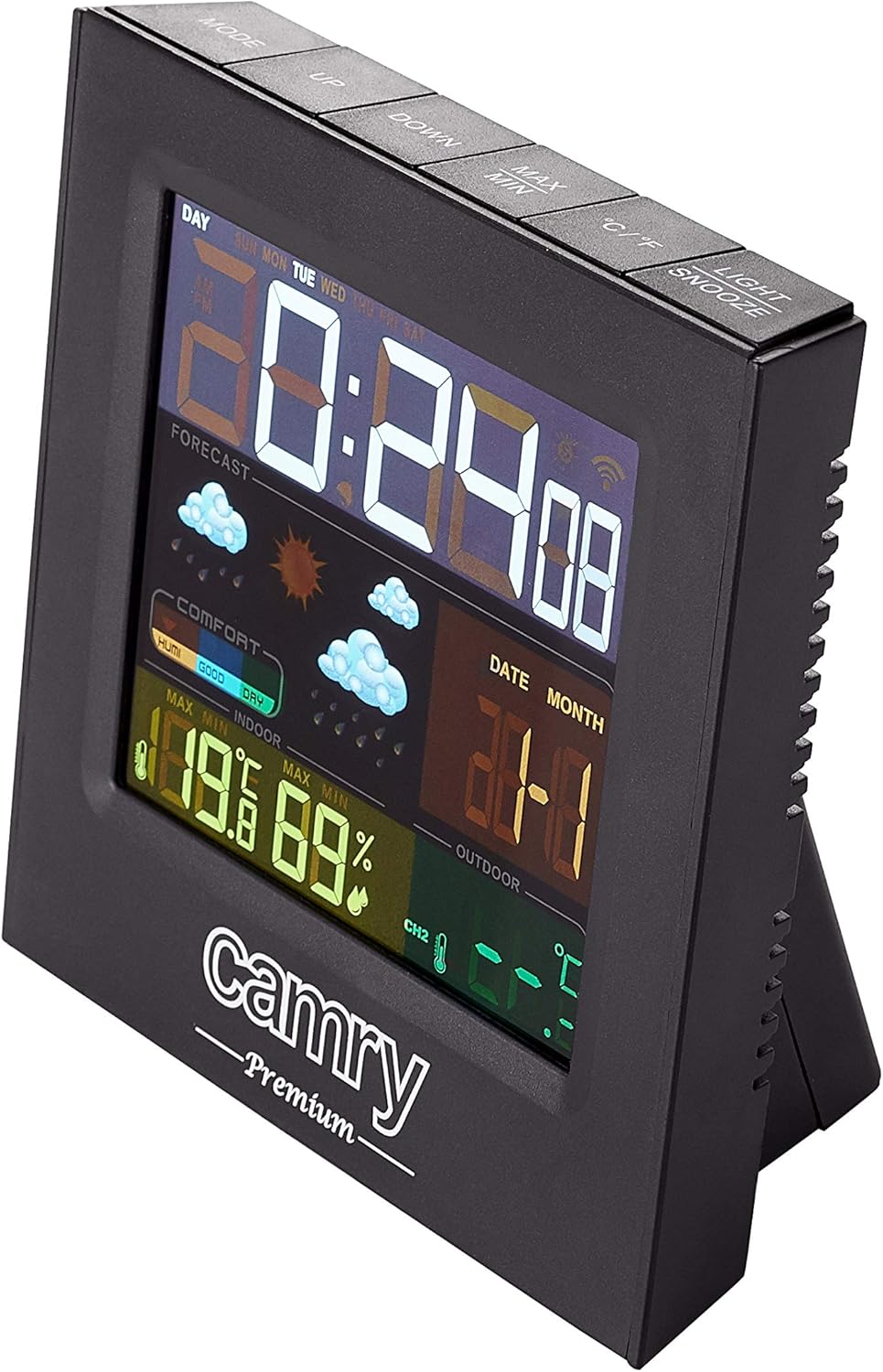
Aworan: Alaye view of the weather station's multi-colored LCD display.
The multi-colored LCD display shows various information:
- Akoko ati Ọjọ: Ṣe afihan akoko ati ọjọ lọwọlọwọ.
- Àfojúsùn ojú ọjọ: Icons indicate predicted weather conditions (e.g., sunny, cloudy, rainy).
- Iwọn inu ile & Ọriniinitutu: Current readings for the indoor environment.
- Iwọn otutu ita gbangba & Ọriniinitutu: Current readings from the remote sensor.
- Atọka Ipele Itunu: Shows indoor comfort based on temperature and humidity.
Eto Aago ati Ọjọ
Refer to the buttons on the top of the unit (e.g., MODE, UP, DOWN).
- Tẹ awọn MODE button to enter time/date setting mode.
- Lo awọn UP ati SILE awọn bọtini lati ṣatunṣe iye.
- Tẹ MODE lẹẹkansi lati jẹrisi ati gbe lọ si eto atẹle.
Iṣẹ-ṣiṣe itaniji
The device includes an alarm clock function.
- Tẹ awọn MODE button repeatedly until the alarm time is displayed.
- Lo UP ati SILE lati ṣeto akoko itaniji.
- Activate/deactivate the alarm using the designated button (e.g., ALARM ON/OFF or a long press of MODE).
Aṣayan Iwọn otutu (°C/°F)
Tẹ awọn ° C / ° F bọtini lati yipada laarin Celsius ati Fahrenheit.
Itoju
- Ninu: Mu ẹrọ naa nu pẹlu asọ ti o gbẹ. Ma ṣe lo abrasive ose tabi epo.
- Rirọpo Batiri: Replace batteries in both the main unit and the remote sensor when the low battery indicator appears on the display.
- Ibi sensọ: Lojoojumọ, ṣayẹwo ipo sensọ ita gbangba lati rii daju pe o wa ni aabo lati awọn eroja oju ojo taara ati pe o wa laarin ibiti o munadoko.
Laasigbotitusita
| Isoro | Owun to le Fa | Ojutu |
|---|---|---|
| Ko si ifihan lori akọkọ kuro. | Ko si agbara tabi awọn batiri ti o ku. | Check AC adapter connection or replace batteries. |
| Àwọn ìwé kíkà níta gbangba kò hàn tàbí pé kò péye. | Sensor out of range, dead sensor batteries, or interference. |
|
| Inaccurate indoor temperature/humidity. | Unit placed near heat/cold source or in high humidity. | Move the main unit to a location with stable ambient conditions. |
Awọn pato
| Awoṣe: | CR1166 |
| Brand: | CAMRY |
| Awọn iwọn Ọja (L x W x H): | 24 x 24 x 76 cm |
| Ìwúwo: | 384 giramu |
| Ohun elo: | Ṣiṣu |
| Àwọ̀: | Dudu |
| Iru ifihan: | LCD |
| Orisun Agbara: | AC Adapter or Battery |
| Imọ-ẹrọ Asopọmọra: | 433 MHz, 868 MHz |
| Yiye iwọn otutu: | 1-2 °C |
| Awọn eroja to wa: | Outdoor sensor, remote-controlled sensor |
| Ilu isenbale: | China |
Atilẹyin ọja ati Support
For warranty information or technical support, please refer to the documentation provided with your purchase or contact CAMRY customer service.