
HoldPeak HP-870P
HoldPeak HP-870P KW Power Meter Clamp Afowoyi olumulo Mita
Model: HP-870P (YF-US-870P)
1. Ifihan
The HoldPeak HP-870P is a versatile and robust KW Power Meter Clamp Meter designed for comprehensive electrical testing. This device combines the functions of an AC/DC Voltmeter, Ammeter, and Multimeter, capable of measuring active power, apparent power, reactive power, active energy, temperature, and frequency. Its high accuracy, large LCD display with backlight, and auto power-off feature make it an essential diagnostic tool for professionals and enthusiasts in various fields, including electronic product manufacturing, computer component inspection, automobile maintenance, home appliance installation, and general electrical maintenance.
2. Alaye Aabo
Please read and understand all safety information and operating instructions before using this meter. Failure to do so may result in injury or damage to the meter or equipment under test.
Awọn iṣọra Aabo Gbogbogbo:
- Always observe local and national safety codes.
- Ma ṣe lo mita naa ti o ba han pe o bajẹ tabi ti idabobo ti o wa lori awọn itọsọna idanwo ba ni ipalara.
- Maṣe lo diẹ sii ju iwọn voltage, bi a ti samisi lori mita, laarin awọn ebute tabi laarin eyikeyi ebute oko ati ilẹ aiye.
- Lo iṣọra pupọ nigbati o ba n ṣiṣẹ pẹlu voltages loke 60V DC tabi 30V AC RMS. Iru voltages duro a mọnamọna ewu.
- Keep your fingers behind the finger guards on the test leads during measurements.
- Remove the test leads from the meter before opening the battery cover.
- Ensure the rotary switch is in the correct position for the desired measurement before connecting the test leads.
- Má ṣe lo mita náà níbi tí afẹ́fẹ́, èéfín, tàbí eruku bá ń gbóná.
3. Ọja Ipariview
Awọn ẹya pataki:
- Iṣẹ ṣiṣe lọpọlọpọ: Measures active power, apparent power, reactive power, AC/DC voltage, AC/DC current, temperature, frequency, power factor, and active energy.
- High Display Count: 9999 counts display for precise readings.
- Imọlẹ ẹhin LCD: Ensures clear visibility of data even in low-light conditions.
- Idaduro data: Freezes the displayed reading for convenient recording.
- Ibi Aifọwọyi: A yan ibiti o yẹ fun wiwọn laifọwọyi.
- Max/Min Function: Ṣe àkọsílẹ̀ iye tó pọ̀jù àti èyí tó kéré jù nígbà ìgbìwọ̀n.
- Agbara Aifọwọyi Paa: Ó ń pa bátírì mọ́ nípa pípa ara rẹ̀ láìfọwọ́sí lẹ́yìn àkókò àìṣiṣẹ́.
- Large Jaw Caliber: 1.77 inches (45mm) jaw opening to accommodate thick cables.
- Iwọn Aabo: Double insulation safety rating.
Awọn akoonu idii:
The HoldPeak HP-870P package includes the following items:
- 1 x Dijital Clamp Multimeter (HP-870P)
- Àwọn Ìdánwò 2 x (Pupa àti Dúdú)
- 1 x Apo gbigbe
- 1 x Ibeere Onitutu
- 1 x 9V (6F22) Battery

Nọmba 3.1: The HoldPeak HP-870P Clamp Meter shown with its complete set of accessories, including test leads, temperature probe, 9V battery, and carrying bag.
Ilana igbimọ:
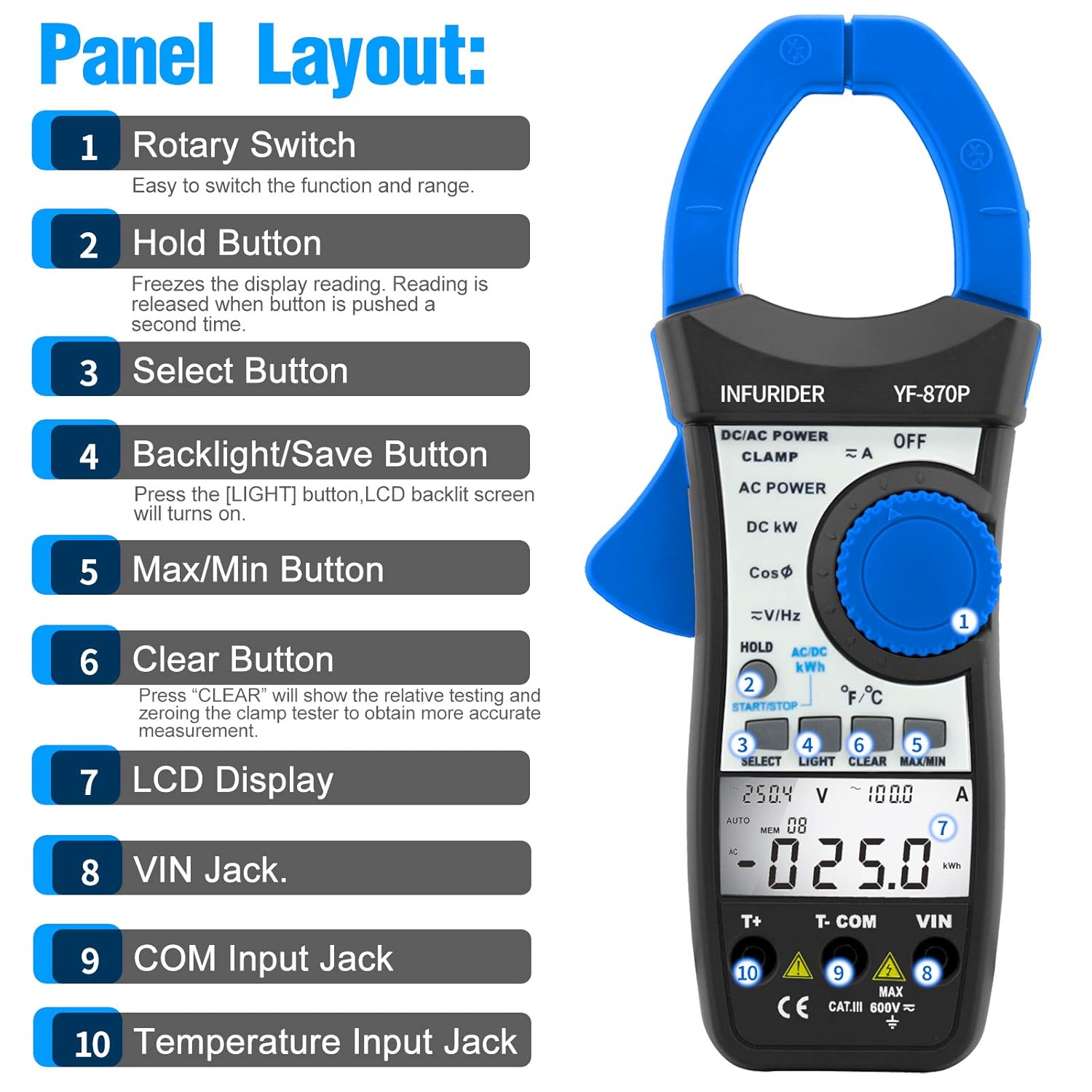
Nọmba 3.2: Alaye view of the HP-870P clamp meter's front panel, indicating the location and function of each control and input jack.
- Yiyi pada: A lo lati yan iṣẹ wiwọn ati ibiti o fẹ.
- Bọtini idaduro: Dii ti isiyi àpapọ kika. Tẹ lẹẹkansi lati tu silẹ.
- Yan Bọtini: Toggles between different measurement modes within a single rotary switch position (e.g., AC/DC, temperature units).
- Backlight/Save Button: Press to turn on the LCD backlight.
- Bọtini ti o pọju/Mimọ: Ó máa ń yí padà láàrín àwọn kíkà tó pọ̀jù, èyí tó kéré jù, àti èyí tó wà lọ́wọ́lọ́wọ́.
- Ko Bọtini kuro: Used to clear relative testing or zero the clamp tester for more accurate measurements.
- Ifihan LCD: Ṣe afihan awọn kika wiwọn, awọn ẹya, ati awọn afihan iṣẹ.
- VIN Jack: Ibugbe igbewọle fun voltage and other measurements (typically for red test lead).
- Jack ti nwọle COM: Common input terminal (typically for black test lead).
- Temperature Input Jack: Dedicated input for the temperature probe.
4. Eto
Fifi sori batiri:
- Rí i dájú pé mita náà ti pa.
- Wa yara batiri ni ẹhin mita naa.
- Lo screwdriver lati ṣii ideri batiri naa.
- Insert the provided 9V (6F22) battery, observing the correct polarity (+ and -).
- Rọpo ideri batiri ki o ni aabo pẹlu dabaru.
Asopọmọra Awọn itọsọna Idanwo:
- Fun voltage, resistance, frequency, and other measurements requiring test leads: Insert the black test lead into the COM Jack input ati asiwaju igbeyewo pupa sinu VIN Jack input.
- For temperature measurements: Insert the temperature probe into the dedicated Jack Input otutu.
5. Awọn ilana Iṣiṣẹ
Isẹ gbogbogbo:
- Titan/Apapa: Rotate the rotary switch from the OFF position to any desired function to turn the meter ON. To turn OFF, rotate the switch back to the OFF position.
- Imọlẹ ẹhin LCD: Tẹ awọn Imọlẹ button to activate the display backlight. Press again to turn it off.
- Idaduro data: Tẹ awọn DIMU bọ́tìnì láti dì kíkà tó wà lórí ìbòjú náà. Tẹ̀ lẹ́ẹ̀kan síi láti tú u sílẹ̀.
- Agbara Aifọwọyi Paa: The meter will automatically power off after a period of inactivity to save battery. To disable this feature temporarily, refer to the full user manual.
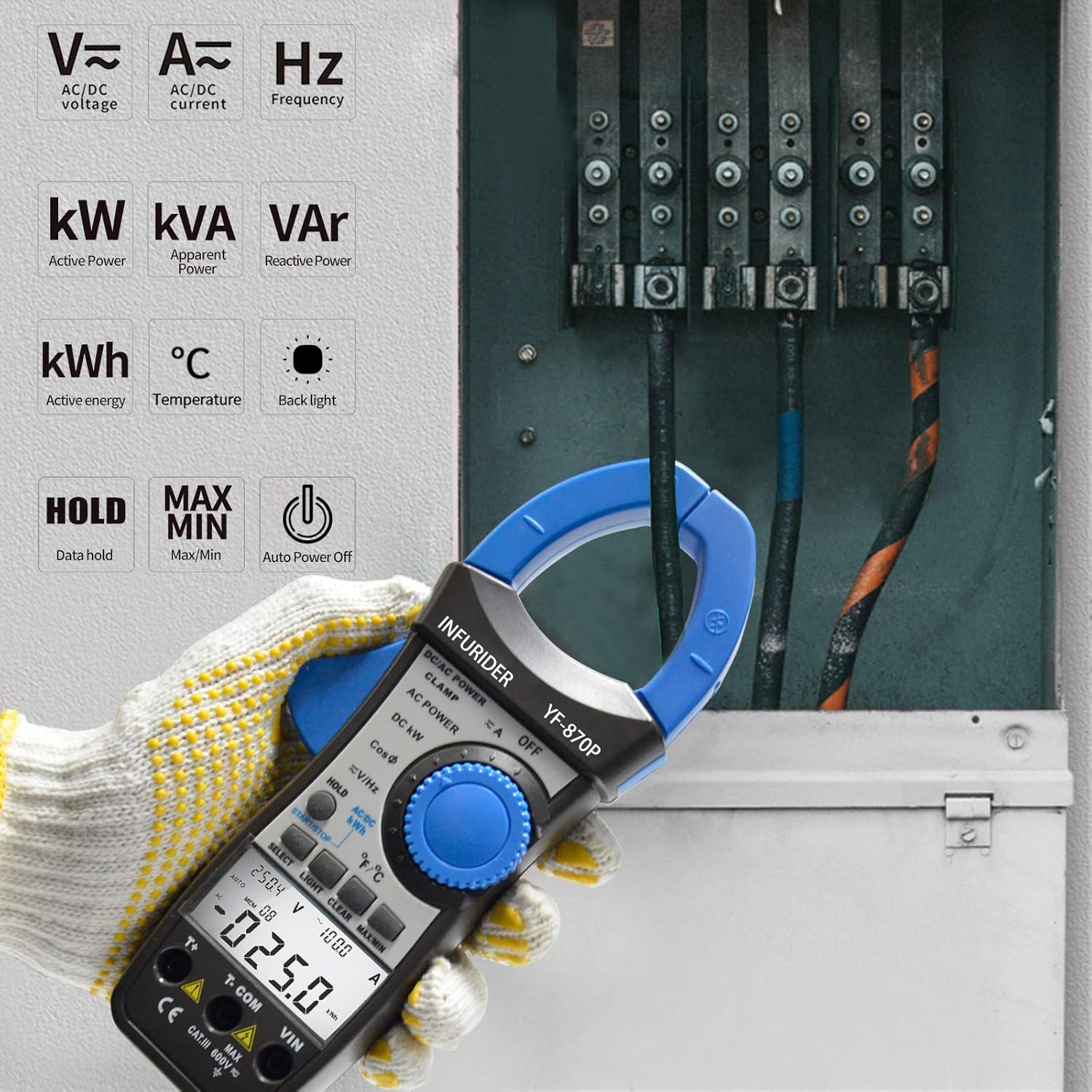
Nọmba 5.1: The HP-870P clamp meter displaying various measurement functions such as AC/DC voltage, current, frequency, active power (kW), apparent power (kVA), reactive power (VAr), active energy (kWh), and temperature (°C).
Awọn iṣẹ wiwọn:
AC/DC Voltage Iwọn:
- Ṣeto iyipada iyipo si V≈ (Ìdìpọ̀ ACtage) tabi V— (DC Voltage) ipo.
- So dudu igbeyewo asiwaju si awọn COM jack ati idanwo pupa si asiwaju VIN jaki.
- So àwọn ìwádìí ìdánwò pọ̀ ní ìfẹ̀sẹ̀mọ́ra pẹ̀lú àyíká tàbí èròjà tí a ń dán wò.
- Ka voltage iye lori ifihan LCD.
AC/DC Current Measurement (Clamp Function):
- Ṣeto iyipada iyipo si A≈ (AC Current) tàbí A— (Ipo DC Current).
- Ṣii clamp bakan nipa titẹ awọn ma nfa.
- Fi adarí kan ṣoṣo ti Circuit naa sinu cl naaamp Ẹsẹ̀. Rí i dájú pé àwọn ẹ̀sẹ̀ náà ti sé pátápátá.
- Ka awọn ti isiyi iye lori LCD àpapọ.
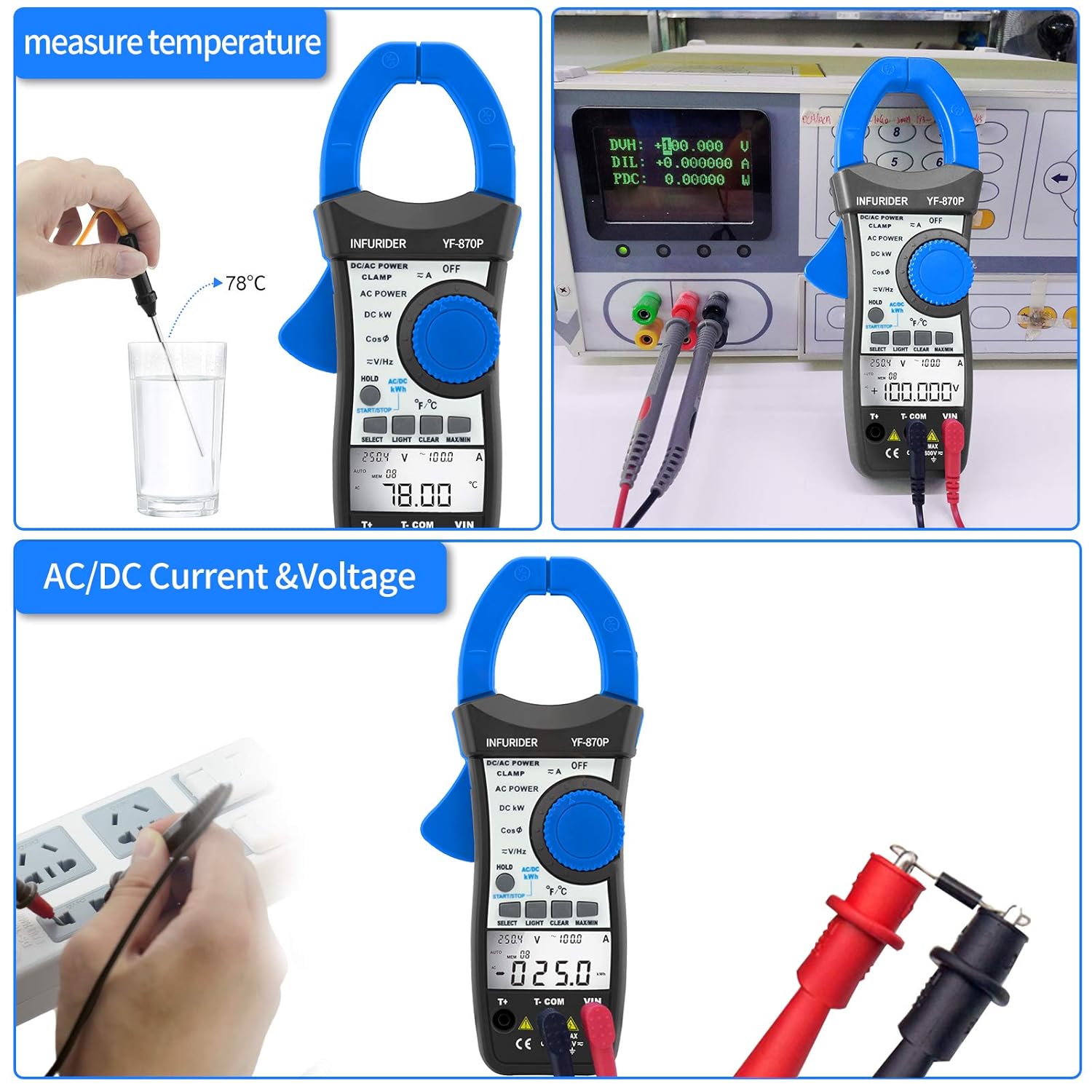
Nọmba 5.2: Demonstrates the HP-870P's capability to measure temperature using the included probe and to measure AC/DC current and voltage by connecting the test leads to a power outlet.
Power Measurement (Active, Apparent, Reactive):
- Ṣeto iyipada iyipo si DC KW or AC AGBARA ipo.
- Connect the test leads as required for voltage measurement and clamp the jaws around the current-carrying conductor.
- Lo awọn Yan button to cycle through Active Power (KW), Apparent Power (KVA), and Reactive Power (KVAr) readings.
Active Energy Measurement (kWh):
- Ṣeto iyipada iyipo si AC/DC KWH ipo.
- So awọn itọsọna idanwo ati cl pọamp the jaws as for power measurement.
- The meter will display the accumulated active energy.
Iwọn iwọn otutu:
- Ṣeto iyipada iyipo si ℃ / ℉ ipo.
- Insert the temperature probe into the dedicated temperature input jack.
- Place the tip of the temperature probe on or in the object whose temperature is to be measured.
- Lo awọn Yan button to toggle between Celsius (℃) and Fahrenheit (℉).
Wiwọn Igbohunsafẹfẹ:
- Ṣeto iyipada iyipo si V≈/Hz ipo.
- Connect the test leads to the circuit where frequency is to be measured.
- Read the frequency value in Hertz (Hz) on the LCD display.
Power Factor Measurement:
- Ṣeto iyipada iyipo si KosiΦ ipo.
- So awọn itọsọna idanwo ati cl pọamp the jaws as for power measurement.
- The power factor value will be displayed.

Nọmba 5.3: Illustrates the 40mm jaw caliber of the HP-870P, allowing measurement on larger conductors, and highlights the large LCD screen for clear observation of measurement data, along with the meter's overall dimensions.
6. Itọju
Ninu:
- Pa ọran naa pẹlu ipolowoamp asọ ati ìwọnba detergent. Maṣe lo awọn abrasives tabi awọn nkan ti a nfo.
- Keep the terminals clean to ensure proper contact.
Rirọpo Batiri:
When the battery symbol appears on the LCD display, the battery needs to be replaced. Refer to the Battery Installation section (4.1) for instructions.
Ibi ipamọ:
- If the meter is not to be used for a long period, remove the battery to prevent leakage and damage to the meter.
- Tọ́jú mita náà sí ibi tí ó tutù tí ó sì gbẹ, kúrò níbi tí oòrùn kò ti lè tàn án tàbí ibi tí ó gbóná jù.
- Use the provided carrying bag for protection during storage and transport.
7. Laasigbotitusita
If the meter does not operate correctly, check the following common issues before seeking service.
| Isoro | Owun to le Fa | Ojutu |
|---|---|---|
| Mita ko ni agbara lori. | Batiri ti ku tabi ti ko tọ. | Rọpo batiri tabi ṣayẹwo polarity. |
| No reading or "OL" displayed. | Overload, incorrect range, or open circuit. | Select higher range (if not auto-ranging), check circuit continuity, ensure proper connection. |
| Awọn kika ti ko pe. | Low battery, dirty terminals, or external interference. | Replace battery, clean terminals, move away from strong electromagnetic fields. |
| Imọlẹ afẹyinti ko ṣiṣẹ. | Low battery or backlight function not activated. | Replace battery, press the LIGHT button. |
8. Awọn pato
| Iṣe wiwọn | Ibiti / Ipeye |
|---|---|
| Agbara Nṣiṣẹ | 99.99KW / 100KW~300KW (3% of rdg + 12dgt) |
| Agbara ti o han gbangba | 99.99KVA~245KVA (3% of rdg + 15dgt) |
| Agbara ifaseyin | 0.01VAr~120KVAr (3% of rdg + 15dgt) |
| AC/DC Voltage | 1.0~600V (1.0% of rdg + 8dgt) |
| AC / DC Lọwọlọwọ | 1.0~999.9A (2.5% of rdg + 15dgt) |
| Iwọn otutu | -20℃~1370℃ (-4℉~2498℉) (3% of rdg + 2dgt) |
| Igbohunsafẹfẹ | 45Hz~250MHz (0.1% + 5dgt) |
| Agbara ifosiwewe | ±0.05 |
| Agbara Agbara | 0~99.99kwh (3% of rdg + 10dgt), 100~700kwh (3% of rdg + 5dgt) |
Awọn Ni pato:
- Ifihan: LCD 9999 Counts
- Jaw Caliber: 1.77 inches (45mm)
- Iru Batiri: 9V (6F22)
- Awọn iwọn: 225 x 97 x 40mm
- Ìwúwo: 450g
- Iwọn Aabo: CE
9. atilẹyin ọja Information
Jọwọ tọka si osise olupese naa website or the warranty card included with your product for detailed warranty terms and conditions. Typically, HoldPeak products come with a limited warranty covering defects in materials and workmanship for a specified period from the date of purchase.
10. Onibara Support
For technical assistance, troubleshooting beyond this manual, or service inquiries, please contact HoldPeak customer support through their official website or the contact information provided in your product packaging. When contacting support, please have your product model number (HP-870P) and purchase details ready.
Ask a question about this manual
Ask about setup, troubleshooting, compatibility, parts, safety, or missing instructions. Manuals+ will review the question and use this page’s manual context to help answer it.