
1. Ifihan
Thank you for choosing the Donner DFM-500 Fog Machine. This device is designed to produce atmospheric fog effects with integrated RGB LED lighting, suitable for various indoor events and entertainment purposes. This manual provides essential information for safe operation, setup, maintenance, and troubleshooting to ensure optimal performance and longevity of your fog machine.
2. Awọn Ilana Aabo pataki
- Lilo inu ile Nikan: This fog machine is designed exclusively for indoor use. It is not waterproof or water-resistant. Avoid exposure to moisture or outdoor elements.
- Ge asopọ agbara: Always disconnect the power cord before performing any maintenance, refilling fog liquid, or changing fuses.
- Ko si Awọn apakan Iṣẹ Olumulo: There are no user-serviceable parts inside the unit. Do not attempt to open or repair the machine yourself. Refer all servicing to qualified personnel.
- Abojuto Agba: Operate the machine only with adult supervision. Keep out of reach of children.
- Use Approved Fog Liquid: Only use fog liquid specifically designed for fog machines. Using other liquids may damage the unit or create hazardous conditions.
- Yago fun Ifihan Taara: Do not direct the fog machine towards people or animals. Maintain a safe distance from the fog output.
- Afẹfẹ: Ensure adequate ventilation in the operating area. Prolonged exposure to dense fog may cause discomfort.
- Awọn oluṣawari ẹfin: Be aware that fog can trigger smoke detectors. Position the machine away from smoke alarms or temporarily disable them if necessary, ensuring fire safety protocols are still observed.
- Ibi: Place the machine on a stable, level surface. Ensure there is sufficient space around the unit for proper airflow and heat dissipation.
3. Package Awọn akoonu
Jẹrisi pe gbogbo awọn ohun kan wa ninu package:
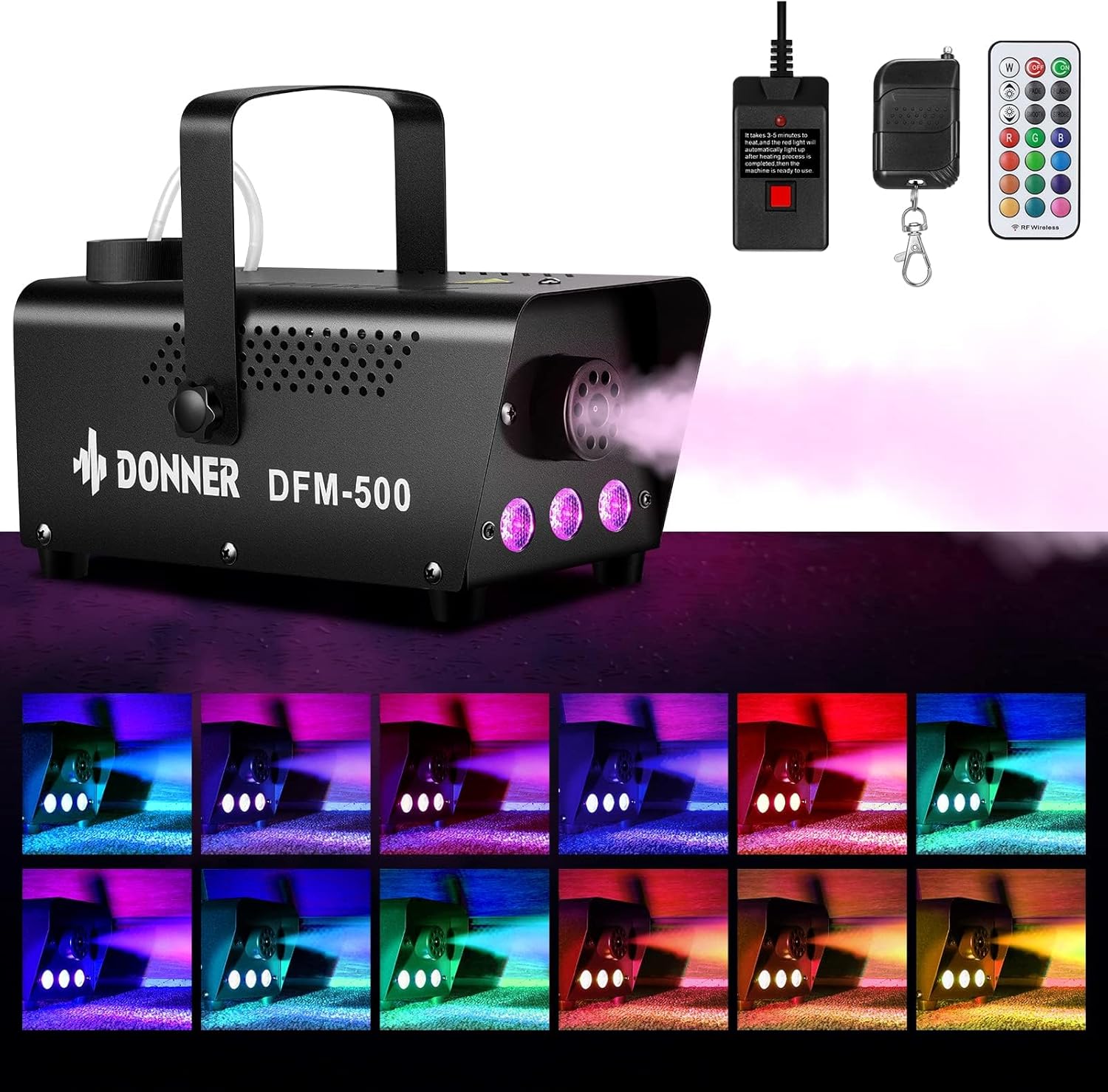
- 1 x Donner DFM-500 Fog Machine
- 1 x RGB LED Remote Control
- 1 x Okun Agbara
- 1 x Remote Receiver Cable (for wired fog remote)
- 1 x Wireless Fog Remote Control
- 1 x Mu
- 2 x Screws (for handle attachment)
- 1 x Itọsọna olumulo (iwe yii)

4. Ọja Ipariview
Familiarize yourself with the components of your Donner DFM-500 Fog Machine:

- Sokiri nozzle: Located at the front, where fog is emitted.
- Awọn imọlẹ LED RGB: Integrated lights around the nozzle for color effects.
- Agbara Yi pada: Iṣakoso agbara akọkọ fun ẹrọ naa.
- Iyipada ina LED: Independent switch to control the RGB LED lights.
- Controller Port: Connection point for the wired remote control.
- Prompt Lamp: Indicator light for heating status.
- Fog Liquid Reservoir: Top-mounted tank for fog liquid.
- Visible Fog Juice Level: A clear window or tube to monitor the liquid level.
- Mu: Fun irọrun gbigbe ati ipo.

5. Awọn ilana iṣeto
- Ṣii silẹ ati Ipo: Carefully remove the fog machine and all accessories from the packaging. Place the machine on a stable, flat, and heat-resistant surface in the desired location. Ensure adequate clearance around the unit for ventilation.
- So Imudani: If not already attached, secure the handle to the top of the machine using the provided screws.
- Omi Kukuru: Unscrew the cap of the fog liquid reservoir. Carefully pour approved fog liquid into the reservoir, ensuring the metal liquid nozzle inside is fully immersed. Do not overfill. Replace the cap securely.

Image 5.1: Filling the fog liquid reservoir. - Sopọ Iṣakoso Latọna jijin: Plug the remote receiver cable into the 'CONTROLLER' port on the rear of the fog machine. For wireless operation, the wired remote must be connected to the machine, even if you primarily use the wireless remote.
- So agbara: Plug the power cable into the machine and then into a standard electrical outlet (AC 110-130V, 50/60Hz).
- Titan ati Igbona: Flip the 'POWER' switch to the 'ON' position. The prompt lamp on the machine's control panel will illuminate (typically green) and then turn off, indicating the machine is warming up. The rapid warm-up system typically takes 2-3 minutes. Once the prompt lamp turns red, the machine is ready for use.
6. Awọn ilana Iṣiṣẹ
The Donner DFM-500 offers flexible control over fog output and LED lighting.

6.1 Fog Output Control
- Iṣakoso Latọna jijin ti firanṣẹ: Once the machine is warmed up (prompt lamp is red), press and hold the button on the wired remote to emit fog. Release the button to stop.
- Iṣakoso Latọna jijin Alailowaya: Ensure the wired remote is connected to the machine. Press the button on the wireless fog remote to emit fog. Release to stop. The wireless remote has an operating range of up to 50 meters without obstacles.


6.2 RGB LED ina Iṣakoso
- Mu Awọn imọlẹ ṣiṣẹ: Flip the 'LED LIGHT' switch on the machine to the 'ON' position.
- Change Colors/Modes: Use the dedicated RGB LED wireless remote control to select from 13 different colors and various lighting-change modes (e.g., flash, fade, strobe, smooth).
- Isẹ olominira: The LED lights can be turned on or off independently of the fog output.
7. Itọju
Itọju deedee n ṣe idaniloju pe ẹrọ kurukuru rẹ yoo pẹ to ati pe yoo ṣiṣẹ daradara.
- Ninu: After each use, especially if storing for an extended period, run a small amount of distilled water through the machine to help prevent clogs.
- Ode Ninu: Mu ese ita ti ẹrọ naa pẹlu asọ ti o gbẹ. Ma ṣe lo abrasive ose tabi epo.
- Ibi ipamọ: Store the fog machine in a cool, dry place, away from direct sunlight and extreme temperatures. Ensure the reservoir is empty or contains fresh fog liquid before storage.
8. Laasigbotitusita
If you encounter issues with your Donner DFM-500, refer to the following common problems and solutions:

- No Fog Output / Machine Not Working:
- Warm-up Status: Ensure the machine has completed its warm-up cycle. The prompt lamp should be red, indicating it is ready. If the lamp is off, it is still warming up.
- Bọtini latọna jijin: The machine does not automatically spray fog. You must press and hold the button on either the wired or wireless remote to initiate fog output. Release to stop.
- Ipele Omi: Check that the fog liquid reservoir is sufficiently filled and the metal liquid nozzle is fully immersed in the atomizing liquid. Insufficient liquid will prevent proper operation.
- Ipo Idaabobo Ara-ẹni: The machine may automatically stop for approximately five minutes due to a self-protection mechanism (e.g., overheating). It will restart after cooling down.
- Wireless Remote Not Responding:
- Wired Remote Connection: For the wireless fog remote to function, the wired remote control must be plugged into the machine's 'CONTROLLER' port.
- Ṣayẹwo Batiri: Ensure the battery in the wireless remote is functional.
- Awọn imọlẹ LED ko ṣiṣẹ:
- Yipada LED: Verify that the 'LED LIGHT' switch on the machine is in the 'ON' position.
- Batiri Latọna jijin: Check the battery in the RGB LED wireless remote control.
9. Awọn pato
| Ẹya ara ẹrọ | Sipesifikesonu |
|---|---|
| Awoṣe | DFM-500 |
| Agbara | 500W |
| Voltage | AC 110-130V, 50/60Hz |
| Aago igbona | 2-3 iṣẹju |
| Fogi o wu | 2000 CFM (ẹsẹ onigun fun iṣẹju kan) |
| Fog Distance | 2-3 mita |
| Awọn imọlẹ LED | RGB, 13 Colors |
| Iṣakoso | Wired Remote, Wireless Fog Remote, Wireless RGB LED Remote |
| Ohun elo | Aluminiomu |
| Ọja Mefa | 10.24 x 7.09 x 6.69 inches (26 x 18 x 17 cm) |
| Iwọn Nkan | 4.36 poun (1.98 kg) |

10. Atilẹyin ọja ati Support
For warranty information, technical support, or service inquiries, please contact Donner customer support. Refer to the product packaging or the official Donner webAaye fun awọn alaye olubasọrọ lọwọlọwọ julọ.