
HOCO BS31 - Army green
Hoco BS31 Bright Sound Sports Wireless Speaker - Instruction Manual
1. Ifihan
Thank you for choosing the Hoco BS31 Bright Sound Sports Wireless Speaker. This manual provides essential information for the proper setup, operation, and maintenance of your device. Please read it thoroughly before use to ensure optimal performance and longevity.
2. Ọja Ipariview ati Awọn ẹya ara ẹrọ
The Hoco BS31 is a compact and portable wireless speaker designed for versatile audio playback. It features robust connectivity options and a durable design, making it suitable for various environments.
- Wireless V4.2 JLAC6928B for stable and efficient connection.
- Integrated 53mm speaker for clear audio output.
- Class A polymer battery with 500mAh capacity for extended playback.
- Multiple playback modes: Wireless (Bluetooth), TF card, and AUX input.
- Compact and lightweight design, weighing only 140g.
- Supports A2DP, AVRCP, HFP, HSP protocols for broad compatibility.

Aworan: Iwaju view of the Hoco BS31 speaker in army green, showcasing its compact design and front controls.

Image: The Hoco BS31 speaker held in a hand, demonstrating its small, palm-sized, and portable nature.
3. Package Awọn akoonu
Jọwọ ṣayẹwo package fun awọn nkan wọnyi:
- Hoco BS31 Wireless Speaker
- Okun Ngba agbara USB
- Itọsọna olumulo
4. Awọn iṣakoso ati awọn atọkun
Familiarize yourself with the speaker's buttons and ports for proper operation.
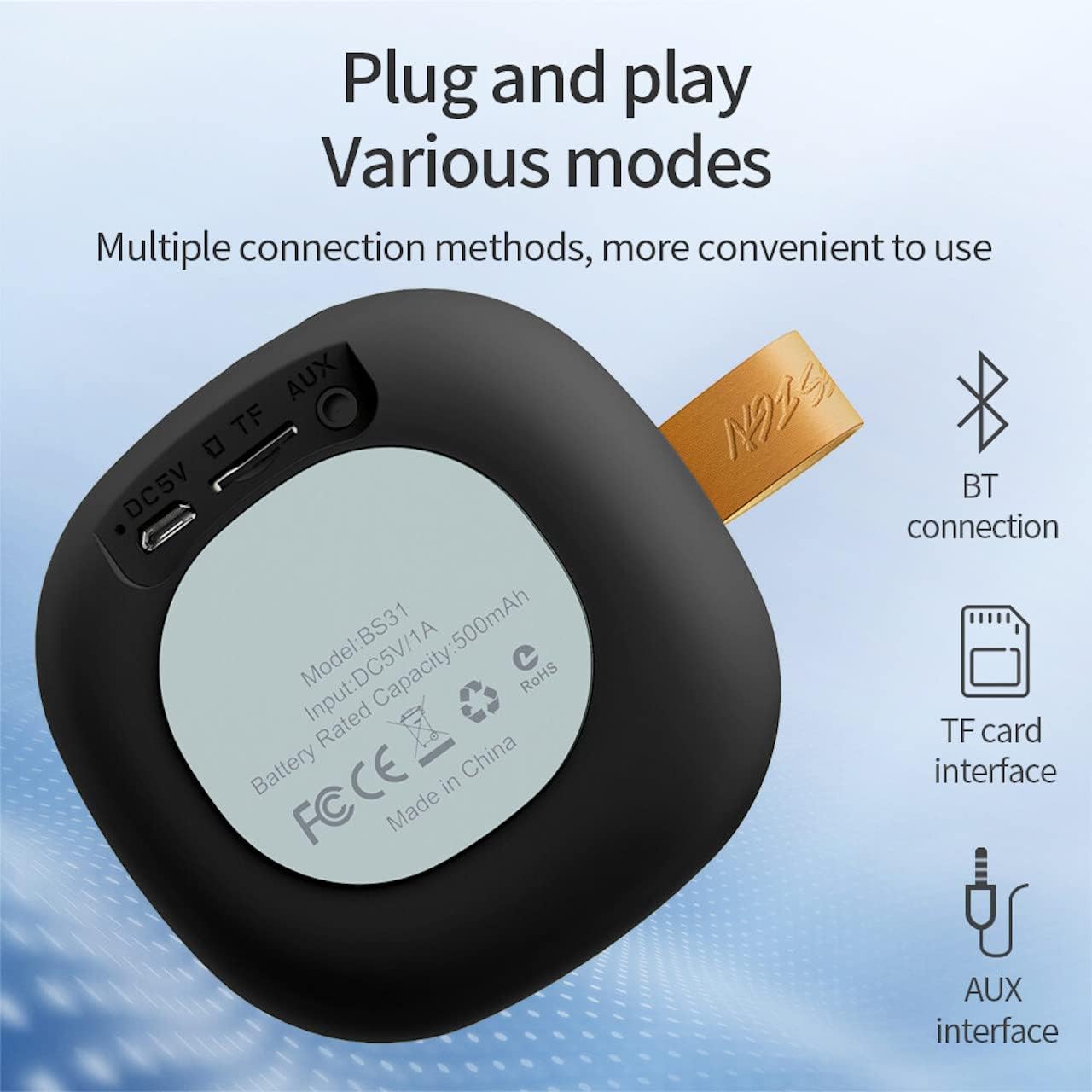
Image: A diagram illustrating the functions of the control buttons on the Hoco BS31 speaker.
- Bọ́tìnì Agbára (⏻): Press and hold to switch on/off. Short press to play/pause music or answer/end calls.
- Previous Song / Volume Up (⏮): Short press for previous song. Long press to increase volume.
- Next Song / Volume Down (⏭): Short press for next song. Long press to decrease volume.
- Mode Button (⏸): Tẹ kukuru lati yipada laarin awọn ipo Bluetooth, kaadi TF, ati awọn ipo AUX.

Aworan: Ẹyin view of the Hoco BS31 speaker, highlighting the DC 5V charging port, TF card slot, and AUX input.
- Ibudo DC 5V: For charging the speaker using the provided USB cable.
- Iho Kaadi TF: Fi kaadi TF (MicroSD) sii fun orin taara lati mu ṣiṣẹ.
- Ibudo AUX: So awọn ẹrọ ohun afetigbọ ita ni lilo okun ohun 3.5mm kan.
5. Eto
5.1. Gbigba agbara Agbọrọsọ
Before first use, fully charge the speaker. Connect the provided USB charging cable to the DC 5V port on the speaker and the other end to a USB power adapter (not included) or a computer's USB port. The charging time is approximately 2 hours. The indicator light will show charging status (e.g., red for charging, off when fully charged).
5.2. Agbara lori / Paa
To power on the speaker, press and hold the Power button (⏻) until you hear an audible prompt. To power off, press and hold the Power button again until the speaker shuts down.
6. Awọn ilana Iṣiṣẹ
6.1. Sisopọ Bluetooth
- Ensure the speaker is powered on and in Bluetooth pairing mode (indicated by a flashing blue light or audible prompt). If not, short press the Mode button (⏸) to switch to Bluetooth mode.
- Lori ẹrọ alagbeka rẹ (foonuiyara, tabulẹti, ati bẹbẹ lọ), mu Bluetooth ṣiṣẹ ki o wa awọn ẹrọ to wa.
- Select "Hoco BS31" from the list of found devices.
- Once paired, the speaker will indicate a successful connection (e.g., solid blue light or audible prompt).
- You can now play audio from your device through the Hoco BS31 speaker.
6.2. TF Card Ipo
Fi káàdì TF (MicroSD) pẹ̀lú ohùn MP3 sí i files into the TF card slot. The speaker will automatically detect the card and switch to TF card playback mode. Use the Previous/Next Song buttons to navigate tracks.
6.3. Ipo AUX
Connect one end of a 3.5mm audio cable (not included) to the AUX port on the speaker and the other end to the audio output jack of your external device (e.g., MP3 player, computer). The speaker will automatically switch to AUX mode. Control playback from your external device.

Image: Visual representation of the Hoco BS31's multiple connection methods, including Bluetooth, TF card, and AUX.
6.4. Music Playback and Call Functions
- Ṣiṣẹ/Daduro: Short press the Power button (⏻).
- Orin to nbọ: Short press the Next Song button (⏭).
- Orin ti tẹlẹ: Short press the Previous Song button (⏮).
- Iwọn didun Up: Long press the Previous Song button (⏮).
- Iwọn didun isalẹ: Long press the Next Song button (⏭).
- Idahun/Ipe Ipari: Short press the Power button (⏻) when a call comes in.
- Kọ Ipe: Press and hold the Power button (⏻) when a call comes in.

Image: The Hoco BS31 speaker positioned next to a smartphone, demonstrating its use for music playback.
7. Itọju ati Itọju
- Jeki agbọrọsọ gbẹ. Maṣe fi han si omi tabi ọrinrin pupọ.
- Sọ agbọrọsọ mọ pẹlu asọ asọ ti o gbẹ. Ma ṣe lo abrasive ose tabi epo.
- Yago fun awọn iwọn otutu to gaju. Ma ṣe tọju agbọrọsọ ni agbegbe ti o gbona pupọ tabi tutu.
- Do not attempt to disassemble or repair the speaker yourself. This will void the warranty and may cause damage.
- Gba agbara si agbọrọsọ nigbagbogbo, paapaa ti ko ba si ni lilo, lati ṣetọju ilera batiri.
8. Laasigbotitusita
| Isoro | Owun to le Fa | Ojutu |
|---|---|---|
| Agbọrọsọ ko ni agbara lori. | Batiri kekere. | Gba agbara fun agbọrọsọ naa fun o kere ju iṣẹju 30. |
| Ko le so pọ pẹlu ẹrọ Bluetooth. | Agbọrọsọ kii ṣe ni ipo sisopọ; Bluetooth ẹrọ pa; ju jina yato si. | Ensure speaker is in pairing mode. Turn Bluetooth on/off on device. Move devices closer. |
| Ko si ohun. | Iwọn ti o kere ju; ipo ti ko tọ; ẹrọ ko dun. | Increase speaker/device volume. Check correct mode (BT, TF, AUX). Ensure audio is playing on source device. |
| TF kaadi ko mọ. | Kaadi ti a fi sii ni aṣiṣe; ọna kika ti ko ni atilẹyin; kaadi ibaje. | Reinsert TF card. Ensure files are MP3 format. Try a different TF card. |
9. Awọn pato
| Ẹya ara ẹrọ | Ẹ̀kúnrẹ́rẹ́ |
|---|---|
| Awoṣe | BS31 |
| Iwọn Agbọrọsọ | 53mm |
| Awọn iwọn | 86 x 86 x 44 mm |
| Iwọn | 140g |
| Ẹya Alailowaya | V4.2 (JLAC6928B) |
| Awọn Ilana atilẹyin | A2DP, AVRCP, HFP, HSP |
| Agbara Batiri | 500mAh (Class A polymer battery) |
| Ngba agbara Voltage | DC 5V |
| Akoko gbigba agbara | O fẹrẹ to awọn wakati 2 |
| Orin/Aago Ipe | O fẹrẹ to awọn wakati 3 |
| Awọn aṣayan Asopọmọra | Wireless (Bluetooth), TF card, AUX |
| O pọju o wu Power | 5 Wattis |
10. Atilẹyin ọja ati Support
Hoco products are manufactured to high quality standards. For warranty information and technical support, please refer to the warranty card included with your product or visit the official Hoco webojula.
Osise Webojula: www.hocotech.com
Ask a question about this manual
Ask about setup, troubleshooting, compatibility, parts, safety, or missing instructions. Manuals+ will review the question and use this page’s manual context to help answer it.