
iROCKER EPUMP
Ìwé Ìtọ́ni fún Pọ́ọ̀pù Pọ́ọ̀pù IROCKER 12V
Model: EPUMP
Ọja Pariview
The iROCKER 12V Electric SUP Pump is designed for fast and efficient inflation and deflation of iROCKER, BLACKFIN, and HOBIE inflatable paddle boards, iROCKER Inflatable Kayaks, and iLAND float products. It features a dual-stage auto-off function and a digital display for precise pressure setting.
Key Awọn ẹya ara ẹrọ
- Fast & Easy Inflation/Deflation: Inflates SUPs in 12 minutes or less and includes a deflate function.
- Meji Stage Auto-Off & Digital Display: Set desired PSI (15 PSI recommended); pump automatically stops when target pressure is reached.
- Ibamu jakejado: Works with iROCKER, BLACKFIN, HOBIE SUPs, iROCKER Inflatable Kayaks, and iLAND floats.
- Durable & Portable Design: Compact size (7" x 8.5" x 4") with a convenient carry handle and cord storage.
- Wapọ Power Aw: Connects to 12V cigarette lighter or 12V battery (not included).
Alaye Aabo
- Do not operate the pump in wet conditions or near water.
- Jeki kuro ni arọwọto awọn ọmọde.
- Rii daju pe fentilesonu to dara lakoko iṣẹ lati ṣe idiwọ igbona.
- Do not block the air intake or exhaust ports.
- Yọ agbara kuro nigbati o ko ba lo tabi ṣaaju ki o to nu.
- Do not exceed the maximum recommended PSI for your inflatable product.
Package Awọn akoonu
Jọwọ rii daju pe gbogbo awọn nkan wa ninu package rẹ:
- iROCKER 12V Electric SUP Pump
- Inflation/Deflation Hose
- 12V Siga fẹẹrẹfẹ Adapter
- Alligator Clips for 12V Battery Connection

Image: The iROCKER Electric SUP Pump shown with its blue hose, illustrating the main components included in the package.
Ṣeto
Asopọ agbara
- For Vehicle 12V Outlet: Insert the 12V cigarette lighter adapter into your vehicle's 12V power socket.
- For External 12V Battery: Connect the alligator clips to a 12V battery, ensuring correct polarity (red to positive, black to negative).
Asopọ okun
Connect the blue inflation hose to the appropriate port on the pump. For inflation, connect to the "INFLATE" port. For deflation, connect to the "DEFLATE" port. Ensure the hose is securely twisted onto the valve.
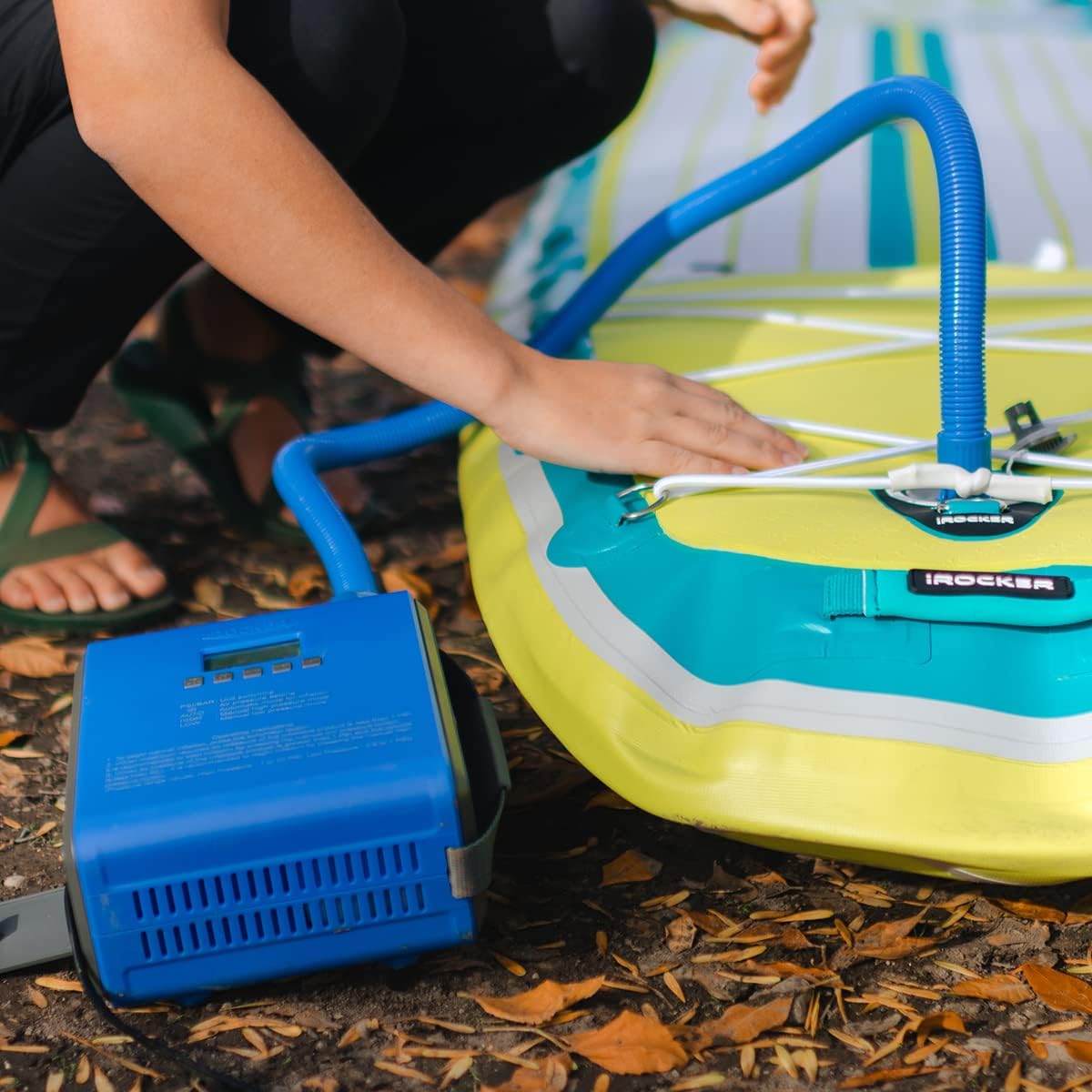
Image: A hand connecting the blue hose from the pump to the inflation valve of an inflatable paddle board.
Awọn ilana Iṣiṣẹ
Setting Desired Pressure (PSI/BAR)
- Power on the pump. The digital display will illuminate.
- Press the "PSI/BAR" button to switch between PSI and BAR units.
- Use the "+" and "-" buttons to set your desired target pressure. For most iROCKER SUPs, 15 PSI is recommended.

Aworan: Isunmọ view of the iROCKER pump's digital display and control buttons, showing the PSI/BAR unit switching and pressure setting options.
Ilana afikun
- Connect the hose to the "INFLATE" port on the pump and securely attach the other end to your inflatable product's valve.
- Ipo Aifọwọyi: If the air pressure of the inflatable product is less than 1 PSI, press the "AUTO" button to begin normal inflation. The pump will automatically switch from high volume to high pressure mode and stop when the set PSI is reached.
- Manual Low Pressure Mode: If the maximum required air pressure of the inflatable product is less than 1 PSI, it is recommended to start inflation by pressing the "LOW" pressure button.
- Manual High Pressure Mode: When air pressure of the inflatable product is greater than 1 PSI and the volume is less than 50 L, it is recommended to begin inflation by pressing the "HIGH" pressure button.

Image: A person's hand pressing a button on the iROCKER pump, which is connected to an inflatable paddle board, initiating the inflation process.
Ilana Deflation
- Connect the hose to the "DEFLATE" port on the pump and securely attach the other end to your inflatable product's valve.
- Press the "DEFLATE" button to begin deflating the product. The pump will actively remove air, making packing easier.

Image: The iROCKER pump actively deflating an inflatable paddle board, showing the hose connected to the deflation port.
Itoju
- Ninu: Wipe the pump exterior with a damp asọ. Maṣe lo awọn kẹmika ti o lewu tabi awọn afọmọ abrasive.
- Ibi ipamọ: Store the pump in a cool, dry place away from direct sunlight and extreme temperatures. Ensure the hose is detached and stored neatly in the cord storage compartment.
- Ajọ Afẹfẹ: Periodically check the air intake filter for debris and clean if necessary to maintain optimal performance.
Laasigbotitusita
| Isoro | Owun to le Fa | Ojutu |
|---|---|---|
| Fifa ko tan. | Ko si asopọ agbara tabi orisun agbara aṣiṣe. | Check 12V connection. Ensure vehicle ignition is on if using cigarette lighter. Verify 12V battery is charged if using clips. |
| Pump stops prematurely or overheats. | Overuse or blocked ventilation. | Allow the pump to cool down for at least 30 minutes. Ensure air vents are clear. Avoid continuous operation for multiple boards without a break. |
| Pump not inflating/deflating effectively. | Hose not securely connected or valve issue. | Ensure hose is tightly connected to both the pump and the product valve. Check product valve for leaks or obstructions. |
| Cannot change PSI setting. | Possible software glitch or button malfunction. | Try unplugging and re-plugging the pump. If issue persists, contact customer support. |
Awọn pato
| Brand | iROCKER |
| Nọmba awoṣe | EPUMP |
| Iwọn Nkan | 1.97 kilo |
| Orisun agbara | Agbara Batiri (12V) |
| Ipa ti o pọju | 15 iwon fun Square Inch |
| Ipo Isẹ | Laifọwọyi |
| Awọn iwọn Nkan (LxWxH) | 10 x 6.9 x 8.75 inches |
| UPC | 085783897283 |
Atilẹyin ọja ati Support
The iROCKER 12V Electric SUP Pump comes with a 1-Year Manufacturer's Warranty. For warranty claims, technical support, or any product-related inquiries, please contact iROCKER customer service.
Visit the official iROCKER webaaye fun alaye atilẹyin ti ode-ọjọ ati awọn alaye olubasọrọ.
Ask a question about this manual
Ask about setup, troubleshooting, compatibility, parts, safety, or missing instructions. Manuals+ will review the question and use this page’s manual context to help answer it.