
ProfiCare PC-BSR 3042
ProfiCare PC-BSR 3042 Robot Vacuum Cleaner Instruction Manual
Awoṣe: PC-BSR 3042
1. Ifihan
Thank you for choosing the ProfiCare PC-BSR 3042 Robot Vacuum Cleaner. This manual provides essential information for the safe and efficient operation, maintenance, and troubleshooting of your new appliance. Please read these instructions thoroughly before first use and keep them for future reference.
The ProfiCare PC-BSR 3042 is designed to independently clean various hard floor surfaces and short-pile carpets, effectively removing dirt, dust, crumbs, and pet hair. Its extra-flat design allows for cleaning under furniture, and its quiet operation ensures minimal disturbance.
2. Awọn ilana aabo
Nigbagbogbo ṣe akiyesi awọn iṣọra ailewu atẹle lati yago fun ipalara tabi ibajẹ si ohun elo:
- Ka gbogbo awọn itọnisọna ni pẹkipẹki ṣaaju ṣiṣe ohun elo naa.
- Ohun elo yii jẹ ipinnu fun lilo inu ile nikan.
- Do not allow children to play with the appliance. Supervise children and individuals with reduced physical, sensory, or mental capabilities when the appliance is in use.
- Do not immerse the appliance, power adapter, or remote control in water or other liquids.
- Use only the original power adapter supplied with the appliance.
- Do not use the appliance to pick up flammable or combustible materials, hot ashes, or sharp objects.
- Ensure the dustbin and filter are correctly installed before operation.
- Jeki irun, aṣọ alaimuṣinṣin, awọn ika ọwọ, ati gbogbo awọn ẹya ara kuro lati awọn ṣiṣi ati awọn ẹya gbigbe.
- The appliance features automatic stair detection. However, always exercise caution near stairs or elevated surfaces.
- If the appliance is damaged, do not operate it. Contact customer support for assistance.
3. Package Awọn akoonu
Jọwọ ṣayẹwo pe gbogbo awọn nkan wa ati ni ipo to dara:
- ProfiCare PC-BSR 3042 Robot Vacuum Cleaner
- Adapter agbara
- Isakoṣo latọna jijin
- Side Brushes (2 pre-installed, 2 extra)
- Ajọ HEPA (ti fi sii tẹlẹ)
- Cleaning Brush for Filter
- Ilana itọnisọna
4. Ọja Ipariview
Familiarize yourself with the components of your robot vacuum cleaner.
Nọmba 4.1: Oke view of the robot vacuum cleaner, showing the main power button, HEPA filter indicator, and remote sensor area.

Nọmba 4.2: The multi-function remote control for operating the robot vacuum cleaner.
Awọn eroja akọkọ:
- Bọtini agbara: Located on the top surface for manual start/stop.
- Dustbin Compartment: Houses the removable dustbin and HEPA filter.
- Awọn brushes ẹgbẹ: Two rotating brushes for sweeping debris into the vacuum's path.
- Ibudo gbigba agbara: Fun sisopọ ohun ti nmu badọgba agbara.
- Awọn sensọ infurarẹẹdi: For obstacle detection and stair avoidance.
- Awọn kẹkẹ Iwakọ: Rubberized and spring-mounted for smooth movement across various surfaces.
Awọn iṣẹ iṣakoso latọna jijin:
- Bẹrẹ / Sinmi: Ó bẹ̀rẹ̀ tàbí ó dáwọ́ ìwẹ̀nùmọ́ dúró.
- Awọn itọka itọsọna: Manually guides the robot.
- FOCUS (Spot Cleaning): Directs the robot to clean a specific area intensively.
- RANDOM (Random Cleaning): Robot cleans in a random pattern.
- AUTO (Systematic Cleaning): Robot cleans in a systematic pattern.
- DÁHÙN: Locates the robot.
5. Eto
5.1. Ngba agbara si Batiri naa
- Connect the power adapter to the charging port on the side of the robot vacuum cleaner.
- Pulọọgi ohun ti nmu badọgba agbara sinu iṣan ogiri kan.
- Allow the robot to charge for approximately 5 hours before its first use. The charging indicator light will show the charging status.
5.2. Fifi ẹgbẹ gbọnnu
The robot comes with two side brushes pre-installed. If replacement is needed:
- Tan igbale regede roboti lodindi.
- Align the new side brush with the brush post and press down until it clicks into place. Ensure the brushes are securely attached.
5.3. Ṣíṣe Ààyè Ìmọ́tótó
- Remove any large obstacles, loose cables, or delicate items from the floor.
- Ensure doors to areas you want cleaned are open, and doors to areas you want to avoid are closed.
6. Operating the Robot Vacuum Cleaner
6.1. Bibẹrẹ a Cleaning ọmọ
You can start the robot in two ways:
- Ibẹrẹ Afowoyi: Press the power button on the top of the robot.
- Ibẹrẹ iṣakoso latọna jijin: Press the "Start/Pause" button on the remote control.
The robot will begin cleaning in its default mode (Systematic or Random, depending on the last setting).
6.2. Selecting Cleaning Modes
Use the remote control to select a specific cleaning program:
- AUTO (Systematic Cleaning): The robot cleans in a structured, back-and-forth pattern to cover the entire area efficiently.
- RANDOM (Random Cleaning): The robot navigates randomly, changing direction upon encountering obstacles.
- FOCUS (Spot Cleaning): The robot cleans a concentrated area in a spiral pattern, ideal for heavily soiled spots.
6.3. Pausing and Resuming
Press the "Start/Pause" button on the robot or remote control to pause the cleaning cycle. Press it again to resume.
6.4. Stopping the Robot
To stop the robot completely, press and hold the power button on the robot until it turns off, or press the "Start/Pause" button on the remote and then the power button on the robot.
6.5. Iṣẹ Aago
The remote control includes a timer function to schedule cleaning times. Refer to the remote control section in this manual for detailed instructions on setting the timer.
6.6. Stair Detection
The robot is equipped with infrared sensors that automatically detect stairs and prevent it from falling. Ensure these sensors are kept clean for optimal performance.
7. Itọju
Itọju deede ṣe idaniloju iṣẹ ṣiṣe ti o dara julọ ati ki o fa igbesi aye ti ẹrọ igbale robot rẹ.
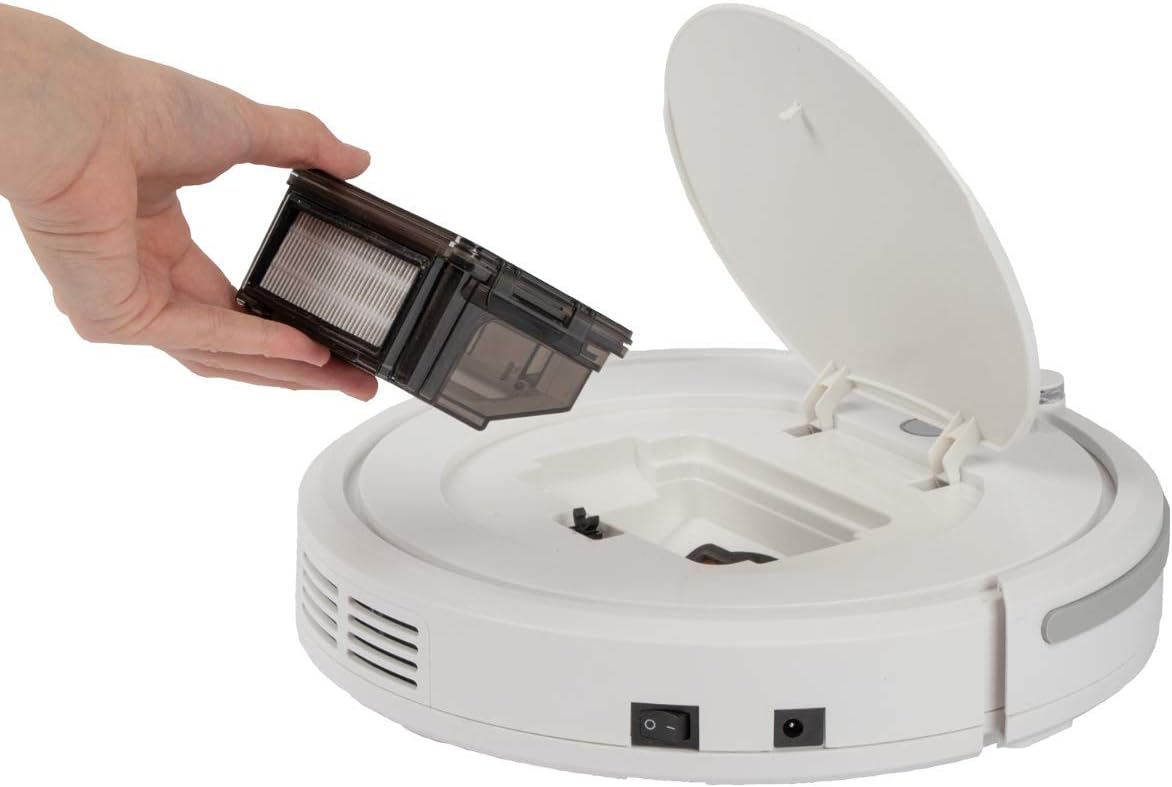
7.1. Ṣíṣe àtúnṣe àti mímú àpótí ìdọ̀tí kúrò

Nọmba 7.1: Removing the dustbin for emptying and cleaning.
- Turn off the robot vacuum cleaner.
- Ṣí ideri òkè ti robot náà.
- Grasp the handle of the dustbin and lift it out.
- Ṣí àpótí ìdọ̀tí náà kí o sì da àwọn ohun tó wà nínú rẹ̀ sínú àpótí ìdọ̀tí.
- Fi omi fọ apoti eruku naa ti o ba wulo, rii daju pe o gbẹ patapata ṣaaju ki o to tun fi sii.
7.2. Nu àlẹ̀mọ́ HEPA mọ́
The HEPA filter is located inside the dustbin. Clean it regularly to maintain suction power.
- Yọ apoti idoti kuro bi a ti salaye loke.
- Fi ìṣọ́ra yọ àlẹ̀mọ́ HEPA kúrò nínú àpótí ìdọ̀tí.
- Use the provided cleaning brush to remove dust and debris from the filter. Do not wash the HEPA filter with water unless specified by the manufacturer.
- Reinsert the clean HEPA filter into the dustbin and then place the dustbin back into the robot.
7.3. Cleaning Side gbọnnu
Periodically check and clean the side brushes for tangled hair or debris.
- Turn off the robot and flip it over.
- Fi pẹ̀lẹ́pẹ̀lẹ́ fa àwọn búrọ́ọ̀ṣì ẹ̀gbẹ́ sókè láti yọ wọ́n kúrò.
- Remove any hair or debris wrapped around the brushes or brush posts.
- Reattach the brushes by pressing them down onto their posts until they click.
7.4. Cleaning Sensors and Wheels
Wipe the infrared sensors (located around the bumper and underneath the robot) and the drive wheels with a clean, dry cloth to ensure proper navigation and movement.
8. Laasigbotitusita
If you encounter issues with your robot vacuum cleaner, refer to the following table for common problems and solutions.
| Isoro | Owun to le Fa | Ojutu |
|---|---|---|
| Robot ko ni tan-an. | Batiri naa kere tabi ti dinku. | Charge the robot for 5 hours. |
| Robot duro lairotẹlẹ. | Battery is low; Obstacle detected; Wheels/brushes jammed. | Charge the robot; Remove obstacles; Clean wheels and brushes. |
| Iṣẹ ṣiṣe mimọ ti ko dara. | Dustbin full; Filter clogged; Side brushes worn or dirty. | Empty dustbin; Clean/replace filter; Clean/replace side brushes. |
| Robot ko gba agbara. | Power adapter not connected; Faulty adapter/port. | Ensure secure connection; Try a different outlet; Contact support. |
| Robot falls down stairs. | Stair sensors are dirty or blocked. | Clean the stair sensors thoroughly. |
9. Awọn pato
Technical details for the ProfiCare PC-BSR 3042 Robot Vacuum Cleaner:

Nọmba 9.1: Dimensions of the robot vacuum cleaner.
| Ẹya ara ẹrọ | Ẹ̀kúnrẹ́rẹ́ |
|---|---|
| Nọmba awoṣe | 330420 |
| Batiri Iru | Ni-MH |
| Batiri Voltage | 14.4 V |
| Agbara Batiri | 1500 mAh |
| Batiri Run Time | Titi di iṣẹju 90 |
| Igba agbara Batiri | Isunmọ. wakati meji 5 |
| Ariwo Ipele | Isunmọ. 61 dB |
| Awọn iwọn (Opin x Giga) | 290 mm x 75 mm |
| Iwọn | 1.9 kg |
| Àlẹmọ Iru | Àlẹmọ HEPA |
| Ninu Awọn eto | 3 (Random, Systematic, Spot) |
| Pataki Awọn ẹya ara ẹrọ | Automatic stair detection, Mechanical furniture barrier, Remote control, Timer function |
| Dada iṣeduro | Hard floors, short-pile carpets |
10. Atilẹyin ọja ati Support
10.1. Atilẹyin ọja olupese
This product is covered by a manufacturer's warranty. Please refer to the warranty card included in your package or contact ProfiCare customer service for specific terms and conditions. Spare parts availability is typically 2 years from the date of purchase.
10.2. Onibara Support
For technical assistance, troubleshooting beyond this manual, or warranty claims, please contact your retailer or the ProfiCare customer support team. Contact information can usually be found on the product packaging or the official ProfiCare webojula.
Ask a question about this manual
Ask about setup, troubleshooting, compatibility, parts, safety, or missing instructions. Manuals+ will review the question and use this page’s manual context to help answer it.