
ZZIPP TXZZ580
ZZIPP TXZZ580 UHF 48-Channel Wireless Microphone System User Manual
Model: TXZZ580
Ọrọ Iṣaaju
This manual provides detailed instructions for the proper setup, operation, and maintenance of your ZZIPP TXZZ580 UHF 48-Channel Wireless Microphone System. Please read this manual thoroughly before using the product to ensure optimal performance and longevity.
Ọja Pariview
Ohun ti o wa ninu Apoti
- Two Handheld Microphones (Transmitters)
- Olugba Unit
- Adapta Agbara fun Olugba
- Okun Asopọ Audio
- Itọsọna olumulo
Key Awọn ẹya ara ẹrọ
- UHF Alailowaya Technology
- 48 Awọn ikanni yiyan
- Manual and IR Configuration
- Designed for Karaoke and other vocal applications
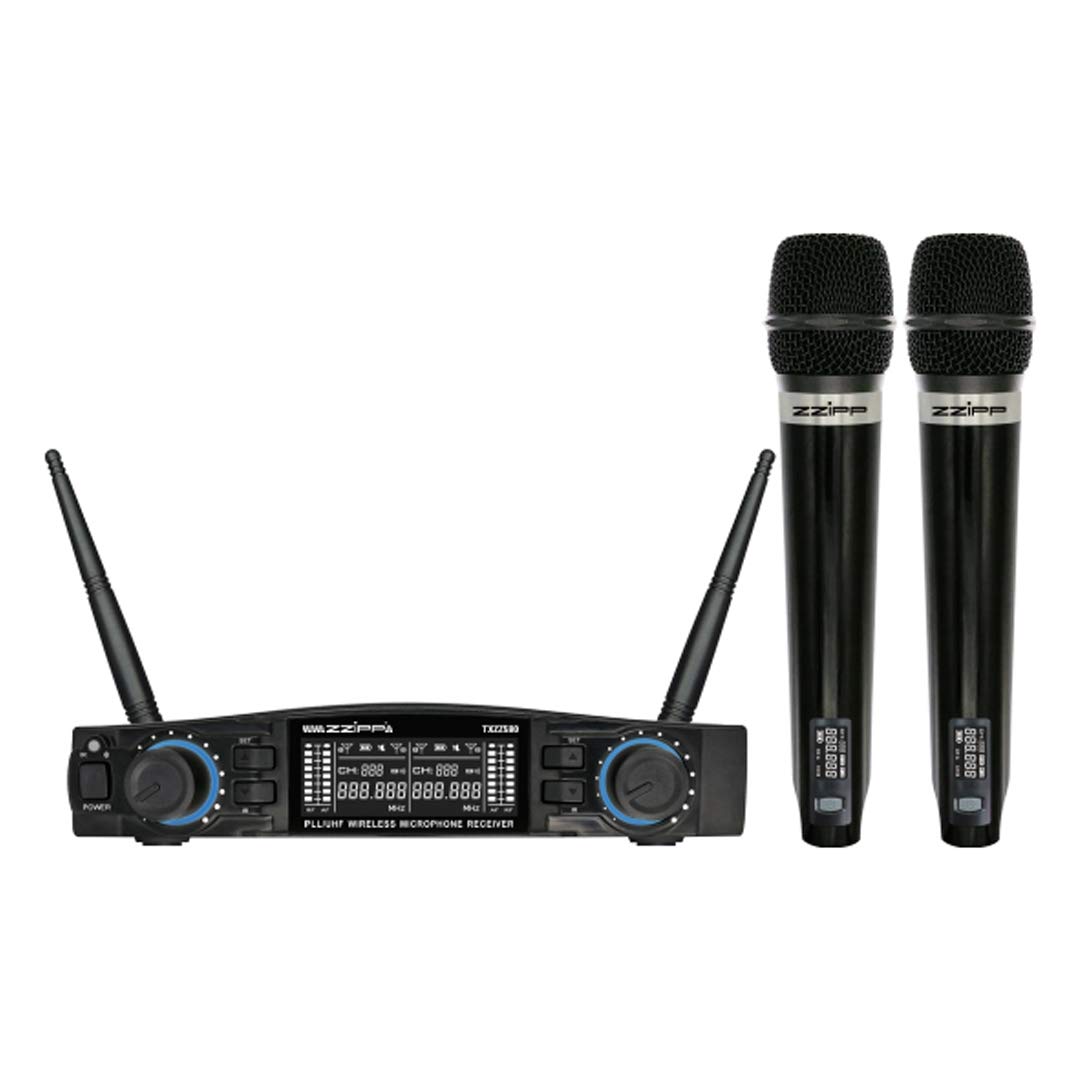
Nọmba 1: Pariview of the ZZIPP TXZZ580 Wireless Microphone System, showing the receiver unit and two handheld microphones.
Ṣeto
- Yọ awọn ohun elo kuro: Fara yọ gbogbo awọn ohun kan kuro ninu apoti.
- Ibi olugba: Place the receiver unit on a stable surface, away from potential sources of interference such as computers, Wi-Fi routers, or other wireless devices. Ensure good line-of-sight to the area where the microphones will be used.
- So agbara: Connect the provided power adapter to the receiver's DC input and then plug it into a suitable power outlet.
- So Oju-iwe So pọ: Connect the receiver's audio output (e.g., 3.5mm Jack) to the input of your mixer, amplifier, or sound system using the supplied audio cable.
- Install Batteries in Transmitters: Open the battery compartment of each handheld microphone and insert the required batteries (typically AA, not always included). Observe correct polarity.
- Agbara Tan: Turn on the receiver unit and then each handheld microphone.
- Channel Synchronization (Manual/IR):
- Iṣeto ni Afowoyi: Refer to the receiver's display and controls to manually select a desired channel for each microphone. Ensure each microphone is set to a unique channel to avoid interference.
- IR Synchronization: For automatic synchronization, align the IR sensor on the microphone with the IR sensor on the receiver. Activate the IR sync function on the receiver, and the microphone will automatically pair to the selected channel.
- Idanwo Ohun: Speak into each microphone to test the audio output through your sound system. Adjust volume levels as needed.
Awọn ilana Iṣiṣẹ
Titan / Paa
- Olugba: Tẹ bọtini agbara lori iwaju nronu lati tan tabi pa ẹrọ naa.
- Awọn gbohungbohun: Press and hold the power button on the microphone handle until the display illuminates (on) or turns off (off).
Aṣayan ikanni
The system offers 48 UHF channels. If you experience interference, change the operating channel. This can be done manually on the receiver and then synchronized with the microphone via IR, or directly on the microphone if it supports manual channel adjustment.
Iṣakoso iwọn didun
Adjust the output volume for each microphone using the dedicated volume knobs on the receiver's front panel. Further volume adjustments can be made on your connected mixer or amplifier.
Awọn imọran Lilo
- Maintain a clear line of sight between the microphones and the receiver for optimal signal quality.
- Avoid placing the receiver near large metal objects or other electronic devices that may cause interference.
- Regularly check microphone battery levels to prevent unexpected power loss during use.
- For best sound quality, hold the microphone approximately 2-6 inches from your mouth.
Itoju
Batiri Rirọpo
When the microphone's battery indicator shows low power, replace the batteries immediately. Always use fresh batteries of the correct type (e.g., AA). Remove batteries if the microphones will not be used for an extended period to prevent leakage.
Ninu
Clean the receiver and microphones with a soft, dry cloth. Do not use liquid cleaners or solvents, as these can damage the finish or internal components. For microphone grilles, a soft brush can be used to remove debris.
Ibi ipamọ
Store the system in a cool, dry place, away from direct sunlight and extreme temperatures. If possible, use the original packaging or a protective case for transport and storage.
Laasigbotitusita
| Isoro | Owun to le Fa | Ojutu |
|---|---|---|
| Ko si ohun lati gbohungbohun |
|
|
| Ìdènà tàbí àìdúró |
|
|
| Ibiti o ṣiṣẹ kukuru |
|
|
Awọn pato
- Brand: ZZIPP
- Awoṣe: TXZZ580
- Àwọ̀: Dudu
- Iru Alailowaya: UHF
- Nọmba awọn ikanni: 48
- Asopọmọra: 3.5 mm Jack
- Orisun Agbara: Corded Electric (for receiver)
- Ẹya Pataki: Manual and IR Configuration
- Iṣeduro Lilo: Karaoke
- Awọn eroja To wa: Two Handheld Microphones, Receiver
Atilẹyin ọja ati Support
For warranty information, technical support, or service inquiries, please refer to the documentation provided with your purchase or contact your retailer. Keep your proof of purchase for warranty claims.
Awọn iwe aṣẹ ti o jọmọ - TXZZ580
 |
Phenyx Pro PTU-6000 UHF Eight-channel Wireless Microphone System Owner's Manual Owner's manual for the Phenyx Pro PTU-6000 selectable frequency UHF eight-channel wireless microphone system. Includes system description, specifications, operating instructions, and warranty information. |
 |
Ìwé Ìtọ́sọ́nà fún Olùní Ètò Gbohungbohun Aláìlókùn PTU-71/7000/6000 Series Ìwé ìtọ́ni fún ẹni tó ni ẹ̀rọ Phenyx Pro PTU-71/7000/6000 Series ti àwọn ẹ̀rọ gbohùngbohùn alailowaya UHF onípele méjì, quad, àti mẹ́jọ. Ó ní ẹ̀rọ lórí ẹ̀rọ náà.view, awọn ẹya ara ẹrọ, irinše, iṣeto, isẹ, laasigbotitusita, pato, ati atilẹyin ọja alaye. |
 |
Phenyx Pro PTU-51/5000/4000 Series Wireless Microphone System User Manual Comprehensive user manual for the Phenyx Pro PTU-51/5000/4000 Series Fixed UHF Frequency Dual/Quad/Eight-Channel Wireless Microphone System. Provides detailed information on system overview, features, components, functions of parts, operation guidance, wireless tips, troubleshooting, specifications, and warranty information. |
 |
Ìwé Ìtọ́sọ́nà fún Olùní Ètò Gbohungbohun Aláìlókùn PTU-51/5000/4000 Series Ìwé ìtọ́ni fún ẹni tó ni PTU-51/5000/4000 Series fún àwọn ẹ̀rọ gbohùngbohùn aláiláàyè UHF tí a ti tọ́jú.view, awọn ẹya ara ẹrọ, awọn paati, itọnisọna iṣẹ, laasigbotitusita, awọn pato, ati alaye atilẹyin ọja. |
 |
Phenyx Pro PTU-71/7000/6000 Series UHF Ailokun Alailowaya Eto Olumulo Eto Olumulo Iwe afọwọkọ olumulo pipe fun Phonyx Pro PTU-71, PTU-7000, ati PTU-6000 jara Auto-Scan UHF Dual, Quad, ati Awọn ọna Gbohungbohun Alailowaya-ikanni mẹjọ. Pẹlu iṣeto, isẹ, awọn iṣẹ, laasigbotitusita, ati awọn pato. |
 |
Ìwé Ìtọ́sọ́nà fún Olùní Ètò Gbohungbohun Aláìlókùn PTU-71/7000/6000 Series UHF Ìwé ìtọ́ni tó péye fún àwọn onílé fún àwọn ẹ̀rọ gbohùngbohùn onígbàlódé UHF tí a lè yan. Ó ní ètò tó wà lórí rẹ̀.view, awọn ẹya ara ẹrọ, awọn paati, awọn iṣẹ ti awọn ẹya ara, itọsọna iṣiṣẹ, awọn imọran alailowaya, laasigbotitusita, awọn alaye ni pato, atokọ igbohunsafẹfẹ, ati alaye atilẹyin ọja. |
Ask a question about this manual
Ask about setup, troubleshooting, compatibility, parts, safety, or missing instructions. Manuals+ will review the question and use this page’s manual context to help answer it.