
1. Ifihan
The Audison SR 4.300 is a high-performance D-Class 4-channel amplifier designed for car audio systems. This amplifier delivers 85 W x 4 at 4 Ohms and features Audison D-Class Technology (ADT) for compact size without compromising audio quality. Its design incorporates extruded aluminum with rounded corners for easy installation in confined spaces, and generous heat sinks eliminate the need for internal cooling fans. This manual provides essential information for proper installation, operation, and maintenance of your SR 4.300 amplifier.
2. Key Awọn ẹya ara ẹrọ
- ADC (Audison D-Class) Technology: Ensures high audio performance in a compact size with a 2 Ohm stable output stage.
- Apẹrẹ Iwapọ: Extruded aluminum construction with fanless convection cooling.
- Universal Speakers Simulator (USS): Built-in for compatibility with various head units.
- Awọn igbewọle Rọ: Balanced high-noise rejection Speaker-In for OEM head units and RCA-In for aftermarket head units.
- Automatic Remote Turn-On/Off (ART): Automatically powers the amplifier on/off with the OEM head unit (can be enabled/disabled with Speaker-In inputs).
- Awọn ijade tẹlẹ: Available even when using Speaker-In level inputs.
3. Alaye Aabo
Please read all instructions carefully before installing and operating the amplifier. Failure to follow these guidelines may result in damage to the product, vehicle, or personal injury.
- Máa yọ ẹ̀rọ batiri tí ó wà nínú ọkọ̀ náà kúrò kí o tó bẹ̀rẹ̀ iṣẹ́ iná mànàmáná èyíkéyìí.
- Ensure proper wiring gauge and fusing are used for power connections to prevent fire hazards.
- Gbe awọn amplifier ni aabo ni ipo ti o fun laaye laaye fun fentilesonu to pe ati pe o ni aabo lati ọrinrin ati ooru ti o pọ ju.
- Yẹra fun fifi sori ẹrọ amplifier in areas where it could interfere with vehicle safety systems or driver visibility.
- Kan si alamọdaju insitola ti o ko ba ni idaniloju nipa eyikeyi abala ti ilana fifi sori ẹrọ.
4. Package Awọn akoonu
Jẹrisi pe gbogbo awọn ohun kan wa ninu package:
- Audison SR 4.300 D-Class 4-Channel Amplifier (Model: SR4.300-FBA)
- Afowoyi Olumulo (iwe-ipamọ yii)
- Ohun elo iṣagbesori (awọn skru, ati bẹbẹ lọ)
- Connection Terminals/Plugs (as supplied by manufacturer)
5. Fifi sori ẹrọ ati Oṣo
Proper installation is crucial for optimal performance and safety. The Audison SR 4.300 amplifier is designed for surface mounting.
5.1. Iṣagbesori Location
Choose a mounting location that is dry, well-ventilated, and secure. Ensure sufficient space around the amplifier fun air san, paapa ni ayika ooru ge je.
5.2. Awọn isopọ Loriview
Awọn amplifier features various input and output terminals for power, signal, and speaker connections. Refer to the images below for a visual guide.

Apejuwe: This image displays the Audison SR 4.300 amplifier from a front-side perspective. Visible are the Audison logo, model number, and various input/output terminals including RCA inputs, speaker inputs, and power connections. The ribbed heat sink design is also prominent.

Apejuwe: Aworan yii pese oke-isalẹ view of the Audison SR 4.300 amplifier. The control panel is clearly visible, featuring switches and potentiometers for channel selection, input mode, filter settings (LP/HP/BP), and gain adjustments for channels A and B. Power and speaker terminals are also visible along the edges.
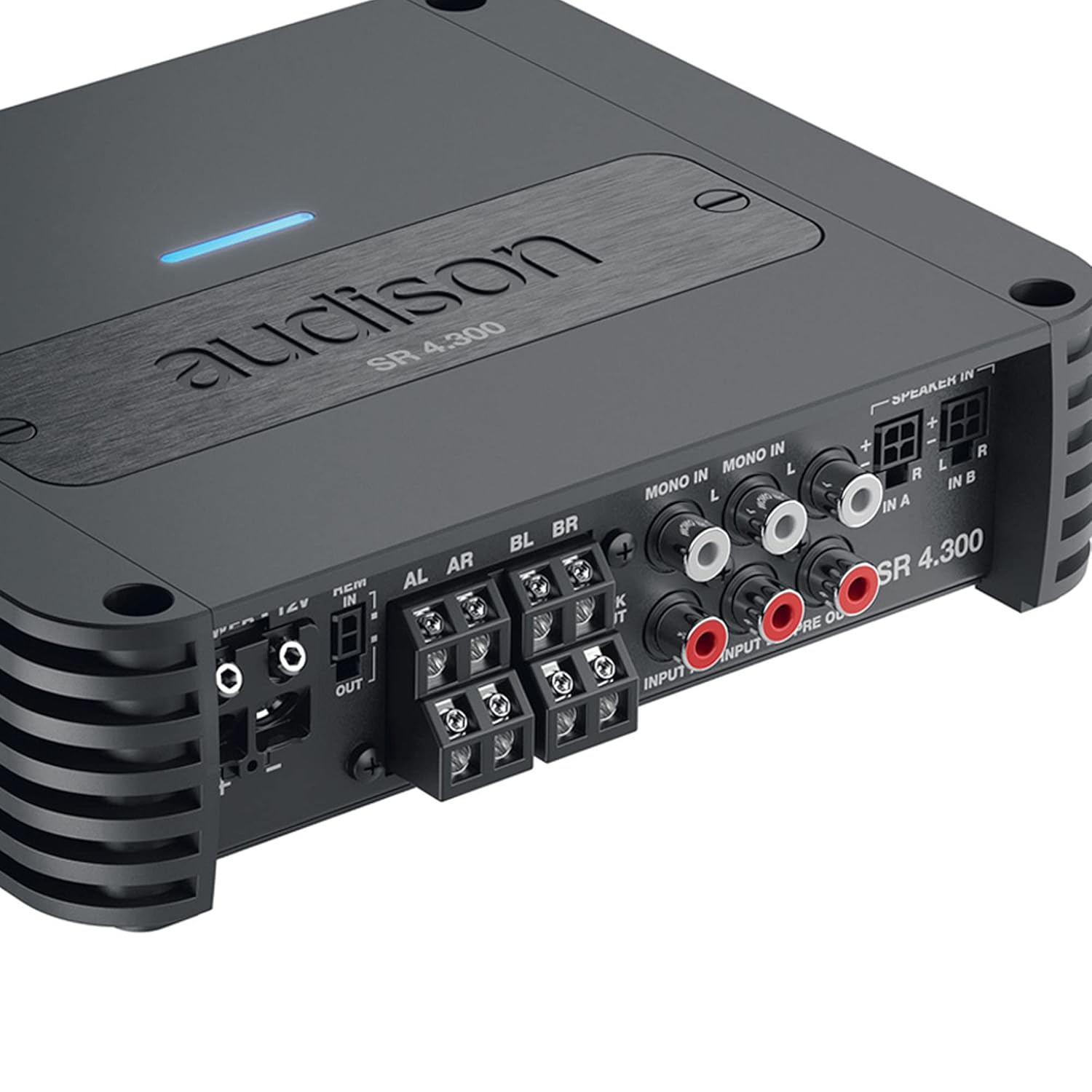
Apejuwe: This close-up image focuses on the input and output section of the Audison SR 4.300 amplifier. It shows the RCA input jacks (MONO IN, IN A, IN B), speaker-level inputs, and pre-out connections. The power and remote turn-on terminals are also visible, along with the speaker output terminals.
5.3. Awọn isopọ Agbara
- Connect the main power cable (positive +12V) to the amplifier's +12V terminal. Ensure an appropriate fuse (1 x 30A) is installed close to the vehicle's battery.
- So ilẹ USB si awọn amplifier's GND terminal and to a clean, unpainted metal point on the vehicle chassis.
- Connect the remote turn-on wire from your head unit to the amplifier's REM IN terminal. If using Speaker-In inputs with an OEM head unit, the ART (Automatic Remote Turn-On/Off) feature can be utilized, eliminating the need for a separate remote wire.
5.4. Awọn igbewọle ifihan agbara
- Awọn igbewọle RCA: For aftermarket head units, connect RCA cables from the head unit's pre-outs to the amplifier's RCA-In terminals (IN A, IN B).
- Àwọn Ìtẹ̀wọlé Ipele Agbọrọsọ: For OEM head units without RCA outputs, connect the speaker wires directly to the amplifier's Speaker-In terminals. The built-in USS (Universal Speakers Simulator) ensures compatibility.
5.5. Agbọrọsọ o wu
So awọn agbohunsoke rẹ pọ si amplifier's speaker output terminals (AL, AR, BL, BR). Ensure correct polarity (+/-) for each speaker. The amplifier supports 2 Ohm stable operation.
6. Awọn ilana Iṣiṣẹ
Once installed, configure the amplifier settings using the controls on the top panel (refer to Figure 2).
- Ipo igbewọle: Select the appropriate input mode (e.g., 2-channel, 4-channel) based on your system configuration.
- Awọn eto àlẹmọ: Adjust the High-Pass (HP), Low-Pass (LP), or Band-Pass (BP) filters for each channel pair to optimize sound reproduction for your speakers.
- Atunse Gba: Carefully set the gain levels for channels A and B to match the output voltage ti ori rẹ kuro. Bẹrẹ pẹlu ere ni o kere ju ki o pọ si laiyara titi ti iwọn didun ti o fẹ yoo waye laisi ipalọlọ.
7. Itọju
The Audison SR 4.300 amplifier nilo itọju kekere lati rii daju pe iṣẹ ṣiṣe igba pipẹ.
- Pa awọn amplifier mọ ki o si free lati eruku ati idoti. Lo asọ asọ ti o gbẹ fun mimọ.
- Ensure that the heat sinks are not obstructed to allow for proper cooling.
- Periodically check all connections for tightness and corrosion.
8. Laasigbotitusita
Ti o ba ni iriri awọn iṣoro pẹlu rẹ amplifier, tọka si awọn igbesẹ laasigbotitusita ti o wọpọ wọnyi:
- Ko si Agbara: Check the main fuse, power connections (+12V, GND, REM), and ensure the vehicle battery is charged.
- Ko si Ohun: Verify all input and output signal connections. Check head unit settings and amplifier gain levels. Ensure speakers are properly connected and functional.
- Ohun Yiyi: Reduce gain levels. Check for proper filter settings. Ensure speaker impedance matches amplifier capabilities.
- Amplifárì Gbígbóná jù: Rii daju deedee fentilesonu ni ayika amplifier. Check speaker impedance. Reduce volume levels.
If problems persist, consult an authorized Audison service center.
9. Awọn pato
| Paramita | Iye |
|---|---|
| Nọmba awoṣe | SR4.300-FBA |
| Ipese Agbara Voltage / Fuse | 11 ÷ 15 VDC / 1 x 30A |
| Ṣiṣẹ agbara Ipese Voltage | 6.5V ÷ 17 VDC |
| Idling lọwọlọwọ | 1.6 A |
| Idling Current when off | 0.03 mA |
| Consumption @ 14.4 VDC, 2Ω, Max Musical Power | 25 A |
| Package Mefa | 10.2 x 7.91 x 3.7 inches |
| Iwọn | 4 iwon |
| Olupese | Audison |
| Iṣagbesori Iru | Oke Oke |
10. Atilẹyin ọja ati Support
Audison products are manufactured to the highest quality standards. For warranty information, please refer to the warranty card included with your product or visit the official Audison website. For technical support or service inquiries, please contact your authorized Audison dealer or distributor.