
1. Ifihan
Thank you for choosing the Silvergear Lollipop Kids Camera. This digital camera is designed for children, featuring a durable silicone case, 5.0-megapixel photo resolution, and video recording capabilities. It also includes built-in games for entertainment. This manual provides essential information for the safe and effective use of your camera.
2. Ọja Ipariview
Familiarize yourself with the components of your Silvergear Lollipop Kids Camera.
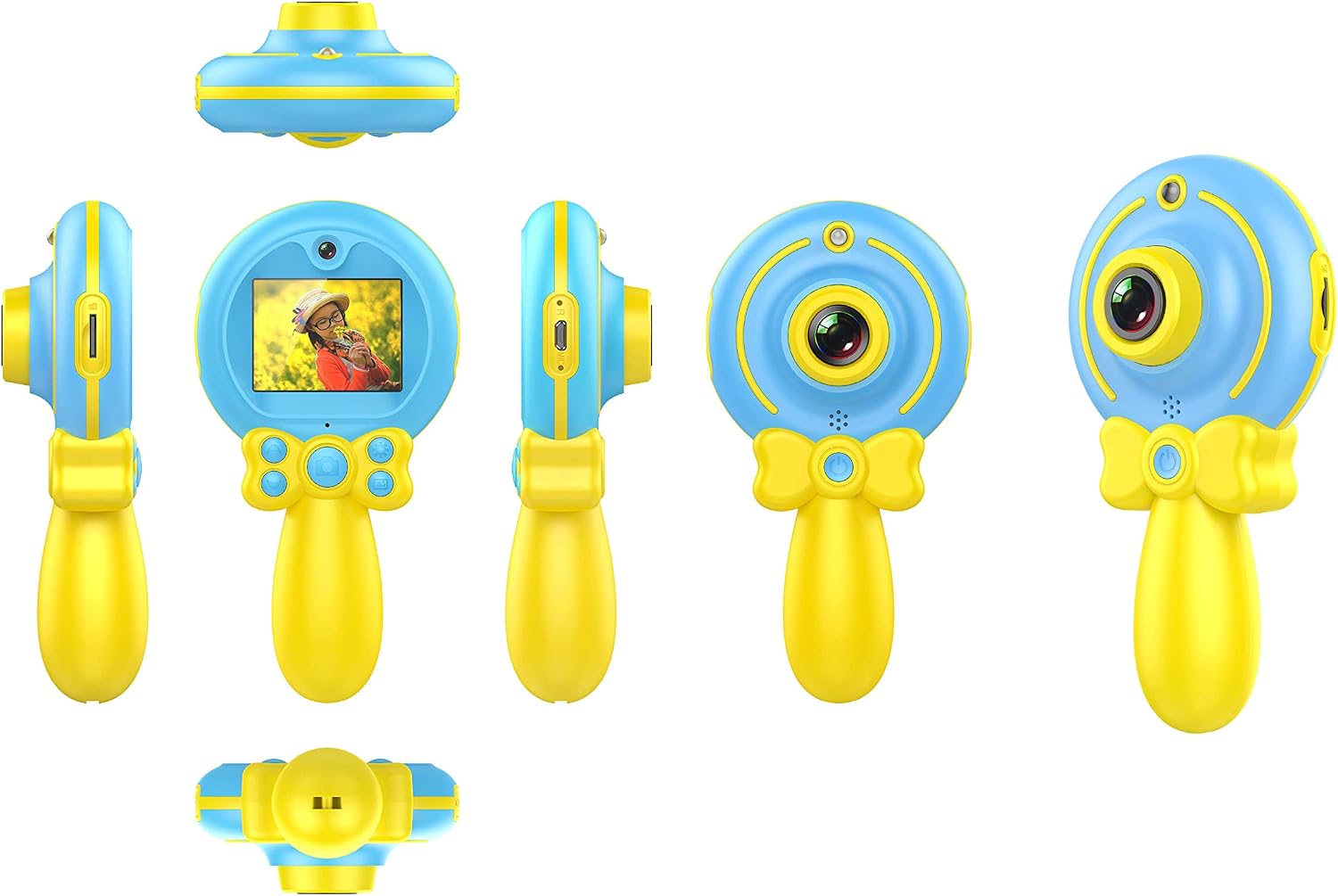
Aworan 2.1: Orisirisi views of the Silvergear Lollipop Kids Camera, illustrating its compact design, front and rear lenses, 2-inch display, and control buttons. The camera features a yellow handle and blue body with a silicone protective case.
- Lẹnsi iwaju: Fun yiya awọn fọto ati awọn fidio.
- Lẹnsi Tẹhin: For selfies.
- Iboju Ifihan 2-inch: Fun viewgígé àwọn fọ́tò, fídíò, àti àwọn àkójọ ìṣàyẹ̀wò.
- Awọn bọtini Iṣakoso: For power, navigation, and selection.
- Ibudo USB Micro: Fun gbigba agbara ati gbigbe data.
- Micro SD Kaadi Iho: Fun ibi ipamọ expandable.
- Wrist Strap Attachment Point: For securing the camera.
3. Eto
3.1 Ngba agbara si Batiri naa
The camera is equipped with a built-in rechargeable Lithium-polymer battery. Before first use, fully charge the camera.
- Connect the included Micro USB cable to the camera's Micro USB port.
- So opin okun miiran pọ si ohun ti nmu badọgba agbara USB (kii ṣe pẹlu) tabi ibudo USB ti kọnputa kan.
- Ina Atọka gbigba agbara yoo tan imọlẹ. Ni kete ti o ti gba agbara ni kikun, ina le yipada awọ tabi paa.
3.2 Fifi Micro SD Kaadi
A Micro SD card (not included) is required to save photos and videos. The camera supports cards up to 32GB.
- Locate the Micro SD card slot on the camera.
- Gently insert the Micro SD card into the slot with the metal contacts facing down until it clicks into place.
- Lati yọ kuro, Titari kaadi naa ni die-die titi yoo fi jade.
3.3 Titan / Pa a
- Lati Fi agbara: Press and hold the Power button for a few seconds until the screen illuminates.
- Lati Paarẹ: Tẹ bọtini agbara naa ki o si dimu fun iṣẹju-aaya diẹ titi iboju yoo fi pa.
4. Awọn ilana Iṣiṣẹ
4.1 Gbigba Awọn fọto
The camera features a 5.0-megapixel resolution for still images.

Aworan 4.1: A child demonstrating the use of the Silvergear Lollipop Kids Camera for taking photographs.
- Ensure the camera is powered on and in photo mode. Use the navigation buttons to select photo mode if necessary.
- Frame your shot using the 2-inch display screen.
- Press the Shutter button to capture the photo. The camera has autofocus for clear images.
4.2 Awọn fidio Gbigbasilẹ
The camera can record videos at 640 x 480 pixels resolution at 30 frames per second in MP4 format.
- Switch the camera to video recording mode using the mode selection button.
- Press the Record button to start recording. A timer or indicator will appear on the screen.
- Tẹ bọtini igbasilẹ lẹẹkansi lati da gbigbasilẹ duro.
4.3 ti ndun Games
The camera includes three built-in games for entertainment.

Aworan 4.2: A child interacting with the Silvergear Lollipop Kids Camera, viewing content on its screen.
- Navigate to the 'Games' menu option using the navigation buttons.
- Select one of the three available games.
- Use the camera's control buttons to play the game.
4.4 Gbigbe Files
Lati gbe awọn fọto ati awọn fidio si kọnputa:
- Connect the camera to a computer using the Micro USB cable.
- The camera should appear as a removable disk drive on your computer.
- Open the camera's folder to access and copy your files.
5. Itọju
- Ninu: Lo aṣọ rírọrùn tí ó gbẹ láti nu ara kámẹ́rà àti ìbòjú rẹ̀. Má ṣe lo àwọn ohun èlò ìfọmọ́ omi tàbí àwọn ohun èlò ìpara.
- Ibi ipamọ: Tọju kamẹra naa ni itura, aye gbigbẹ kuro lati orun taara ati awọn iwọn otutu to gaju.
- Itọju Batiri: For optimal battery life, avoid fully discharging the battery frequently. Charge the camera regularly, even if not in use for extended periods.
- Omi Resistance: Kamẹra yii jẹ ko mabomire. Yago fun ifihan si omi tabi ọriniinitutu giga.
6. Laasigbotitusita
- Kamẹra ko tan: Ensure the battery is charged. Connect the camera to a power source and try again.
- Cannot take photos/videos: Check if a Micro SD card is inserted correctly and has sufficient free space.
- Didara aworan ti ko dara: Ensure the lens is clean and free from smudges. Check lighting conditions.
- Dídì kámẹ́rà: Press and hold the Power button to force a shutdown, then restart the camera.
- Computer does not recognize camera: Ensure the USB cable is properly connected. Try a different USB port or cable.
7. Awọn pato
| Ẹya ara ẹrọ | Sipesifikesonu |
|---|---|
| Nọmba awoṣe | 1087-B |
| Brand | Ohun elo fadaka |
| Awọn iwọn (L x W x H) | 9 x 5 x 15 cm |
| Iwọn | 140 giramu |
| Iduro Aworan Ṣi | 5 Megapiksẹli |
| Ipinnu fidio | 640 x 480 pixels (30 FPS) |
| Fidio kika | MP4 |
| Aworan kika | JPEG |
| Iwon iboju | 2 inches |
| Ibi ipamọ | Micro SD card support up to 32 GB |
| Batiri | 1 Litiọmu-polyma (tí ó wà pẹ̀lú rẹ̀) |
| Asopọmọra | USB |
| Idojukọ aifọwọyi | Bẹẹni |
| Omi Resistance | Ko mabomire |
| Pataki Awọn ẹya ara ẹrọ | Video recording, filters, 3 built-in games |
8. Awọn akoonu Apoti
- Silvergear Lollipop Kids Camera (Blue)
- Ohun elo Idaabobo Silikoni
- Micro USB Ngba agbara USB
- Okun Ọwọ
9. Atilẹyin ọja ati Support
Alaye nipa atilẹyin ọja ati atilẹyin alabara ko si ninu data ọja ti a pese. Jọwọ tọka si apoti ọja tabi osise olupese. website for details on warranty coverage and how to contact customer support.