
Ọrọ Iṣaaju
This manual provides essential information for the proper installation, operation, and maintenance of your PLUSPOE 40mm x 10mm DC 12V Brushless Cooling Fan. Designed for efficient heat dissipation, this fan is suitable for a variety of electronic devices and small appliances. Please read this manual thoroughly before use to ensure optimal performance and longevity of the product.
Ọja Awọn ẹya ara ẹrọ
- Apẹrẹ Iwapọ: Dimensions of 40mm x 40mm x 10mm for versatile integration.
- Itutu ti o munadoko: Features a 9-blade design for enhanced airflow.
- Iṣẹ Ariwo Kekere: Rated at 27.5 dB(A) for quiet performance.
- Ikole ti o tọ: Housing and fan blades made from Black PBT (UL94V-0) material.
- Reliable Bearing: Equipped with a dual ball bearing system for extended life expectancy.
- Asopọmọra boṣewa: Utilizes a 2-pin connector (PH2.5) for easy power integration.
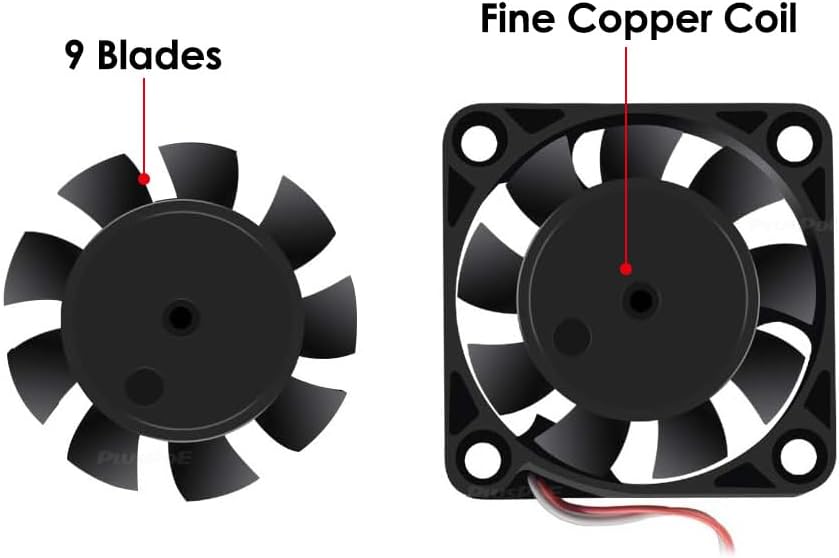
Nọmba 1: Illustration highlighting the 9-blade design and the fine copper coil within the fan motor.
Package Awọn akoonu
- 2 x PLUSPOE 40mm x 10mm DC 12V Brushless Cooling Fans
Awọn pato
| Iwa | Iye |
|---|---|
| Nọmba awoṣe | PF001 |
| Awọn iwọn | 40mm x 40mm x 10mm (1.57" x 1.57" x 0.39") |
| Oṣuwọn Voltage | DC 12V |
| Awọn ọna Voltage Ibiti | 10.8V - 13.2V DC |
| Ibẹrẹ Voltage | 6V DC |
| Ti won won Lọwọlọwọ | 0.04A (Max. 0.10A) |
| Ti won won Agbara | 0.48W (O pọju 1.2W) |
| Iyara Yiyipo ti o pọju | 6800 RPM |
| Air Sisan Agbara | 7.56 CFM |
| Agbara afẹfẹ | 3.19 mmH2O |
| Ariwo Ipele | 27.5 dB(A) |
| Ètò Bearing | Meji Bọọlu Bọtini |
| Ireti aye | 50,000 wakati ni 25 ° C |
| Asopọmọra Iru | 2-Pin (PH2.5) |
| Housing & Blade Material | Black PBT (UL94V-0) |
| Item Weight (per fan) | 18.7g (0.66 iwon) |
| Awọn Ifọwọsi Aabo | CE, RoHS |
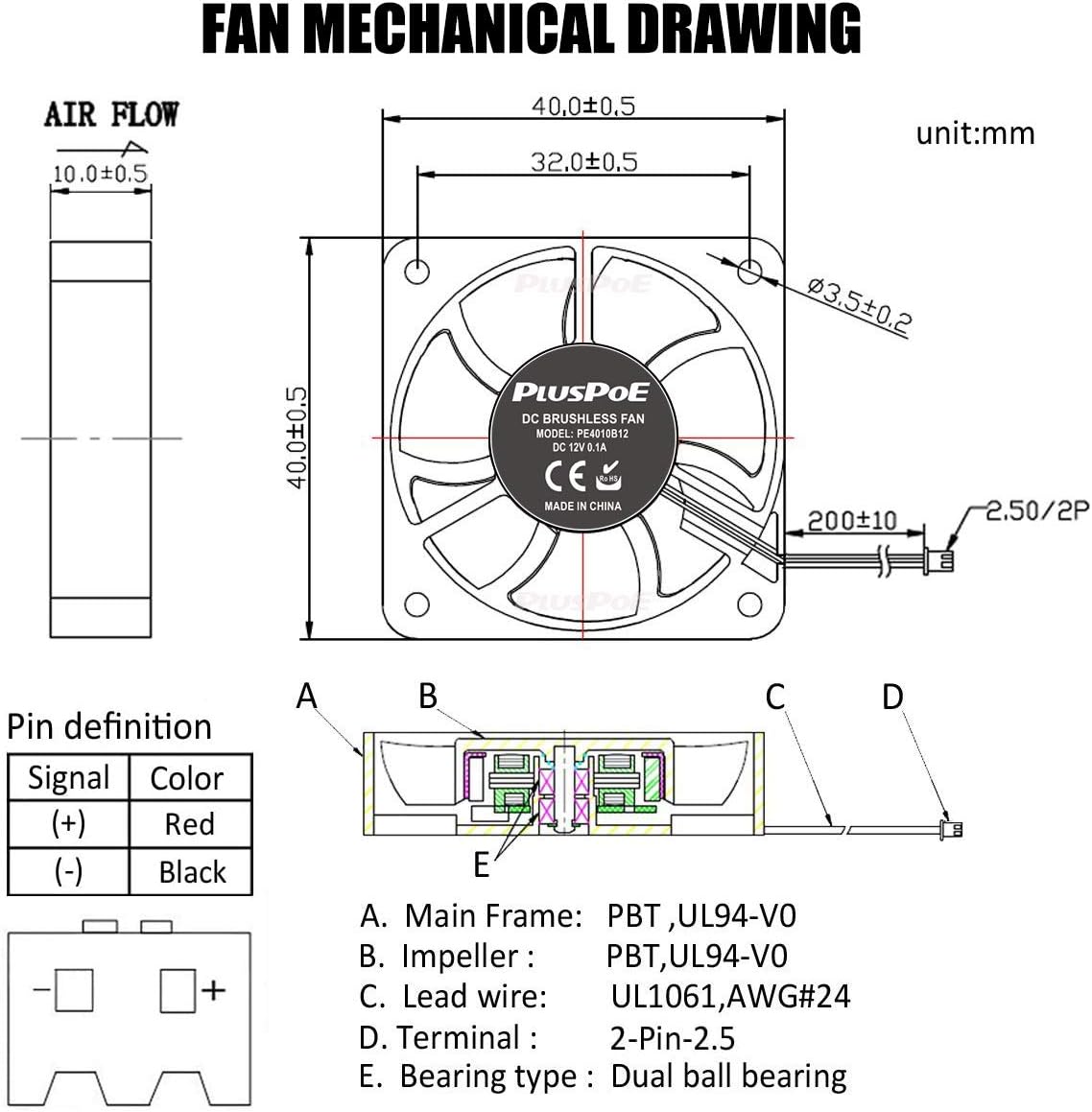
Nọmba 2: A detailed mechanical drawing of the fan, showing dimensions (40x40x10mm), airflow direction, and internal components with a pin definition for the 2-pin connector.
Ṣeto
- Ṣe idanimọ Ibi Iṣagbesori: Determine the optimal position for the fan within your device or enclosure. Ensure there is sufficient space for the fan and proper airflow.
- Pinnu Itọsọna Afẹfẹ: The fan is designed to push air in a specific direction. Refer to the mechanical drawing (Figure 2) or the arrow on the fan housing to ensure the desired airflow (intake or exhaust) is achieved.
- Ṣe aabo Olufẹ naa: Mount the fan securely using appropriate screws or fasteners through the mounting holes. Avoid over-tightening, which can damage the fan housing.
- So agbara: Connect the fan's 2-pin connector (PH2.5) to a compatible DC 12V power source. Observe the correct polarity: the Red wire is positive (+) ati awọn Black wire is negative (-). Incorrect polarity can damage the fan.

Nọmba 3: Sun mo tipetipe views of the 2-pin connector (PH2.5) and its dimensions, along with the fan's label showing model and voltage.
Awọn ilana Iṣiṣẹ
Once properly installed and connected to a stable DC 12V power source, the fan will begin operation. The fan is designed for continuous use in various applications requiring active cooling.
Awọn ohun elo ti o wọpọ:
- Computer cases and components (e.g., CPU cooling, server cooling)
- 3D atẹwe
- Humidifiers and aromatherapy devices
- Small electronic appliances and communication equipment
- Intelligent industrial control equipment
- High-precision medical equipment

Nọmba 4: Visual examples of common applications for the 40mm cooling fan, including power banks, USB chargers, network routers, and laptops.
Itoju
Regular maintenance helps ensure the fan's efficiency and extends its lifespan.
- Ninu: Periodically inspect the fan blades and housing for dust accumulation. Gently clean with a soft brush or compressed air. Ensure the fan is powered off and disconnected before cleaning.
- Ayewo: Check for any physical damage, loose connections, or obstructions that might impede the fan's rotation.
- Yẹra fún fífún ní òróró: The dual ball bearing system is designed for long-term, maintenance-free operation. Do not attempt to lubricate the bearings.
Laasigbotitusita
Olufẹ Ko Yiyi:
- Verify that the fan is correctly connected to a DC 12V power source.
- Check the power source for proper voltage jade.
- Ensure the polarity of the connection is correct (Red to positive, Black to negative).
- Inspect for any obstructions preventing the fan blades from rotating freely.
Ariwo Pupọ:
- Rí i dájú pé afẹ́fẹ́ náà wà lórí rẹ̀ dáadáa, kò sì gbọ̀n gbọ̀n-ọ́n sí àwọn ẹ̀yà ara mìíràn.
- Check for any foreign objects or dust buildup on the fan blades.
- If the noise persists and is unusual, the fan may be faulty and require replacement.
Itutu agbaiye ti ko to:
- Confirm that the fan's airflow direction is appropriate for your cooling needs.
- Rí i dájú pé kò sí ìdènà kankan tí ó lè dí ìgbafẹ́ tàbí èéfín afẹ́fẹ́ lọ́wọ́.
- Verify that the fan is receiving adequate power (DC 12V).
Atilẹyin ọja
This PLUSPOE cooling fan comes with a 1-odun atilẹyin ọja from the date of purchase. This warranty covers defects in materials and workmanship under normal use. It does not cover damage caused by misuse, accident, unauthorized modification, or improper installation. Please retain your proof of purchase for warranty claims.
Atilẹyin
For further assistance, technical support, or warranty inquiries regarding your PLUSPOE 40mm x 10mm DC 12V Brushless Cooling Fan, please contact PLUSPOE customer service through the retailer where the product was purchased or refer to the official PLUSPOE webojula fun alaye olubasọrọ.

Nọmba 5: A gbogbogbo view of the PLUSPOE 40mm x 10mm DC 12V Brushless Cooling Fan.