
1. Ifihan
The SmallRig Universal Bottom Mount Plate with 15mm Rod Support System DBC2272B is designed for mirrorless and DSLR cameras, providing a versatile platform for mounting accessories. This baseplate is height-adjustable to ensure compatibility with various camera setups, adhering to the LWS standard.
It features an Arca-compatible quick release (QR) plate and receiver for efficient camera attachment and detachment. The system supports 15mm rods, allowing for the integration of accessories such as lens supports, shoulder pads, matte boxes, and follow focus systems. Multiple 1/4"-20 and 3/8"-16 threaded holes on the bottom enable attachment to tripod plates.
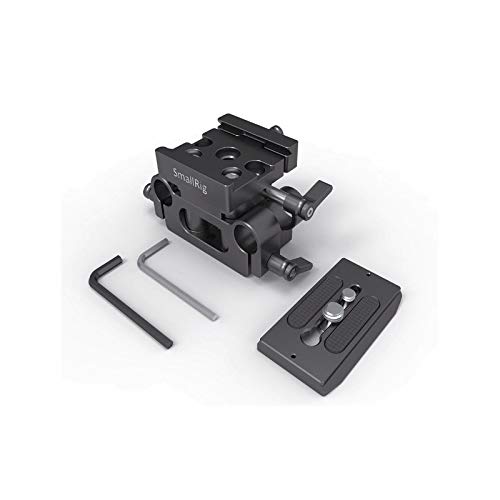
Figure 1: SmallRig Universal Bottom Mount Plate DBC2272B, showing the main baseplate, the detachable quick release plate, and the two included hex spanners.
2. Awọn ilana iṣeto
Follow these steps to set up your SmallRig Universal Bottom Mount Plate:
- Attach the Quick Release Plate: Secure the Arca-compatible quick release (QR) plate to your camera's tripod socket or SmallRig cage using the appropriate screw. Ensure it is tightened firmly.
- Mount Camera to Baseplate: Drop the QR plate (with the camera/cage attached) into the receiver on top of the baseplate. Tighten the knob screw on the side of the receiver to secure the QR plate in place.
- Ṣatunṣe Giga: To adjust the height of the baseplate to align with the LWS standard for your specific camera, unscrew the wingnut on the side of the baseplate. Adjust the height as needed, then tighten the wingnut to lock it.
- Attach 15mm Rods: Insert SmallRig 15mm Rods (e.g., SmallRig 1053) into the rod clamps on the baseplate. Tighten the locking screws on the rod clamps to secure the rods.
- Ṣafikun Awọn ẹya ẹrọ: Once 15mm rods are in place, you can attach various accessories such as lens supports (e.g., SmallRig 2152), shoulder pads (e.g., SmallRig 2077), matte boxes, or follow focus systems to the rods.
- Mount to Tripod (Optional): If desired, attach a tripod plate to the bottom of the baseplate using the available 1/4"-20 and 3/8"-16 threaded holes.
3. Awọn ilana Iṣiṣẹ
Once the baseplate is set up, operating it involves making minor adjustments and utilizing its quick-release functionality.
- Quick Release Function: To quickly detach your camera or cage from the baseplate, loosen the knob screw on the QR receiver until the QR plate can be lifted out. To re-attach, simply drop the QR plate back into the receiver and tighten the knob screw.
- Atunse Giga: If you change cameras or accessories that require a different height alignment, repeat step 3 from the Setup Instructions to adjust the baseplate's vertical position.
- Rod Accessory Adjustment: Loosen the locking screws on your 15mm rod accessories to slide them along the rods for optimal positioning, then re-tighten.
4. Itọju
Proper maintenance ensures the longevity and reliable performance of your SmallRig baseplate.
- Ninu: Use a soft, dry cloth to wipe down the baseplate after use. For stubborn dirt, a slightly damp asọ le ṣee lo, atẹle nipa gbigbe lẹsẹkẹsẹ. Yago fun awọn kẹmika lile tabi awọn ohun elo abrasive.
- Ibi ipamọ: Store the baseplate in a clean, dry environment, away from extreme temperatures and humidity.
- Ayewo: Periodically inspect all screws, knobs, and moving parts for tightness and wear. Use the provided hex spanners to tighten any loose screws.
- Lubrication: No lubrication is typically required for this product. If any moving parts feel stiff, contact support.
5. Laasigbotitusita
If you encounter issues with your SmallRig Universal Bottom Mount Plate, consider the following:
- Kámẹ́rà Kò Ní Ààbò:
- Ensure the QR plate is properly attached to your camera/cage and the screw is tight.
- Verify the knob screw on the baseplate's QR receiver is fully tightened after dropping the QR plate in.
- Rods Not Holding Firmly:
- Check that the 15mm rods are fully inserted into the clamps.
- Confirm the locking screws on the rod clamps ti wa ni tightened.
- Awọn Iṣoro Ṣatunṣe Giga:
- Ensure the wingnut for height adjustment is sufficiently loosened before attempting to adjust.
- Tighten the wingnut firmly after adjustment to prevent slippage.
- Aiduroṣinṣin gbogbogbo:
- Double-check all connection points, including camera, cage, QR plate, baseplate, and tripod connections, for tightness.
- Ensure all components are correctly aligned and seated.
6. Awọn pato
| Ẹya ara ẹrọ | Ẹ̀kúnrẹ́rẹ́ |
|---|---|
| Nọmba awoṣe | DBC2272 |
| Brand | Kekere Rig |
| Àwọ̀ | Dudu |
| Awọn ẹrọ ibaramu | Camera (Mirrorless and DSLR) |
| Awọn iwọn Ọja (D x W x H) | 15D x 5W x 10H |
| Iwọn Nkan | 199 giramu |
| Rod Support | 15mm LWS standard |
| Eto Itusilẹ iyara | Arca-compatible |
| Mounting Points (Bottom) | Àwọn ihò oníhò 1/4"-20 àti 3/8"-16 |
| Awọn akoonu apoti | 1 x Baseplate 2272, 2 x Hex Spanner |
| Ilu isenbale | China |
7. atilẹyin ọja Information
This SmallRig product comes with a 1-YEAR atilẹyin ọja from the date of purchase. Please retain your proof of purchase for warranty claims. For detailed warranty terms and conditions, please refer to the official SmallRig webojula tabi kan si atilẹyin alabara.
8. Atilẹyin ati Olubasọrọ
For technical assistance, product inquiries, or warranty support, please contact the manufacturer or authorized distributors.
- Olupese: SHENZHEN LEQI CO LTD, 4th Floor Building 12, Asian Industrial Park Bantian Shenzhen, China.
- Oluwọle (India): Shetala Agencies Pvt Ltd, 27, 5th Street, Bharathi Ave, Kaveri Nagar, Kottivakkam, Chennai, Tamil Nadu 600041.
- Packer (India): Shetala Agencies Pvt Ltd, 27, 5th Street, Bharathi Ave, Kaveri Nagar, Kottivakkam, Chennai, Tamil Nadu 600041.
- SmallRig Official Webojula: www.smallrig.com