
1. Ifihan
This user manual provides detailed instructions for the installation, operation, and maintenance of your BAFANG C965 LCD Display. This display is designed for use with Bafang Mid Drive motors that utilize the UART communication protocol. Please read this manual thoroughly before using the product to ensure safe and correct operation.
The BAFANG C965 LCD Display offers essential information for your electric bicycle, including speed, battery level, assistance level (PAS), and trip data, enhancing your riding experience.
2. Alaye Aabo
- Always ensure the display is securely mounted and all cables are properly connected before riding.
- Do not attempt to open or modify the display unit. This may void the warranty and cause damage.
- Keep the display screen clean and free from obstructions to ensure clear visibility of information.
- Avoid exposing the display to extreme temperatures or direct sunlight for prolonged periods.
- In case of malfunction, refer to the troubleshooting section or contact Bafang support.
3. Package Awọn akoonu
Daju pe gbogbo awọn nkan wa ninu apo rẹ:
- BAFANG C965 LCD Display Unit
- Àmì ìfìkọ́lé ọwọ́
- Control Button Unit
- Afowoyi Olumulo (iwe-ipamọ yii)
4. Eto ati fifi sori
Follow these steps to install your BAFANG C965 LCD Display:
- Gbigbe Ifihan naa: Attach the handlebar mounting bracket to your bicycle's handlebar. The bracket is compatible with handlebar diameters of 22.2mm, 25.4mm, and 31.8mm. Secure the C965 display unit into the bracket.
- Awọn kebulu asopọ: Connect the 5-pin female connector from the display unit to the corresponding male connector on your Bafang Mid Drive motor system. Ensure the connection is firm and secure.
- Mounting Control Buttons: Position the external control button unit on your handlebar within easy reach. Connect its cable to the display unit.

Figure 1: Bafang C965 LCD display unit with cables and mounting bracket.
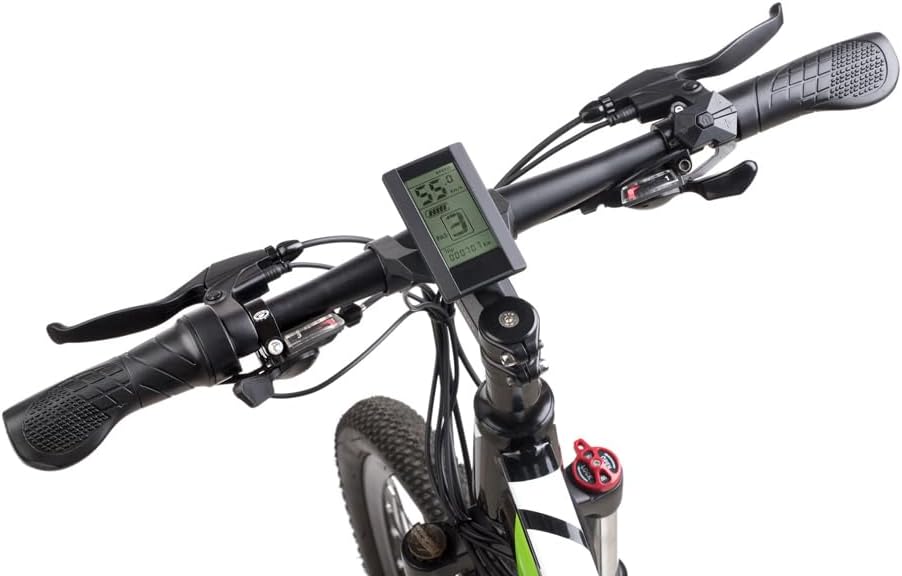
Figure 2: Bafang C965 LCD display mounted on an e-bike handlebar.
5. Awọn ilana Iṣiṣẹ
Once installed, operate your BAFANG C965 LCD Display as follows:
- Titan/Apapa: Press and hold the power button on the external control unit to turn the display on or off.
- Adjusting PAS Level: Use the '+' and '-' buttons on the control unit to increase or decrease the Pedal Assist System (PAS) level.
- Ifihan Alaye: The display cycles through various information screens. Use the 'M' (Mode) button to switch between different data views such as trip distance, total distance, average speed, max speed, and time.
- Iṣakoso ina iwaju: If your e-bike system supports it, a dedicated button or a long press of a specific button (refer to your motor's manual) may control the headlights.

Figure 3: Bafang C965 LCD display showing active riding data.
6. Display Functions and Indicators
The C965 display provides various indicators and data points:
- Ifihan Iyara: Shows current speed, average speed (AVG), and maximum speed (MAX).
- Atọka Batiri: Ṣe afihan ipele gbigba agbara batiri ti o ku.
- Ipele PAS: Indicates the current pedal assist level (0-9 or 0-3, depending on configuration).
- Àmì Ìrìnnà: Shows trip distance and total odometer reading.
- Atọka Agbara: Displays real-time motor power output.
- Àkókò: Current time or trip duration.
- Àmì Ìdánwò: Ó máa ń tànmọ́lẹ̀ nígbà tí a bá lo bírékì.
- Atọka aṣiṣe: Displays error codes if a system fault occurs.
- Agbára iná iwájú orí: Indicates when the e-bike's headlights are active.

Figure 4: Bafang C965 LCD display icons and basic specifications.
7. Itọju
To ensure the longevity and optimal performance of your C965 display:
- Ninu: Mu ese iboju ati ara pẹlu asọ, damp asọ. Ma ṣe lo abrasive ose tabi epo.
- Omi Resistance: The display has an IP65 waterproof rating, meaning it is protected against dust and low-pressure water jets. Avoid submerging the unit in water.
- Iwọn otutu: Operate the display within its specified temperature range of -20°C to 60°C.
- Ayẹwo USB: Lojoojumọ, ṣayẹwo gbogbo awọn okun waya ati awọn asopọ fun awọn ami ti ibajẹ tabi ibajẹ.
8. Laasigbotitusita
If you encounter issues with your BAFANG C965 LCD Display, consider the following:
- Ifihan Ko Tii:
- Rii daju pe batiri e-keke ti gba agbara ati ti sopọ daradara.
- Check all cable connections between the display, control unit, and motor for looseness or damage.
- Verify the power button is pressed correctly.
- Awọn kika Iyara / Ijinna ti ko tọ:
- Check the speed sensor and magnet on your wheel for proper alignment and cleanliness.
- Ensure the wheel circumference setting in the display's advanced settings (if accessible) is correct.
- Awọn koodu aṣiṣe Ti han:
- Refer to your Bafang motor's specific error code list for detailed explanations and solutions. Common issues include motor, controller, or sensor faults.
- Often, turning the system off and on again can clear temporary errors.
- Awọn bọtini Ko Dahun:
- Check the connection of the external control button unit to the display.
- Rí i dájú pé àwọn bọ́tìnì náà kò di ara wọn.
If problems persist after attempting these steps, contact Bafang customer support or your authorized dealer for assistance.
9. Awọn pato
| Ẹya ara ẹrọ | Sipesifikesonu |
|---|---|
| Nọmba awoṣe | C965 |
| Ifihan Iru | LCD |
| Asopọmọra Technology | Ti firanṣẹ |
| Sensọ Iru | Speed sensor, Voltage sensọ |
| Iṣagbesori Iru | Handlebar òke |
| Human Interface Input | Awọn bọtini |
| Mabomire Rating | IP65 |
| Max Speed Limit | 70 km / h |
| Batiri Ipese Voltage | 36V/48V |
| Awọn iwọn otutu ti nṣiṣẹ | -20°C si 60°C |
| Iwọn Iwọn Mimu Ọpa Ibamu Ti o baamu | 22.2mm / 25.4mm / 31.8mm |
| Asopọmọra Iru | 5 pinni obinrin |
| Package Mefa | 9.65 x 9.4 x 9.4 cm |
| Package iwuwo | 159 giramu |
| UPC / GTIN | 779296258319 |
10. Atilẹyin ọja ati Support
BAFANG products are typically covered by a manufacturer's warranty against defects in materials and workmanship. The specific terms and duration of the warranty may vary by region and retailer. Please retain your proof of purchase for any warranty claims.
For technical support, warranty inquiries, or spare parts, please contact your original retailer or visit the official BAFANG webojula fun onibara iṣẹ alaye olubasọrọ.