
Docooler H300
Ìwé Àgbékalẹ̀ Olùlò Docooler HXSJ H300 USB Wire Gaming Asin Ìwé Àgbékalẹ̀ Olùlò
Awoṣe: H300
1. Ọja Ipariview
The Docooler HXSJ H300 is a high-performance USB wired gaming mouse designed for an enhanced gaming experience. It features 7 programmable buttons, adjustable DPI settings, and dynamic breathing lights.

Aworan: Iwaju view of the Docooler HXSJ H300 gaming mouse, showcasing its ergonomic design and vibrant breathing light patterns.
Awọn ẹya pataki:
- Imọlẹ mimi: Features 7-color breathing light effects for an immersive gaming atmosphere.
- 7 Awọn bọtini: Equipped with 7 buttons for versatile control, including a dedicated fire key for rapid triple attacks.
- Cable ti o tọ: Woven nylon cable with anti-static electromagnetic ring ensures durability and anti-interference performance.
- DPI ti o le ṣatunṣe: Offers 5 adjustable DPI settings (1000/1600/2400/3200/5500 DPI) for precise control.
- Apẹrẹ Ergonomic: Contoured surface designed for comfortable hand feeling, reducing fatigue during extended use.
2. Eto Itọsọna
Follow these steps to set up your Docooler HXSJ H300 gaming mouse:
- Yọọ kuro: Fara yọ asin kuro ninu apoti rẹ.
- Sopọ: Locate an available USB 2.0 port on your computer (PC or Laptop). Insert the USB connector of the mouse firmly into the USB port.
- Fifi sori Awakọ: The mouse is plug-and-play. Your operating system (Windows 7/8/10/2000/XP/Vista, Mac OS or later) will automatically detect and install the necessary drivers. No additional software installation is typically required.
- Jẹrisi: Once connected, the breathing lights on the mouse should illuminate, indicating it is powered on and ready for use.
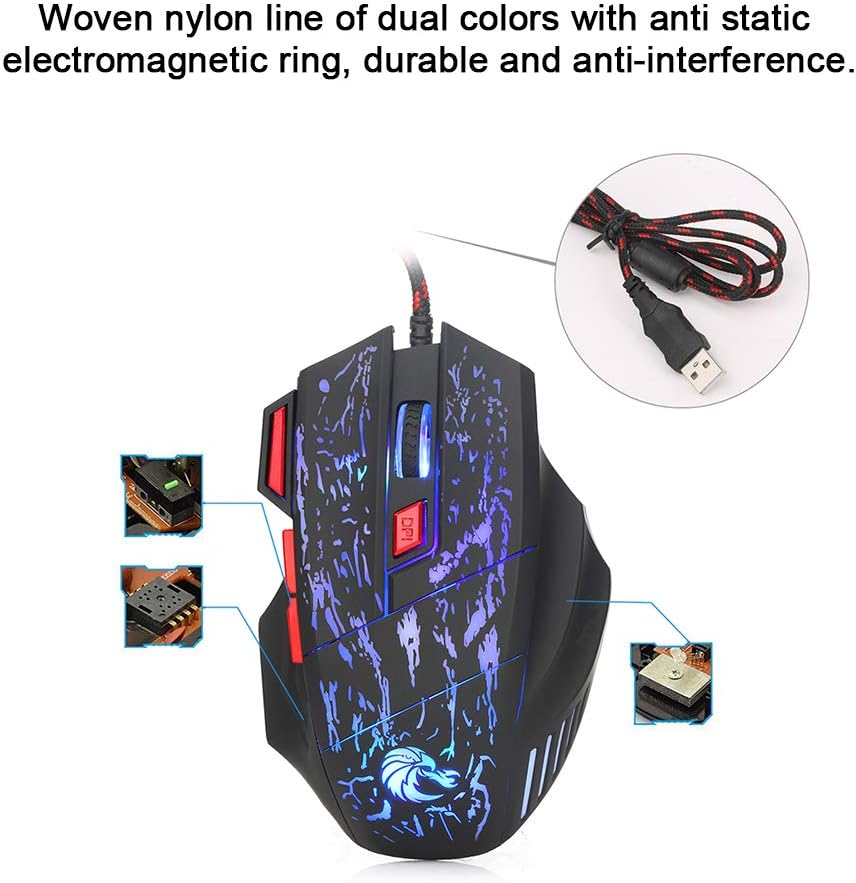
Image: The mouse's durable woven nylon cable with an anti-static electromagnetic ring, designed for reliable connection and reduced interference.
3. Awọn ilana Iṣiṣẹ
The HXSJ H300 mouse features 7 buttons for various functions and adjustable sensitivity.
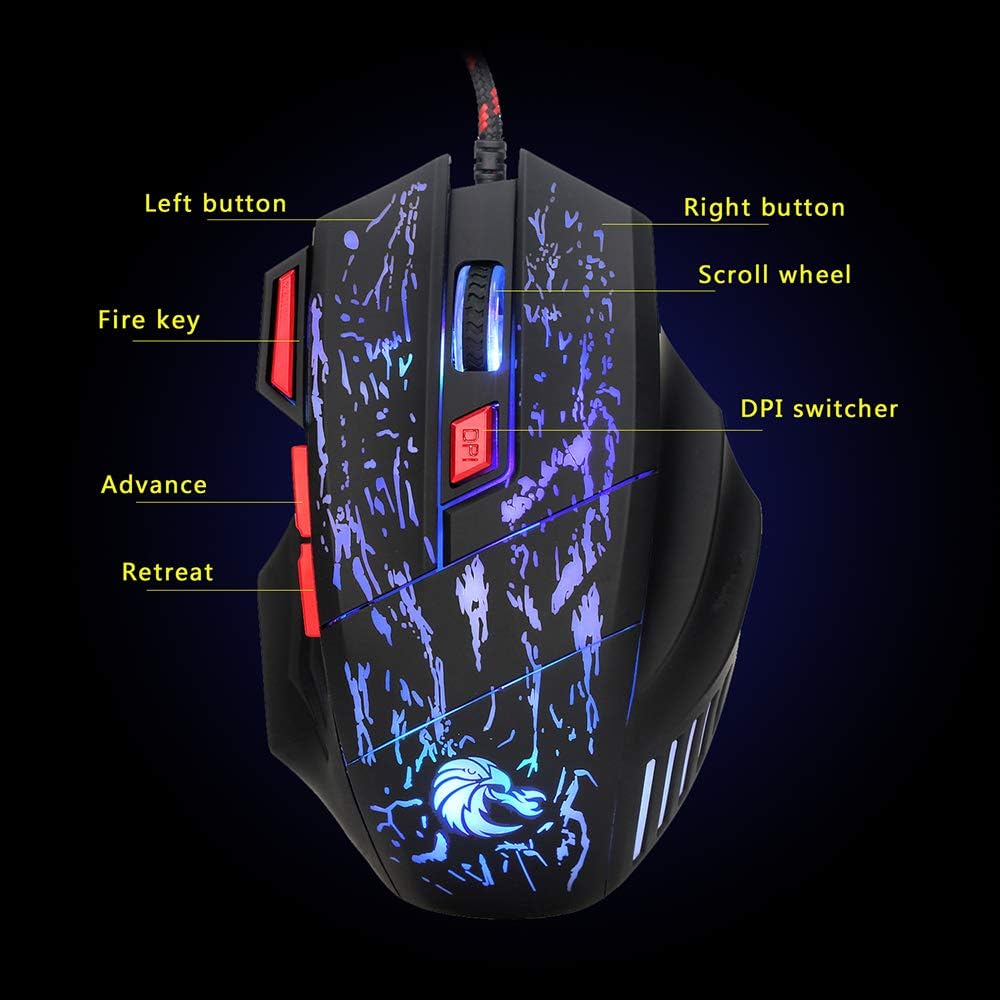
Image: Diagram illustrating the layout and labeling of the seven buttons on the Docooler HXSJ H300 gaming mouse.
Awọn iṣẹ bọtini:
- Bọtini osi: Standard osi-iṣẹ iṣẹ.
- Bọtini Ọtun: Standard-ọtun iṣẹ.
- Yi lọ Kẹkẹ: Scrolls content up or down. Can also be pressed for middle-click functionality.
- DPI Switcher: Cycles through the 5 adjustable DPI settings (1000/1600/2400/3200/5500 DPI). Press to change sensitivity.
- Bọtini ina: Provides a rapid triple-click action, useful in gaming.
- Advance (Forward): Lilọ siwaju sinu web aṣàwákiri tabi file oluwadi.
- Retreat (Back): Lilọ kiri sẹhin sinu web aṣàwákiri tabi file oluwadi.
Atunse DPI:
The mouse offers 5 levels of DPI (Dots Per Inch) sensitivity. Press the DPI Switcher button, located behind the scroll wheel, to cycle through the available settings. Each press will change the mouse's tracking speed, allowing you to select the optimal sensitivity for your task or game.
Breathing Light Effect:
The mouse features a dynamic 7-color breathing light effect that automatically cycles through colors. This provides visual feedback and enhances the aesthetic appeal during use.

Àwòrán: Ìfihàn àsinasing its vibrant breathing light feature, cycling through multiple colors.
4. Itọju
Ìtọ́jú tó péye máa ń jẹ́ kí atẹ́gùn eré rẹ pẹ́ títí, ó sì máa ń ṣiṣẹ́ dáadáa.
- Ninu: Lo asọ ti o rọ, ti o gbẹ lati nu dada ti Asin naa. Fun idoti alagidi, die-die dampFi omi tàbí ohun èlò ìfọmọ́ tí kò ní ìbàjẹ́ bo aṣọ náà. Yẹra fún lílo àwọn kẹ́míkà líle tàbí àwọn ohun èlò ìpara.
- Itọju Sensọ: Jeki sensọ opiti ti o wa ni isalẹ ti Asin ni mimọ ati ofe kuro ninu eruku tabi idoti lati rii daju titele deede.
- Iṣakoso USB: Yago fun awọn atunse didasilẹ tabi fifaju iwọn lori okun USB lati yago fun ibajẹ.
- Ibi ipamọ: Nigbati o ko ba wa ni lilo fun awọn akoko ti o gbooro sii, tọju asin naa sinu mimọ, agbegbe gbigbẹ kuro lati orun taara ati awọn iwọn otutu to gaju.
5. Laasigbotitusita
If you encounter issues with your Docooler HXSJ H300 gaming mouse, refer to the following common solutions:
| Isoro | Owun to le Fa | Ojutu |
|---|---|---|
| Mouse not responding / No light | Asopọ USB alaimuṣinṣin, ibudo USB ti ko tọ, ọran awakọ. |
|
| Titọpa aipe / Aṣiṣe kọsọ | Idọti opitika sensọ, unsuitable Asin pad dada. |
|
| Eto DPI ko yipada | Button not pressed correctly, temporary software glitch. |
|
6. Awọn pato
Detailed technical specifications for the Docooler HXSJ H300 Gaming Mouse:
| Brand | Olutọju ẹrọ |
| Awoṣe | HXSJ H300 |
| Key opoiye | 7 |
| Ipinu (DPI) | 1000, 1600, 2400, 3200, 5500 (Adjustable) |
| Igbesi aye bọtini | 10 million tẹ |
| Voltage Rating / Current | DC 5V / 100mA |
| Ẹya USB | 2.0 |
| Awọn bọtini | Left, Right, Scroll Wheel, DPI, Fire Key, Advance, Retreat |
| Imọlẹ Ipa | Colorful Breathing Light |
| Ibamu | Windows 7 / 8 / 10 / 2000 / XP / Vista, Mac OS or latest |
| Àwọ̀ | Black + Red accents |
| Ohun elo | ABS |
| USB Ipari | 140 cm |
| Àwọn Ìwọ̀n Ohun kan (L*W*H) | 13.0 * 8.5 * 4.0 cm |
| Iwọn Nkan | 139.0 g |

Image: Technical drawing of the Docooler HXSJ H300 gaming mouse with key dimensions (length, width, height) indicated.
7. Atilẹyin ọja ati Support
For warranty information and technical support, please refer to the documentation provided with your purchase or contact Docooler customer service.
While specific warranty details are not provided in this manual, Docooler products typically come with a standard manufacturer's warranty covering defects in materials and workmanship. Please retain your proof of purchase for any warranty claims.
For further assistance, visit the official Docooler webaaye tabi kan si awọn ikanni atilẹyin wọn.
Ask a question about this manual
Ask about setup, troubleshooting, compatibility, parts, safety, or missing instructions. Manuals+ will review the question and use this page’s manual context to help answer it.