
TOPTECH JET-4-BLUE
TOPTECH Jet-4 Bluetooth Speaker User Manual
Model: JET-4-BLUE
Ọrọ Iṣaaju
Thank you for choosing the TOPTECH Jet-4 Portable Bluetooth Speaker. This manual provides essential information for setting up, operating, and maintaining your speaker to ensure optimal performance and longevity. Please read this manual thoroughly before using the product.

Image: The TOPTECH Jet-4 Bluetooth Speaker, showcasing its compact design and vibrant LED lighting.
Alaye Aabo
To prevent fire or shock hazards, always follow basic safety precautions when using this product:
- Ma ṣe fi agbọrọsọ si ojo tabi ọrinrin.
- Do not disassemble or modify the speaker. Refer all servicing to qualified personnel.
- Jeki agbohunsoke kuro lati orun taara, awọn orisun ooru, ati awọn iwọn otutu to gaju.
- Yago fun sisọ tabi tẹriba agbọrọsọ si awọn ipa to lagbara.
- Lo okun gbigba agbara pato nikan ati oluyipada agbara.
Package Awọn akoonu
- TOPTECH Jet-4 Bluetooth Speaker
- Okun Ngba agbara USB
- Itọsọna olumulo
Ọja Pariview
Awọn iṣakoso ati awọn ibudo
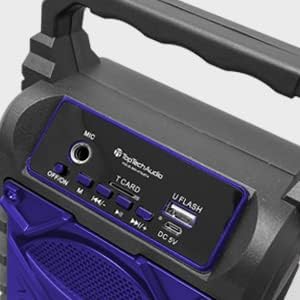
Aworan: Alaye view of the speaker's top control panel, showing various buttons and input ports.
- Iṣawọle MIC: Connect an external microphone for karaoke.
- PA/ON Yipada: Power the speaker on or off.
- M (Ipo) Bọtini: Switch between Bluetooth, AUX, USB, and TF Card modes.
- Previous / Volume Down Button: Tẹ kukuru fun orin iṣaaju, tẹ gun lati dinku iwọn didun.
- Bọtini Mu / Sinmi: Mu ṣiṣẹ tabi da idaduro ṣiṣiṣẹsẹhin ohun.
- Next / Volume Up Button: Tẹ kukuru fun orin atẹle, tẹ gun lati mu iwọn didun pọ si.
- T CARD Slot: Insert a TF (MicroSD) card for direct audio playback.
- U FLASH (USB) Port: Fi awakọ filasi USB sii fun ṣiṣiṣẹsẹhin ohun taara.
- Ibudo DC 5V: Connect the USB charging cable to power and charge the speaker.
Key Awọn ẹya ara ẹrọ

Image: An infographic showing the TOPTECH Jet-4 speaker with icons representing its key features: easy portability, mic port, mode karaoke, disco light, TF card port, and USB port.
- Ohun Alagbara: Dual-driver stereo output delivers crisp highs and deep bass for a premium audio experience.
- Sisisẹsẹhin Ipo pupọ: Supports Bluetooth, AUX, USB, and TF card input for versatile music streaming.
- Ṣetan Karaoke: Built-in karaoke mode with light effects and mic support makes any party more fun.
- TWS Pairing Support: Connect two speakers wirelessly for immersive, room-filling sound.
- Igbesi aye batiri gigun: Enjoy up to 6 hours of playtime with a rechargeable battery, perfect for all-day events.
Ṣeto
Ibere idiyele
Before first use, fully charge the speaker. Connect the provided USB charging cable to the DC 5V port on the speaker and the other end to a USB power adapter (not included) or a computer USB port.

Image: A visual representation of a fully charged battery, symbolizing the speaker's long battery life.
The charging indicator light will illuminate during charging and turn off or change color when fully charged. A full charge typically takes a few hours.
Awọn ilana Iṣiṣẹ
Asopọ Bluetooth
- Turn on the speaker by sliding the OFF/ON switch to the 'ON' position. The speaker will enter Bluetooth pairing mode automatically, indicated by a flashing LED light and an audible prompt.
- Mu Bluetooth ṣiṣẹ lori foonu alagbeka rẹ, tabulẹti, tabi ẹrọ Bluetooth miiran ti o ṣiṣẹ.
- Wa fun available Bluetooth devices and select "JET-4" from the list.
- Once connected, the speaker will provide an audible confirmation, and the LED light will stop flashing.
- O le mu ohun ṣiṣẹ bayi lati ẹrọ rẹ nipasẹ agbọrọsọ.
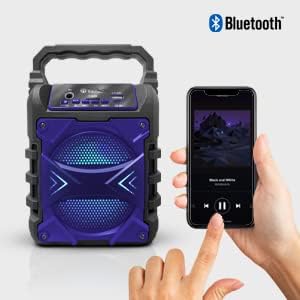
Image: The TOPTECH Jet-4 speaker positioned next to a smartphone, illustrating the seamless Bluetooth connection process.
Playback Modes (AUX, USB, TF Card)
Press the 'M' (Mode) button to cycle through available playback modes:
- Ipo AUX: Connect an external audio device using a 3.5mm audio cable (not included) to the AUX input.
- Ipo USB: Insert a USB flash drive into the 'U FLASH' port. The speaker will automatically detect and play compatible audio files.
- Ipo Kaadi TF: Insert a TF (MicroSD) card into the 'T CARD' slot. The speaker will automatically detect and play compatible audio files.
Ipo Karaoke
To use the karaoke function, connect a microphone (not included) to the 'MIC' input port. Adjust the microphone volume as needed. The speaker's built-in light effects will enhance the karaoke experience.
TWS Pairing (True Wireless Stereo)
For an enhanced stereo sound experience, you can pair two TOPTECH Jet-4 speakers together:
- Ensure both Jet-4 speakers are powered on and not connected to any Bluetooth device.
- On one speaker (this will be the primary speaker), long press the 'M' (Mode) button until you hear a pairing tone.
- Awọn agbohunsoke meji yoo sopọ laifọwọyi si ara wọn. Ni kete ti o ti sopọ, iwọ yoo gbọ ohun orin idaniloju kan.
- Bayi, so ẹrọ Bluetooth rẹ pọ mọ agbọrọsọ akọkọ bi a ti ṣe apejuwe rẹ ni apakan 'Bluetooth Pairing'. Audio yoo ṣiṣẹ nipasẹ awọn agbohunsoke mejeeji ni sitẹrio.

Image: Two TOPTECH Jet-4 speakers wirelessly connected to a smartphone, demonstrating the True Wireless Stereo (TWS) pairing feature for expanded sound.
Itoju
- Sọ agbọrọsọ mọ pẹlu asọ asọ ti o gbẹ. Ma ṣe lo abrasive ose tabi epo.
- Tọju agbohunsoke ni itura, ibi gbigbẹ nigbati o ko ba lo.
- Avoid prolonged exposure to extreme temperatures or humidity.
Laasigbotitusita
| Isoro | Ojutu |
|---|---|
| Agbọrọsọ ko ni agbara lori. | Rí i dájú pé batiri náà ti gba agbára. So agbọrọsọ náà mọ́ orísun agbára nípa lílo okùn USB. |
| Ko si ohun lati agbọrọsọ. | Ṣàyẹ̀wò ìwọ̀n ohùn tó wà lórí agbọ́hùnsọ̀ àti ẹ̀rọ tó so mọ́ ọn. Rí i dájú pé o yan ipò ìṣiṣẹ́ tó tọ́. |
| Asopọ Bluetooth kuna. | Ensure the speaker is in pairing mode. Turn off Bluetooth on your device and turn it back on. Try restarting both the speaker and your device. Make sure no other devices are connected to the speaker. |
| Didara ohun ti ko dara. | Move the speaker closer to your Bluetooth device to reduce interference. Ensure the audio source is of good quality. |
Awọn pato
| Ẹya ara ẹrọ | Ẹ̀kúnrẹ́rẹ́ |
|---|---|
| Brand | TOPTECH |
| Nọmba awoṣe | JET-4-BLUE |
| Orisun agbara | Agbara Batiri |
| Asopọmọra Technology | Bluetooth, USB |
| Input Audio | Guitar Input, Karaoke Input, USB |
| Nọmba ti awọn ikanni | 2 |
| Ohun elo | Ṣiṣu, Irin |
| Iwọn Nkan | 1.54 iwon |
| Package Mefa | 9.29 x 6.38 x 4.17 inches |
| UPC | 689259338593 |
Atilẹyin ọja ati Support
For warranty information and customer support, please refer to the contact details provided on the product packaging or visit the official TOPTECH webojula. Tọju iwe-ẹri rira rẹ bi ẹri rira fun eyikeyi awọn ibeere atilẹyin ọja.
Ask a question about this manual
Ask about setup, troubleshooting, compatibility, parts, safety, or missing instructions. Manuals+ will review the question and use this page’s manual context to help answer it.