
GLIDiC TW-5000s
GLIDiC Sound Air TW-5000s True Wireless Earbuds Instruction Manual
Model: TW-5000s
1. Ifihan
O ṣeun fun riraasing the GLIDiC Sound Air TW-5000s True Wireless Earbuds. This manual provides essential information for the safe and effective use of your device. Please read it thoroughly before use and retain it for future reference.
2. Alaye Aabo
- Ma ṣe fi agbekọri tabi apoti gbigba agbara si awọn iwọn otutu to gaju, oorun taara tabi ọriniinitutu giga.
- Avoid dropping, impacting, or disassembling the device. This may cause damage and void the warranty.
- Keep the device away from water and liquids. While sweatproof, immersion can cause damage.
- Lo okun gbigba agbara ti a pese nikan tabi iwe-ẹri deede.
- Gbigbọ gigun ni awọn ipele iwọn didun giga le fa ibajẹ igbọran. Ṣatunṣe iwọn didun si ipele ailewu.
- Be aware of your surroundings when using earbuds, especially in traffic or hazardous environments.
3. Package Awọn akoonu
Daju pe gbogbo awọn nkan wa ninu apo rẹ:
- GLIDiC Sound Air TW-5000s True Wireless Earbuds (Left and Right)
- Ngba agbara Case
- USB Charging Cable (Type-A to Micro-USB)
- Awọn iwọn pupọ ti awọn imọran eti (S, M, L)
- Ilana Afowoyi (iwe yii)
4. Ọja Ipariview
Familiarize yourself with the components of your GLIDiC Sound Air TW-5000s earbuds and charging case.

Figure 4.1: GLIDiC Sound Air TW-5000s Earbuds and Charging Case. The image displays the black charging case with the GLIDiC logo on top, positioned next to the two black earbuds.
Àwọn Ohun Èlò Etí
- Bọtini Pupọ: Located on the outer surface of each earbud, used for playback control, call management, and voice assistant activation.
- Atọka LED: Provides status information (pairing, charging, power).
- Gbohungbohun: For voice calls and voice assistant commands.
- Awọn olubasọrọ gbigba agbara: Located on the underside of each earbud, for charging within the case.
- Italolobo Eti: Silicone tip for in-ear comfort and sound isolation.
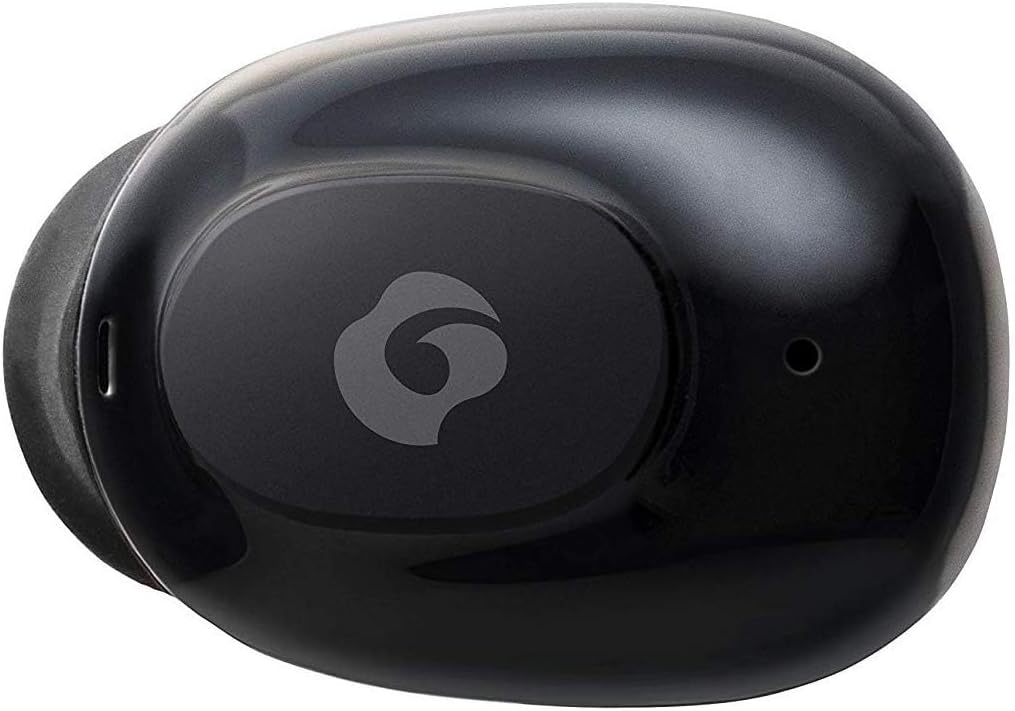
olusin 4.2: Isunmọ view of a single GLIDiC earbud, highlighting the multifunction button with the GLIDiC logo and the microphone opening.
Charging Case Components
- Awọn ibudo gbigba agbara: Internal contacts for earbuds, external port for case charging.
- Atọka LED ọran: Shows charging status of the case.
- Ideri: Protects earbuds and secures them during charging.
5. Eto
5.1 Gbigba agbara akọkọ
- Place both earbuds into the charging case. Ensure they are correctly seated, and the LED indicators on the earbuds illuminate.
- So okùn gbigba agbara USB pọ mọ ibudo gbigba agbara lori apoti naa ki o si so opin keji pọ mọ orisun agbara USB kan (fun apẹẹrẹ, kọmputa, adapter ogiri).
- The case LED indicator will show charging status. Allow approximately 2 hours for a full charge of both earbuds and the case.
- Once fully charged, disconnect the charging cable. The earbuds offer up to 60 days of standby time when stored in the fully charged case.
5.2 Sisopọ pọ pẹlu Ẹrọ Bluetooth kan
- Rii daju pe awọn agbekọri ti gba agbara.
- Ṣii apoti gbigba agbara. Awọn agbekọri naa yoo tẹ ipo sisopọ laifọwọyi, ati awọn olufihan LED wọn yoo filasi.
- Lórí ẹ̀rọ Bluetooth rẹ (fóònù alágbèéká, tábìlẹ́ẹ̀tì, àti bẹ́ẹ̀ bẹ́ẹ̀ lọ), lọ sí àwọn ètò Bluetooth.
- Wa fun available devices. Select "GLIDiC TW-5000s" from the list.
- Once connected, the earbud LED indicators will stop flashing and may show a solid light or turn off, depending on the model. A voice prompt may also confirm the connection.
- Tí ìsopọ̀ náà bá kùnà, gbé àwọn ètí ìgbọ́rọ̀ náà padà sínú àpótí náà, kí o ti ìbòrí náà, dúró fún ìṣẹ́jú díẹ̀, lẹ́yìn náà, tún ṣe àwọn ìgbésẹ̀ náà.
6. Awọn ilana Iṣiṣẹ
6.1 Agbara Tan / Pa
- Agbara Tan: Open the charging case, or press and hold the multifunction button on each earbud for approximately 3 seconds.
- Agbara Pa: Place the earbuds back into the charging case and close the lid, or press and hold the multifunction button on each earbud for approximately 5 seconds.
6.2 Sisisẹsẹhin Orin
- Ṣiṣẹ/Daduro: Press the multifunction button once on either earbud.
- Orin t’okan: Double-press the multifunction button on the right earbud.
- Tẹlẹ Orin: Double-press the multifunction button on the left earbud.
- Iwọn didun Up: Triple-press the multifunction button on the right earbud.
- Iwọn didun isalẹ: Triple-press the multifunction button on the left earbud.
6.3 ipe Management
- Idahun/Ipe Ipari: Press the multifunction button once on either earbud.
- Kọ Ipe: Press and hold the multifunction button on either earbud for approximately 2 seconds.
6.4 Iranlọwọ ohun
- Mu Oluranlọwọ Ohun ṣiṣẹ: Press and hold the multifunction button on either earbud for approximately 2 seconds (when not on a call).
6.5 Multi-Communication Mode
The GLIDiC Sound Air TW-5000s features a multi-communication mode that allows select ambient sounds to be heard without compromising audio quality. This enhances user awareness and safety.
- Activate/Deactivate Multi-Communication Mode: Consult the specific instructions provided with your device, as activation methods can vary. Typically, this involves a specific press sequence on the multifunction button or an option within a companion app if available.
7. Itọju
7.1 Ninu
- Pa awọn afikọti ati apoti gbigba agbara kuro pẹlu asọ ti o gbẹ, asọ ti ko ni lint.
- Maṣe lo awọn afọmọ abrasive, ọti-lile, tabi awọn nkan ti kemikali.
- Gently remove ear tips and clean them with mild soap and water if necessary. Ensure they are completely dry before reattaching.
- Lo owú gbígbẹ láti fọ àwọn ohun tí ó ń gba agbára lórí àwọn ètí àti àpótí náà dáadáa.
7.2 Ibi ipamọ
- Nigbati ko ba si ni lilo, tọju awọn afikọti sinu apoti gbigba agbara wọn lati daabobo wọn ati rii daju pe wọn wa ni idiyele.
- Tọju ẹrọ naa ni itura, aye gbigbẹ, kuro lati orun taara ati awọn iwọn otutu to gaju.
8. Laasigbotitusita
If you encounter issues with your GLIDiC Sound Air TW-5000s, refer to the following common problems and solutions:
| Isoro | Owun to le Solusan |
|---|---|
| Earbuds ko ni agbara lori. | Ensure earbuds are charged. Place them in the charging case and connect the case to a power source. |
| Earbuds ko so pọ pẹlu ẹrọ. |
|
| Agbekọri agbekọri kan ṣoṣo ni ohun. |
|
| Ngba agbara ko gba agbara. |
|
| Didara ohun ko dara tabi igba diẹ. |
|
9. Awọn pato
| Ẹya ara ẹrọ | Ẹ̀kúnrẹ́rẹ́ |
|---|---|
| Orukọ awoṣe | TW-5000s |
| Asopọmọra Technology | Ailokun (Bluetooth) |
| Bluetooth Ibiti | 10 Mita |
| Iwọn Igbohunsafẹfẹ | 20 Hz - 20,000 Hz |
| Battery Life (Carrying Case Standby) | Titi di ọjọ 60 |
| Omi Resistance Ipele | Alatako Omi |
| Iṣakoso Iru | Media Control, Touch, Voice |
| Pataki Awọn ẹya ara ẹrọ | Microphone Included, Noise Cancellation, Multi-communication mode |
| Ohun elo | Plastic, TPE, and Silicone |
| Awọn iwọn (Earbud) | 0.98 x 0.67 x 0.91 inches (isunmọ) |
| Iwọn Nkan | 9.6 iwon (àpapọ iwuwo package) |
| UPC | 811559030024 |
10. Atilẹyin ọja ati Support
GLIDiC products are designed for reliability and performance. For specific warranty details, please refer to the warranty card included with your purchase or visit the official GLIDiC website. If you require technical support or have questions not covered in this manual, please contact GLIDiC customer service through their official channels.
Jọwọ ṣe idaduro ẹri rira rẹ fun awọn iṣeduro atilẹyin ọja.
Ask a question about this manual
Ask about setup, troubleshooting, compatibility, parts, safety, or missing instructions. Manuals+ will review the question and use this page’s manual context to help answer it.