
1. Ifihan
This manual provides essential instructions for the safe and effective use of your Otech DFB-0120 compatible battery. This battery is designed as a replacement for Doro DFB-0120 cell phone batteries, offering reliable power with a capacity of 850 mAh.
Please read this manual thoroughly before installation and use to ensure optimal performance and safety.
2. Alaye Aabo
Observe the following safety precautions to prevent damage to the battery, device, or personal injury:
- Ewu ina: The battery may explode if disposed of in fire. Do not expose the battery to high temperatures or direct flame.
- Gbigba agbara: Use only the specified charger designed for your Doro device. Using an incompatible charger may damage the battery and pose a safety risk.
- Circuit kukuru: Do not short circuit the battery terminals. Avoid contact with metal objects that could bridge the positive and negative terminals.
- Disas Karo: Do not attempt to disassemble, puncture, or modify the battery.
- Ifihan omi: Keep the battery away from water and other liquids.
- Idasonu: Má ṣe da àwọn bátìrì tí a ti lò nù gẹ́gẹ́ bí òfin àdúgbò. Má ṣe da àwọn ìdọ̀tí ilé nù.
Failure to follow these safety instructions can result in fire, explosion, or other hazards.
3. Ọja Ipariview
The Otech DFB-0120 compatible battery is a high-quality replacement power source for Doro mobile phones that utilize the DFB-0120 battery model. It features a capacity of 850 mAh and operates at 3.7V, providing 3.14Wh of power.
Awọn ẹya pataki pẹlu:
- Optimum Service Life: Equipped with high-quality cells for extended durability.
- Ipadanu ara ẹni kekere: Designed to retain charge longer when not in use.
- Individually Tested: Each battery undergoes load and capacity testing before shipment.

olusin 1: Iwaju view of the Otech DFB-0120 compatible battery, showing the Otech brand, Li-ion DIV004 3.7V 850mAh 3.14Wh specifications, and safety warnings.
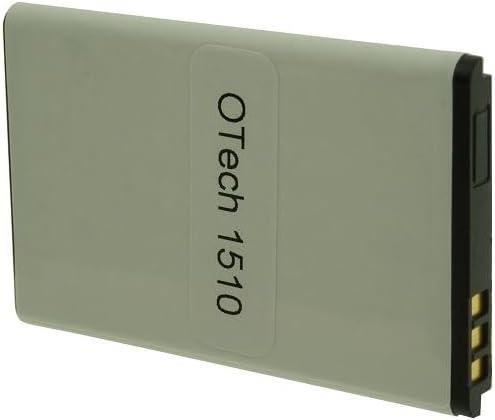
olusin 2: Pada view of the Otech DFB-0120 compatible battery, displaying the "OTech 1510" label and battery terminals.
4. Eto ati fifi sori
To install the Otech DFB-0120 compatible battery into your Doro mobile phone, follow these general steps. Refer to your specific Doro phone's user manual for detailed instructions on battery compartment access.
- Ohun elo Agbara: Ensure your Doro mobile phone is completely powered off before beginning the installation.
- Yọ Ideri Pada kuro: Carefully remove the back cover of your Doro phone. This usually involves sliding or prying it off.
- Yọ Batiri atijọ kuro: If an old battery is present, gently lift it out of its compartment.
- Fi Batiri Tuntun sii: Align the Otech DFB-0120 battery with the battery compartment, ensuring the gold contacts on the battery match the contacts in the phone. Gently press the battery into place.
- Rọpo Ideri Pada: Reattach the back cover of your phone, ensuring it clicks securely into place.
- Idiyele Ibẹrẹ: A gbani nimọran lati gba agbara batiri tuntun naa patapata ki o to lo o fun igba akọkọ.
Exercise caution during installation to avoid damaging the phone or battery terminals.
5. Awọn ilana Iṣiṣẹ
Once installed, the Otech DFB-0120 battery operates like the original battery in your Doro phone.
- Gbigba agbara: Connect your Doro phone to its original or a compatible charger. The phone's display will indicate charging status. Allow the battery to charge fully for optimal performance, especially during the first few cycles.
- Lilo: Use your phone as normal. Battery life will vary depending on usage patterns, network conditions, and phone settings.
- Iwọn otutu: Avoid operating or charging the phone in extreme temperatures (below 0°C or above 45°C) as this can degrade battery performance and lifespan.
6. Itọju
Proper maintenance can extend the life of your Otech DFB-0120 battery:
- Gbigba agbara deede: Má ṣe jẹ́ kí batiri náà máa gbẹ pátápátá nígbà gbogbo. Gba agbára rẹ̀ déédéé, kódà bí kò bá tilẹ̀ ti bàjẹ́ pátápátá.
- Ibi ipamọ: If storing the battery for an extended period, charge it to approximately 50% and store it in a cool, dry place. Recharge it every few months to prevent deep discharge.
- Ninu: Keep the battery contacts clean. If necessary, gently wipe them with a dry, soft cloth.
- Yago fun Bibajẹ Ti ara: Dáàbò bo batiri naa kuro ninu awọn silė, awọn ipa, ati fifọ.
7. Laasigbotitusita
If you encounter issues with your Otech DFB-0120 battery, consider the following:
| Isoro | Owun to le Fa | Ojutu |
|---|---|---|
| Batiri ko ngba agbara | Loose connection, faulty charger, dirty contacts, battery issue. |
|
| Aye batiri kukuru | High usage, background apps, poor signal, battery degradation. |
|
| Foonu ko tan | Battery completely drained, incorrect installation, faulty phone. |
|
If troubleshooting steps do not resolve the issue, contact Otech customer support.
8. Awọn pato
| Ẹya ara ẹrọ | Ẹ̀kúnrẹ́rẹ́ |
|---|---|
| Brand | Otech |
| Orukọ awoṣe | DFB-0120 (Compatible) |
| Nọmba apakan | DIV004-13105256 |
| Batiri Iru | Li-dẹlẹ |
| Voltage | 3.7 Volts |
| Agbara | 850 mAh |
| Agbara Rating | 3.14 Wh |
| Ọja Mefa | 5.3 x 3.3 x 0.5 cm |
| Iwọn | 100 g (isunmọ) |
9. Atilẹyin ọja ati Support
Otech batteries are individually tested to ensure functionality and quality. For specific warranty information regarding your Otech DFB-0120 compatible battery, please refer to the purchase documentation or contact Otech customer support directly.
For technical assistance or inquiries, please visit the official Otech webojú-òpó wẹ́ẹ̀bù tàbí kí o kàn sí ẹ̀ka iṣẹ́ oníbàárà wọn nípasẹ̀ ìwífún ìbánisọ̀rọ̀ tí a pèsè pẹ̀lú ohun tí o rà.