
1. Ifihan ati Loriview
Thank you for choosing the Comix S3508D Desktop Micro-Cut Paper Shredder. This manual provides essential information for the safe and efficient operation, maintenance, and troubleshooting of your new shredder. Please read it thoroughly before use and retain it for future reference.
The Comix S3508D is designed for personal and home office use, offering secure destruction of sensitive documents, CDs/DVDs, and credit cards with its micro-cut technology. Key features include:
- Continuous shredding for up to 30 minutes.
- Separate waste bin design for CD/DVD fragments, allowing for easy waste separation.
- Energy-saving technology that automatically shuts off the device after 30 minutes of inactivity.
2. Awọn Ilana Aabo pataki
Láti dín ewu ìpalára tàbí ìbàjẹ́ kù, ẹ jọ̀wọ́ ẹ kíyèsí àwọn ìlànà ààbò wọ̀nyí:
- Jeki kuro ni arọwọto awọn ọmọde ati awọn ohun ọsin. The shredder has sharp blades and moving parts.
- Avoid loose clothing, jewelry, and long hair near the paper entry slot.
- Do not insert fingers or hands sinu iwe titẹsi Iho.
- Do not spray any flammable products onto the shredder or use it near flammable materials.
- Unplug the shredder before moving, cleaning, or emptying the waste bin.
- Do not shred metal objects, wet paper, or adhesive labels as this can damage the blades.
- Ṣiṣẹ shredder lori alapin, dada iduroṣinṣin.
- Do not overload the shredder. Refer to the maximum sheet capacity in the specifications.
- Do not open the shredder housing. Ko si awọn ẹya ti olumulo-iṣẹ ninu.
3. Ọja irinše
Familiarize yourself with the main parts of your Comix S3508D shredder:
- Ori Aṣọ: Ó ní ẹ̀rọ ìgé àti pánẹ́lì ìṣàkóso.
- Ibi Ìwọlé Ìwé: Fún fífi àwọn ìwé sí i.
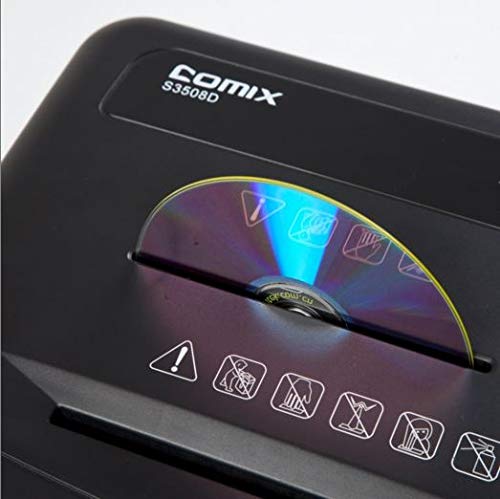
- CD/DVD Entry Slot: A separate slot for optical media.
- Yipada Iṣakoso: For selecting ON/OFF, Auto, Forward, and Reverse modes.
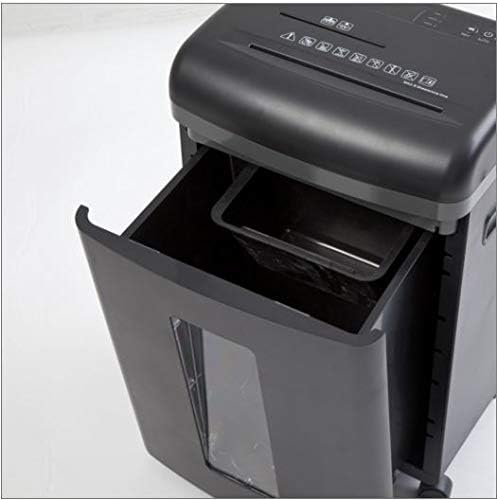
- Ibi idọti: Collects shredded paper and media.
- CD/DVD Waste Compartment: A smaller, separate compartment within the main bin for shredded optical media.
- Awọn Casters: Awọn kẹkẹ fun irọrun arinbo.
4. Eto
- Yọọ kuro: Farabalẹ yọ shredder kuro ninu apoti rẹ. Ṣe idaduro apoti fun irinna ọjọ iwaju tabi ibi ipamọ.
- Ipo: Place the shredder on a level and stable surface. Ensure there is enough space around the unit for proper ventilation and access to the power outlet.
- So agbara: Pulọọgi okun agbara sinu kan boṣewa itanna iṣan.
- Ṣàyẹ̀wò Àpótí: Rí i dájú pé a fi àpótí ìdọ̀tí sínú ara ẹ̀rọ ìfọṣọ náà dáadáa. Ẹ̀rọ ìfọṣọ náà kò ní ṣiṣẹ́ tí a kò bá gbé àpótí náà sí ibi tí ó yẹ.
5. Awọn ilana Iṣiṣẹ
Awọn iṣẹ Yipada Iṣakoso:
- PA: Awọn shredder ti wa ni pipa.
- LATIO: The shredder is in standby mode. It will automatically start when paper is inserted and stop when shredding is complete. This is the recommended setting for normal operation.
- Siwaju: Manually runs the shredder forward. Use this for continuous shredding if needed, but be mindful of the duty cycle.
- Sọ: Manually runs the shredder in reverse. Use this to clear paper jams.
Pípa Àwọn Ìwé Àṣẹ:
- Ṣeto iyipada iṣakoso si AUTO.
- Insert up to 8 sheets of A4 (70gsm) paper straight into the paper entry slot. The shredder will automatically start and stop.
- Do not exceed the maximum sheet capacity to prevent jams and damage.
Shredding CDs/DVDs and Credit Cards:
- Ṣeto iyipada iṣakoso si AUTO.
- Insert one CD/DVD or credit card at a time into the dedicated CD/DVD entry slot.
- The shredded media will fall into the separate CD/DVD waste compartment within the main bin.
Àyíká Iṣẹ́:
The Comix S3508D is designed for a continuous run time of 30 minutes ON, followed by a 40 iṣẹju PA cool-down period. Exceeding the duty cycle may cause the shredder to overheat and activate its thermal protection, temporarily shutting down the unit. Allow it to cool down before resuming operation.
6. Itọju
Gbigbe Ibi Idọti naa di ofo:
- Always set the control switch to PAA and unplug the shredder before emptying the bin.
- Fa jade ni egbin bin lati iwaju shredder.
- Dispose of the shredded waste. Remember to empty the separate CD/DVD compartment as well.
- Gbe abọ egbin pada si aaye titi ti o fi tẹ ni aabo.
Ipara Shredder:
Regular oiling is recommended to maintain optimal performance and extend the life of your shredder, especially after emptying the waste bin 2-3 times or after heavy use. Use shredder oil (vegetable oil is not recommended).
- Ṣeto iyipada iṣakoso si PAA.
- Waye laini tinrin ti epo shredder kọja iho titẹsi iwe.
- Ṣeto iyipada iṣakoso si Siwaju for 2-3 seconds to distribute the oil, then switch back to PAA.
Ninu:
Mu ese ita ti shredder pẹlu asọ ti o gbẹ. Ma ṣe lo abrasive ose tabi epo.
7. Laasigbotitusita
| Isoro | Owun to le Fa | Ojutu |
|---|---|---|
| Shredder ko ṣiṣẹ. | 1. Okun agbara ti ko fi sii.
2. Waste bin not properly inserted. 3. Gbona. |
1. Ensure power cord is securely plugged into an outlet.
2. Push the waste bin firmly into place. 3. Allow the shredder to cool down for 40 minutes. |
| Jam iwe. | 1. Too much paper inserted.
2. A fi ìwé tí kò tọ́ sí i. |
1. Set switch to Yipada to clear paper. Remove excess paper.
2. If jam persists, unplug, carefully remove paper, then plug in and try Yipada lẹẹkansi. |
| Shredder runs continuously in AUTO mode. | Sensor is blocked or dirty. | Unplug the shredder and clean the paper entry sensor (usually a small clear window) with a soft cloth. |
8. Awọn pato
| Ẹya ara ẹrọ | Ẹ̀kúnrẹ́rẹ́ |
|---|---|
| Brand | Comix |
| Awoṣe | S3508D |
| Shred Iru | Micro-ge |
| Iwon Shred | 2 x 12 mm |
| Standard Sheet Capacity (70gsm) | 8 iwe |
| CD/DVD/Card Capacity | 1 ni akoko kan |
| Iwọn titẹ sii | 220 mm |
| Iyara Shred | 2.3 meters/minute |
| Ojuse Cycle | Iṣẹju 30 ON / 40 iṣẹju PA |
| Pataki Ẹya | Ipo Ifipamọ Agbara |
| Iwọn Nkan | 2.2 iwon |
| ASIN | B083XFNHQH |
9. Atilẹyin ọja ati Support
Comix products are manufactured to high-quality standards. For warranty information, please refer to the warranty card included with your purchase or contact your retailer. For technical support or service inquiries, please contact Comix customer service through the contact information provided on the official Comix webojula tabi rẹ ra iwe.