
1. Ifihan ati Loriview
The TROTEC PWLS 06-10 Cordless LED Work Light is designed to provide bright, portable illumination for various indoor and outdoor applications. It features a powerful LED light source and an integrated USB power bank function, allowing you to charge compatible devices.
Awọn ẹya pataki pẹlu:
- Powerful 3.7 V lithium-ion battery (4.4 Ah) for extended operation.
- Bright LED work light with shock-resistant edges for durability.
- High-power COB-LEDs delivering uniform, extra-bright light (800 lumens).
- Flexible handle and stand, adjustable up to 180 degrees in 6 positions.
- Three lighting modes: bright, reduced, and strobe.
- Strong magnetic holder for secure attachment to metal surfaces.
- Integrated USB power bank function (5 V / 1 A) for charging external devices.
- IP44 protection rating, safeguarding against splashing water from all directions.
- 4-stage battery capacity indicator.
- Up to 8 hours of constant illumination.
- Daylight white color temperature (6,000 K).
- Iwapọ ati apẹrẹ ti a ṣe pọ fun ibi ipamọ ti o rọrun.

Image 1.1: The TROTEC PWLS 06-10 Cordless LED Work Light, showcasing its compact design and key features like USB charging and battery power.
2. Awọn ilana aabo
Please read these safety instructions carefully before using the device. Failure to follow these instructions may result in electric shock, fire, or serious injury.
- Aabo gbogbogbo: Keep the device away from children. Do not disassemble, modify, or attempt to repair the device yourself. Refer all servicing to qualified personnel.
- Aabo Batiri: The device contains a lithium-ion battery. Do not expose the battery to extreme temperatures, direct sunlight, or fire. Do not short-circuit the battery. Dispose of batteries according to local regulations.
- Lilo Ayika: The device has an IP44 protection rating, making it resistant to splashing water. However, do not immerse it in water. Avoid using the device in highly flammable or explosive environments.
- Aabo oju: Do not look directly into the LED light when it is on, as it can cause eye strain or temporary vision impairment.
- Gbigba agbara: Use only the provided USB cable or a certified equivalent for charging. Ensure the charging port is dry before connecting the cable.
3. Package Awọn akoonu
Jẹrisi pe gbogbo awọn nkan wa ati ni ipo ti o dara nigbati ṣiṣi silẹ:
- 1 x TROTEC PWLS 06-10 Cordless LED Work Light
- 1 x USB Charging Cable (USB-A to Micro-USB, 80 cm)
- 1 x Itọsọna olumulo
4. Ọja Ipariview ati irinše
Familiarize yourself with the different parts of your TROTEC PWLS 06-10 work light:

Aworan 4.1: Pariview of the TROTEC PWLS 06-10 highlighting its key features and specifications.
- Igbimo Imọlẹ LED: The main light source, featuring COB-LED technology.
- Adjustable Handle/Stand: Allows for flexible positioning and serves as a carrying handle.
- Bọtini agbara: Used to turn the device on/off and cycle through lighting modes.
- USB Output Port (Type A): Fun gbigba agbara awọn ẹrọ ita (iṣẹ banki agbara).
- Micro-USB Input Port (Type B): For charging the work light's internal battery.
- Atọka Batiri: Displays the current charge level of the internal battery.
- Ipilẹ oofa: Integrated magnets in the stand for attaching to metal surfaces.
5. Eto
5.1 Gbigba agbara akọkọ
Before first use, fully charge the work light's internal battery.
- Connect the small end of the provided USB charging cable to the Micro-USB input port on the work light.
- Connect the larger end of the USB cable to a suitable USB power adapter (not included) or a computer's USB port.
- The battery indicator lights will illuminate, showing the charging progress. All four lights will be solid when fully charged.
5.2 Ṣíṣe àtúnṣe Iduro naa
The flexible handle/stand can be adjusted up to 180 degrees to direct the light as needed.

Image 5.1: The adjustable stand allows for 180-degree rotation to position the light.
Gently pivot the stand to one of the six available positions until it clicks into place.
5.3 Using the Magnetic Holder
The integrated magnetic base allows for hands-free operation by attaching the work light to metal surfaces.
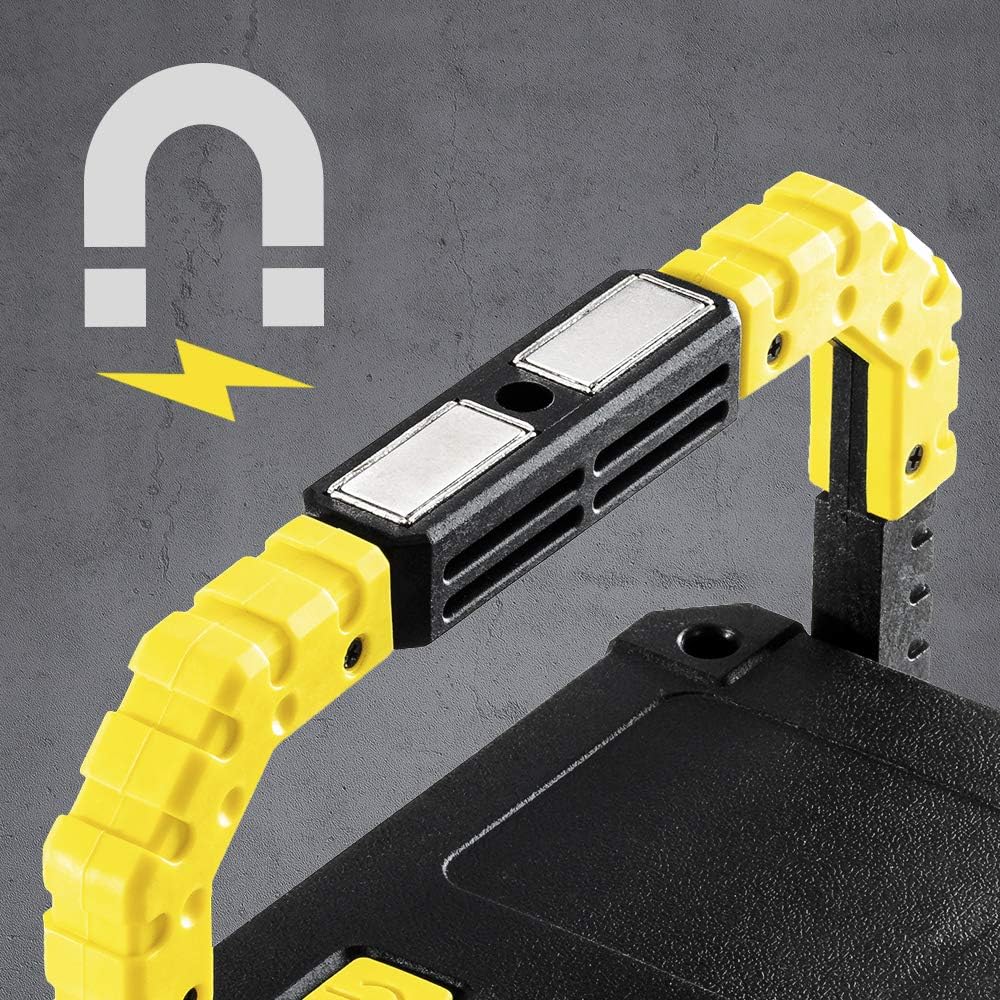
Image 5.2: The powerful magnetic base provides secure attachment to metallic objects.
Ensure the metal surface is clean and strong enough to support the weight of the work light.
6. Awọn ilana Iṣiṣẹ
6.1 Powering On/Off and Changing Lighting Modes
The power button controls the light's functions:
- Lati Tan: Press the power button once. The light will turn on in bright mode.
- Lati Yi Awọn ọna pada: Press the power button repeatedly to cycle through the modes: Bright → Reduced → Strobe → Off.
- Lati Pa: Continue pressing the power button until the light turns off, or press and hold the button for 2 seconds in any mode.
6.2 Lilo Iṣẹ́ Báńkì Agbára
The work light can charge other USB-powered devices:

Image 6.1: The back panel features the USB output port (covered by a flap), Micro-USB input, power button, and battery indicator.
- Open the protective flap covering the USB output port.
- Connect your device's charging cable to the USB Type-A output port (5 V / 1 A) on the work light.
- The work light will begin charging your device. The battery indicator will show the remaining power.
- Disconnect your device once charged and close the protective flap to maintain IP44 rating.
6.3 Atọka Ipele Batiri
Awọn 4-stage LED indicator shows the approximate battery charge level:
- 4 LEDs: 75-100% charge
- 3 LEDs: 50-75% charge
- 2 LEDs: 25-50% charge
- 1 LED: Below 25% charge (recharge soon)
7. Itọju
7.1 Ninu
To clean the work light, wipe it with a soft, damp cloth. Do not use abrasive cleaners, solvents, or harsh chemicals, as these can damage the surface or internal components. Ensure the charging ports are dry before cleaning.
7.2 Ibi ipamọ
When not in use for extended periods, store the work light in a cool, dry place, away from direct sunlight and extreme temperatures. It is recommended to charge the battery at least once every three months to maintain its lifespan.
8. Laasigbotitusita
If you encounter issues with your TROTEC PWLS 06-10, refer to the following table:
| Isoro | Owun to le Fa | Ojutu |
|---|---|---|
| Work light does not turn on. | Batiri ti dinku. | Gba agbara ina iṣẹ naa ni kikun. |
| Imọlẹ jẹ baibai tabi flickers. | Kekere batiri idiyele. | Saji si batiri. |
| Power bank function not working. | Device not compatible or cable faulty. Battery too low. | Ensure your device is compatible (5V/1A). Try a different USB cable. Check work light battery level. |
| Work light not charging. | Charging cable or adapter faulty. Port is dirty. | Try a different USB cable and power adapter. Ensure Micro-USB port is clean and dry. |
Ti iṣoro naa ba wa lẹhin igbiyanju awọn iṣeduro wọnyi, jọwọ kan si atilẹyin alabara.
9. Awọn pato
| Ẹya ara ẹrọ | Sipesifikesonu |
|---|---|
| Awoṣe | PWLS 06-10 |
| Olupese | TROTEC |
| Ọja Mefa | 4 x 16 x 12.5 cm |
| Iwọn | 500 g |
| Orisun Imọlẹ | COB-LED |
| Flux Imọlẹ | 800 lumen |
| Agbara agbara | 10 Watt |
| Iwọn otutu awọ | 6,000 K (Imọlẹ Oju-ọjọ Funfun) |
| Batiri Iru | 3.7 V Lithium-ion (4.4 Ah) |
| Akoko Iṣiṣẹ | Up to 8 hours (constant strength) |
| Ijade USB | 5V/1 A |
| Idaabobo Rating | IP44 (majẹri asesejade) |
| Ohun elo | Irin, PVC |
10. Atilẹyin ọja ati Support
TROTEC products are manufactured with high-quality standards. This product includes a warranty as per local regulations. Information regarding the availability of spare parts in the EU is typically for a period of 2 years.
For technical support, warranty claims, or service inquiries, please contact your retailer or the official TROTEC customer service. Please have your model number (PWLS 06-10) and proof of purchase ready when contacting support.