
Ọrọ Iṣaaju
This manual provides detailed instructions for the proper use and maintenance of your HOCO ES36 Wireless Earbuds. Please read this manual thoroughly before using the product to ensure optimal performance and longevity.

Image: The HOCO ES36 Wireless Earbuds resting inside their open charging case, displaying the earbuds and the case's interior.

Aworan: A sunmọ-soke view of the HOCO ES36 Wireless Earbuds, highlighting their design and in-ear form factor.
Package Awọn akoonu
- HOCO ES36 Wireless Earbuds (Left and Right)
- Alailowaya Ngba agbara Case
- Ngba agbara USB
- Afowoyi Olumulo (iwe-ipamọ yii)
Ṣeto
1. Ngba agbara si Earbuds ati Ọran
Before first use, ensure both the earbuds and the charging case are fully charged. The charging case supports both wired charging via the included cable and wireless charging.
- Ti firanṣẹ Ngba agbara: Connect the charging cable to the charging port on the case and to a USB power source. The indicator light on the case will show charging status.
- Gbigba agbara Alailowaya: Gbé àpótí ìgbara náà sí orí pádì ìgbara aláilowaya tí ó báramu. Rí i dájú pé àpótí náà wà ní àárín pádì náà fún gbígba agbára dáadáa.

Image: The HOCO ES36 charging case placed on a wireless charging pad next to a smartphone, both receiving power wirelessly.
The earbuds will charge automatically when placed inside the charging case, provided the case has power.
2. Sisopọ Bluetooth
- Rii daju pe awọn agbekọri wa ninu apoti gbigba agbara ati pe o ti gba agbara lọwọ ọran naa.
- Ṣii ideri ti apoti gbigba agbara. Awọn agbekọri yoo tan ina laifọwọyi ati tẹ ipo sisopọ pọ sii.
- Lori ẹrọ rẹ (foonuiyara, tabulẹti, ati bẹbẹ lọ), lọ si awọn eto Bluetooth ki o mu Bluetooth ṣiṣẹ.
- Look for "HOCO ES36" or a similar name in the list of available devices and select it to connect.
- A pop-up window may appear on compatible devices, showing the connection status and battery levels.
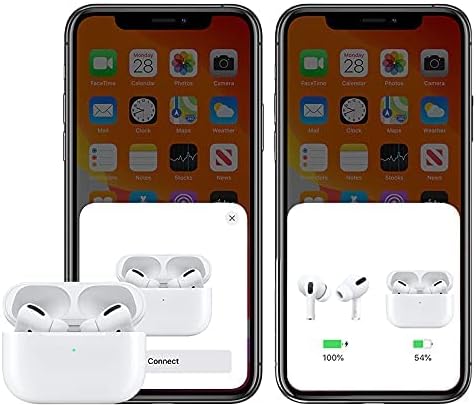
Image: A smartphone screen displaying a pop-up window indicating the HOCO ES36 earbuds are ready to connect, along with battery level indicators for both earbuds and the charging case.
Once paired, the earbuds will automatically connect to your device when the case lid is opened and Bluetooth is enabled on your device.
Awọn ilana Iṣiṣẹ
Awọn iṣẹ Aifọwọyi
- Titan/Pa Agbara Aifọwọyi: The earbuds power on automatically when removed from the case and power off when placed back into the case and the lid is closed.
- Sisọpọ Aifọwọyi: Lẹ́yìn ìsopọ̀ àkọ́kọ́, àwọn agbekọri náà yóò so pọ̀ mọ́ ẹ̀rọ ìbáṣepọ̀ ìkẹyìn nígbà tí a bá yọ wọ́n kúrò nínú àpótí náà.
- Ṣiṣawari Ninu-Eti: Music playback may pause automatically when an earbud is removed from your ear and resume when reinserted (feature availability may vary).
- Yipada Titunto-Ẹrú: Both earbuds can function independently. You can use either the left or right earbud alone, and they will seamlessly switch roles.
Awọn iṣakoso ifọwọkan
The HOCO ES36 earbuds feature touch-sensitive areas for controlling various functions. Specific touch gestures may vary slightly depending on your device and software version. Common functions include:
- Ṣiṣẹ/Daduro: Fọwọ ba ẹyọkan lori boya agbekọri.
- Orin t’okan: Fọwọ ba lẹẹmeji lori agbekọri ọtun.
- Tẹlẹ Orin: Fọwọ ba lẹẹmeji lori agbekọri osi.
- Idahun/Ipe Ipari: Fọwọ ba ẹyọkan lori boya agbekọri.
- Kọ Ipe: Tẹ mọlẹ lori boya agbekọri.
- Mu Oluranlọwọ Ohun ṣiṣẹ (Siri/Oluranlọwọ Google): Fọwọ ba meteta lori boya agbekọri.

Image: The HOCO ES36 earbuds placed next to a smartphone displaying a music player interface, illustrating their use for audio playback.
Itoju
- Ninu: Mọ awọn afikọti nigbagbogbo ati apoti gbigba agbara pẹlu asọ ti o gbẹ, asọ ti ko ni lint. Ma ṣe lo awọn ohun elo abrasive tabi awọn kemikali ti o lagbara.
- Ibi ipamọ: Nigbati o ko ba si ni lilo, tọju awọn afikọti sinu apoti gbigba agbara wọn lati daabobo wọn ki o jẹ ki wọn gba agbara.
- Yago fun Ọrinrin: Keep the earbuds and case away from water and excessive moisture.
- Iwọn otutu: Yẹra fún fífi ọjà náà sí ojú otútù tó le koko (gbóná tàbí òtútù).
Laasigbotitusita
| Isoro | Ojutu |
|---|---|
| Earbuds ko so pọ |
|
| Agbekọri agbekọri kan ṣoṣo ti n ṣiṣẹ |
|
| Ko si ohun |
|
| Ngba agbara ko gba agbara |
|
Awọn pato
| Ẹya ara ẹrọ | Ẹ̀kúnrẹ́rẹ́ |
|---|---|
| Brand | HOCO |
| Orukọ awoṣe | Airpods Pro (ES36) |
| Nọmba Awoṣe Nkan | ES36 |
| Asopọmọra Technology | Ailokun |
| Imọ-ẹrọ Ibaraẹnisọrọ Alailowaya | Bluetooth 5.0 |
| Agbekọri Fọọmù ifosiwewe | Ninu Eti |
| Gbigbe Eti Agbekọri | Ninu Eti |
| Ariwo Iṣakoso | Ti nṣiṣe lọwọ Noise Ifagile (Note: This typically refers to passive noise isolation for this product type unless specific ANC features are detailed by the manufacturer.) |
| Ọrọ / Orin Time | O fẹrẹ to awọn wakati 3 |
| Akoko Iduro | O fẹrẹ to awọn wakati 150 |
| Gbigba agbara | Supports Wireless Charging |
| Awọn irinše to wa | Cable, Wireless Charging Case |
| Àwọ̀ | Funfun |
| Package Mefa | 18.8 x 11.2 x 3.6 cm; 190g |
Alaye Aabo
Jọwọ tẹle awọn itọsọna aabo wọnyi lati yago fun ibajẹ si ọja tabi ipalara si ara rẹ:
- Ma ṣe tuka, tunṣe, tabi tun ọja naa pada.
- Ma ṣe fi ọja han si ina tabi awọn iwọn otutu giga.
- Yago fun gbigbọ ni awọn ipele iwọn didun giga fun awọn akoko gigun lati dena ibajẹ igbọran.
- Jeki ọja naa kuro ni arọwọto awọn ọmọde ati awọn ohun ọsin.
- Pa ọjà náà àti àwọn èròjà rẹ̀ dànù ní ìbámu pẹ̀lú ìlànà agbègbè.
Atilẹyin ọja ati Support
For warranty information and customer support, please refer to the documentation provided at the point of purchase or contact your retailer. HOCO products typically come with a limited warranty against manufacturing defects. Please retain your proof of purchase for warranty claims.