
Hoco W21 Graceful Charm Wired Headphones User Manual
Model: W21 Purple | Brand: HOCO
1. Ifihan
Thank you for choosing the Hoco W21 Graceful Charm Wired Headphones. This manual provides detailed instructions for the proper use, setup, and maintenance of your new headphones. Please read this manual thoroughly before using the product to ensure optimal performance and longevity.
2. Awọn ẹya Ọja
- Agbọrọsọ: 40mm drivers for clear audio.
- Agbara: Rated power of 10mW; maximum input power of 50mW.
- Asopọmọra: Standard Ø3.5mm audio plug for universal compatibility.
- USB: High elastic braided cable with a length of 1.2m for durability and flexibility.
- Gbohungbohun: Integrated controller with a microphone for hands-free communication.
- Iṣakoso: One-button operation control for easy management of calls and music.
3. Package Awọn akoonu
Jọwọ ṣayẹwo awọn akoonu ti package lori unboxing:
- Hoco W21 Graceful Charm Wired Headphones
- Afowoyi Olumulo (iwe-ipamọ yii)

4. Eto
- Yọ Agbekọri kuro: Fara yọ awọn agbekọri kuro ninu apoti wọn.
- Identify the Audio Plug: Locate the Ø3.5mm audio plug at the end of the headphone cable.
- Sopọ si Ẹrọ: Insert the Ø3.5mm audio plug into the headphone jack of your mobile phone, tablet, or any compatible audio device. Ensure the plug is fully inserted for proper audio output.
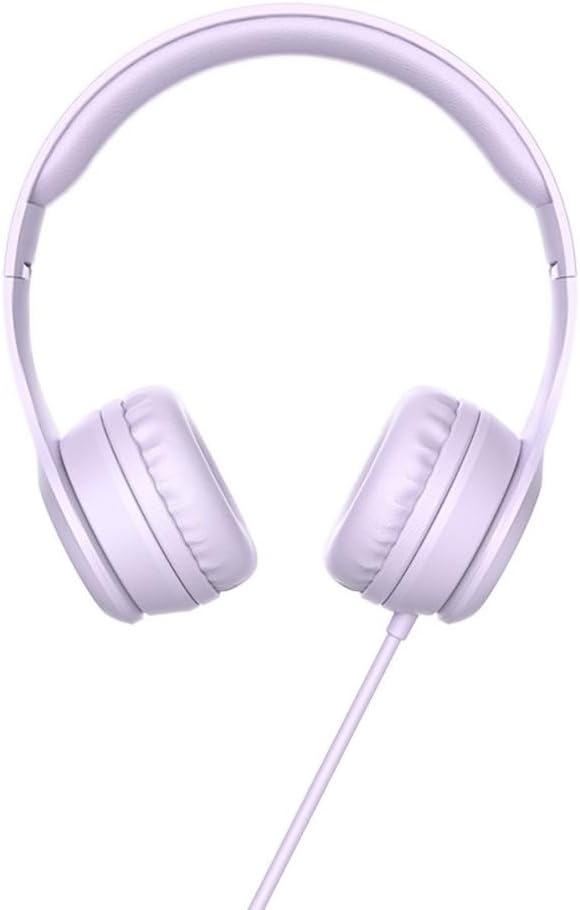
- Ṣatunṣe ibamu: Place the headphones over your ears. Adjust the headband to ensure a comfortable and secure fit. The earcups are designed to sit over the ear.

5. Awọn ilana Iṣiṣẹ
The Hoco W21 headphones feature a convenient one-button inline control for managing audio and calls.
5.1 Sisisẹsẹhin Orin
- Ṣiṣẹ/Daduro: Tẹ bọtini ni ẹẹkan lati mu ṣiṣẹ tabi da duro orin ti isiyi.
- Orin t’okan: Tẹ bọtini naa lẹẹmeji ni kiakia lati fo si orin ti o tẹle.
- Tẹlẹ Orin: Tẹ bọtini naa ni igba mẹta ni kiakia lati pada si orin ti tẹlẹ.
5.2 ipe Management
- Idahun/Ipe Ipari: Tẹ bọtini naa lẹẹkan lati dahun ipe ti nwọle tabi lati pari ipe ti nlọ lọwọ.
- Kọ Ipe: Tẹ bọtini naa ki o si di mu fun bii iṣẹju-aaya meji lati kọ ipe ti nwọle.

6. Itọju
Proper maintenance will extend the life of your headphones.
- Ninu: Lo asọ gbigbẹ, asọ ti o gbẹ lati nu awọn afikọti ati ideri ori. Maṣe lo awọn kẹmika lile tabi awọn ohun elo abrasive.
- Ibi ipamọ: When not in use, store the headphones in a clean, dry place away from extreme temperatures and direct sunlight. Avoid tangling the cable.
- Yago fun Ọrinrin: Do not expose the headphones to water or excessive moisture. They are not waterproof.
- Mu pẹlu Itọju: Avoid dropping the headphones or subjecting them to strong impacts. Do not pull the cable forcefully.

7. Laasigbotitusita
| Isoro | Owun to le Fa | Ojutu |
|---|---|---|
| Ko si ohun tabi iwọn didun kekere |
|
|
| Gbohungbohun ko ṣiṣẹ |
|
|
| Iparun ohun |
|
|
8. Awọn pato
| Nọmba awoṣe | W21 Purple |
| Brand | HOCO |
| Agbọrọsọ Opin | 40mm |
| Ti won won Agbara | 10mW |
| O pọju Input Power | 50mW |
| Ohun Plug | Ø3.5mm |
| USB Iru | High elastic braid |
| USB Ipari | 1.2m |
| Gbohungbohun | Controller with mic |
| Iṣakoso Waya | One-button operation control |
| Ọja Mefa | 19.4 x 17.3 x 7.4 cm |
| Iwọn Ọja | 109 g |
| Àwọ̀ | eleyi ti |
9. Atilẹyin ọja ati Support
Hoco products are manufactured to high quality standards. For information regarding warranty coverage and customer support, please refer to the warranty card included with your purchase or visit the official Hoco webojula. Tọju iwe-ẹri rira rẹ bi ẹri rira fun eyikeyi awọn ibeere atilẹyin ọja.
For technical assistance or further inquiries, please contact your retailer or the authorized service center in your region.