
1. Ifihan
O ṣeun fun riraasing the Lenco SPR-100BK Splash-Proof Bluetooth Speaker. This portable speaker delivers powerful sound with strong bass and features FM radio, USB, SD card playback, and integrated light effects. Designed for durability, it is splash-proof, making it suitable for various environments. This manual provides essential information for safe and optimal use of your device.
2. Awọn Ilana Aabo pataki
- Ma ṣe fi ẹrọ naa han si awọn iwọn otutu to gaju, imọlẹ orun taara, tabi ọriniinitutu giga.
- Ensure the charging port cover is securely closed when near water to maintain splash-proof integrity.
- Do not disassemble or modify the device. Refer all servicing to qualified personnel.
- Lo okùn gbigba agbara ti a sọ tẹlẹ nikan.
- Jeki ẹrọ naa kuro ni awọn aaye oofa ti o lagbara.
- Yago fun sisọ silẹ tabi tẹriba ẹrọ si awọn ipa to lagbara.
3. Ọja Ipariview
Familiarize yourself with the components of your Lenco SPR-100BK speaker.
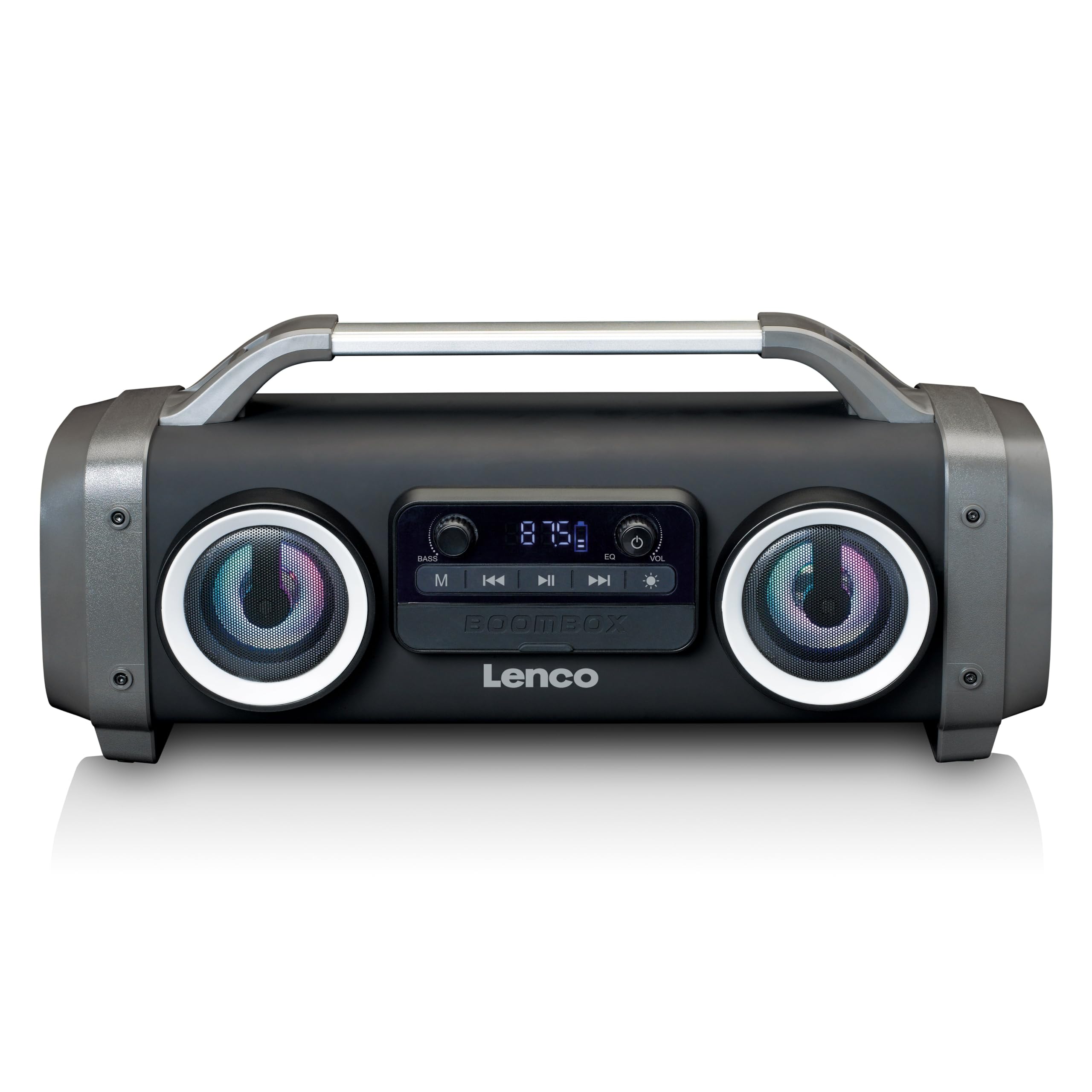
olusin 1: Iwaju view of the Lenco SPR-100BK speaker, showing the main speaker grille, control panel, and integrated light effects.
3.1 Awọn iṣakoso ati awọn ibudo
- Bọtini agbara: Yipada agbọrọsọ si tan tabi paa.
- Bọtini Ipo: Yípadà láàrín àwọn ipò Bluetooth, FM Radio, USB, SD, àti AUX.
- Bọ́tìnnì Ṣíṣe/Sánu duro: Ó máa ń gbé ohùn sókè tàbí ó máa ń dá dúró.
- Bọtini Iṣakoso iwọn didun: Ṣatunṣe iwọn didun oluwa.
- Bass Boost Knob: Ṣe atunṣe ipele baasi.
- Light Effect Button: Cycles through or turns off light effects.
- Ibudo USB: Fun šišẹsẹhin okun filasi USB.
- Iho kaadi SD: Fun ṣiṣiṣẹsẹhin kaadi SD.
- Iṣawọle AUX (3.5mm): Fun sisopọ awọn ohun elo ita gbangba.
- Charging Port (Mini USB): Fun gbigba agbara ti abẹnu batiri.
4. Eto
4.1 Ṣiṣii silẹ
Carefully remove the speaker and all accessories from the packaging. Ensure the following items are present:
- Lenco SPR-100BK Bluetooth Speaker
- Okun Ngba agbara USB
- 3.5mm Audio Cable (AUX cable)
- Itọsọna olumulo
4.2 Ngba agbara si Batiri naa
- Locate the Mini USB charging port on the speaker.
- So okun gbigba agbara USB ti a pese mọ ibudo gbigba agbara agbọrọsọ naa.
- Connect the other end of the USB cable to a compatible USB power adapter (5V/1A, not included) or a computer's USB port.
- Ìmọ́lẹ̀ àmì ìgbóná yóò máa tàn, nígbà tí a bá ń gba agbára. Ó máa ń pa tàbí yí àwọ̀ padà (fún àpẹẹrẹ, àwọ̀ búlúù) nígbà tí a bá ti gba agbára tán.
- A full charge takes approximately 4-5 hours and provides up to 15 hours of playback (without light effects).
4.3 Ibẹrẹ Agbara Lori
Tẹ mọlẹ Bọtini agbara for a few seconds until the speaker powers on and you hear an audible prompt or see the display light up.
5. Isẹ
5.1 Agbara Tan / Pa
- Lati fi agbara tan: Tẹ mọlẹ Bọtini agbara.
- Lati fi agbara si pipa: Tẹ mọlẹ Bọtini agbara lẹẹkansi.
5.2 Bluetooth Asopọ
- Tan agbohunsoke. Yoo tẹ ipo sisopọ pọ si Bluetooth laifọwọyi, tọka nipasẹ LED didan.
- Mu Bluetooth ṣiṣẹ lori ẹrọ alagbeka rẹ (foonuiyara, tabulẹti, ati bẹbẹ lọ).
- Wa fun Awọn ẹrọ Bluetooth ti o wa ki o yan"SPR-100BK"lati akojọ.
- Nígbà tí a bá so wọ́n pọ̀, agbọ́hùnsọ̀ náà yóò mú ohùn ìjẹ́rìí jáde, LED náà yóò sì dáwọ́ dúró.
- Ipo Sitẹrio Alailowaya otitọ (TWS): If you have two SPR-100BK speakers, you can pair them for stereo sound.
- Rii daju pe awọn agbohunsoke mejeeji ti tan ati ni ipo Bluetooth.
- On one speaker (the master), press and hold the Bọtini Ipo títí tí o fi gbọ́ ìtọ́sọ́nà ìsopọ̀ TWS kan.
- The two speakers will automatically connect. Once connected, pair your device to the master speaker as described above.
5.3 Redio FM
- Tẹ awọn Bọtini Ipo repeatedly until you select FM Radio mode.
- Láti ṣe àyẹ̀wò láìfọwọ́kọ àti fi àwọn ibùdó pamọ́: Tẹ kí o sì di Bọtini Muu ṣiṣẹ/Daduro. The speaker will scan for available FM stations and save them automatically.
- To switch between saved stations: Use the Previous/Next Track Buttons (if available, otherwise it will cycle through automatically).
- Akiyesi: For better FM reception, ensure the included 3.5mm audio cable is plugged into the AUX input, as it acts as an external antenna.
5.4 USB / SD Kaadi Sisisẹsẹhin
- Insert a USB flash drive or an SD card (with supported audio files) sinu awọn oniwun ibudo / Iho.
- The speaker will automatically switch to USB or SD mode and begin playback. If not, press the Bọtini Ipo lati yan orisun to tọ.
- Lo awọn Bọtini Muu ṣiṣẹ/Daduro ati Previous/Next Track Buttons láti ṣàkóso ìṣiṣẹ́ orin.
5.5 Iṣawọle AUX
- Connect one end of the supplied 3.5mm audio cable to the AUX input on the speaker.
- So opin miiran pọ si jaketi agbekọri tabi iṣelọpọ ohun ti ẹrọ ita rẹ.
- Tẹ awọn Bọtini Ipo lati yan ipo AUX.
- Ṣakoso ṣiṣiṣẹsẹhin ati iwọn didun lati ẹrọ ita rẹ.
5.6 Light Ipa
Tẹ awọn Bọtini Ipa Imọlẹ to cycle through different light modes or to turn the lights off. The speaker features 12 color light effects.
5.7 Atunse ohun
- Iwọn didun: Yiyi awọn Iwọn Iṣakoso Iṣakoso to increase or decrease the overall sound level.
- Bass: Yiyi awọn Bass Boost Knob to adjust the intensity of the bass.
6. Itọju
6.1 Ninu
Wipe the speaker with a soft, dry cloth. Do not use abrasive cleaners, waxes, or solvents. For stubborn dirt, a slightly damp cloth can be used, ensuring all port covers are sealed.
6.2 batiri Itọju
- Lati pẹ aye batiri, gba agbara si ni kikun agbọrọsọ ṣaaju lilo akọkọ.
- Yago fun mimu batiri kuro patapata nigbagbogbo.
- If storing the speaker for an extended period, charge it to about 50% every few months.
6.3 Ibi ipamọ
Tọ́jú agbọ́hùnsọ̀ náà sí ibi tí ó tutù tí ó sì gbẹ, tí kò sí ìmọ́lẹ̀ oòrùn tààrà àti ooru tó le koko.
7. Laasigbotitusita
| Isoro | Owun to le Fa | Ojutu |
|---|---|---|
| Agbọrọsọ ko ni agbara lori. | Batiri ti dinku. | Gba agbara si agbọrọsọ nipa lilo okun USB ti a pese. |
| Ko si ohun. | Iwọn didun kere ju; ipo ti ko tọ ti yan; ẹrọ ko sopọ mọ. | Increase volume; press Mode button to select correct source; ensure Bluetooth device is paired or AUX cable is connected. |
| Asopọ Bluetooth kuna. | Agbọrọsọ kii ṣe ni ipo sisopọ; ẹrọ jina ju; kikọlu. | Ensure speaker is in Bluetooth pairing mode (flashing LED); move device closer; turn off other Bluetooth devices. |
| Gbigba redio FM ti ko dara. | No external antenna; weak signal. | Plug in the 3.5mm AUX cable to act as an antenna; try moving the speaker to a different location. |
| USB/SD playback not working. | Ti ko ni atilẹyin file ìṣètò; a kò fi káàdì/wakọ̀ sí i dáadáa; ó bàjẹ́ files. | Rii daju files are in a supported format (e.g., MP3); reinsert the USB drive/SD card; try a different drive/card. |
8. Awọn pato
| Nọmba awoṣe | SPR-100BK |
| Brand | Lenco |
| Ijade agbara | 25 Wattis RMS |
| Asopọmọra | Bluetooth, USB, SD Card, 3.5mm AUX Input |
| Batiri Iru | Lithium-ion (4400 mAh) |
| Akoko Sisisẹsẹhin | Up to 15 hours (reduced with light effects) |
| Gbigba agbara Input | 5V/1A (Mini USB) |
| Pataki Awọn ẹya ara ẹrọ | Splash-proof design, Integrated light effects, FM Radio, TWS function |
| Awọn iwọn (L x W x H) | 60 x 60 x 85 cm |
| Iwọn | 2 kilo |
Akiyesi: Awọn pato jẹ koko ọrọ si iyipada laisi akiyesi iṣaaju.
9. Atilẹyin ọja ati Support
9.1 atilẹyin ọja Alaye
This Lenco product is covered by a warranty for a period of ọdun meji 2 on parts from the date of purchase. This warranty covers manufacturing defects and workmanship under normal use. It does not cover damage caused by misuse, accidents, unauthorized modifications, or normal wear and tear.
9.2 Software imudojuiwọn
A ṣe iṣeduro awọn imudojuiwọn sọfitiwia fun ọja yii titi di igba ti Oṣu Kẹrin Ọjọ 13, Ọdun 2030.
9.3 Onibara Support
For technical assistance, warranty claims, or product inquiries, please contact Lenco customer support through their official website or the retailer where the product was purchased. Please have your model number (SPR-100BK) and proof of purchase ready.
Lenco osise Webojula: www.lenco.com