
VMAI HD-019
Ìwé Ìtọ́sọ́nà Olùlò VMAI 38 Inch 2.1 Sound Bar
Awoṣe: HD-019
1. Ifihan
Thank you for choosing the VMAI 38 Inch 2.1 Sound Bar. This sound bar is designed to enhance your home entertainment experience with powerful audio, featuring dual built-in subwoofers and versatile connectivity options. Please read this manual thoroughly before use to ensure proper operation and to maximize your enjoyment of the product.
2. Alaye Aabo
- Do not expose this appliance to dripping or splashing liquids.
- Ma ṣe dina eyikeyi awọn ṣiṣi atẹgun. Fi sori ẹrọ ni ibamu pẹlu awọn ilana ti olupese.
- Maṣe fi sori ẹrọ nitosi awọn orisun ooru gẹgẹbi awọn imooru, awọn iforukọsilẹ ooru, awọn adiro, tabi awọn ohun elo miiran (pẹlu ampliifiers) ti o gbe ooru jade.
- Dabobo okun agbara lati ma rin tabi fun pọ, ni pataki ni awọn ifibọ, awọn apo itọju, ati aaye ti wọn jade kuro ninu ohun elo.
- Lo awọn asomọ/awọn ẹya ara ẹrọ ti olupese pato.
- Yọọ ohun elo yi nigba iji manamana tabi nigba lilo fun igba pipẹ.
3. Package Awọn akoonu
Jọwọ ṣayẹwo pe gbogbo awọn ohun kan wa ninu apo rẹ:
- VMAI 38 Inch Sound Bar
- Isakoṣo latọna jijin
- Premium 5 ft Optical cable
- 5 ft RCA cable
- Adapter agbara
- Wall mounting brackets and screws
- Itọsọna olumulo
4. Ọja Ipariview
The VMAI Sound Bar HD-019 is engineered to deliver a powerful and clear audio experience. It features dual 25W built-in subwoofers and four speakers, providing 90W of total power for room-shaking bass and precise sound.

Figure 4.1: VMAI 38 Inch Sound Bar and included remote control.
The sound bar incorporates advanced DSP technology and Bluetooth 5.0 for stable and fast wireless transmission. It offers multiple input connections including HDMI ARC, Optical, AUX, and USB (for flash drives only).

Figure 4.2: Internal components of the VMAI Sound Bar, highlighting the 6 speakers and 90 watts of power for a superb sound experience.

Figure 4.3: Illustration of the sound bar's dual built-in subwoofers, designed to deliver deep bass.
5. Eto
5.1 Àwọn Àṣàyàn Ìgbékalẹ̀
The VMAI Sound Bar offers flexible placement options to suit your home theater setup:
- Ibi tabili: Position the sound bar directly in front of your TV on a flat surface, ensuring it does not obstruct the TV's remote sensor.
- Odi Odi: For an elegant, space-saving setup, the sound bar can be mounted on the wall using the included mounting brackets and template. Ensure the wall can support the weight of the sound bar.

Figure 5.1: The sound bar's mountable design allows for both wall mounting and desktop placement.
5.2 Connecting Your Sound Bar
The sound bar supports various connection methods to integrate with your devices:
- HDMI ARC: Connect an HDMI cable from the sound bar's HDMI ARC port to your TV's HDMI ARC port. This allows for audio return channel functionality, simplifying control.
- Iṣawọle Opitika: Use the included optical cable to connect the sound bar to your TV's optical audio output.
- Iṣawọle AUX: Connect devices using the included RCA cable to the AUX input.
- Input USB: Fun ohun orin lati inu kọnputa filasi USB kan.
- Bluetooth 5.0: Wirelessly connect your Bluetooth-enabled devices.

Figure 5.2: The sound bar supports HDMI (ARC), AUX, Optical, USB, and Bluetooth 5.0 connections.
5.3 Important Note for Optical Mode (PCM Setting)
When using the Optical input, it is crucial to adjust your TV's audio settings to PCM (Pulse Code Modulation). Failure to do so may result in no sound or distorted audio.
Steps to enable PCM (may vary by TV brand):
- Go to the 'Settings' menu on your TV.
- Navigate to 'Audio Format' or 'Sound Output' settings.
- Select 'PCM' as the digital audio output format.
- If using HDMI ARC, also check 'HDMI Audio Format' and set it to 'PCM'.
6. Awọn ilana Iṣiṣẹ
6.1 Titan / Pa a
Tẹ awọn Agbara / Ipo button on the sound bar or the remote control to turn the unit on or off.
6.2 Aṣayan titẹ sii
Tẹ awọn Selection (M) bọtini lori awọn ohun bar tabi awọn ÀWỌN Ọ̀RỌ̀ button on the remote control to cycle through available input sources (HDMI ARC, Optical, AUX, USB, Bluetooth).
6.3 Iṣakoso iwọn didun
Lo awọn Iwọn didun + ati Iwọn didun - buttons on the sound bar or remote control to adjust the volume level.
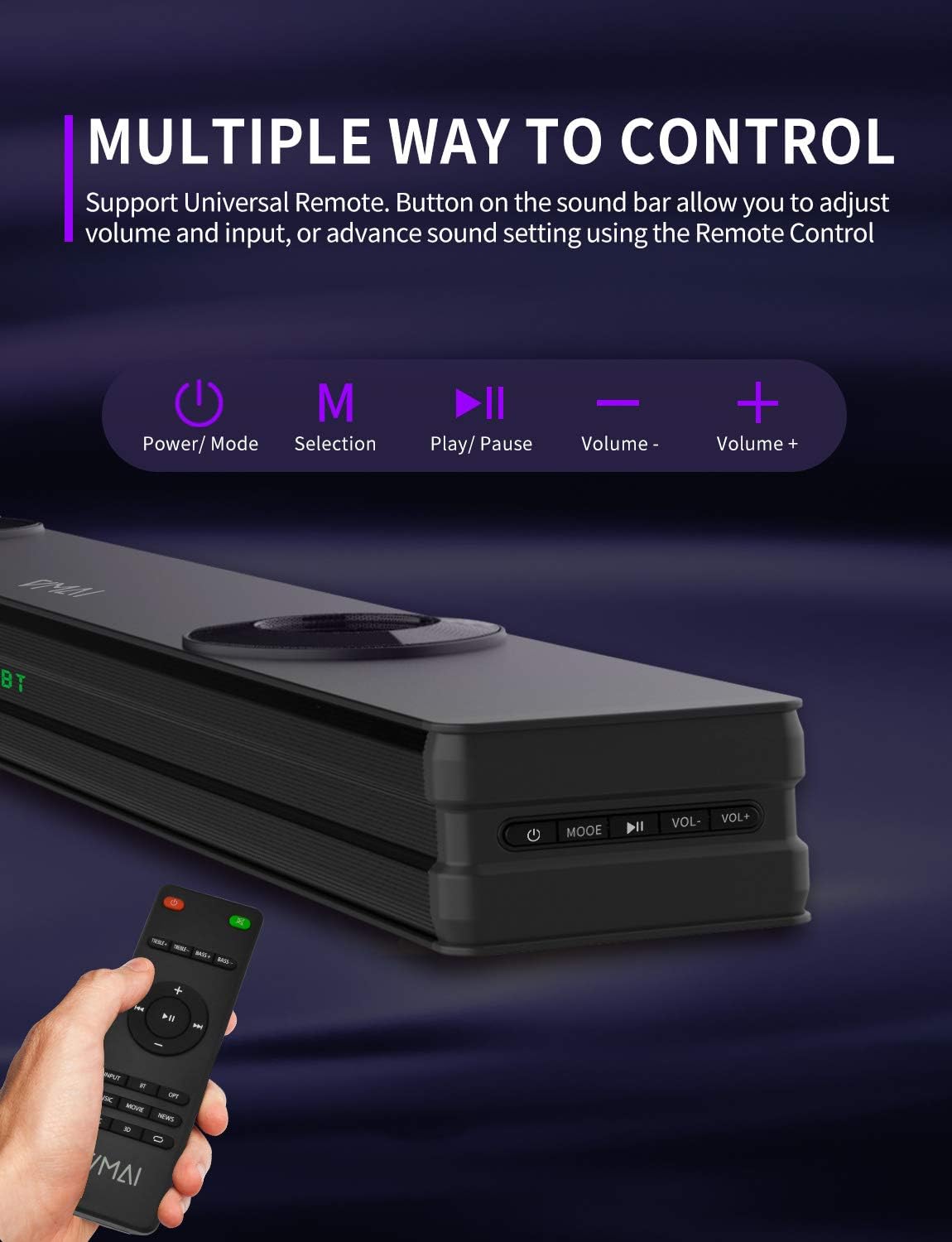
Figure 6.1: The sound bar can be controlled via its integrated buttons or the included remote control.
6.4 Awọn ọna oluṣeto
The sound bar features 4 distinct sound modes to optimize your listening experience. Use the remote control to switch between them:
- Ipo Orin: Optimized for music playback, enhancing clarity and bass.
- Ipo fiimu: Provides a cinematic surround sound experience, ideal for films.
- Ipo iroyin: Enhances vocal clarity for news broadcasts and dialogue-heavy content.
- 3D Surround Sound Mode: Creates an immersive, three-dimensional audio field.
6.5 Sisopọ Bluetooth
To pair your Bluetooth device:
- Switch the sound bar to Bluetooth mode (indicated by 'BT' on the display).
- Mu Bluetooth ṣiṣẹ lori ẹrọ rẹ (foonuiyara, tabulẹti, ati bẹbẹ lọ).
- Wa fun 'VMAI Sound Bar' in your device's Bluetooth settings.
- Select it to pair. Once connected, the 'BT' indicator will stop flashing.
7. Itọju
To ensure the longevity and optimal performance of your VMAI Sound Bar, follow these maintenance guidelines:
- Ninu: Use a soft, dry cloth to clean the surface of the sound bar. Do not use liquid cleaners or aerosol sprays.
- Afẹfẹ: Rii daju pe awọn šiši fentilesonu ko ni idinamọ lati ṣe idiwọ igbona.
- Ibi ipamọ: If storing the sound bar for an extended period, unplug it from the power outlet and store it in a cool, dry place.
- Yago fun Ọrinrin: Jeki ọpa ohun kuro lati omi ati ọriniinitutu giga.
8. Laasigbotitusita
If you encounter issues with your VMAI Sound Bar, please refer to the following common problems and solutions:
| Isoro | Owun to le Fa / Solusan |
|---|---|
| Ko si ohun lati igi ohun. |
|
| Daru tabi ko dara ohun didara. |
|
| Awọn oran asopọ Bluetooth. |
|
| Isakoṣo latọna jijin ko ṣiṣẹ. |
|
| Bass is weak or not noticeable. |
|
9. Awọn pato
| Ẹya ara ẹrọ | Sipesifikesonu |
|---|---|
| Orukọ awoṣe | HD-019 |
| Iwọn (D x W x H) | 4.3"D x 38"W x 2.5"H |
| Iwọn Nkan | 6 iwon |
| Agbọrọsọ Agbara Ijade ti o pọju | 90 Wattis |
| Iṣagbewọle Voltage | 240 Volts |
| Agbọrọsọ Iru | 3D, Soundbar, Subwoofer, Surround Sound |
| Asopọmọra Technology | Optical, HDMI (ARC), AUX, USB, Bluetooth |
| Ẹya Bluetooth | 5.0 |
| Bluetooth Ibiti | 15.24 Mita (50 Ẹsẹ) |
| Ipo Ijade Ohun | Sitẹrio, Agbegbe |
| Ohun elo | Irin |
| Àwọ̀ | Matte Black |
10. Atilẹyin ọja ati Support
VMAI offers a 12-month coverage for its products. Every VMAI sound bar undergoes a strict quality test process before shipment. For any issues or inquiries, please contact VMAI customer support. We are committed to resolving all your problems within 24 hours.
VMAI aims to provide high-quality audio products that deliver fantastic audio-visual enjoyment and an authentic interactive experience.
Ask a question about this manual
Ask about setup, troubleshooting, compatibility, parts, safety, or missing instructions. Manuals+ will review the question and use this page’s manual context to help answer it.