
1. Ifihan
Thank you for choosing the Master MA-8.1K Portable Amplified Bluetooth Speaker. This manual provides essential information for the safe and efficient operation of your device. Please read it thoroughly before use and retain it for future reference.
The Master MA-8.1K is designed to deliver powerful and clear audio, featuring versatile connectivity options including Bluetooth, USB, Micro SD, and auxiliary input. It also includes a microphone for karaoke or public address functions and TWS (True Wireless Stereo) technology for pairing with another compatible speaker.
2. Ọja Ipariview
2.1 Package Awọn akoonu
Nígbà tí o bá ti yọ àpótí kúrò, rí i dájú pé gbogbo ohun kan wà níbẹ̀:
- Titunto si MA-8.1K Portable AmpLified Bluetooth Agbọrọsọ
- Gbohungbo onina
- Isakoṣo latọna jijin
- Ngba agbara Adapter
- USB Iranlọwọ

Figure 2.1: Master MA-8.1K speaker and included accessories.
2.2 Rear Panel Controls and Ports
Familiarize yourself with the controls and connection ports located on the rear panel of the speaker.

Nọmba 2.2: Alaye view of the rear control panel.
- Micro SD Iho: Fun ohun afetigbọ files from a Micro SD card.
- Ibudo USB: Fun ohun afetigbọ files lati kọnputa filasi USB kan.
- Bọtini Iwọn didun: Ṣe atunṣe iwọn didun agbọrọsọ akọkọ.
- Knob Treble: Ṣe atunṣe iṣẹjade ohun igbohunsafẹfẹ giga-giga.
- Knob Bass: Ṣe atunṣe iṣelọpọ ohun-igbohunsafẹfẹ kekere.
- Iṣawọle Iranlọwọ (AUX IN): Jack 3.5mm fun sisopọ awọn ẹrọ ohun afetigbọ ita.
- Iṣawọle gbohungbohun (MIC IN): 6.35mm jack fun sisopọ gbohungbohun onirin.
- Kokoro Iwọn Gbohungbohun: Ṣe atunṣe iwọn gbohungbohun.
- Agbara Yi pada: Yipada agbọrọsọ si tan tabi paa.
- Iyipada ina LED: Ó ń ṣàkóso ìmọ́lẹ̀ LED tí a ṣepọ.
- Bọtini Ipo: Cycles through input modes (Bluetooth, USB, Micro SD, AUX).
- TWS Mode Button: Ó bẹ̀rẹ̀ sí í sopọ̀ mọ́ ẹ̀rọ aláilowaya True Wireless.
- Record/Play Button: For recording microphone input or playing back recordings.
- Bọ́tìnì Àkọ́kọ́ Mákrọ́kì: Ó dín ohùn orin kù nígbà tí a bá ń lo gbohungbohun.

Figure 2.3: Key features highlighted on the rear panel.
3. Eto
3.1 Gbigba agbara si Agbọrọsọ
The speaker is equipped with a rechargeable battery. Before first use, fully charge the speaker for optimal performance.
- Connect the charging adapter to the DC 5V input port on the rear panel.
- So ohun ti nmu badọgba naa sinu ibudo ina deede kan.
- The charging indicator light will illuminate. Once fully charged, the light may change color or turn off, depending on the model.
- A full charge provides approximately 5 hours of continuous music playback.
3.2 Titan / Pa a
Locate the Power Switch on the rear panel.
- To turn on: Flip the Power Switch to the 'ON' position. The display will light up.
- To turn off: Flip the Power Switch to the 'OFF' position.
4. Awọn ilana Iṣiṣẹ
4.1 Bluetooth Asopọ
Connect your smartphone, tablet, or other Bluetooth-enabled device wirelessly.
- Turn on the speaker. It will automatically enter Bluetooth pairing mode, indicated by a flashing 'BLUE' on the display and an audible prompt.
- Lori ẹrọ rẹ, mu Bluetooth ṣiṣẹ ki o wa awọn ẹrọ to wa.
- Select 'MA-8.1K' from the list of devices.
- Once connected, the speaker will emit an audible confirmation, and the 'BLUE' indicator will stop flashing.
- O le mu ohun ṣiṣẹ bayi lati ẹrọ rẹ nipasẹ agbọrọsọ.
4.2 Ìsopọ̀ TWS (Stéréó Aláìlókùn Tòótọ́)
Pair two Master MA-8.1K speakers for a stereo sound experience.
- Ensure both MA-8.1K speakers are turned on and in Bluetooth mode, but not yet connected to any device.
- On one of the speakers (this will be the primary speaker), press and hold the 'TWS' button. The speaker will emit a pairing tone.
- The primary speaker will search for the secondary speaker. Once connected, both speakers will emit a confirmation tone.
- Now, connect your Bluetooth device to the primary speaker as described in Section 4.1. Audio will play in stereo through both speakers.
4.3 USB and Micro SD Playback
Mu ohun ṣiṣẹ files taara lati USB filasi drive tabi Micro SD kaadi.
- Insert a USB flash drive into the USB port or a Micro SD card into the Micro SD slot on the rear panel.
- The speaker will automatically switch to USB or Micro SD mode and begin playing audio files. If it does not, press the 'Mode' button until the correct mode is selected.
- Use the playback controls (Play/Pause, Next/Previous Track) on the speaker or remote control to manage your music.
4.4 Ìbáṣepọ̀ Ìrànlọ́wọ́ (AUX IN)
So awọn ẹrọ ohun ita pọ nipa lilo okun iranlọwọ 3.5mm.
- Connect one end of the 3.5mm auxiliary cable to the AUX IN port on the speaker.
- So opin okun miiran pọ si jaketi agbekọri tabi iṣelọpọ ohun ti ẹrọ ita rẹ.
- Press the 'Mode' button on the speaker until 'AUX' mode is selected.
- Play audio from your external device. Adjust volume on both the speaker and your device.
4.5 Gbohungbohun Lilo
Lo gbohungbohun ti a firanṣẹ ti o wa fun karaoke tabi adirẹsi gbogbo eniyan.
- Plug the wired microphone into the MIC IN port on the rear panel.
- Adjust the 'Microphone Volume' knob to your desired level.
- To prioritize microphone audio over music, press the 'Mic Priority' button. This will temporarily lower the music volume when you speak into the microphone.

Figure 4.1: Wired microphone and remote control.
4.6 Latọna Iṣakoso Awọn iṣẹ
The remote control provides convenient access to various speaker functions.
- Agbara: N tan/pa agbohunsoke.
- Ipo: Switches between input sources (Bluetooth, USB, Micro SD, AUX).
- Iwọn didun +/-: Adjusts the main volume.
- Ṣiṣẹ/Daduro: Bẹrẹ tabi da duro sẹhin duro.
- Ti tẹlẹ/Itele: Rekọja si išaaju tabi orin atẹle.
- EQ: Cycles through equalizer presets (if available).
- Pa ẹnu mọ́: Dẹkun ohun afetigbọ ohun.
- Awọn bọtini Nọmba: For direct track selection in USB/Micro SD mode.
4.7 Imọlẹ LED
The speaker features integrated LED lights.
- Use the 'LED Light Switch' on the rear panel to turn the lights on or off.
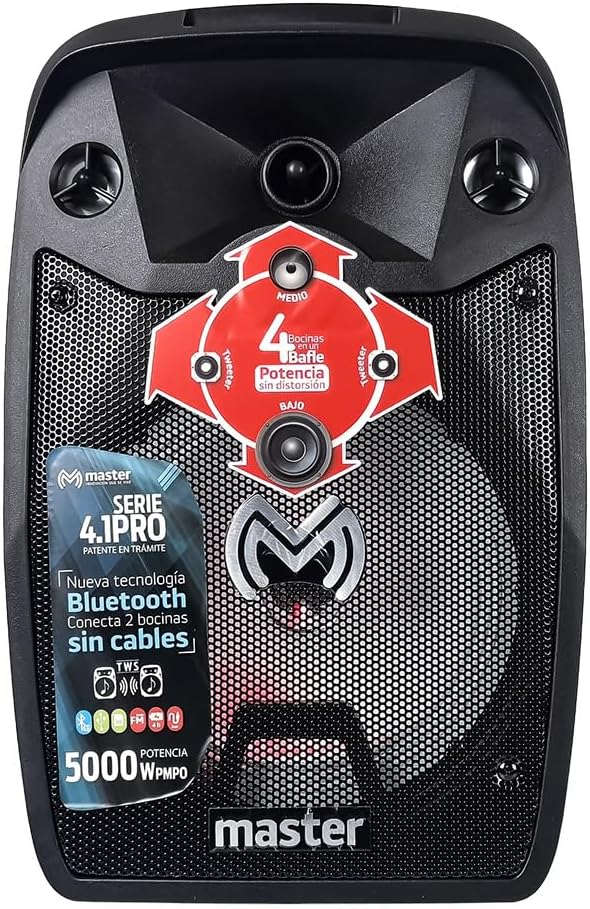
olusin 4.2: Iwaju view pẹlu LED ina.
5. Itọju
Proper care ensures the longevity of your Master MA-8.1K speaker.
- Ninu: Lo asọ rirọ, ti o gbẹ lati nu ode ti agbọrọsọ. Ma ṣe lo abrasive ose tabi epo.
- Ibi ipamọ: Tọju agbohunsoke ni itura, aye gbigbẹ kuro lati orun taara ati awọn iwọn otutu to gaju.
- Itọju Batiri: If storing for extended periods, charge the battery every 3-6 months to maintain its health.
- Ifihan omi: Agbọrọsọ yii kii ṣe omi ti o n da omi duro. Yẹra fun fifi omi si tabi ọrinrin ti o pọ ju.
6. Laasigbotitusita
Tọkasi apakan yii fun awọn ọran ti o wọpọ ati awọn ojutu wọn.
| Isoro | Owun to le Fa | Ojutu |
|---|---|---|
| Ko si agbara | Batiri ti dinku; Yipada agbara wa ni pipa. | Charge the speaker; Ensure the Power switch is in the 'ON' position. |
| Ko si ohun | Iwọn didun ti lọ silẹ pupọ; Ipo titẹ sii ti ko tọ; Ẹrọ ko ni asopọ daradara. | Increase speaker and device volume; Press 'Mode' button to select correct input; Reconnect device. |
| Bluetooth ko sopọ | Agbọrọsọ kii ṣe ni ipo sisopọ; Ẹrọ Bluetooth kuro; Ju jina lati agbọrọsọ. | Ensure speaker is in Bluetooth mode (flashing 'BLUE'); Turn on device Bluetooth; Move device closer to speaker (within 10 meters). |
| Gbohungbohun ko ṣiṣẹ | Kò sí gbohungbohun tí a fi sínú rẹ̀; Ìwọ̀n gbohungbohun náà kéré jù. | Ensure microphone is securely plugged into MIC IN; Adjust 'Microphone Volume' knob. |
| Sisopọ TWS kuna | Speakers not in Bluetooth mode; Already connected to a device. | Ensure both speakers are in Bluetooth mode and not connected to any device before initiating TWS pairing. |
7. Awọn pato
Detailed technical specifications for the Master MA-8.1K speaker.

Figure 7.1: Speaker dimensions.
| Ẹya ara ẹrọ | Sipesifikesonu |
|---|---|
| Nọmba awoṣe | MA-8.1K |
| Brand | Oga |
| Ijade Wattage | 5000 Watts (PMPO) |
| Asopọmọra Technology | Bluetooth, USB, Micro SD, Auxiliary (3.5mm) |
| Orisun agbara | Batiri |
| Igbesi aye Batiri (Apapọ) | Awọn wakati 5 |
| Pataki Awọn ẹya ara ẹrọ | Bluetooth, TWS (True Wireless Stereo), Microphone Input, Remote Control, LED Lights |
| Iṣeduro Lilo | Awọn ẹrọ orin |
| Awọn iwọn Ọja (L x W x H) | 28.5 x 27 x 46.5 cm |
| Iwọn Ọja | 5.5 kg |
| Awọn ẹrọ ibaramu | MP3 Player, Smartphones, Tablets |
| Iṣagbesori Iru | Floor Oke |
8. Atilẹyin ọja ati Support
For warranty information and customer support, please refer to the documentation included with your purchase or contact the retailer where the product was acquired. Keep your proof of purchase for any warranty claims.