
Ọrọ Iṣaaju
This manual provides instructions for the installation, operation, and maintenance of the Maxxima 8-inch Recessed Commercial LED Downlight. This fixture features selectable color temperature (CCT) and wattage, offering versatility for various lighting needs. It is designed for commercial applications and is 0-10V dimmable, Energy Star certified, and UL listed.
Alaye Aabo
IKILO: Risk of electric shock. Disconnect power at the fuse or circuit breaker before installation or servicing. This product must be installed in accordance with the applicable installation code by a person familiar with the construction and operation of the product and the hazards involved.
- Ka gbogbo awọn ilana ṣaaju fifi sori ẹrọ.
- Do not install in locations where the operating temperature exceeds -20°C to 40°C (-4°F to 104°F).
- Dara fun damp awọn ipo.
- IC Rated: Suitable for direct contact with insulation.
- Rí i dájú pé gbogbo ìsopọ̀ iná mànàmáná wà ní ààbò kí o sì tẹ̀lé àwọn òfin àti ìlànà agbègbè.
Package Awọn akoonu
Daju pe gbogbo awọn paati wa ṣaaju ki o to bẹrẹ fifi sori:
- 1x Maxxima 8-inch Recessed Commercial LED Downlight
- Pre-wired flexible metal conduit (whip)
- Ceiling tension spring clips (pre-attached)
- Awọn eso waya
- Safety cable (pre-attached)
Awọn pato
| Ẹya ara ẹrọ | Sipesifikesonu |
|---|---|
| Nọmba awoṣe | 755183179899 |
| Iṣagbewọle Voltage | 110-277 VAC, 50/60 Hz |
| Wattage | Selectable: 12W / 20W / 30W |
| Imọlẹ | Up to 2400 Lumens (depending on wattage aṣayan) |
| Iwọn otutu awọ (CCT) | Selectable: 2700K / 3000K / 3500K / 4000K / 5000K |
| Dimming | 0-10V Dimming (20% to 100% range) |
| Awọn iwọn | 10.2" Diameter x 4.6" Depth |
| Okùn Gigun | 18.5" |
| Ailewu USB Ipari | 19.5" |
| Awọn iwọn otutu ti nṣiṣẹ | -20°C si 40°C |
| Awọn iwe-ẹri | Energy Star, UL, IC Rated |
| Ohun elo | Irin |
| Iwọn | 1.83 iwon |
Eto & Fifi sori
Ṣaaju ki o to bẹrẹ: Ensure power is disconnected at the circuit breaker. This fixture is designed for flush mount installation into standard ceilings.
- Prepare Ceiling Opening: Create an appropriate size opening in the ceiling for the 8-inch downlight. Refer to local building codes for exact requirements.
- Awọn isopọ onirin:
- Connect the black wire from the fixture's pre-wired whip to the live (hot) wire from the power supply using a wire nut.
- Connect the white wire from the fixture's pre-wired whip to the neutral wire from the power supply using a wire nut.
- Connect the green (ground) wire from the fixture's pre-wired whip to the ground wire from the power supply using a wire nut.
- For 0-10V dimming, connect the purple wire to the dimmer's positive (+) dimming control wire and the gray wire to the dimmer's negative (-) dimming control wire. If not using dimming, cap these wires individually.
Image: Maxxima 8-inch Recessed Commercial LED Downlight with flexible conduit and wiring.

This image displays the downlight with its pre-wired flexible metal conduit, showing the individual wires for power and dimming connections. The tension spring clips are visible on the sides.
- Imuduro to ni aabo: Gently push the fixture into the ceiling opening. The pre-attached tension spring clips will automatically engage and secure the downlight firmly against the ceiling surface. Ensure the safety cable is also properly secured to a structural element if required by local codes.
Aworan: Pada view of the Maxxima 8-inch Recessed Commercial LED Downlight showing tension clips.

This image shows the rear of the downlight, highlighting the robust tension spring clips that facilitate secure installation into the ceiling.
Awọn ilana Iṣiṣẹ
The Maxxima 8-inch Recessed Commercial LED Downlight features selectable color temperature and wattage settings, allowing customization of light output.
- Yan Iwọn Awọ (CCT): Before installation, or by carefully removing the fixture, locate the 'KELVIN SETTING' switch on the back of the downlight. Slide the switch to select your desired color temperature: 2700K (Soft White), 3000K (Warm White), 3500K (Bright White), 4000K (Neutral White), or 5000K (Daylight).
- Yan Wattage: Locate the 'WATTAGE SETTING' switch on the back of the downlight. Slide the switch to select your desired wattage: Low (12W), Med (20W), or High (30W). This will adjust the lumen output accordingly.
- Iṣẹ Dimming: If connected to a compatible 0-10V dimmer, the light output can be adjusted from 20% to 100% brightness using the dimmer control.
Image: Maxxima 8-inch Recessed Commercial LED Downlight with CCT and Wattage selector switches.
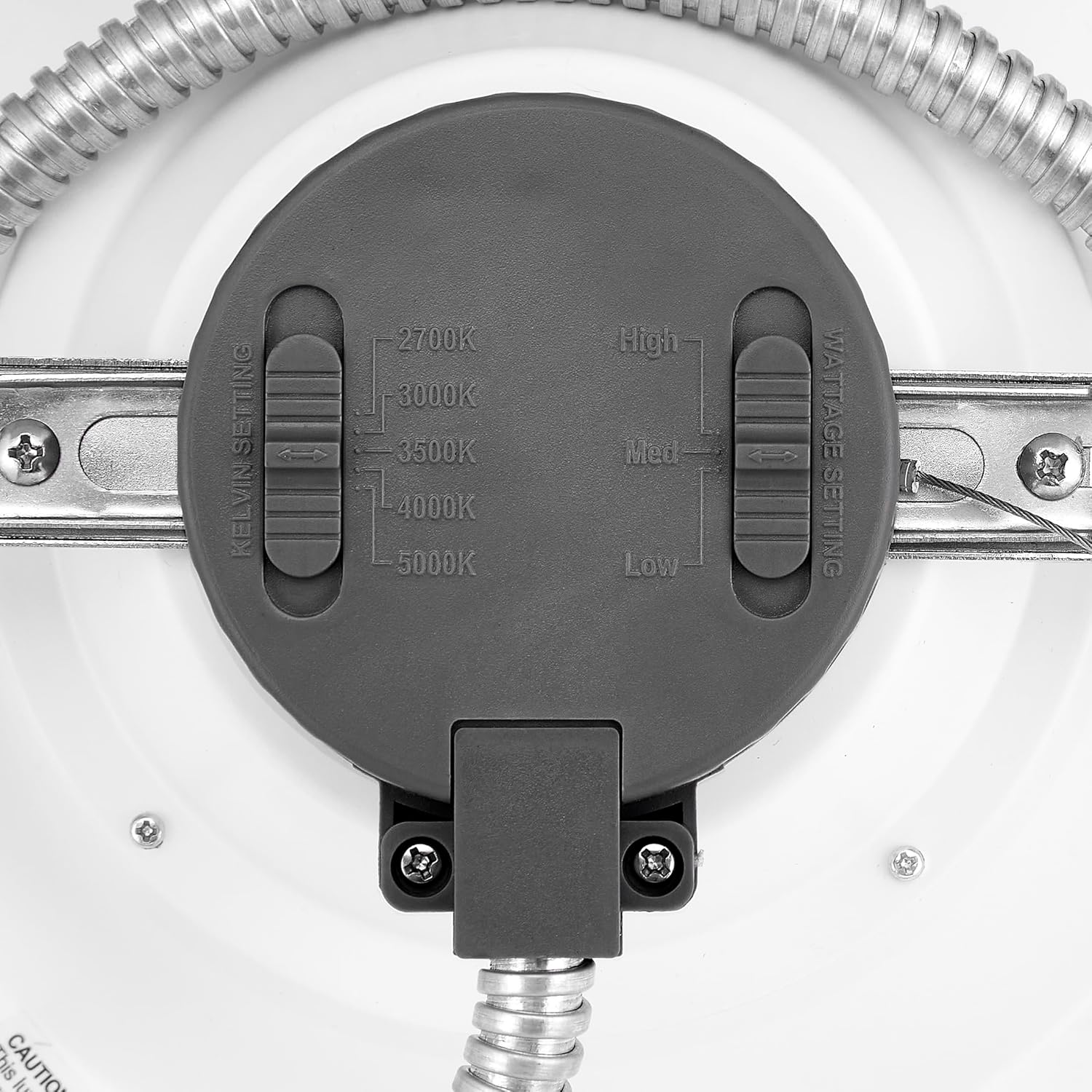
Aworan yii pese alaye kan view of the back of the downlight, clearly showing the two slider switches for adjusting Kelvin (color temperature) and Wattage eto.
Image: Commercial LED Downlight illustrating 5 CCT options.

This image visually demonstrates the different color temperature options (2700K, 3000K, 3500K, 4000K, 5000K) available with the 8-inch commercial LED downlight.
Itoju
The Maxxima LED Downlight requires minimal maintenance. Ensure power is off before cleaning.
- Ninu: Mu imuduro rẹ nu pẹlu rirọ, gbẹ, tabi die-die damp Aṣọ. Má ṣe lo àwọn kẹ́míkà líle, àwọn ohun ìfọmọ́ra, tàbí àwọn ohun olómi, nítorí pé wọ́n lè ba àwọn ohun èlò ìparí tàbí ẹ̀rọ iná mànàmáná jẹ́.
- Ayewo: Periodically inspect the fixture for any signs of damage or loose connections. If any issues are found, consult a qualified electrician.
Laasigbotitusita
| Isoro | Owun to le Fa | Ojutu |
|---|---|---|
| Imọlẹ ko tan | No power to the fixture; Loose wiring connection; Faulty switch/breaker | Check power supply at the circuit breaker. Verify all wire connections are secure. Test the switch or replace if faulty. |
| Ina flickers tabi dims lairotẹlẹ | Incompatible dimmer; Loose wiring; Voltage awọn iyipada | Ensure a compatible 0-10V dimmer is used. Check all wiring connections. Consult an electrician for voltage oran. |
| Iwọn otutu tabi imọlẹ awọ ti ko tọ | CCT/Wattage selector switches set incorrectly | Adjust the CCT and Wattage selector switches on the back of the fixture to the desired settings. |
Atilẹyin ọja
This Maxxima LED Downlight is backed by a 5-year manufacturer's warranty. This warranty covers defects in materials and workmanship under normal use. For warranty claims or further details, please contact Maxxima customer support.
Atilẹyin
For technical assistance, troubleshooting, or product information, please contact Maxxima customer support. You can find contact details and additional resources on the official Maxxima webojula tabi nipa lilo si awọn Maxxima Store on Amazon.


