
1. Ifihan
This manual provides instructions for the proper setup, operation, and maintenance of your IPD IPH-160 Monaural Wired Headset. The IPH-160 is designed for clear communication in various environments, featuring a noise-cancelling microphone and a 3.5mm jack for broad compatibility.
2. Package Awọn akoonu
Jọwọ rii daju pe gbogbo awọn ohun kan wa ninu apo rẹ:
- IPD IPH-160 Monaural Headset
- Quick Disconnect (QD) to 3.5mm Jack Cable (4-pole)
- Awọn iṣu Eti (ti a ti fi sii tẹlẹ tabi apoju)
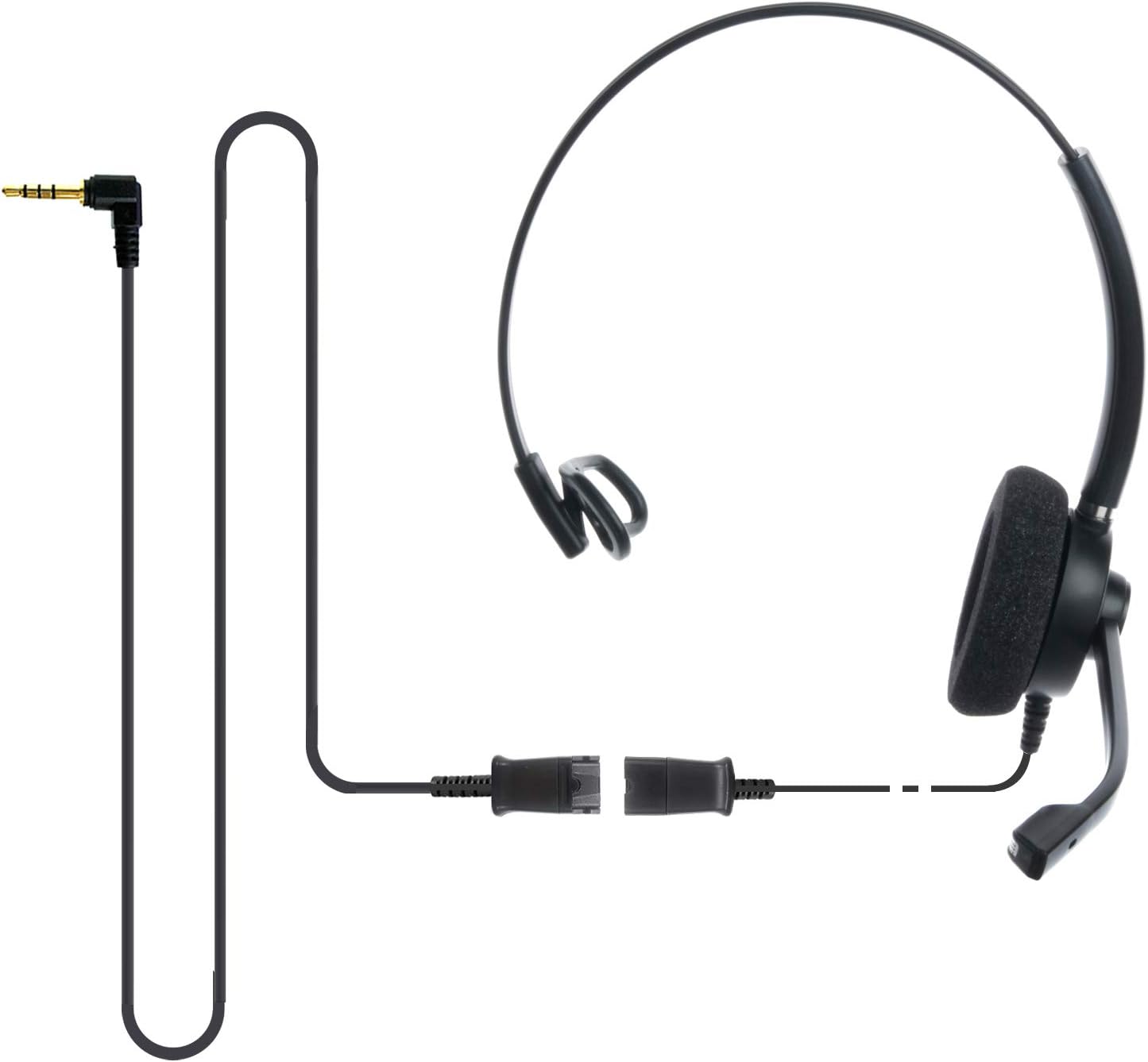
Image: The IPD IPH-160 headset with its detachable Quick Disconnect cable and 3.5mm jack connector.
3. Eto
3.1 Nsopọ Agbekọri
- Connect the Quick Disconnect (QD) cable to the headset. Ensure a secure connection.
- Insert the 3.5mm jack of the cable into the corresponding port on your device (Android cell phone, laptop, tablet, Apple MacBook, or other smart device).

Aworan: A sunmọ-soke view of the 3.5mm jack connector, illustrating its connection to a mobile device and laptop.
3.2 Ibamu ẹrọ
The 3.5mm jack (4 poles) is compatible with a wide range of devices including:
- Android cell phones (e.g., Samsung, Huawei, HTC, ZTE)
- Kọǹpútà alágbèéká
- Awọn tabulẹti
- Apple MacBooks with a single 3.5mm headset port
Akiyesi:
- iPhone 7/7S and later models may require an additional Lightning to 3.5mm adapter (not included).
- If your specific phone model is not listed or you encounter compatibility issues, please contact IPD support for assistance.

Image: The IPD headset shown with various connection options for desk phones, PCs/softphones, and mobile phones, highlighting the versatility of Quick Disconnect cables.
4. Ṣiṣẹ Agbekọri
4.1 Wearing and Adjusting
The IPH-160 headset is designed for all-day comfort. Adjust the headband for a secure yet comfortable fit. The microphone boom is flexible; position it approximately 1-2 inches from your mouth for optimal voice pickup.
4.2 Ariwo Fagilee Gbohungbohun
The headset features a passive noise-cancelling microphone to reduce background noise, ensuring clearer conversations. Proper microphone positioning is crucial for effective noise cancellation.

Image: A user wearing the headset, demonstrating the microphone's position and illustrating the effect of noise cancellation on audio waveforms.
4.3 Acoustic Shock Protection (ASP)
The headset incorporates an Acoustic Shock Protection (ASP) circuit on the speaker. This feature protects your hearing from sudden, unwanted loud noises by cutting sounds over 105dB and maintaining levels below 105dB.
4.4 Wideband Audio
The HD Wideband speaker delivers clear sound, enhancing the quality of your calls and audio monitoring.

Image: A close-up of the headset's ear cushion, visually representing the distinction between acoustic noise and clear sound for high-quality voice communication.
5. Itọju
5.1 Ninu
To maintain hygiene and performance, regularly clean the ear cushions and other surfaces of the headset with a soft, dry cloth. Avoid using harsh chemicals or abrasive materials.
5.2 Ibi ipamọ
When not in use, store the headset in a clean, dry place away from direct sunlight and extreme temperatures. Avoid tangling the cable to prevent damage.
6. Laasigbotitusita
6.1 Ko si Ohun tabi Iwọn kekere
- Rii daju pe jaketi 3.5mm ti fi sii ni kikun sinu ẹrọ rẹ.
- Ṣayẹwo awọn eto iwọn didun ẹrọ rẹ.
- Verify that the headset is selected as the audio output device in your computer's sound settings.
- Confirm the Quick Disconnect (QD) cable is securely connected to the headset.
6.2 Gbohungbohun Ko Ṣiṣẹ
- Rí i dájú pé gbohùngbohùn náà wà ní ibi tí ó yẹ nítòsí ẹnu rẹ.
- Check your device's microphone input settings and ensure the headset is selected as the input device.
- Test the headset with another compatible device to rule out a device-specific issue.
6.3 ibamu Oran
If you experience compatibility problems with your device, especially if it's not explicitly listed as compatible, please contact IPD customer support for guidance.
7. Awọn pato
| Ẹya ara ẹrọ | Sipesifikesonu |
|---|---|
| Orukọ awoṣe | IPH-160-35 |
| Asopọmọra Technology | Ti firanṣẹ |
| Awọn agbekọri Jack | 3.5 mm Jack (4-pole) |
| Ariwo Iṣakoso | Fifagile Ariwo |
| Idahun Igbohunsafẹfẹ | 10 kHz |
| Ifamọ | 58 dB |
| Ipalara | 150 ohms |
| Iwọn Nkan | 198 Giramu (7 iwon) |
| Ohun elo | Ṣiṣu |
| Gbigbe Eti | Lori Eti |
| Pataki Ẹya | Ifagile Ariwo |
| Awọn irinše to wa | Awọn iṣu Eti |
8. atilẹyin ọja Information
The IPD IPH-160 Headset comes with a 3-odun atilẹyin ọja lati ọjọ ti o ra. Atilẹyin ọja yi ni wiwa awọn abawọn iṣelọpọ labẹ lilo deede. Jọwọ ṣe idaduro ẹri rira rẹ fun awọn iṣeduro atilẹyin ọja.
9. Atilẹyin
For technical assistance, warranty claims, or any questions regarding your IPD IPH-160 Headset, please contact IPD customer support. You can find contact information on the official IPD webojula tabi nipasẹ rẹ alagbata.
Ṣabẹwo si IPD Store fun alaye siwaju sii ati awọn ọja.