
1. Awọn ilana aabo
Please read these safety instructions carefully before using the MINISO Mini Portable Aromatic Fan. Keep this manual for future reference.
- Ma ṣe fi afẹfẹ bọ inu omi tabi awọn olomi miiran.
- Jeki kuro ni arọwọto awọn ọmọde.
- Do not insert fingers or any objects into the fan blades.
- Lo okun USB ti a pese nikan fun gbigba agbara.
- Do not disassemble, repair, or modify the fan yourself. Contact qualified personnel for service.
- Avoid exposing the fan to extreme temperatures or direct sunlight for prolonged periods.
- Only use essential oils specifically designed for diffusers in the aromatherapy compartment.
2. Ọja Ipariview
The MINISO Mini Portable Aromatic Fan is designed for personal cooling and aromatherapy. Its compact and ergonomic design makes it suitable for various environments, including offices, schools, and outdoor use.

Nọmba 2.1: Iwaju view of the MINISO Mini Portable Aromatic Fan. This image shows the fan's overall design, including the protective grille and handle.
Awọn ẹya pataki:
- Apẹrẹ to gbe: Compact size (4.5 x 9.8 x 20.1 cm) and ergonomic handle for easy carrying.
- Eto Iyara mẹta: Afẹfẹ afẹfẹ ti a le ṣatunṣe fun itunu ti ara ẹni.
- Aromatherapy Compartment: Integrated space for adding aromatic oils.
- USB gbigba agbara: Built-in 1200 mAh lithium battery, charged via USB.
- Isẹ idakẹjẹ: Engineered for low noise while providing effective airflow.

Nọmba 2.2: Close-up of the fan's ergonomic handle. The handle is designed to fit comfortably in your hand, ensuring a secure grip.
3. Eto
3.1 Gbigba agbara Fan
Before first use, fully charge the fan. The fan is equipped with a 1200 mAh lithium battery.
- Locate the USB charging port on the fan handle.
- Connect the provided USB cable to the fan's charging port.
- So opin keji okun USB pọ mọ orisun agbara USB ti o baamu (fun apẹẹrẹ, kọmputa, adapter ogiri).
- The charging indicator light will illuminate (color may vary) to show that the fan is charging.
- Charging time is approximately 1.5 to 3 hours. The indicator light will change or turn off once fully charged.

Nọmba 3.1: Illustration of the fan's rechargeable battery feature. The fan uses a USB cable for charging, providing up to 3.5 hours of continuous use on a full charge.
3.2 Adding Aromatic Oil
The fan includes a special compartment for aromatherapy.
- Locate the aromatherapy cover on the front grille of the fan.
- Fi pẹ̀lẹ́pẹ̀lẹ́ ṣí ìbòrí náà.
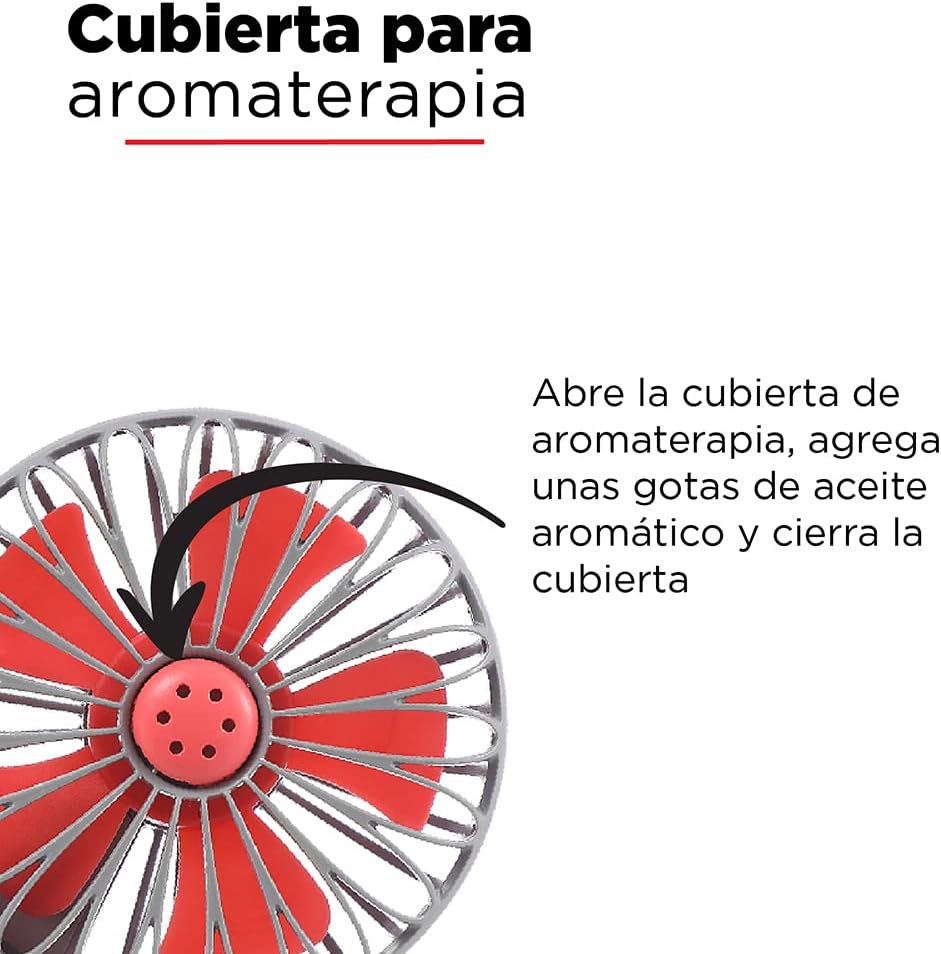
- Add a few drops of your preferred aromatic oil onto the small pad inside the compartment. Do not overfill.
- Pa ideri naa ni aabo.

Nọmba 3.2: Detail of the aromatherapy cover. To use, open the cover, add a few drops of aromatic oil, and then close it.
4. Isẹ
4.1 Agbara Titan / Pa ati Iṣatunṣe Iyara
The fan features a single button for power control and speed adjustment.
- Lati Fi agbara: Press the power button located on the handle once. The fan will start at the lowest speed setting.
- Láti Ṣàtúnṣe Ìyára: While the fan is on, press the power button repeatedly to cycle through the three speed settings (Low → Medium → High).
- Lati Paarẹ: After the highest speed setting, press the power button one more time to turn the fan off.

Nọmba 4.1: Location of the power/speed button on the fan handle. Pressing this button cycles through the three available speeds and turns the fan off.
5. Itọju
Proper maintenance ensures the longevity and optimal performance of your fan.
- Ninu Ode: Wipe the fan's exterior with a soft, dry cloth. For stubborn dirt, a slightly damp cloth can be used, but ensure no water enters the fan's internal components.
- Ninu awọn Blades: Use a soft brush or cotton swab to gently clean dust from the fan blades through the grille. Do not attempt to remove the grille or blades.
- Aromatherapy Compartment: Regularly clean the aromatic oil pad and compartment to prevent residue buildup. Replace the pad if it becomes discolored or loses effectiveness.
- Ibi ipamọ: When not in use for extended periods, store the fan in a cool, dry place, away from direct sunlight and moisture. Ensure the battery is partially charged before storage.
6. Laasigbotitusita
Ti o ba pade awọn ọran pẹlu olufẹ rẹ, tọka si tabili atẹle fun awọn iṣoro ati awọn iṣoro ti o wọpọ.
| Isoro | Owun to le Fa | Ojutu |
|---|---|---|
| Fan ko ni tan-an. | Batiri ti dinku. | Gba agbara afẹfẹ naa nipa lilo okun USB ti a pese. |
| Fan runs weakly or stops unexpectedly. | Kekere batiri idiyele. | Tun gba afẹfẹ pada. |
| Aroma is not noticeable. | Aromatic oil pad is dry or needs more oil. | Add more drops of aromatic oil to the pad or replace the pad. |
| Fan ki asopọ dani ariwo. | Ìdènà nínú abẹ́ afẹ́fẹ́ tàbí ìṣòro inú. | Turn off the fan and check for any visible obstructions. If the noise persists, discontinue use and contact support. |
7. Awọn pato
Technical details for the MINISO Mini Portable Aromatic Fan.
| Ẹya ara ẹrọ | Ẹ̀kúnrẹ́rẹ́ |
|---|---|
| Brand | MINISO |
| Orukọ awoṣe | Mini Ventilador Aromático |
| Orisun agbara | Battery, Electric Cord (USB) |
| Batiri Iru | 1200 mAh Litiumu Batiri |
| Akoko gbigba agbara | 1.5 si 3 wakati |
| Akoko Lilo | 1.5 to 3 hours (up to 3.5 hours continuous use) |
| Ijade agbara | 3 Wattis |
| Nọmba ti Awọn iyara | 3 |
| Ọna Iṣakoso | Touch (Single Button) |
| Iwọn (D x W x H) | 4.5 x 9.8 x 20.1 cm (1.77 x 3.86 x 7.91 inches) |
| Ohun elo | Ṣiṣu |
| Àwọ̀ | Black (as per product data, though images show grey) |
Nọmba 7.1: Visual representation of the fan's dimensions, showing a height of 20 cm and a width of 9.8 cm.
8. Atilẹyin ọja ati Support
For warranty information, technical support, or service inquiries, please contact MINISO customer support through their official webaaye tabi alagbata ti o ti ra ọja naa.
Please have your product model name (Mini Ventilador Aromático) and purchase details ready when contacting support.
You can visit the MINISO store on Amazon for more information: MINISO Official Store