
Altec Lansing AL-5003
Altec Lansing AL-5003 Multimedia DJ Trolly Speaker User Manual
Awoṣe: AL-5003
Ọrọ Iṣaaju
O ṣeun fun riraasing the Altec Lansing AL-5003 Multimedia DJ Trolly Speaker. This speaker is designed to deliver powerful audio for various applications, including parties and surround sound systems. Featuring wireless connectivity, a built-in trolley for portability, and multiple input options, the AL-5003 offers a versatile audio experience. Please read this manual carefully to ensure proper setup, operation, and maintenance of your speaker.
Awọn Itọsọna Aabo pataki
- Read these instructions thoroughly before operating the speaker.
- Jeki iwe afọwọkọ yii fun itọkasi ọjọ iwaju.
- Ma ṣe fi agbọrọsọ si ojo tabi ọrinrin.
- Ma ṣe dina eyikeyi awọn ṣiṣi atẹgun.
- Maṣe fi sori ẹrọ nitosi awọn orisun ooru gẹgẹbi awọn imooru, awọn iforukọsilẹ ooru, awọn adiro, tabi awọn ohun elo miiran (pẹlu ampliifiers) ti o gbe ooru jade.
- Dabobo okun agbara lati ma rin lori tabi pin, ni pataki ni awọn pilogi, awọn ohun elo irọrun, ati aaye nibiti wọn ti jade kuro ninu ohun elo naa.
- Lo awọn asomọ/awọn ẹya ara ẹrọ ti olupese pato.
- Yọọ ohun elo yi nigba iji manamana tabi nigba lilo fun igba pipẹ.
- Tọkasi gbogbo iṣẹ si awọn oṣiṣẹ iṣẹ ti o peye.
Package Awọn akoonu
Jọwọ ṣayẹwo package fun awọn nkan wọnyi:
- Altec Lansing AL-5003 Multimedia DJ Trolly Speaker
- Okun agbara
- Isakoṣo latọna jijin
- Itọsọna olumulo
- Auxiliary Cable (may vary by region)
Ọja Pariview
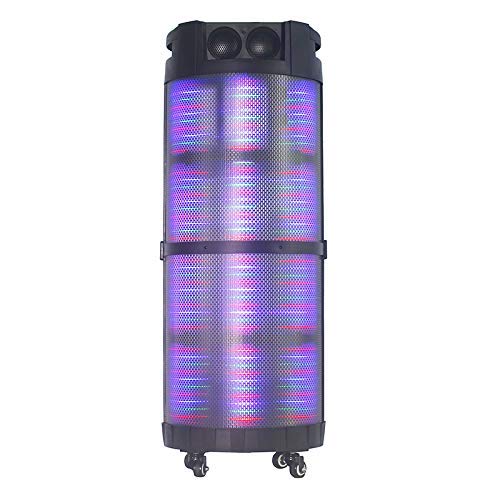
The AL-5003 speaker features a robust design with integrated wheels and a handle for easy transport. It includes a powerful 10-inch speaker and a 1-inch tweeter, providing clear and dynamic sound. The control panel is located on the top of the unit, offering easy access to various functions.
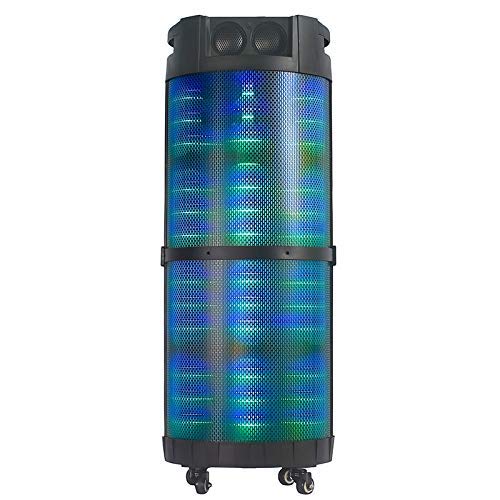
Aworan 1: Iwaju view of the Altec Lansing AL-5003 speaker, showcasing its cylindrical design and illuminated grille. The speaker features a sturdy build with integrated wheels at the base for portability.
Ibi iwaju alabujuto ati awọn isopọ
The top panel of the speaker houses the main controls and input/output ports.
Aworan 2: Oke-isalẹ view of the AL-5003 speaker, highlighting the control panel with various buttons and knobs, along with the top-mounted speakers. This view also shows the integrated handle for easy transport.
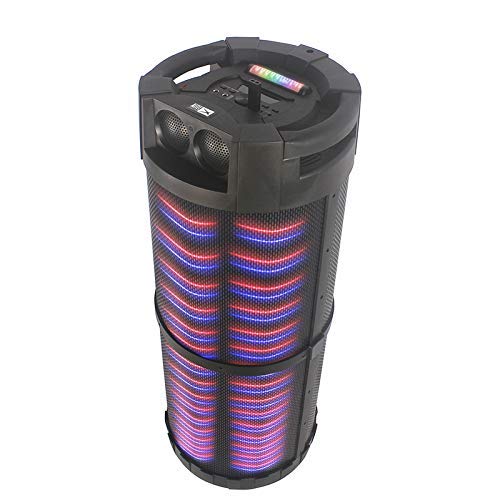
Aworan 3: Igun view of the AL-5003 speaker, providing a perspective of its overall structure, including the side grille and the top control area. The dynamic lighting effects are visible through the mesh.
Common controls include Power, Volume, Mode selection, Play/Pause, Track Skip, and inputs for USB, Auxiliary, and potentially Microphone (if available on the model).
Awọn ilana iṣeto
- Ṣii silẹ: Carefully remove the speaker and all accessories from the packaging. Retain the packaging for future transport or storage.
- Ibi: Place the speaker on a stable, flat surface. Ensure there is adequate ventilation around the unit. For optimal sound, position the speaker in a central location within the listening area.
- Asopọ agbara: Connect the provided power cord to the AC input on the speaker and then plug it into a standard wall outlet (AC 100-240V, 50/60Hz).
- Initial Charge (if applicable): If the speaker has an internal battery (Lead Acid battery mentioned in specs), it is recommended to fully charge it before first use. The charging indicator light will typically show charging status.
- Agbara Tan: Press the Power button on the control panel or remote control to turn on the speaker.
Awọn ilana Iṣiṣẹ
1. Ipo Bluetooth
- Mu Bluetooth ṣiṣẹ: Turn on the speaker. Press the "Mode" button on the control panel or remote until "Bluetooth" or "BT" is displayed (or indicated by a blue LED). The speaker will enter pairing mode, indicated by a flashing light or audible prompt.
- Asopọmọra pẹlu Ẹrọ: On your mobile device (smartphone, tablet, laptop), go to Bluetooth settings and enable Bluetooth. Wa fun available devices. You should see "AL-5003" or "Altec Lansing" in the list. Select it to pair.
- Ìmúdájú Ìsopọ̀: Once successfully paired, the speaker will emit a confirmation sound, and the Bluetooth indicator light will become solid.
- Sisisẹsẹhin: Start playing audio on your connected device. Use the speaker's volume controls or your device's volume controls to adjust the sound level. Use the Play/Pause, Next, and Previous buttons on the speaker or remote to control playback.
2. Auxiliary (AUX) Mode
- So okun AUX pọ: Insert one end of a 3.5mm auxiliary cable into the AUX input port on the speaker. Connect the other end to the headphone jack or audio output of your external audio device (e.g., MP3 player, laptop).
- Yan Ipo AUX: Press the "Mode" button on the speaker or remote until "AUX" is displayed or indicated.
- Sisisẹsẹhin: Play audio from your connected device. Adjust volume using both the speaker's controls and your device's volume.
3. USB Playback Mode
- Fi USB Drive sii: Fi kọnputa USB ti o ni ohun MP3 sii files sinu USB ibudo lori agbọrọsọ.
- Yan Ipo USB: The speaker may automatically switch to USB mode. If not, press the "Mode" button until "USB" is displayed or indicated.
- Sisisẹsẹhin: Agbọrọsọ yoo bẹrẹ sisẹ ohun laifọwọyi files from the USB drive. Use the Play/Pause, Next, and Previous buttons to control playback.
4. Karaoke Function (if applicable)
If your AL-5003 model includes a microphone input, you can use it for karaoke:
- Sopọ Gbohungbo: Plug a wired microphone into the designated microphone input jack.
- Ṣatunṣe Iwọn didun: Use the dedicated Microphone Volume knob (if present) to adjust the microphone's volume.
- Iṣakoso iwoyi: Some models may have an Echo knob to add an echo effect to the microphone audio.
5. Isẹ Iṣakoso latọna jijin
The included remote control provides convenient access to all major functions:
- Agbara: Tan/Pa agbọrọsọ naa.
- Ipo: Switch between Bluetooth, AUX, USB, and other available modes.
- Iwọn didun +/-: Ṣatunṣe iwọn didun titunto si.
- Ṣiṣẹ/Daduro: Bẹrẹ tabi da ṣiṣiṣẹsẹhin duro.
- Ti tẹlẹ/Itele: Rekọja si orin iṣaaju tabi atẹle.
- EQ: Select different equalizer presets (if available).
- Pa ẹnu mọ́: Mu ohùn náà dẹ́kun tàbí kí o yọ ohùn náà kúrò.
Itoju
- Ninu: Lo aṣọ rírọrùn tí ó gbẹ láti nu ìta agbọ́hùnsọ náà. Má ṣe lo àwọn ohun èlò ìfọmọ́ omi tàbí àwọn ohun èlò ìpara.
- Ibi ipamọ: Nigbati o ko ba wa ni lilo fun awọn akoko ti o gbooro sii, tọju agbohunsoke si tutu, ibi gbigbẹ, kuro lati orun taara ati awọn iwọn otutu to gaju.
- Itọju Batiri: If the speaker has a built-in rechargeable battery, avoid fully discharging it frequently. For long-term storage, charge the battery to approximately 50-70% every few months to prolong its lifespan.
- Afẹfẹ: Rii daju pe awọn šiši fentilesonu ko ni idinamọ lati ṣe idiwọ igbona.
Laasigbotitusita
| Isoro | Owun to le Fa | Ojutu |
|---|---|---|
| Ko si agbara | Power cord not connected; Power outlet not working; Speaker is off; Battery drained. | Ensure power cord is securely connected. Try a different outlet. Press the Power button. Charge the battery. |
| Ko si ohun | Volume too low; Incorrect mode selected; Device not connected properly; Mute function active. | Increase volume on speaker and source device. Select the correct input mode (Bluetooth, AUX, USB). Reconnect device. Check if mute is active on remote. |
| Ikuna sisopọ Bluetooth | Agbọrọsọ kii ṣe ni ipo sisopọ; Ẹrọ Bluetooth kuro; Agbọrọsọ jina si ẹrọ; kikọlu. | Ensure speaker is in Bluetooth pairing mode. Turn on Bluetooth on your device. Move device closer to speaker. Turn off other Bluetooth devices nearby. |
| Sisisẹsẹhin USB ko ṣiṣẹ | A kò fi awakọ USB sii daradara; Ko baamu file format; USB drive corrupted. | Reinsert USB drive. Ensure files are in MP3 format. Try a different USB drive. |
| Isakoṣo latọna jijin ko ṣiṣẹ | Batteries drained; Obstruction between remote and speaker; Remote not pointed at sensor. | Replace remote control batteries. Remove any obstructions. Point remote directly at the speaker's IR sensor. |
Awọn pato
| Ẹya ara ẹrọ | Ẹ̀kúnrẹ́rẹ́ |
|---|---|
| Orukọ awoṣe | Altec Lansing AL-5003 Multimedia DJ Trolly Speaker |
| Agbọrọsọ Iru | Agbegbe Ohun |
| Pataki Ẹya | Ailokun |
| Niyanju Lilo | For Surround Sound Systems, Party |
| Awọn ẹrọ ibaramu | Gaming Console, Karaoke Machine, Laptop, MP3 Player, Smartphone, Tablet |
| Kakiri Ohun ikanni iṣeto ni | 1.0 |
| Ọna Iṣakoso | Latọna jijin |
| Imọ-ẹrọ Ibaraẹnisọrọ Alailowaya | Bluetooth |
| Iwọn Agbọrọsọ | 10 inches |
| Orisun agbara | Okun Itanna |
| Opin Tweeter | 1 inches |
| Audio Input Compatible | Iranlọwọ, USB |
| Agbọrọsọ Asopọmọra | Wired (for power), Wireless (Bluetooth) |
| Audio Wattage | 100 Wattis |
| Batiri Cell Tiwqn | Olori Acid |
| Iṣagbesori Iru | Iduro Floor |
Atilẹyin ọja ati Support
Altec Lansing products are manufactured to the highest quality standards. For information regarding warranty coverage, technical support, or service inquiries, please refer to the warranty card included with your product or visit the official Altec Lansing website. Please have your model number (AL-5003) and purchase details ready when contacting support.
Webojula: www.alteclansing.com (This is a generic link, actual link might vary by region)
Ask a question about this manual
Ask about setup, troubleshooting, compatibility, parts, safety, or missing instructions. Manuals+ will review the question and use this page’s manual context to help answer it.