
Awọn Itọsọna Aabo pataki
Please read these instructions carefully before operating your Altec Lansing AL-5001 speaker and retain them for future reference. Following these guidelines will ensure safe operation and prolong the life of your device.
- Orisun Agbara: Only use the provided power adapter. Ensure the voltage matches the requirements specified on the speaker.
- Omi ati Ọrinrin: Do not expose this appliance to rain, moisture, dripping, or splashing. Do not place objects filled with liquids, such as vases, on the apparatus.
- Ooru: Maṣe fi sori ẹrọ nitosi awọn orisun ooru gẹgẹbi awọn imooru, awọn iforukọsilẹ ooru, awọn adiro, tabi awọn ohun elo miiran (pẹlu ampliifiers) ti o gbe ooru jade.
- Afẹfẹ: Rí i dájú pé afẹ́fẹ́ ń yọ́ dáadáa. Má ṣe dí àwọn ihò afẹ́fẹ́. Fi sori ẹ̀rọ náà gẹ́gẹ́ bí ìlànà olùpèsè.
- Ninu: Yọ ẹ̀rọ yìí kúrò kí o tó fọ. Fi aṣọ gbígbẹ nìkan fọ ọ.
- Ṣiṣẹ: Maṣe gbiyanju lati ṣe iṣẹ ọja yii funrararẹ. Tọkasi gbogbo iṣẹ si awọn oṣiṣẹ iṣẹ ti o peye. Iṣẹ nilo nigbati ohun elo ba ti bajẹ ni ọna eyikeyi, gẹgẹbi okun ipese agbara tabi plug ti bajẹ, omi ti ta silẹ tabi awọn nkan ti ṣubu sinu ẹrọ, ohun elo naa ti farahan si ojo tabi ọrinrin, ko ṣiṣẹ deede, tabi ti lọ silẹ.
- Aabo Batiri: This product contains a Lithium battery. Do not expose to excessive heat or direct sunlight. Dispose of batteries properly according to local regulations.
Package Awọn akoonu
Daju pe gbogbo awọn nkan ti a ṣe akojọ rẹ si isalẹ wa ninu package rẹ:
- Altec Lansing AL-5001 Multimedia DJ Trolley Speaker
- Itọsọna olumulo
- Adapter agbara
- Isakoṣo latọna jijin
- Gbohungbohun Alailowaya
Ọja Pariview
The Altec Lansing AL-5001 is a portable multimedia DJ trolley speaker designed for powerful audio output and versatile connectivity. It features a robust design with a pull rod and wheels for easy transport, integrated disco ball lighting, and multiple input options.

Nọmba 1: Iwaju view of the Altec Lansing AL-5001 speaker, showcasing the main speaker grille, control panel, and the disco ball light on top. The extendable handle is visible in its retracted position.
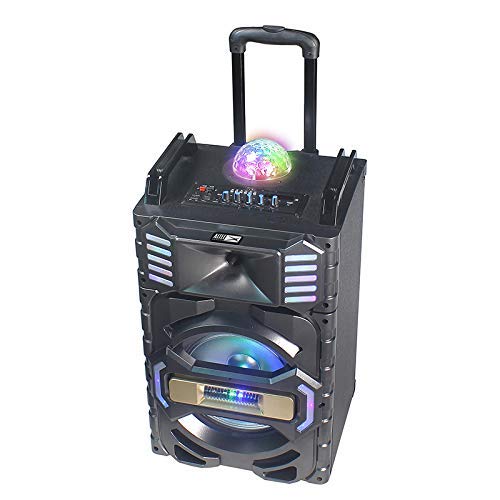
Nọmba 2: Igun view of the Altec Lansing AL-5001 speaker, highlighting the side panels with integrated LED lights and the extendable trolley handle in an extended position for portability.
Key components include the main speaker unit, control panel with various buttons and knobs, input ports (USB, TF Card, AUX, Mic), and the built-in disco ball light.
Ṣeto
- Ṣii silẹ: Carefully remove the speaker and all accessories from the packaging. Retain the packaging for future transport or storage.
- Ibi: Place the speaker on a stable, flat surface. Ensure there is adequate space around the speaker for proper ventilation.
- Asopọ agbara: Connect the provided power adapter to the DC IN port on the speaker and then plug it into a standard wall outlet. The speaker can operate directly from AC power or use its internal rechargeable battery.
- Gbigba agbara akọkọ: For first-time use, it is recommended to fully charge the speaker's internal lithium battery. The charging indicator will typically show the charging status and turn off or change color once fully charged.
Awọn ilana Iṣiṣẹ
Titan / Paa
Locate the power button on the control panel. Press and hold it for a few seconds to turn the speaker ON or OFF. A power indicator light will illuminate when the speaker is on.
Asopọ Bluetooth
- Tan agbohunsoke. Yoo tẹ ipo sisopọ pọ si Bluetooth laifọwọyi, tọka nipasẹ LED didan.
- Lori ẹrọ alagbeka rẹ (foonuiyara, tabulẹti, kọǹpútà alágbèéká), mu Bluetooth ṣiṣẹ ki o wa awọn ẹrọ to wa.
- Select "AL-5001" from the list of devices.
- Ni kete ti a ba so pọ, agbohunsoke yoo tu ohun ìmúdájú jade, ati pe ina Atọka Bluetooth yoo di mimọ.
The maximum operating distance for Bluetooth connectivity is approximately 1 foot (0.3 meters).
USB / TF Kaadi Sisisẹsẹhin
- Insert a USB flash drive or a TF (MicroSD) card into the respective port on the control panel.
- The speaker will automatically detect the media and begin playing audio files. If not, press the 'Mode' button to switch to USB or TF Card mode.
- Use the 'Play/Pause', 'Next Track', and 'Previous Track' buttons on the control panel or remote control to manage playback.
Apọju AX
- So opin kan ti okun ohun 3.5mm (ko si ninu rẹ) mọ ibudo AUX IN lori agbọrọsọ naa.
- Connect the other end of the cable to the headphone jack or audio output of your external device (e.g., laptop, smartphone).
- Press the 'Mode' button on the speaker until 'AUX' mode is selected.
- Ṣakoso ṣiṣiṣẹsẹhin ati iwọn didun lati ẹrọ ti a ti sopọ.
Redio FM
- Tẹ bọtini 'Ipo' lati yipada si ipo redio FM.
- Press the 'Play/Pause' button once to initiate an automatic scan for FM stations. The speaker will save all found stations.
- Use the 'Next Track' and 'Previous Track' buttons to navigate between saved FM stations.
Gbohungbohun Lilo
The AL-5001 includes a wireless microphone for karaoke or announcements.
- Ensure the wireless microphone has fresh batteries installed.
- Tan gbohungbohun alailowaya naa. O yẹ ki o sopọ mọ agbọrọsọ naa laifọwọyi.
- Adjust the microphone volume using the dedicated 'Mic Vol' knob on the speaker's control panel.
Disiko Ball Light
The speaker features an integrated disco ball light. Locate the dedicated button on the control panel to turn the light ON or OFF, or to cycle through different light modes.
Isakoṣo latọna jijin
The included remote control allows for convenient operation of the speaker from a distance. Functions include power, mode selection, volume control, track navigation, play/pause, and light control.
Itoju
Ninu
Always unplug the speaker from the power outlet before cleaning. Use a soft, dry, lint-free cloth to wipe the exterior surfaces. Do not use liquid cleaners, aerosols, or abrasive chemicals, as these may damage the finish or internal components.
Ibi ipamọ
When not in use for extended periods, store the speaker in a cool, dry place, away from direct sunlight and extreme temperatures. If possible, use the original packaging for protection.
Itọju Batiri
To maintain the longevity of the internal lithium battery, avoid fully discharging it frequently. If storing for a long time, charge the battery to approximately 50-70% every few months.
Laasigbotitusita
- Ko si Agbara:
- Ensure the power adapter is securely connected to both the speaker and a working wall outlet.
- Check if the speaker's internal battery is charged. Connect to power and try again. - Ko si Ohun:
- Increase the volume on both the speaker and your connected audio source.
- Ensure the correct input mode (Bluetooth, USB, AUX, FM) is selected.
- Check all audio cable connections for AUX mode. - Bluetooth Ko Sopọ:
- Ensure the speaker is in Bluetooth pairing mode (flashing indicator).
- Turn off and on Bluetooth on your device.
- Move your device closer to the speaker (within 1 foot).
- Forget the speaker from your device's Bluetooth list and try pairing again. - FM Radio Poor Reception:
- Tun agbọrọsọ si ipo pẹlu gbigba ifihan agbara to dara julọ.
- Rii daju pe ko si awọn nkan irin nla ti n ṣe idiwọ ifihan agbara naa. - Gbohungbohun Ko Ṣiṣẹ:
- Ensure the wireless microphone is turned on and has fresh batteries.
- Adjust the 'Mic Vol' knob on the speaker.
Awọn pato
| Awoṣe | AL-5001 |
| Brand | Altec Lansing |
| Agbọrọsọ pọju wu Power | 50 Wattis |
| Orisun agbara | Okun Itanna |
| Asopọmọra Technology | AUX, USB, Bluetooth |
| Ṣe atilẹyin Imọ-ẹrọ Bluetooth | Bẹẹni |
| Maximum Operating Distance (Bluetooth) | 1 Foot (0.3 meters) |
| Lapapọ Awọn ibudo USB | 1 |
| Input Audio | Iranlọwọ |
| Ohun elo | Ṣiṣu, Igi |
| Awọn iwọn Ọja (LxWxH) | 35 x 35 x 64 cm |
| Iwọn Nkan | 9.95 kg |
| Awọn batiri To wa | Bẹẹni |
| Batiri Cell Tiwqn | Litiumu |
| Pataki Awọn ẹya ara ẹrọ | Portable, In-built FM radio, Disco ball light |
| Awọn ẹrọ ibaramu | Kọǹpútà alágbèéká, Foonuiyara |
Atilẹyin ọja ati Support
Altec Lansing products are manufactured to the highest quality standards. This product is covered by a limited warranty from the date of purchase. For specific warranty terms and conditions, please refer to the warranty card included with your product or visit the official Altec Lansing webojula.
For technical support, troubleshooting assistance, or service inquiries, please contact Altec Lansing customer support through their official channels. Contact information can typically be found on the product packaging or the official webojula.