
1. Ifihan
This manual provides essential instructions for the safe and efficient operation of your Nuwave Brio 8-Qt Air Fryer. Please read this manual thoroughly before first use and retain it for future reference. The Nuwave Brio 8-Qt Air Fryer utilizes super-heated air and an efficient air-flow design to cook a variety of foods.
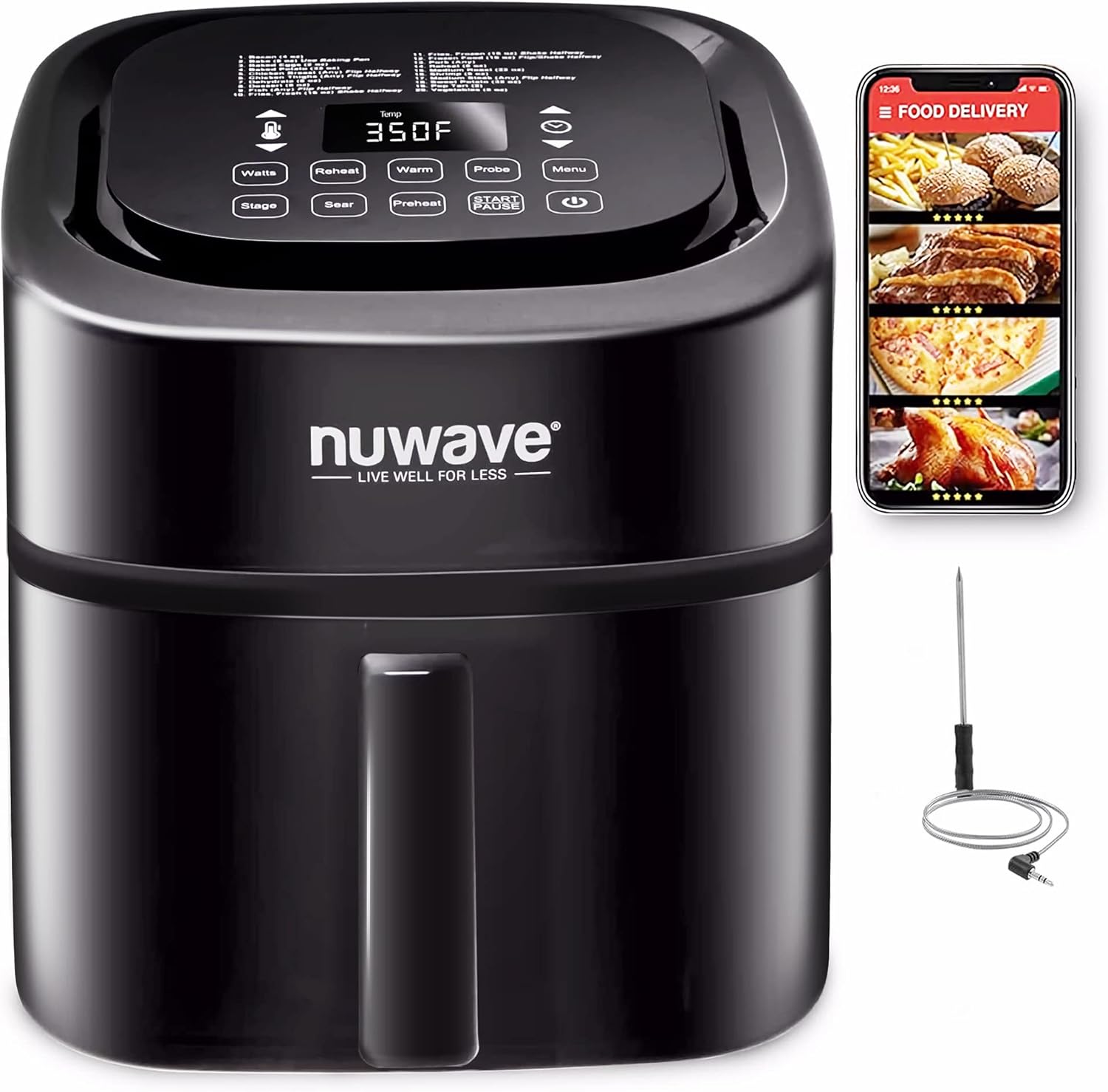
Image 1.1: Nuwave Brio 8-Qt Air Fryer with its digital display and smart thermometer accessory.
2. Alaye Aabo pataki
When using electrical appliances, basic safety precautions should always be followed to reduce the risk of fire, electric shock, and injury. This appliance is for household use only.
- Maṣe fi ọwọ kan awọn aaye ti o gbona. Lo awọn ọwọ tabi awọn koko.
- Lati daabobo lodi si mọnamọna ina, maṣe fi okun, plugs, tabi ẹyọ akọkọ sinu omi tabi omi miiran.
- Abojuto sunmọ jẹ pataki nigbati eyikeyi ohun elo ba lo nipasẹ tabi sunmọ awọn ọmọde.
- Yọọ kuro lati inu iṣan nigbati ko si ni lilo ati ṣaaju ṣiṣe mimọ. Gba laaye lati tutu ṣaaju fifi si tabi mu awọn ẹya kuro.
- Ma ṣe ṣiṣẹ ohun elo eyikeyi pẹlu okun tabi pulọọgi ti o bajẹ, tabi lẹhin aiṣe ohun elo tabi ti bajẹ ni eyikeyi ọna.
- Lilo awọn asomọ ẹya ẹrọ ti a ko ṣeduro nipasẹ olupese ohun elo le fa awọn ipalara.
- Maṣe lo ni ita.
- Ma ṣe jẹ ki okun duro lori eti tabili tabi counter, tabi fi ọwọ kan awọn aaye ti o gbona.
- Ma ṣe gbe sori tabi sunmọ gaasi ti o gbona tabi ina ina, tabi ni adiro ti o gbona.
- Išọra to gaju gbọdọ ṣee lo nigba gbigbe ohun elo ti o ni epo gbona tabi awọn olomi gbona miiran.
- Nigbagbogbo so plug to ohun elo akọkọ, ki o si pulọọgi okun sinu ogiri iṣan. Lati ge asopọ, tan eyikeyi iṣakoso si “pa”, lẹhinna yọ plug kuro ni iṣan ogiri.
- Ma ṣe lo ohun elo fun miiran ju lilo ti a pinnu lọ.
- Okun ipese agbara kukuru ni a pese lati dinku awọn ewu ti o waye lati idimọ tabi gige lori okun to gun.
- Ọja yii ni awọn kemikali ti a mọ si Ipinle California lati fa akàn ati awọn abawọn ibimọ tabi ipalara ibisi miiran.
3. Ọja Ipariview
The Nuwave Brio 8-Qt Air Fryer is designed for versatile cooking with various components to enhance your experience.
Awọn eroja:
- Ẹka akọkọ: Ibugbe akọkọ ti ẹrọ fifọ afẹfẹ.
- Ibi iwaju alabujuto: Digital interface for setting cooking parameters.
- Air Circulation Riser: Ensures even air circulation and allows fat to drip away.
- Reversible Rack: Stainless steel rack for multi-layer cooking.
- Digital Probe: Integrated thermometer for precise internal temperature monitoring.

Image 3.1: Key components of the Nuwave Brio 8-Qt Air Fryer.
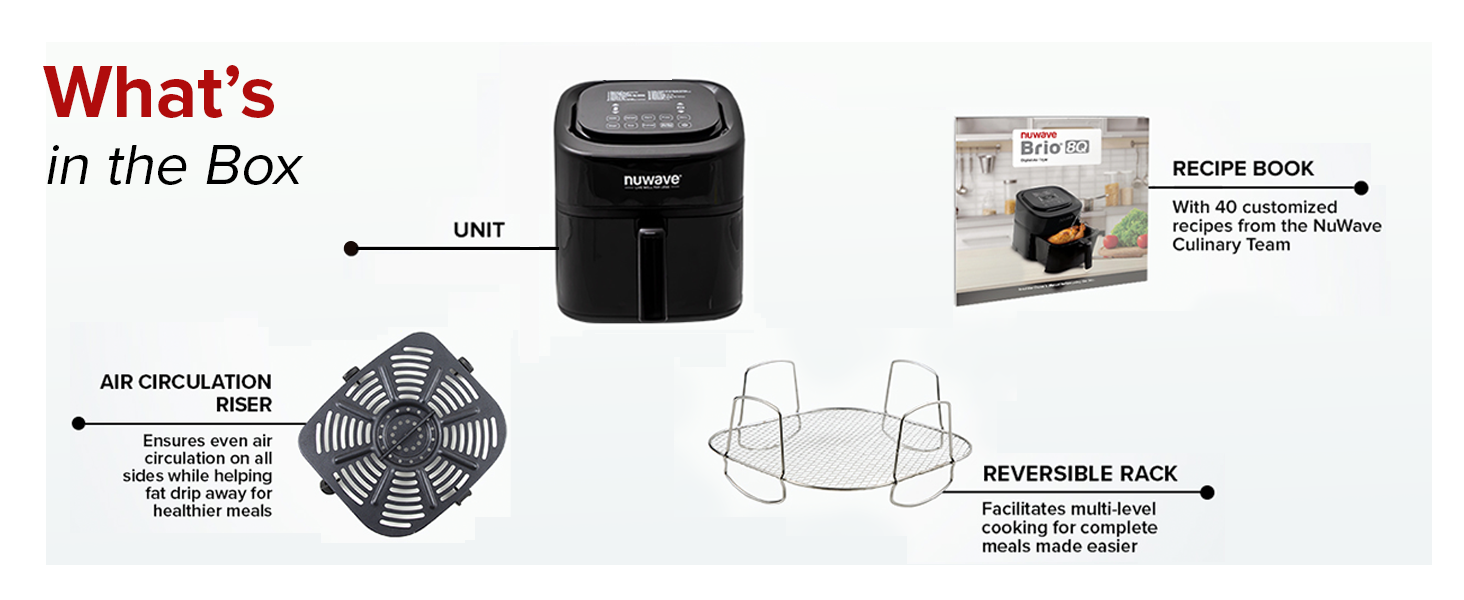
Image 3.2: Contents included with the Nuwave Brio 8-Qt Air Fryer.
Awọn ẹya pataki:
- Linear Thermal (Linear T) Technology: Maintains precise temperature throughout the cooking process by continuously monitoring and adjusting power.
- Integrated Digital Temperature Probe: Monitors internal food temperature and automatically stops cooking when the set temperature is reached.
- 100 Pre-Programmed Presets: Includes settings for grilling, air frying, baking, broiling, roasting, dehydrating, reheating, defrosting, and toasting.
- 50 Memory Slots: Allows saving and recalling custom recipes.
- On-the-Fly Adjustments: Enables temperature and time changes during cooking without restarting the process.
- Preheat & Reheat Functions: Dedicated functions for preheating the cooking chamber and reheating food.
- Isọsọ-rọrun: Non-stick air circulation riser and reversible rack are dishwasher safe.
- Safety Pause: Cooking pauses automatically when the air fry basket is removed and resumes when reinserted.
4. Eto
Ṣii silẹ:
- Ni ifarabalẹ yọ gbogbo awọn paati kuro ninu apoti.
- Remove any protective film or packaging materials from the appliance.
- Rii daju pe gbogbo awọn paati ti a ṣe akojọ wa.
Ìfọ̀mọ́ àkọ́kọ́:
- Before first use, wash the air circulation riser and reversible rack in warm, soapy water or in the dishwasher.
- Mu ese ita ti ẹyọ akọkọ pẹlu ipolowoamp asọ. Ma ṣe fi ẹya akọkọ sinu omi.
- Rí i dájú pé gbogbo àwọn ẹ̀yà ara ti gbẹ pátápátá kí a tó kó wọn jọ kí a sì lò wọ́n.
Ibi:
- Gbe awọn air fryer lori kan idurosinsin, ooru-sooro dada.
- Ensure there is adequate space (at least 6 inches) around the appliance for proper ventilation.
- Má ṣe gbé ẹ̀rọ ìfọṣọ afẹ́fẹ́ sí ẹ̀gbẹ́ àwọn ohun èlò tí ó lè jóná tàbí àwọn orísun ooru.
5. Awọn ilana Iṣiṣẹ
Isẹ ipilẹ:
- So ẹ̀rọ afẹ́fẹ́ sínú ihò iná mànàmáná tí a ti yọ́. Ìfihàn náà yóò tàn yanranyanran.
- Place food into the air fry basket, ensuring it does not exceed the MAX fill line. Insert the air circulation riser and reversible rack as needed.
- Slide the air fry basket securely into the main unit.
- Tẹ bọtini Agbara lati tan ẹyọ naa.

Image 5.1: Steps for intuitive digital control operation.
Eto iwọn otutu ati akoko:
- Use the Temperature control buttons (up/down arrows) to set the desired cooking temperature (50°F to 400°F in 5°F increments).
- Use the Time control buttons (up/down arrows) to set the desired cooking duration.
- Tẹ bọtini Bẹrẹ/Sinmi lati bẹrẹ sise.
Lilo Awọn Eto Ti a Ti Ṣeto tẹlẹ:
- The Brio features 100 pre-programmed menu presets for various cooking methods.
- Press the 'Menu' button to cycle through the available presets.
- Once a preset is selected, the default temperature and time will be displayed. These can be adjusted if desired.
- Tẹ START/SINMI lati bẹrẹ sise.

Image 5.2: The Nuwave Brio offers 100 pre-programmed recipes and 50 memory slots for custom settings.
Using the Integrated Smart Thermometer:
- Insert the digital probe into the thickest part of the food, avoiding bone.
- Plug the probe into the designated port on the air fryer.
- Set your desired internal food temperature using the probe controls.
- The air fryer will monitor the food's internal temperature and automatically end the cooking cycle when the target temperature is reached.

Image 5.3: The integrated digital smart thermometer ensures precise cooking by monitoring internal food temperature.
On-the-Fly Adjustments:
During cooking, you can adjust the temperature or time without interrupting the cooking cycle. Simply use the temperature or time control buttons, and the changes will be applied immediately.

Image 5.4: Adjustments to cooking time or temperature can be made at any point during the cooking process.
Preheat and Reheat Functions:
- Gbona: Use the 'Preheat' button to bring the cooking chamber to the desired temperature before adding food.
- Tun gbona: The 'Reheat' function warms food at 360°F for 4 minutes, designed to restore crispiness to leftovers.

Image 5.5: The Preheat function ensures the cooking chamber reaches the set temperature, while Reheat warms food at 360°F for 4 minutes.
6. Ninu ati Itọju
Regular cleaning ensures optimal performance and extends the lifespan of your Nuwave Brio Air Fryer.
Cleaning the Air Fry Basket and Accessories:
- The air fry basket, air circulation riser, and reversible rack are dishwasher safe.
- Fún fífọ ọwọ́, lo omi gbígbóná, omi ọṣẹ àti kànrìnkàn tí kò ní bàjẹ́.
- Rí i dájú pé gbogbo oúnjẹ tí ó ṣẹ́kù ni a ti yọ kúrò.
- The non-stick coating on the air circulation riser should be treated with care to prevent damage.

Image 6.1: The air fry basket and circulation riser are non-stick, and the reversible rack is stainless steel. All are dishwasher safe.
Ninu Ẹka Akọkọ:
- Yọọ ohun elo naa ki o jẹ ki o tutu patapata ṣaaju mimọ.
- Pa ode nu pẹlu ipolowoamp asọ. Ma ṣe lo awọn afọmọ abrasive tabi awọn paadi iyẹfun.
- Nu inu ti iyẹwu sise pẹlu ipolowoamp asọ.
- Ma ṣe fi ẹya akọkọ sinu omi tabi omi miiran.
7. Laasigbotitusita
If you encounter issues with your Nuwave Brio Air Fryer, refer to the following common problems and solutions:
| Isoro | Owun to le Fa | Ojutu |
|---|---|---|
| Ohun elo ko tan. | Kò sí ohun tí a fi sínú rẹ̀; àìṣiṣẹ́ ibi tí agbára ń jáde; àìṣiṣẹ́ ẹ̀rọ náà. | Rii daju pe okun agbara ti wa ni edidi ni aabo sinu iṣan-iṣẹ iṣẹ. Ṣayẹwo awọn Circuit fifọ. Ti ọrọ naa ba wa, kan si atilẹyin alabara. |
| Ounjẹ kii ṣe boṣeyẹ. | Overcrowding the basket; insufficient shaking/flipping; incorrect temperature/time. | Má ṣe kó oúnjẹ pọ̀ jù nínú agbọ̀n náà. Mi oúnjẹ náà tàbí kí o yí i padà ní àárín ìgbà tí a bá ti ń sè é. Ṣe àtúnṣe ìwọ̀n otútù àti àkókò bí ó ṣe yẹ. |
| Ẹfin funfun n bọ lati inu ohun elo. | Aloku girisi lati lilo iṣaaju; ounjẹ ti o sanra. | Clean the air fry basket and cooking chamber thoroughly. For high-fat foods, drain excess fat during cooking. |
| Ifihan ko ṣiṣẹ. | Ti abẹnu paati oro. | Unplug the unit, wait a few minutes, and plug it back in. If the problem persists, contact Nuwave customer service. |
For issues not listed here, please refer to the official Nuwave support resources or contact customer service.
8. Awọn pato
| Ẹya ara ẹrọ | Sipesifikesonu |
|---|---|
| Orukọ awoṣe | Nuwave 8-Quart 6-in-1 Brio Healthy Smart Digital Air Fryer |
| Ọja Mefa | 15.1"D x 16.5"W x 13.1"H |
| Agbara | 8 mẹẹdogun |
| Wattage | 1800 Wattis |
| Voltage | 120 Volts |
| Iwọn otutu | 50°F de 400°F |
| Ọna Iṣakoso | Afi ika te |
| Ohun elo | Irin ti ko njepata |
| Nkan Nonstick | Bẹẹni |
| Fifọ Ailewu Parts | Yes (Air fry basket, air circulation riser, reversible rack) |
| USB Ipari | 32 inches |
| Iwọn Nkan | 15.87 iwon |
| UPC | 652185370128 |
9. Atilẹyin ọja ati Support
For warranty information, product registration, or technical support, please visit the official Nuwave website or contact Nuwave customer service. Keep your purchase receipt for warranty claims.
Ìwé Ìtọ́sọ́nà Olùlò ní ọ̀nà PDF wà fún ìgbàsílẹ̀: Ṣe igbasilẹ Itọsọna olumulo (PDF)