
U-Turn Audio R200BK-V2
U-Turn Audio Pluto 2 Phono Preamp Ilana itọnisọna
Model: R200BK-V2
1. Ifihan ati Loriview
The U-Turn Audio Pluto 2 Phono Preamp ti a ṣe lati amplify the delicate signal from your turntable's moving magnet (MM) cartridge to a line-level signal, suitable for your amplifier or receiver. This device ensures optimal audio performance by providing clear and accurate amplification.
Awọn ẹya pataki pẹlu:
- Low-noise design for all MM cartridges.
- High-quality components such as WIMA film capacitors and precision resistors.
- Active subsonic filter to remove low-frequency noise.
- Dual high-performance gain stages for low total harmonic distortion (THD).
- Compact aluminum enclosure to shield sensitive electronic components from interference.
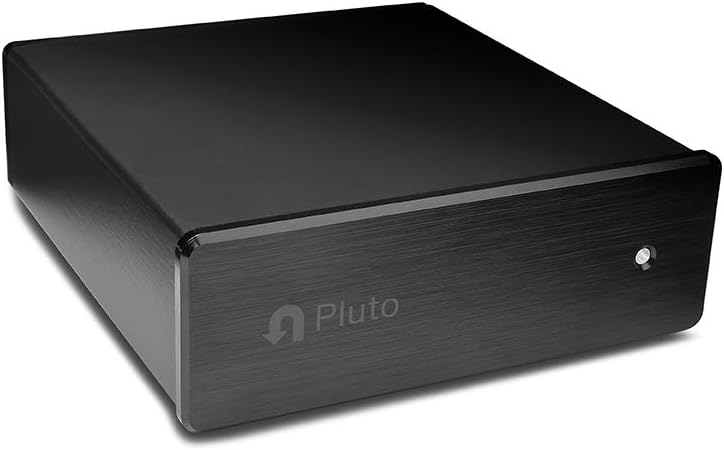
Aworan 1.1: Iwaju view of the U-Turn Audio Pluto 2 Phono Preamp in black aluminum.

Aworan 1.2: alaye view of the Pluto 2's black brushed aluminum finish.
2. Awọn ilana iṣeto
Follow these steps to correctly set up your U-Turn Audio Pluto 2 Phono Preamp:
- Ibi: Place the Pluto 2 on a stable, flat surface near your turntable and amplifier/receiver. Ensure it is away from sources of electromagnetic interference.
- Connect Turntable to Pluto 2: Connect your turntable's RCA output cables to the FONO NINU RCA jacks on the rear of the Pluto 2. Ensure the left (white) and right (red) channels are correctly matched.
- So Ilẹ Waya: Connect your turntable's ground wire to the ILE terminal on the Pluto 2. This is crucial for minimizing hum and static.
- Connect Pluto 2 to Amplifier/olugba: Sopọ awọn ILA LATI RCA jacks on the Pluto 2 to a line-level input (e.g., AUX, CD, TUNER) on your amplifier tabi olugba. Do not connect to a PHONO input on your amplifier/receiver, as this will result in over-amplification and distorted sound.
- So agbara: Pulọọgi ohun ti nmu badọgba agbara sinu AGBARA input on the Pluto 2, then plug the adapter into a wall outlet. The Pluto 2 does not have an on/off switch and will power on automatically.
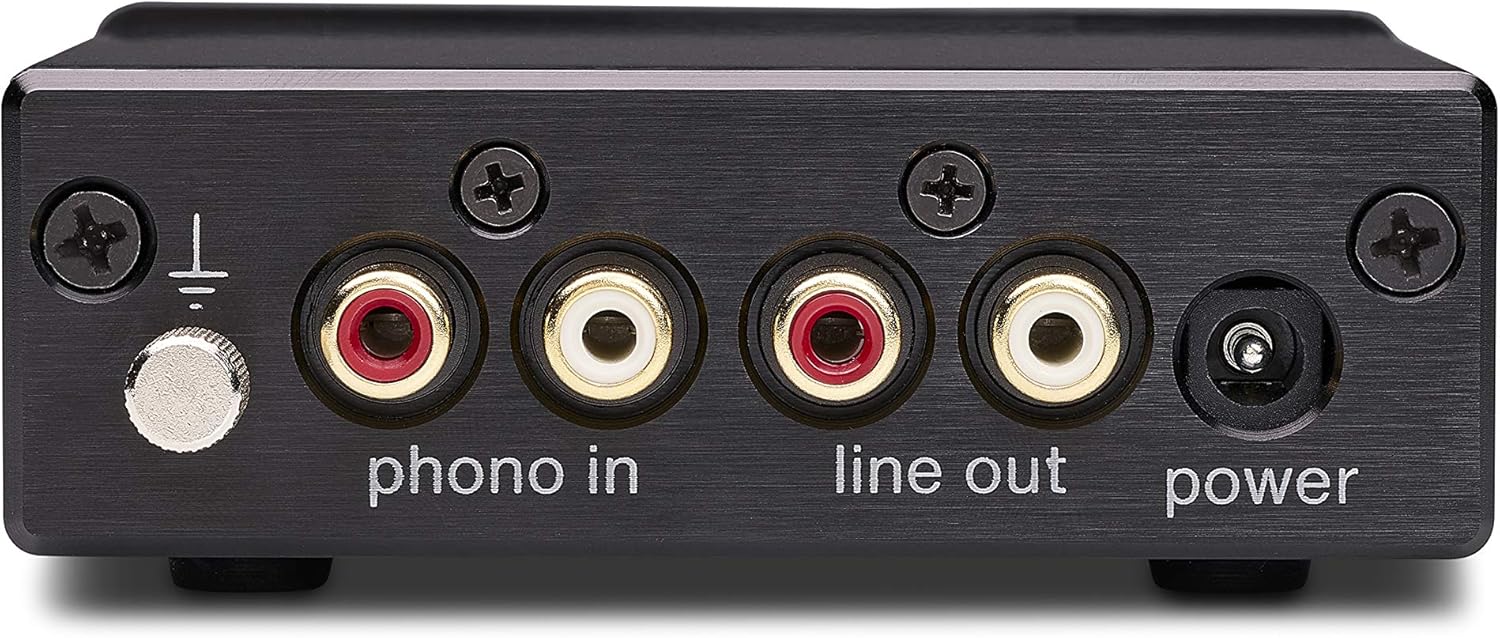
Image 2.1: Rear panel connections of the Pluto 2, illustrating PHONO IN, LINE OUT, GROUND, and POWER ports.

Image 2.2: The Pluto 2 Phono Preamp positioned within a complete audio system setup.
3. Awọn ilana Iṣiṣẹ
The U-Turn Audio Pluto 2 Phono Preamp is designed for straightforward operation:
- Once connected to power, the Pluto 2 is active and ready for use. There is no manual on/off switch.
- Rii daju rẹ amplifier/receiver is set to the correct line-level input where the Pluto 2 is connected.
- Begin playing your vinyl record on the turntable. The Pluto 2 will automatically ampmu ifihan agbara ṣiṣẹ.
- Ṣatunṣe iwọn didun nipa lilo rẹ ampiṣakoso iwọn didun lifia tabi olugba.
4. Itọju
To ensure the longevity and optimal performance of your Pluto 2 Phono Preamp, tẹle awọn itọsọna itọju ti o rọrun wọnyi:
- Ninu: Use a soft, dry cloth to wipe the exterior of the unit. Avoid using liquid cleaners, solvents, or abrasive materials, as these can damage the finish.
- Afẹfẹ: Ensure the unit has adequate ventilation. Do not block any vents or place the unit in an enclosed space that could lead to overheating.
- Ibi ipamọ: Ti o ba tọju ẹyọ naa fun akoko ti o gbooro sii, ge asopọ kuro ni agbara ki o tọju rẹ si ibi ti o tutu, ti o gbẹ.
- Awọn Isopọ USB: Periodically check all cable connections to ensure they are secure. Loose connections can lead to signal loss or interference.
5. Laasigbotitusita
If you encounter issues with your Pluto 2 Phono Preamp, wo àwọn ìṣòro àti ojútùú tó wọ́pọ̀ wọ̀nyí:
| Isoro | Owun to le Fa | Ojutu |
|---|---|---|
| No sound or very low sound | Incorrect input selection on receiver; loose cables; Pluto 2 connected to PHONO input on receiver. | Ensure receiver is set to the correct line-level input (e.g., AUX, CD). Check all RCA connections. Ensure Pluto 2 is connected to a line-level input, not a PHONO input. |
| Ariwo ariwo tabi ariwo | Improper grounding; interference from other electronics; faulty cables. | Ensure the turntable's ground wire is securely connected to the Pluto 2's ground terminal. Try moving the Pluto 2 away from other electronic devices. Replace RCA cables if suspected faulty. |
| Ohun ti o daru | Pluto 2 connected to PHONO input on receiver; damaged cartridge/stylus; incorrect cartridge type. | Verify Pluto 2 is connected to a line-level input. Inspect your turntable's cartridge and stylus for damage. The Pluto 2 is designed for Moving Magnet (MM) cartridges only. |
| Ina Atọka agbara wa ni pipa | No power supply; faulty power adapter. | Check if the power adapter is securely plugged into the Pluto 2 and a working wall outlet. Try a different outlet. If the issue persists, contact support. |
Ti awọn igbesẹ wọnyi ko ba yanju ọran rẹ, jọwọ tọka si Atilẹyin ọja ati apakan Atilẹyin fun iranlọwọ siwaju.
6. Awọn pato
Detailed specifications for the U-Turn Audio Pluto 2 Phono Preamp (Model R200BK-V2):
- Awoṣe: R200BK-V2
- Awọn Iwọn Nkan (L x W x H): 1.4 x 4.5 x 3.85 inches (3.56 x 11.43 x 9.78 cm)
- Ìwọ̀n Nkan: 10 iwon (0.28 kg)
- Iru nkan elo: Aluminiomu
- Nọmba awọn ikanni: 1 (Stereo output from a single phono input)
- Ibamu Katiriji: Gbigbe Oofa (MM)
- Olupese: U-Tan Audio
- Nọmba Idanimọ Iṣowo Agbaye (GTIN): 00860003574317
- UPC: 860003574317

Aworan 6.1: Ti abẹnu view of the Pluto 2 circuit board, highlighting component quality.
7. Atilẹyin ọja ati Support
The U-Turn Audio Pluto 2 Phono Preamp wa pẹlu a 3-odun atilẹyin ọja from the date of purchase, covering defects in materials and workmanship under normal use. U-Turn Audio also provides lifetime product support fún ẹ̀rọ yìí.
For warranty claims, technical assistance, or any questions regarding your Pluto 2 Phono Preamp, please contact U-Turn Audio directly through their official website or customer service channels. Please have your purchase information and product model number (R200BK-V2) available when contacting support.
U-Turn Audio Contact Information:
- Webojula: uturnaudio.com
- Oju-iwe atilẹyin: Tọka si apakan atilẹyin lori osise naa webAaye fun olubasọrọ awọn alaye ati FAQs.
Ask a question about this manual
Ask about setup, troubleshooting, compatibility, parts, safety, or missing instructions. Manuals+ will review the question and use this page’s manual context to help answer it.