
Ọrọ Iṣaaju
The Edifier TWS NB2 True Wireless Active Noise Canceling Earbuds are designed to provide a superior audio experience with advanced noise cancellation technology. These earbuds offer hybrid ANC for effective noise reduction, ensuring clear audio in various environments. Key features include crystal-clear calls with dual microphones, infrared wearing detection for automatic playback control, and convenient one-touch pairing. The ambient sound pass-through mode allows users to stay aware of their surroundings without removing the earbuds. With an extended playback time, the TWS NB2 is ideal for daily use, commuting, and workouts.
Ohun ti o wa ninu Apoti
Nigbati o ba ṣii package, iwọ yoo wa awọn paati wọnyi:
- Edifier TWS NB2 Earbuds
- Ngba agbara Case
- USB Iru-C Ngba agbara USB
- Spare Eartips (S/M/L sizes)
- Itọsọna olumulo
Fidio: Unboxing the Edifier TWS NB2 Earbuds. This video demonstrates the contents of the product packaging, including the earbuds, charging case, charging cable, and various eartip sizes.
Ọja Pariview
The Edifier TWS NB2 earbuds are designed for comfort and high-quality audio performance. Below are some key features and components:

Aworan: The Edifier TWS NB2 earbuds resting in their open charging case, showcasing apẹrẹ didan wọn ati ifosiwewe fọọmu kekere.

Aworan: Visual representation highlighting the Hi-Res Audio Wireless capability, promising an immersive sound effect and HiFi enjoyment.

Aworan: An individual using the earbuds, illustrating the Tri-MIC phone call feature designed for clear communication even in windy conditions.

Aworan: A user wearing the earbuds in an outdoor setting, demonstrating the Environment Monitoring Mode which allows hearing surroundings for safety.
Aworan: The charging case with water droplets, indicating the IP54 dust and water resistance, making the earbuds suitable for outdoor activities.

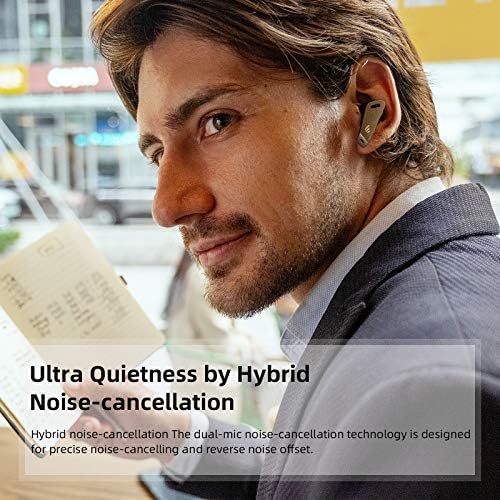
Aworan: A person wearing the earbuds in a cafe, highlighting the Ultra Quietness achieved through Hybrid Noise-cancellation technology.

Aworan: The earbuds in their case with a speed gauge background, illustrating the extended playback time of up to 32 hours.
Fidio: Edifier TWS NB2 Active Noise Cancelling Lifestyle Video. This video showcases the earbuds' active noise cancellation and ambient sound features in various daily scenarios.
Ṣeto
1. Ngba agbara si Earbuds ati Ọran
Before first use, fully charge the earbuds and the charging case. Place the earbuds into the charging case. Connect the USB Type-C charging cable to the charging port on the case and a power source. The indicator lights on the case will show the charging status. A full charge typically takes approximately 1.5 hours for the earbuds and 2 hours for the case.
2. Sisopọ Bluetooth
To pair your Edifier TWS NB2 earbuds with a device:
- Rii daju pe awọn afikọti wa ninu apoti gbigba agbara ati pe ideri ọran wa ni sisi.
- Lori ẹrọ rẹ (foonuiyara, tabulẹti, ati be be lo), jeki Bluetooth.
- The earbuds will automatically enter pairing mode. Look for 'TWS NB2' in your device's Bluetooth settings.
- Select 'TWS NB2' to connect. Once connected, a voice prompt will confirm successful pairing.
Fidio: Bluetooth Connection Guide for Edifier TWS NB2. This video illustrates the steps to connect your earbuds to a mobile device via Bluetooth.
Awọn ilana Iṣiṣẹ
The Edifier TWS NB2 earbuds feature intuitive touch controls. Here’s how to operate them:
| Išẹ | Iṣe | Agbohungbo |
|---|---|---|
| Ṣiṣẹ / Sinmi | Fọwọ ba lẹẹmeji | Osi tabi ọtun |
| Next Track | Tẹ lẹẹmẹta | Ọtun |
| Ti tẹlẹ Track | Tẹ lẹẹmẹta | Osi |
| Iwọn didun soke | Press and hold (Right) | Ọtun |
| Iwọn didun isalẹ | Press and hold (Left) | Osi |
| Idahun/Pari Ipe | Fọwọ ba lẹẹmeji | Osi tabi ọtun |
| Kọ Ipe | Tẹ mọlẹ fun iṣẹju meji 2 | Osi tabi ọtun |
| Mu Oluranlọwọ Ohun ṣiṣẹ | Quadruple-tap | Osi tabi ọtun |
| Toggle ANC/Ambient Sound | Double-tap (Left) | Osi |
Infrared Wearing Detection: The music will automatically pause playback when the earbuds are removed from your ears and resume when you put them back on.
Itoju
To ensure the longevity and optimal performance of your Edifier TWS NB2 earbuds, follow these maintenance guidelines:
- Ninu: Nigbagbogbo nu afikọti ati apoti gbigba agbara pẹlu asọ ti o gbẹ. Yago fun lilo awọn ohun elo abrasive tabi awọn kemikali lile.
- Ibi ipamọ: Nigbati ko ba si ni lilo, tọju awọn afikọti sinu apoti gbigba agbara wọn lati daabobo wọn lati eruku ati ibajẹ.
- Omi Resistance: The earbuds are IP54 rated for dust and water resistance. This means they are protected against limited dust ingress and water spray from any direction. Do not submerge them in water or expose them to heavy rain. Dry them thoroughly if they get wet.
- Gbigba agbara: Use only the provided USB Type-C cable for charging. Avoid extreme temperatures during charging and storage.
- Yago fun Ipa: Do not drop or subject the earbuds to strong impacts, as this can damage internal components.
Laasigbotitusita
If you encounter issues with your Edifier TWS NB2 earbuds, refer to the following common solutions:
- Awọn agbekọri ti ko so pọ: Ensure both earbuds are charged and in the case with the lid open. Turn off and on your device's Bluetooth. If issues persist, try resetting the earbuds (refer to the full user manual for specific reset instructions).
- Ko si ohun lati inu agbekọri agbekọri kan: Gbe awọn agbekọri mejeeji pada sinu apoti gbigba agbara, pa ideri naa, duro fun iṣẹju diẹ, lẹhinna ṣi i lẹẹkansi. Eleyi igba tun-syncs wọn.
- Awọn iṣoro gbigba agbara: Ṣàyẹ̀wò okùn gbigba agbara àti adapter. Rí i dájú pé àwọn ohun tí ó wà lórí àwọn agbekọri àti inú àpótí náà mọ́ tónítóní tí kò sì sí ìdọ̀tí kankan.
- Didara ohun ti ko dara: Ensure the eartips provide a good seal in your ear. Try different sized eartips. Check for any obstructions in the earbud nozzles.
- Asopọmọra igba diẹ: Keep your device within the Bluetooth range (up to 10 meters). Avoid strong electromagnetic interference.
For more detailed troubleshooting or persistent issues, please contact Edifier customer support.
Awọn pato
| Sipesifikesonu | Ẹ̀kúnrẹ́rẹ́ |
|---|---|
| Orukọ awoṣe | TWS NB2 |
| Ariwo Iṣakoso | Ti nṣiṣe lọwọ Noise Ifagile |
| Asopọmọra Technology | Ailokun (Bluetooth 5.0) |
| Igbesi aye batiri | Wákàtí 32 (Àròpọ̀ pẹ̀lú àpótí ìgbara) |
| Iṣakoso Iru | Iṣakoso ifọwọkan |
| Omi Resistance Ipele | IP54 Omi sooro |
| Iwọn Nkan | 1.9 iwon |
| Àwọ̀ | Funfun |
| Ohun elo | Ṣiṣu |
| Bluetooth Ibiti | 10 Mita |
| Olupese | OLOTUNTO |
Atilẹyin ọja ati Support
Edifier products typically come with a limited warranty covering manufacturing defects. For specific warranty terms and conditions, please refer to the warranty card included in your product packaging or visit the official Edifier webojula.
If you require technical assistance, have questions about your product, or need to claim warranty service, please contact Edifier customer support through their official channels. You can usually find contact information on the Edifier website or in your product's user manual.