
1. Awọn Ilana Aabo pataki
Ka gbogbo awọn ikilọ ailewu, awọn itọnisọna, awọn apejuwe, ati awọn pato ti a pese pẹlu irinṣẹ agbara yii. Ikuna lati tẹle gbogbo awọn ilana ti a ṣe akojọ rẹ si isalẹ le ja si mọnamọna, ina, ati/tabi ipalara nla.
Gbogbogbo Power Ọpa Aabo ikilo
- Aabo Agbegbe Iṣẹ: Keep the work area clean and well-lit. Cluttered or dark areas invite accidents. Do not operate power tools in explosive atmospheres, such as in the presence of flammable liquids, gases, or dust. Power tools create sparks which may ignite the dust or fumes. Keep children and bystanders away while operating a power tool. Distractions can cause you to lose control.
- Aabo Itanna: Awọn pilogi irinṣẹ agbara gbọdọ baramu iṣan. Maṣe yi plug naa pada ni ọna eyikeyi. Ma ṣe lo awọn pilogi ohun ti nmu badọgba eyikeyi pẹlu awọn irinṣẹ agbara ilẹ (ti ilẹ). Awọn pilogi ti a ko yipada ati awọn iÿë ti o baamu yoo dinku eewu ina-mọnamọna. Yago fun olubasọrọ ara pẹlu ilẹ tabi ilẹ roboto, gẹgẹ bi awọn paipu, imooru, awọn sakani, ati firiji. Ewu ti o pọ si ti mọnamọna ina mọnamọna ti ara rẹ ba wa ni ilẹ tabi ti ilẹ. Ma ṣe fi awọn irinṣẹ agbara han si ojo tabi awọn ipo tutu. Omi ti nwọle ọpa agbara yoo mu eewu ti mọnamọna mọnamọna pọ si. Maṣe ṣe ilokulo okun naa. Maṣe lo okun fun gbigbe, fifa tabi yọọ ohun elo agbara. Jeki okun kuro lati ooru, epo, eti to mu, tabi awọn ẹya gbigbe. Awọn okun ti o bajẹ tabi dipọ pọ si eewu ina mọnamọna. Nigbati o ba n ṣiṣẹ ohun elo agbara ni ita, lo okun itẹsiwaju ti o dara fun lilo ita gbangba. Lilo okun ti o yẹ fun lilo ita gbangba yoo dinku eewu ina mọnamọna. Ti o ba nṣiṣẹ ohun elo agbara ni ipolowoamp ipo ko ṣee ṣe, lo ẹrọ to ku lọwọlọwọ (RCD) ipese to ni aabo. Lilo RCD n dinku eewu ina-mọnamọna.
- Aabo ti ara ẹni: Duro ni iṣọra, wo ohun ti o n ṣe, ati lo ọgbọn ti o wọpọ nigbati o nṣiṣẹ ohun elo agbara kan. Maṣe lo ohun elo agbara nigba ti o rẹ rẹ tabi labẹ ipa ti oogun, ọti-lile, tabi oogun. Akoko ti aibikita lakoko ti o nṣiṣẹ awọn irinṣẹ agbara le ja si ipalara ti ara ẹni pataki. Lo awọn ohun elo aabo ti ara ẹni. Nigbagbogbo wọ aabo oju. Awọn ohun elo aabo gẹgẹbi boju-boju eruku, awọn bata ailewu ti kii ṣe skid, fila lile, tabi idaabobo igbọran ti a lo fun awọn ipo ti o yẹ yoo dinku awọn ipalara ti ara ẹni. Dena aimọkan ibẹrẹ. Rii daju pe iyipada wa ni pipa-ipo ṣaaju asopọ si orisun agbara ati/tabi idii batiri, gbigbe tabi gbe ọpa naa. Gbigbe awọn irinṣẹ agbara pẹlu ika rẹ lori iyipada tabi awọn irinṣẹ agbara agbara ti o ni iyipada lori n pe awọn ijamba. Yọ eyikeyi bọtini ti n ṣatunṣe tabi wrench ṣaaju titan ohun elo agbara. Wrench tabi bọtini kan ti o sosi si apakan yiyi ti ohun elo agbara le ja si ipalara ti ara ẹni. Ma ṣe bori. Jeki ẹsẹ to dara ati iwọntunwọnsi ni gbogbo igba. Eyi jẹ ki iṣakoso to dara julọ ti ọpa agbara ni awọn ipo airotẹlẹ. Mura daradara. Maṣe wọ aṣọ ti ko ni tabi ohun ọṣọ. Pa irun ati aṣọ rẹ kuro lati awọn ẹya gbigbe. Awọn aṣọ alaimuṣinṣin, awọn ohun-ọṣọ, tabi irun gigun ni a le mu ni awọn ẹya gbigbe. Ti a ba pese awọn ẹrọ fun asopọ ti isediwon eruku ati awọn ohun elo gbigba, rii daju pe awọn wọnyi ni asopọ ati lilo daradara. Lilo gbigba eruku le dinku awọn ewu ti o ni ibatan si eruku. Ma ṣe jẹ ki ifaramọ ti o gba lati lilo awọn irinṣẹ loorekoore gba ọ laaye lati di aibikita ati foju kọ awọn ipilẹ aabo irinṣẹ. Iṣe aibikita le fa ipalara nla laarin ida kan ti iṣẹju kan.
- Lilo ati Itọju Ohun elo Agbara: Maṣe fi agbara mu ohun elo agbara. Lo ohun elo agbara ti o pe fun ohun elo rẹ. Ọpa agbara ti o tọ yoo ṣe iṣẹ naa dara julọ ati ailewu ni iwọn fun eyiti a ṣe apẹrẹ rẹ. Maṣe lo ohun elo agbara ti iyipada ko ba tan-an ati pa. Eyikeyi ohun elo agbara ti ko le ṣakoso pẹlu iyipada jẹ ewu ati pe o gbọdọ tunše. Ge asopọ plug lati orisun agbara ati/tabi yọọ idii batiri kuro, ti o ba ṣee yọkuro, lati inu ohun elo agbara ṣaaju ṣiṣe eyikeyi awọn atunṣe, yiyipada awọn ẹya ẹrọ, tabi titoju awọn irinṣẹ agbara. Iru awọn ọna aabo idena dinku eewu ti bẹrẹ ohun elo agbara lairotẹlẹ. Tọju awọn irinṣẹ agbara laišišẹ ni arọwọto awọn ọmọde ati ma ṣe gba awọn eniyan ti ko mọ pẹlu ohun elo agbara tabi awọn ilana wọnyi lati ṣiṣẹ ohun elo agbara naa. Awọn irinṣẹ agbara jẹ ewu ni ọwọ awọn olumulo ti ko ni ikẹkọ. Ṣetọju awọn irinṣẹ agbara ati awọn ẹya ẹrọ. Ṣayẹwo fun aiṣedeede tabi abuda awọn ẹya gbigbe, fifọ awọn ẹya, ati eyikeyi ipo miiran ti o le ni ipa lori iṣẹ irinṣẹ agbara. Ti o ba bajẹ, jẹ ki ohun elo agbara tunše ṣaaju lilo. Ọpọlọpọ awọn ijamba ni o ṣẹlẹ nipasẹ awọn irinṣẹ agbara ti ko tọju daradara. Jeki gige awọn irinṣẹ didasilẹ ati mimọ. Awọn irinṣẹ gige ti a ṣetọju daradara pẹlu awọn eti gige didasilẹ ko ṣeeṣe lati dipọ ati rọrun lati ṣakoso. Lo ohun elo agbara, awọn ẹya ẹrọ, ati awọn ohun elo irinṣẹ, ati bẹbẹ lọ ni ibamu pẹlu awọn ilana wọnyi, ni akiyesi awọn ipo iṣẹ ati iṣẹ ti o yẹ ki o ṣe. Lilo ohun elo agbara fun awọn iṣẹ ṣiṣe yatọ si awọn ti a pinnu le ja si ipo eewu kan. Jeki awọn ọwọ ati mimu awọn aaye ti o gbẹ, mimọ, ati laisi epo ati girisi. Awọn imudani isokuso ati awọn ipele mimu ko gba laaye fun mimu ailewu ati iṣakoso ọpa ni awọn ipo airotẹlẹ.
- Lilo ati Itọju Ohun elo Batiri: Recharge only with the charger specified by the manufacturer. A charger that is suitable for one type of battery pack may create a risk of fire when used with another battery pack. Use power tools only with specifically designated battery packs. Use of any other battery packs may create a risk of injury and fire. When battery pack is not in use, keep it away from other metal objects, like paper clips, coins, keys, nails, screws, or other small metal objects, that can make a connection from one terminal to another. Shorting the battery terminals together may cause burns or a fire. Under abusive conditions, liquid may be ejected from the battery; avoid contact. If contact accidentally occurs, flush with water. If liquid contacts eyes, additionally seek medical help. Liquid ejected from the battery may cause irritation or burns. Do not use a battery pack or tool that is damaged or modified. Damaged or modified batteries may exhibit unpredictable behavior resulting in fire, explosion, or risk of injury. Do not expose a battery pack or tool to fire or excessive temperature. Exposure to fire or temperature above 130 °C (265 °F) may cause explosion. Follow all charging instructions and do not charge the battery pack or tool outside the temperature range specified in the instructions. Charging improperly or at temperatures outside the specified range may damage the battery and increase the risk of fire.
- Iṣẹ: Jẹ ki ohun elo agbara rẹ ṣiṣẹ nipasẹ eniyan atunṣe ti o ni oye nipa lilo awọn ẹya ara rirọpo kanna nikan. Eyi yoo rii daju pe aabo ti ọpa agbara ti wa ni itọju. Maṣe ṣe iṣẹ awọn akopọ batiri ti o bajẹ. Iṣẹ awọn akopọ batiri yẹ ki o ṣee ṣe nipasẹ olupese tabi olupese iṣẹ ti a fun ni aṣẹ.
2. Package Awọn akoonu
Fi pẹ̀lẹ́pẹ̀lẹ́ tú gbogbo nǹkan náà kí o sì rí i dájú pé o ti gba àwọn nǹkan wọ̀nyí:
- 1 x WORKPRO 20V Cordless Drill Driver
- 1 x WORKPRO 20V Cordless Impact Driver
- 2 x 20V 2.0Ah Litiumu-dẹlẹ Batiri
- 1 x Fast Charger (2.4A)
- 10 x Screwdriver Bits
- 6 x Twist Drills
- 2 x Belt Hooks
- 1 x Ilana itọnisọna

Image: The complete WORKPRO 20V Cordless Drill and Impact Driver Combo Kit, including both tools, two batteries, a charger, and various drill and screwdriver bits.
3. Ọja Ipariview
The WORKPRO 20V Cordless Drill and Impact Driver Combo Kit provides versatile solutions for drilling and fastening tasks. This kit includes a drill driver with adjustable torque and a powerful impact driver, both powered by 20V lithium-ion batteries.
Key Awọn ẹya ara ẹrọ
- Awakọ Lilu Alailowaya 20V: Features 18+1 torque settings and two speed ranges (0-360 RPM and 0-1300 RPM) for various drilling and screwing applications. Equipped with a 10mm keyless chuck for easy accessory changes.
- 20V Cordless Impact Driver: Delivers up to 130Nm of torque with a maximum speed of 2600 RPM and an impact frequency of 0-3500 IPM. Features a 6.35mm (1/4") hexagonal quick-release chuck for rapid bit changes.
- 2.0Ah Lithium-ion Batteries: Two rechargeable 20V 2.0Ah batteries provide extended runtime. Integrated indicator lights display remaining battery capacity.
- Ṣaja Yara: A 2.4A fast charger allows for a full battery charge in approximately 60 minutes.
- Apẹrẹ Ergonomic: Soft rubber non-slip handles ensure comfortable use during prolonged operation.
- Awọn imọlẹ LED ti a ṣepọ: Both tools feature LED work lights to illuminate the work area, enhancing visibility and safety in dark conditions.
- Belt Hooks: Included belt hooks allow for convenient carrying and storage of the tools.

Aworan: inu view highlighting the powerful 20-volt motor in both the drill driver (25 Nm max torque) and the impact driver (130 Nm max torque).
4. Eto
4.1 Gbigba agbara batiri
- So ṣaja iyara pọ mọ ibudo agbara boṣewa kan.
- Fi batiri Lithium-ion 20V 2.0Ah sinu ṣaja naa titi ti yoo fi tẹ sinu ipo rẹ.
- The charger's indicator light will show the charging status. A full charge typically takes about 60 minutes.
- Ni kete ti o ti gba agbara ni kikun, yọ batiri kuro lati ṣaja.

Image: A WORKPRO 20V 2.0Ah Lithium-ion battery being charged on the 2.4A fast charger, illustrating the 1-hour fast charging capability.
4.2 Fifi sori ati Yọ Batiri naa kuro
- Lati fi sori ẹrọ: Align the battery with the base of the tool handle and slide it in until it locks securely.
- Lati Yọ: Tẹ bọtini itusilẹ batiri (ti o wa ni ẹgbẹ batiri naa) ki o si yọ batiri naa kuro ninu ohun elo naa.
4.3 Installing and Removing Drill Bits (Drill Driver)
- Rii daju pe ọpa wa ni pipa ati pe o ti yọ batiri kuro fun ailewu.
- Rotate the 10mm keyless chuck counter-clockwise to open the jaws.
- Insert the drill bit into the chuck, ensuring it is centered.
- Rotate the chuck clockwise to tighten the jaws firmly around the bit.
- Lati Yọ: Rotate the chuck counter-clockwise to loosen and remove the bit.

Image: Visual guide demonstrating how to quickly change bits on the drill driver by rotating the chuck to loosen and tighten.
4.4 Installing and Removing Screwdriver Bits (Impact Driver)
- Rii daju pe ọpa wa ni pipa ati pe o ti yọ batiri kuro fun ailewu.
- Pull the quick-release collar of the 6.35mm (1/4") hexagonal chuck forward.
- Insert the screwdriver bit into the chuck.
- Release the collar to lock the bit in place. Pull on the bit to ensure it is secure.
- Lati Yọ: Pull the quick-release collar forward and pull the bit out.

Aworan: A sunmọ-soke view showing the 10mm keyless chuck of the drill driver and the 6.5mm (1/4") hexagonal chuck of the impact driver, along with their bright LED lights for visibility.
4.5 Adjusting Torque (Drill Driver)
The drill driver features an 18+1 position torque adjustment ring. Rotate the ring to select the desired torque setting. Lower settings are for driving small screws or working with soft materials, while higher settings are for larger screws or harder materials. The 'drill' symbol setting is for drilling applications, providing maximum torque.
4.6 Selecting Speed (Both Tools)
Both the drill driver and impact driver feature a 2-speed transmission switch, typically located on top of the tool. Position 1 (low speed) is for higher torque applications and controlled drilling/driving. Position 2 (high speed) is for faster drilling or driving with less torque.
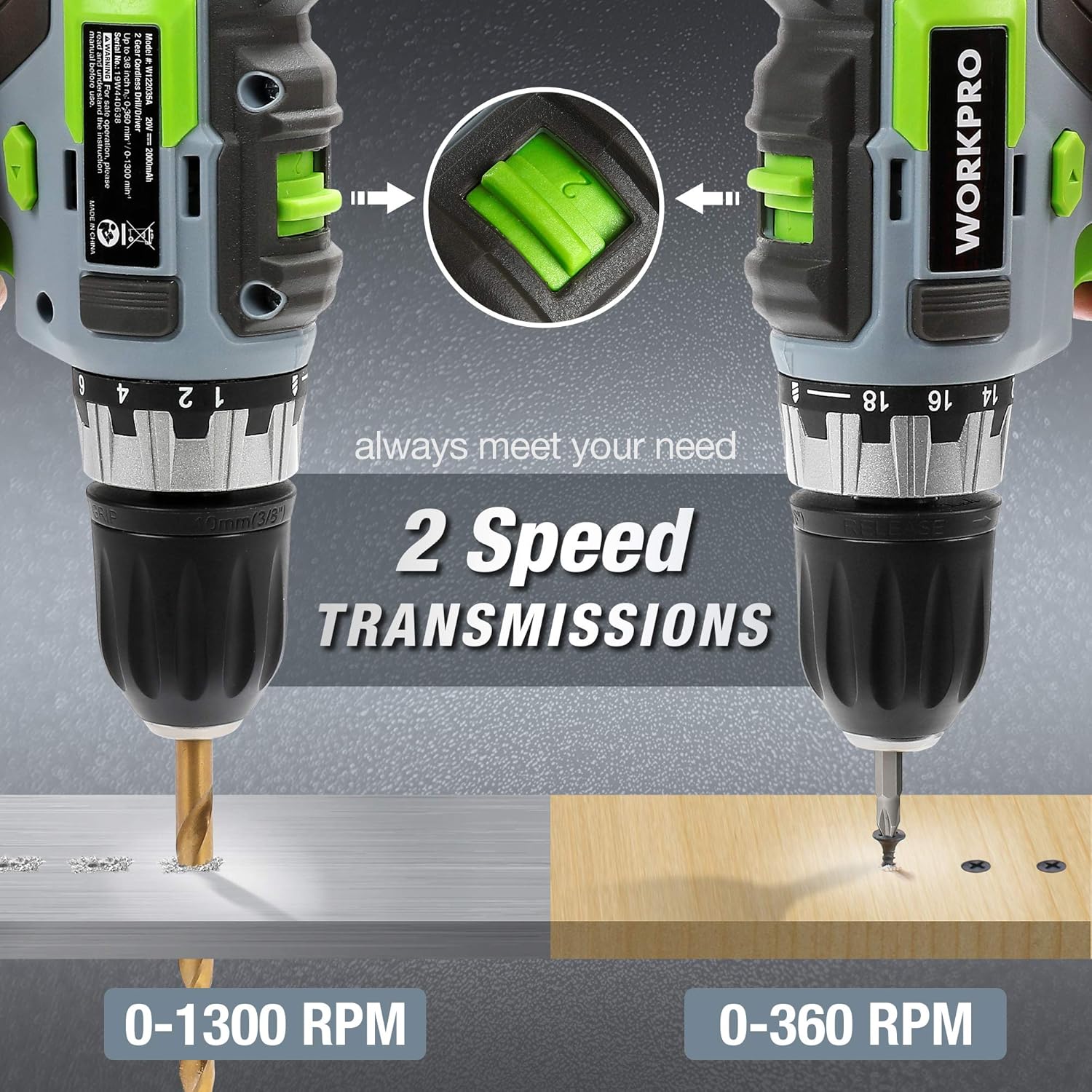
Image: Both the WORKPRO drill driver and impact driver illustrating their 2-speed transmission settings, with the drill driver operating at 0-1300 RPM and the impact driver at 0-360 RPM for different tasks.
5. Isẹ
5.1 Titan / Pa a
To start the tool, press the trigger switch. The tool speed is variable depending on how far the trigger is pressed. To stop the tool, release the trigger switch.
5.2 Siwaju / yiyipada
A forward/reverse selector switch is located above the trigger. Push the lever to the left for forward rotation (drilling and screwing). Push the lever to the right for reverse rotation (removing screws or freeing a stuck drill bit). Center the switch for the lock position, which prevents accidental starting.

Image: A diagram illustrating the forward, reverse, and lock positions of the rotation control switch on the WORKPRO drill driver, with instructions for each setting.
5.3 Lilo Imọlẹ Iṣẹ LED
Both tools are equipped with an LED work light that activates when the trigger is pressed, illuminating the work surface for improved visibility in dimly lit areas.

Image: The WORKPRO impact driver in use, with its integrated LED work light brightly illuminating the fastening point, demonstrating its utility in dark environments.
5.4 liluho imuposi
- Always secure the workpiece to prevent movement.
- Select the appropriate drill bit and speed setting for the material.
- Start drilling at a low speed to create a pilot hole, then increase speed as needed.
- Waye ni imurasilẹ, paapaa titẹ. Maṣe fi agbara mu liluho naa.
- Fún àwọn ihò jíjìn, máa fa èèpo náà nígbàkúgbà láti kó àwọn ìdọ̀tí kúrò.
5.5 Screwing Techniques
- Yan bit screwdriver ti o tọ fun ori skru naa.
- For the drill driver, adjust the torque setting to prevent over-tightening or stripping screws.
- For the impact driver, its high torque is suitable for driving long or stubborn screws.
- Apply firm, steady pressure to keep the bit engaged with the screw head.

Image: A collage showing the WORKPRO drill driver and impact driver being used in various applications, including drilling into wood and metal, and driving screws.
5.6 Using the Belt Hook
The included belt hooks can be attached to either tool for convenient temporary storage on a belt or workbench edge, allowing for hands-free movement between tasks.

Image: Demonstrates the 1-hour fast charging of the 2.0Ah Li-ion battery and the convenient belt hook feature for carrying the tool.
6. Itọju
Itọju deedee n ṣe idaniloju iṣẹ ṣiṣe to dara julọ ati gigun igbesi aye awọn irinṣẹ rẹ.
6.1 Ninu
- Ge asopọ batiri nigba gbogbo ṣaaju ṣiṣe mimọ.
- Lo asọ, damp asọ lati mu ese si isalẹ awọn ọpa ká ode. Maṣe lo awọn kẹmika ti o lewu tabi awọn afọmọ abrasive.
- Clear any dust or debris from the ventilation openings using compressed air or a soft brush.
- Keep the chucks clean and free of debris to ensure proper bit retention.
6.2 batiri Itọju
- Tọju awọn batiri ni itura, aye gbigbẹ kuro lati orun taara ati awọn iwọn otutu to gaju.
- Ma ṣe fi awọn batiri pamọ si ipo idasilẹ fun awọn akoko ti o gbooro sii. Saji wọn lorekore ti ko ba si ni lilo.
- Yago fun sisọ silẹ tabi ba awọn batiri bajẹ nipa ti ara.
6.3 Ibi ipamọ
- Store the tools and batteries in a secure, dry location, out of reach of children.
- Ensure batteries are removed from the tools before storage.
7. Laasigbotitusita
If you encounter issues with your WORKPRO tools, refer to the following common problems and solutions:
| Isoro | Owun to le Fa | Ojutu |
|---|---|---|
| Irinṣẹ ko bẹrẹ | Battery not charged or improperly installed; Forward/Reverse switch in lock position; Faulty switch. | Charge battery and ensure it is securely installed; Move switch out of lock position; Contact customer support for switch replacement. |
| Isonu ti agbara nigba isẹ | Battery low; Overload protection activated. | Recharge battery; Reduce load on the tool, allow it to cool down. |
| Bit slips or wobbles in chuck | Chuck not tightened properly; Bit shank is dirty or damaged; Incorrect bit size. | Retighten chuck firmly; Clean or replace bit; Use correct bit size. |
| Batiri ko ngba agbara | Charger not plugged in; Faulty battery or charger; Battery too hot/cold. | Ensure charger is plugged in; Try another battery/charger if available; Allow battery to reach room temperature before charging. Contact customer support if problem persists. |
8. Awọn pato
| Ẹya ara ẹrọ | Sipesifikesonu |
|---|---|
| Brand | WORKPRO |
| Nọmba awoṣe | W004578A |
| Voltage | 20 Volts (DC) |
| Batiri Iru | Litiumu-dẹlẹ |
| Agbara Batiri | 2.0 Ah (tí a fi kún un) |
| Ṣaja Ampigba | 2.4 A (Fast Charger) |
| Drill Driver Torque | 25 Nm (18+1 settings) |
| Drill Driver Speed | 0-360 RPM / 0-1300 RPM |
| Drill Driver Chuck Size | 10mm Keyless Chuck |
| Ipa Driver Torque | 130 Nm |
| Impact Driver Speed | 0-2600 RPM |
| Impact Driver Impact Frequency | 0-3500 IPM |
| Impact Driver Chuck Size | 6.35mm (1/4") Hexagonal Quick-Release Chuck |
| Awọn iwọn Ọja (L x W x H) | 22.5 x 17 x 6 cm |
| Iwọn Nkan | 4 kilo |
| Ohun elo | Ṣiṣu |
| UPC | 820909766186 |
9. Atilẹyin ọja ati Support
WORKPRO products are manufactured to high-quality standards. For warranty information, technical support, or service inquiries, please refer to the warranty card included with your purchase or visit the official WORKPRO webojula. Jọwọ ṣe idaduro ẹri rira rẹ fun eyikeyi awọn ibeere atilẹyin ọja.