
Yenkee YSP 2025
Ìwé Ìtọ́sọ́nà Olùlò Ètò Agbọrọsọ kọ̀ǹpútà Yenkee YSP 2025 2.0
Model: YSP 2025
1. Ifihan
O ṣeun fun riraasing the Yenkee YSP 2025 2.0 PC Speaker System. This manual provides detailed instructions for setting up, operating, and maintaining your new speakers. Please read this manual thoroughly before use to ensure proper operation and to maximize the lifespan of your product.
The Yenkee YSP 2025 speaker system is designed to enhance your multimedia audio experience with powerful and clear sound. It features versatile connectivity options including Bluetooth 5.0, 3.5mm audio input, TF card reader, and USB port for various audio sources.
2. Alaye Aabo
Lati rii daju iṣẹ ailewu ati yago fun ibajẹ, jọwọ ṣe akiyesi awọn iṣọra ailewu atẹle:
- Do not expose the speakers to water, moisture, or extreme temperatures.
- Do not place the speakers near heat sources such as radiators, heat registers, stoves, or other apparatus (including ampliifiers) ti o gbe ooru jade.
- Lo awọn asomọ/awọn ẹya ara ẹrọ ti a sọ pato nipasẹ olupese.
- Yọọ ohun elo yi nigba iji manamana tabi nigba lilo fun igba pipẹ.
- Tọkasi gbogbo iṣẹ si awọn oṣiṣẹ iṣẹ ti o peye. Iṣẹ nilo nigbati ohun elo ba ti bajẹ ni ọna eyikeyi, gẹgẹbi okun ipese agbara tabi plug ti bajẹ, omi ti ta silẹ tabi awọn nkan ti ṣubu sinu ẹrọ, ohun elo naa ti farahan si ojo tabi ọrinrin, ko ṣiṣẹ deede. , tabi ti lọ silẹ.
- Ma ṣe dina eyikeyi awọn ṣiṣi atẹgun. Fi sori ẹrọ ni ibamu pẹlu awọn ilana ti olupese.
- Dabobo okun agbara lati ma rin lori tabi pin, ni pataki ni awọn pilogi, awọn ohun elo irọrun, ati aaye nibiti wọn ti jade kuro ninu ohun elo naa.
3. Package Awọn akoonu
Jọ̀wọ́ ṣàyẹ̀wò ohun tó wà nínú àpò náà nígbà tí o bá ń tú u. Tí àwọn nǹkan kan bá sọnù tàbí tí wọ́n bá bàjẹ́, pe olùtajà rẹ.
- Yenkee YSP 2025 2.0 PC Speaker System (2 speakers)
- Isakoṣo latọna jijin
- 3.5mm Audio USB
- Okun agbara
- Itọsọna olumulo
4. Ọja Ipariview
Familiarize yourself with the components and controls of your Yenkee YSP 2025 speaker system.

Nọmba 4.1: Iwaju view of the Yenkee YSP 2025 speakers, showing the main speaker with control panel on the side and the secondary speaker.
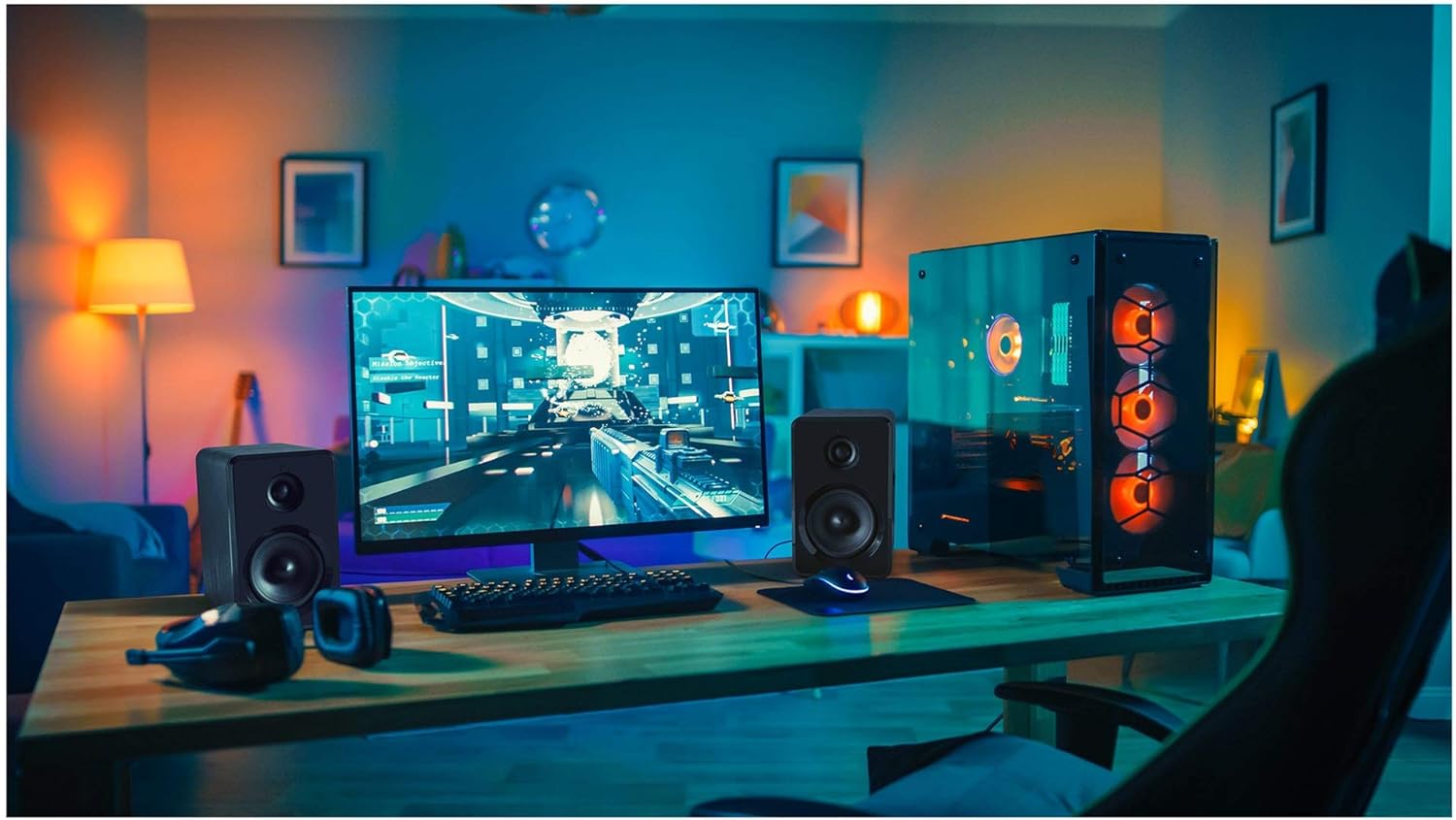
Nọmba 4.2: Yenkee YSP 2025 speakers integrated into a typical desktop computer setup, demonstrating their compact size and placement beside a monitor.

Nọmba 4.3: The retail packaging for the Yenkee YSP 2025 speakers, highlighting key features and including an image of the remote control.
4.1 Main Speaker Controls and Ports
The main speaker houses the primary controls and connectivity ports:
- Bọtini Iwọn didun: Ṣe atunṣe iwọn didun gbogbogbo.
- Bọtini Ipo: Cycles through input modes (Bluetooth, AUX, USB, TF).
- Bọ́tìnnì Ṣíṣe/Sánu duro: Controls playback in Bluetooth, USB, and TF modes.
- Ti tẹlẹ/Awọn bọtini orin atẹle: Navigates tracks in Bluetooth, USB, and TF modes.
- Ibudo USB: Fun šišẹsẹhin okun filasi USB.
- Iho Kaadi TF: For TF (microSD) card playback.
- Iṣawọle AUX (3.5mm): For connecting external audio devices via cable.
- Iṣagbewọle agbara: Sopọ si ohun ti nmu badọgba agbara.
- Agbejade Agbọrọsọ: Ó so mọ́ agbọrọsọ keji.
4.2 Iṣakoso latọna jijin
Iṣakoso latọna jijin ti o wa ninu rẹ pese iwọle irọrun si awọn iṣẹ oriṣiriṣi:
- Titan / Paa
- Aṣayan Ipo
- Iwọn didun Up / Isalẹ
- Pa ẹnu mọ́
- Ṣiṣẹ / Sinmi
- Ti tẹlẹ/Orin atẹle
- EQ Presets (if available)
5. Eto
5.1 Agbọrọsọ Placement
For optimal sound quality, place the speakers on a stable, flat surface. Position them equidistant from your listening position, forming an equilateral triangle for the best stereo imaging. Ensure there is adequate ventilation around the speakers.
5.2 Nsopọ awọn Agbọrọsọ
- Connect the cable from the secondary speaker to the "Speaker Output" port on the main speaker.
- Connect the power cable to the "Power Input" on the main speaker, then plug the other end into a standard wall outlet (100-240V).
5.3 Nsopọ Awọn orisun ohun
5.3.1 AUX Asopọ
Use the included 3.5mm audio cable to connect your device (e.g., computer, smartphone, MP3 player) to the "AUX Input" port on the main speaker.
5.3.2 USB/TF Card Connection
Insert a USB flash drive or TF (microSD) card into the respective port on the main speaker. The system will automatically switch to USB/TF mode and begin playing supported audio files.
6. Awọn ilana Iṣiṣẹ
6.1 Agbara Tan / Pa
Press the Power button on the remote control or the main speaker to turn the speakers on or off.
6.2 Aṣayan ipo
Press the "MODE" button on the main speaker or the remote control to cycle through the available input modes: Bluetooth, AUX, USB, and TF.
6.3 Iṣakoso iwọn didun
Rotate the volume knob on the main speaker clockwise to increase volume and counter-clockwise to decrease. Alternatively, use the Volume Up/Down buttons on the remote control.
6.4 Sisopọ Bluetooth
- Switch the speaker system to Bluetooth mode. The indicator light will flash, indicating it's ready for pairing.
- On your Bluetooth-enabled device (e.g., smartphone, tablet, computer), enable Bluetooth and search for available devices.
- Select "Yenkee YSP 2025" from the list of devices.
- Once paired, the indicator light will stop flashing and remain solid. You can now play audio wirelessly from your device.
6.5 USB/TF Playback
When a USB flash drive or TF card is inserted, the speakers will automatically switch to the corresponding mode and begin playing audio files. Use the Play/Pause and Previous/Next Track buttons on the main speaker or remote control to manage playback.
7. Itọju
Proper maintenance ensures the longevity and performance of your speakers:
- Ninu: Lo aṣọ rírọrùn tí ó gbẹ láti nu ojú agbọ́rọ̀ náà. Má ṣe lo àwọn ohun ìfọṣọ, epo tàbí àwọn ohun èlò ìfọṣọ.
- Ibi ipamọ: If storing the speakers for an extended period, unplug them from the power outlet and store them in a cool, dry place, away from direct sunlight and extreme temperatures.
- Afẹfẹ: Rii daju pe awọn šiši fentilesonu ko ni idinamọ lati ṣe idiwọ igbona.
8. Laasigbotitusita
If you encounter issues with your Yenkee YSP 2025 speakers, refer to the following common problems and solutions:
| Isoro | Owun to le Fa | Ojutu |
|---|---|---|
| Ko si ohun |
|
|
| Ohun ti o daru |
|
|
| Awọn oran sisopọ Bluetooth |
|
|
| USB/TF kaadi ko dun |
|
|
9. Awọn pato
Detailed technical specifications for the Yenkee YSP 2025 speaker system:
| Nọmba awoṣe | YSP 2025 |
| Agbọrọsọ Iru | 2.0 PC Speaker System |
| Agbara Ijade (RMS) | 40 W |
| Idahun Igbohunsafẹfẹ | 60 Hz - 20 kHz |
| Ẹya Bluetooth | 5.0 |
| Awọn aṣayan Asopọmọra | Bluetooth, 3.5mm AUX, USB, TF Card |
| Awọn iwọn (fun agbọrọsọ) | 115 x 185 x 159 mm (W x H x D) |
| Apapọ iwuwo | 2.5 kg |
| Ibi ti ina elekitiriki ti nwa | AC 100-240V |
| Ọna Iṣakoso | Push Button, Remote Control |
| Àwọ̀ | Dudu |
10. Atilẹyin ọja ati Support
Yenkee products are manufactured to the highest quality standards. For information regarding warranty terms and conditions, please refer to the warranty card included with your product or contact your local retailer. Keep your purchase receipt as proof of purchase.
For technical support or service inquiries, please contact the retailer where you purchased the product or visit the official Yenkee webojula fun alaye olubasọrọ.
Ask a question about this manual
Ask about setup, troubleshooting, compatibility, parts, safety, or missing instructions. Manuals+ will review the question and use this page’s manual context to help answer it.