
Ọrọ Iṣaaju
Thank you for choosing the Caliber CAM030 Wired Rear View Camera. This manual provides essential information for the proper installation, operation, and maintenance of your new camera. Please read this manual thoroughly before using the product to ensure safe and optimal performance.
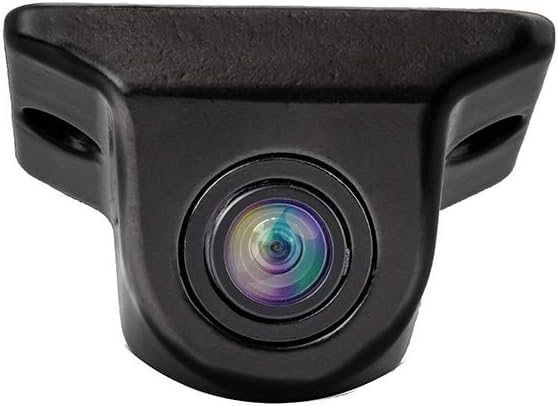
Figure 1: Caliber CAM030 Rear View Kamẹra
Alaye Aabo
Nigbagbogbo ṣe akiyesi awọn iṣọra ailewu atẹle lati yago fun ipalara tabi ibajẹ si ẹrọ naa:
- Rí i dájú pé agbára ọkọ̀ náà ti pa kí o tó bẹ̀rẹ̀ sí í fi sori ẹ̀rọ.
- Kan si alamọja kan ti o ko ba ni idaniloju nipa eyikeyi awọn igbesẹ fifi sori ẹrọ.
- Do not expose the camera to extreme temperatures or direct water immersion.
- Lo awọn kebulu ti a pese nikan ati awọn ẹya ẹrọ.
- Jeki kuro ni arọwọto awọn ọmọde.
Package Awọn akoonu
Jọwọ ṣayẹwo pe gbogbo awọn nkan wa ninu package:
- Caliber CAM030 Rear View Kamẹra
- RCA Video Cable
- Okun agbara
- Mounting Hardware (screws, bracket)
- Afowoyi Olumulo (iwe-ipamọ yii)
Eto ati fifi sori
The Caliber CAM030 is designed for aftermarket installation and connects to a compatible monitor via an RCA connector. Follow these steps for proper installation:
- Yan Ibi Igbesoke: Select a suitable location at the rear of your vehicle, typically near the license plate or bumper, that provides a clear view. The camera is designed for a wide-angle view ti 170 iwọn.
- Gbe Kamẹra naa: Secure the camera using the provided mounting bracket and screws. Ensure it is firmly attached and angled correctly for optimal visibility.
- So agbara: Connect the camera's power cable to the vehicle's reverse light circuit. This allows the camera to automatically power on when the vehicle is put into reverse gear. Ensure proper polarity.
- So Cable Fidio: Route the RCA video cable from the camera to your in-car monitor. Connect the RCA plug from the camera to the corresponding RCA input on your monitor.
- Ṣe idanwo fifi sori ẹrọ: Once all connections are made, turn on your vehicle and shift into reverse gear to test the camera's functionality. Adjust the camera's angle if necessary.

Figure 2: Typical mounting location near the license plate.
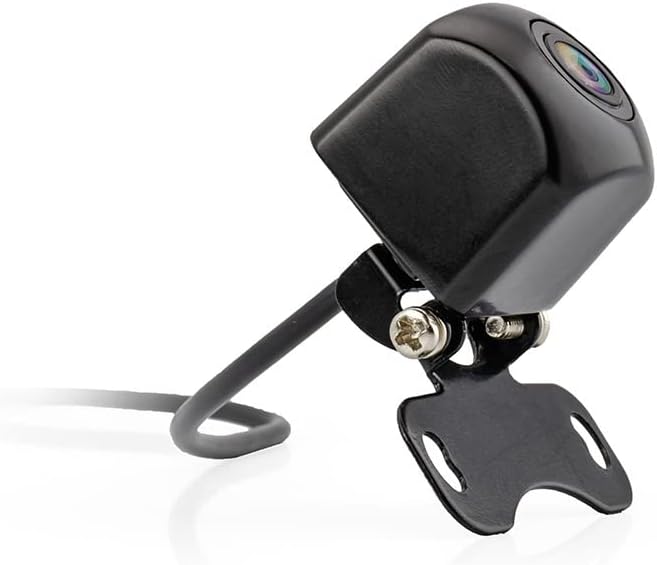
Figure 3: Camera with mounting bracket.

Figure 4: Compact size of the CAM030 camera.
Awọn ilana Iṣiṣẹ
The Caliber CAM030 is designed for simple, automatic operation:
- Ṣiṣẹ Aifọwọyi: When properly installed and connected to the reverse light circuit, the camera will automatically activate and display the rear view on your connected monitor as soon as you shift your vehicle into reverse gear.
- Igun gbooro View: The camera features a 170-degree wide-angle lens, providing a broad field of vision to assist with parking and maneuvering.
- Didara aworan: The camera captures video in 1080p resolution using CMOS sensor technology for clear images.
Itoju
To ensure the longevity and optimal performance of your camera:
- Ninu: Fọ lẹnsi kamẹra lẹẹkọọkan pẹlu asọ, damp aṣọ láti yọ ẹrẹ̀, eruku, tàbí àwọn ibi omi tí ó lè dí i lọ́wọ́ kúrò viewMá ṣe lo àwọn kẹ́míkà líle.
- Ayẹwo USB: Regularly check the cables for any signs of wear, fraying, or damage. Ensure all connections remain secure.
- Idaabobo Ayika: While the camera is designed for outdoor use, avoid exposing it to extreme pressure washing or prolonged submersion in water.
Laasigbotitusita
| Isoro | Owun to le Fa | Ojutu |
|---|---|---|
| Ko si aworan lori atẹle |
|
|
| Flicker tabi aworan ti o daru |
|
|
| Àwòrán náà kò hàn kedere tàbí kò hàn gbangba |
|
|
Awọn pato
| Ẹya ara ẹrọ | Ẹ̀kúnrẹ́rẹ́ |
|---|---|
| Brand | Caliber |
| Nọmba awoṣe | CAM030 |
| Awọn ẹrọ ibaramu | Atẹle |
| Asopọmọra Iru | RCA |
| Iru fifi sori ẹrọ | Lẹhin ọja |
| Ipinnu Gbigbasilẹ fidio | 1080p |
| Opitika sensọ Technology | CMOS |
| Lẹnsi Iru | Igun gbooro |
| Real Igun ti View | 170 iwọn |
| Aaye ti View | 170 iwọn |
| Ọja Mefa | 26L x 26W x 87H millimeters |
| Batiri gbigba agbara | Rara |
| Apoju Awọn ẹya ara wiwa | Alaye ko si |
| Software imudojuiwọn Titi | Alaye ko si |
| Akọkọ Wa Ọjọ | Oṣu Kẹrin Ọjọ 5, Ọdun 2022 |
Atilẹyin ọja ati Support
For warranty information and technical support, please refer to the documentation provided at the time of purchase or visit the official Caliber webojula. Jeki ẹri rira rẹ fun eyikeyi awọn ibeere atilẹyin ọja.
Akiyesi: Information regarding spare parts availability and software updates is not available at this time.