
1. Ọja Ipariview
The Cello C2220FSDE is a compact 22-inch Full HD LED television designed for versatile use. It features an integrated DVD player and a triple tuner (DVBT2/S2) for comprehensive signal reception. Its sleek design makes it suitable for various environments, including guest rooms, motorhomes, caravans, trucks, or boats.
Key features include HDMI and USB inputs for connecting external devices like game consoles and hard drives. The USB functionality also supports recording live television and playing stored media. This TV can also function as a monitor for laptops or desktop computers.

Aworan 1.1: The integrated DVD player allows for direct playback of DVDs without additional devices.

Aworan 1.2: Experience clear and detailed images with Full HD 1080p resolution.
2. Eto ati fifi sori
2.1 Ṣíṣí àpótí àti Àkóónú rẹ̀
Ni ifarabalẹ yọ gbogbo awọn paati kuro ninu apoti. Rii daju pe awọn nkan wọnyi wa:
- 1 x Cello 22-inch LED TV
- Okun agbara
- Isakoṣo latọna jijin
- Quick Bẹrẹ Itọsọna
- 2 x AAA batiri
- Iduro TV
2.2 So Iduro
Place the TV screen face down on a soft, clean surface to prevent scratches. Align the stand with the mounting holes on the bottom of the TV and secure it using the provided screws.
2.3 Connecting Power and Antenna
- So okun agbara pọ si titẹ agbara TV ati lẹhinna si iṣan ogiri.
- Connect your TV aerial cable to the 'TV Aerial' input on the back of the TV.
- For satellite reception, connect a satellite dish cable (not supplied) to the 'DVB-S2' input.

Aworan 2.1: Ẹyìn view of the TV showing power, antenna, and other connectivity ports.
2.4 External Device Connections
TV nfunni ni ọpọlọpọ awọn ebute oko oju omi fun sisopọ awọn ẹrọ ita:
- HDMI: Connect high-definition devices such as Blu-ray players, game consoles, or set-top boxes.
- USB: Connect USB storage devices for media playback or recording.
- VGA: So kọ̀ǹpútà pọ̀ láti lò ó gẹ́gẹ́ bí àtẹ̀gùn.
- 3.5mm Audio Jade: So awọn agbekọri ita tabi awọn agbohunsoke.

Aworan 2.2: Illustration of HDMI and USB ports for connecting various devices.

Aworan 2.3: The integrated satellite tuner allows connection to a satellite dish for satellite TV reception.
3. Awọn ilana Iṣiṣẹ
3.1 Initial Power On and Channel Scan
- Fi awọn batiri AAA sinu isakoṣo latọna jijin.
- Tẹ bọtini agbara lori isakoṣo latọna jijin tabi lori TV lati tan-an.
- Follow the on-screen instructions for initial setup, including language selection and automatic channel scanning for DVB-T2 (terrestrial) and DVB-S2 (satellite) signals.
3.2 Ipilẹ TV Awọn iṣẹ
- Aṣayan ikanni: Use the 'CH+' / 'CH-' buttons or the numeric keypad on the remote control.
- Iṣakoso iwọn didun: Use the 'VOL+' / 'VOL-' buttons.
- Aṣayan Orisun: Press the 'SOURCE' button to switch between inputs (TV, HDMI, USB, DVD).
- Lilọ kiri akojọ aṣayan: Use the 'MENU' button to access settings and navigation arrows to browse.
3.3 Integrated DVD Player Operation
- Rí i dájú pé TV náà ti tan, àti pé orísun ìtẹ̀síwájú náà ti wà ní 'DVD'.
- Gently insert a DVD disc into the slot on the side of the TV, label side facing the mirror side (as indicated on the slot).
- The DVD should load automatically. Use the remote control for playback functions (Play, Pause, Stop, Skip).
3.4 USB Recording and Media Playback
- Sisisẹsẹhin Media: Insert a USB storage device into the USB port. Select 'USB' as the input source. Navigate through your files (photos, music, videos) using the remote control.
- USB Recording (PVR): While watching live TV, insert a USB storage device. Press the 'RECORD' button on the remote to start recording. You can also use the 'PAUSE' function for time-shifting live TV.
Fidio 3.1: This video demonstrates the physical controls on the TV and the various input/output ports available on the back and side of the unit, including the DVD slot, USB, HDMI, and antenna connections.
4. Itọju
4.1 Ninu TV
- Yọọ TV kuro nigbagbogbo lati iṣan agbara ṣaaju ṣiṣe mimọ.
- Lo asọ ti o gbẹ lati nu iboju ati minisita. Fun awọn ami alagidi, fẹẹrẹ dampen asọ pẹlu omi tabi kan ìwọnba, ti kii-abrasive iboju regede.
- Má ṣe lo ọtí líle, benzene, àwọn ohun èlò ìpara, tàbí àwọn ohun mìíràn tó lè yí padà, nítorí wọ́n lè ba ibojú tàbí ìparí rẹ̀ jẹ́.
4.2 DVD Player Care
- Keep the DVD slot free from dust and debris.
- Only insert clean, undamaged discs.
5. Laasigbotitusita
If you encounter issues with your Cello TV, refer to the following common problems and solutions:
| Isoro | Owun to le Fa | Ojutu |
|---|---|---|
| Ko si agbara | Power cord not connected; power outlet faulty | Check power cord connection; try a different outlet |
| Ko si aworan, ṣugbọn ohun wa | Incorrect input source selected; faulty cable connection | Press 'SOURCE' to select correct input; check HDMI/VGA cable connections |
| Ko si ohun, ṣugbọn aworan wa | Volume too low or muted; external audio device issue | Increase volume; check mute status; ensure external audio devices are connected correctly |
| Poor picture quality (TV channels) | Weak antenna signal; incorrect antenna connection | Adjust antenna position; check antenna cable connection; perform a channel rescan |
| DVD ko dun | Disc inserted incorrectly; dirty or damaged disc; incorrect source selected | Re-insert disc correctly; clean or replace disc; select 'DVD' source |
| Isakoṣo latọna jijin ko ṣiṣẹ | Batteries depleted or inserted incorrectly; obstruction between remote and TV | Replace batteries; ensure correct polarity; remove obstructions; point remote directly at TV sensor |
For further assistance, please refer to the support section or the full instruction manual available online.
6. Awọn pato
Below are the detailed technical specifications for the Cello C2220FSDE 22-inch Full HD LED TV:
| Ẹya ara ẹrọ | Sipesifikesonu |
|---|---|
| Iwon iboju | 22 inches (aguntan 54.6 cm) |
| Brand | Cello |
| Ifihan ọna ẹrọ | LED |
| Ipinnu | 1080p (Full HD, 1920 x 1080 pixels) |
| Oṣuwọn sọtun | 60 Hz |
| Pataki Ẹya | Integrated DVD Player |
| Asopọmọra Technology | HDMI, USB, VGA |
| Apakan Ipin | 16:9 |
| Awọn iwọn Ọja (D x W x H) | 5P x 50.4W x 34.2H cm |
| Iwọn Nkan | 2.55 kilo |
| Ipin Itansan | 600:1 |
| Imọlẹ ti o pọju | 180 NIT Coating |
| HDR atilẹyin | HDR10 |
| Akoko Idahun | 10 millise-aaya |
| Tuner Iru | DVB-C, DVB-S2, DVB-T2 |
| Ipo Ijade Ohun | Sitẹrio |
| Agbọrọsọ Apejuwe | 2 x 3 W Pitch Perfect Sound |
| Agbara agbara | 21 kWh |
| Voltage | 230 Volts (100-240 V AC 50-60 Hz) |
| Boṣewa VESA Mount | 100 x 100 mm |
| Odun awoṣe | 2023 |
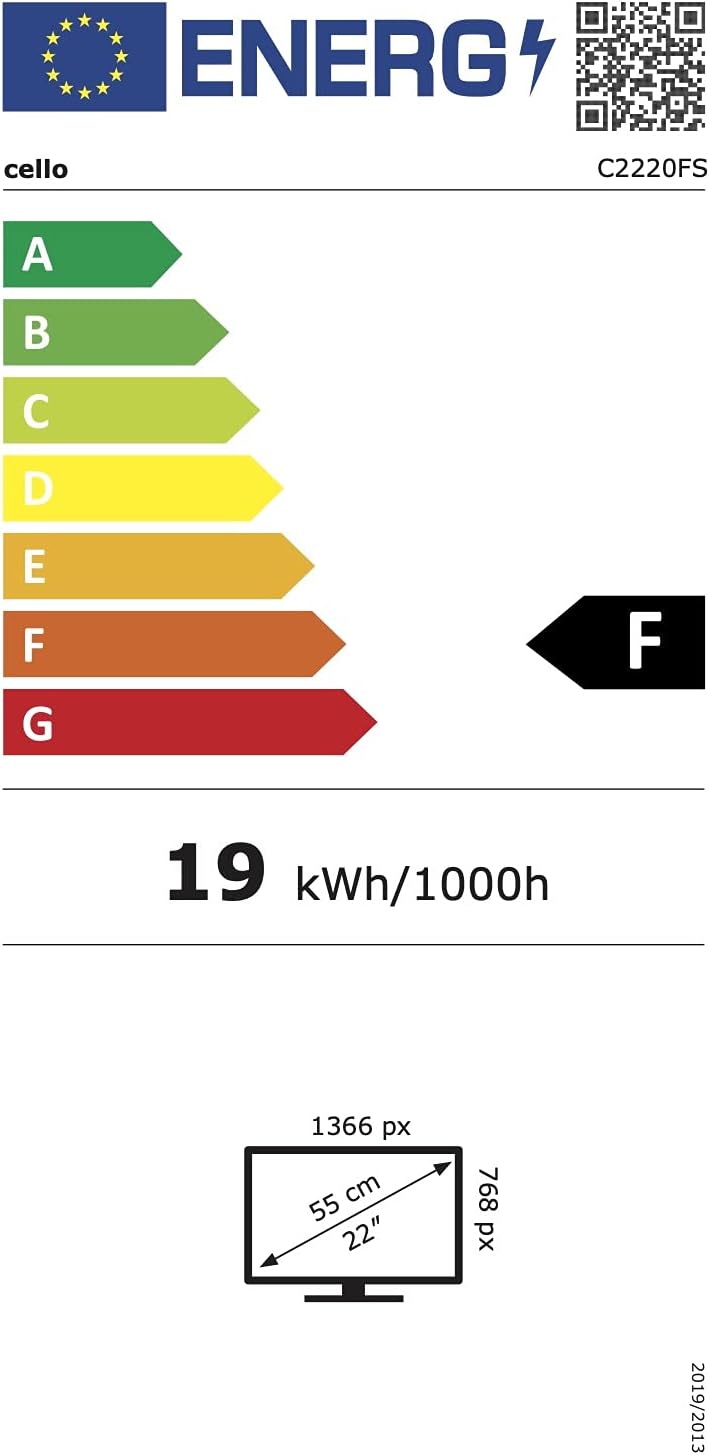
Aworan 6.1: Energy efficiency label for the Cello C2220FSDE TV. For more details, visit EPREL aaye data.

Aworan 6.2: Detailed product information sheet. For more details, visit EPREL aaye data.
7. Atilẹyin ọja ati Support
7.1 atilẹyin ọja Alaye
This Cello TV comes with a 1-odun lopin atilẹyin ọja. Jọwọ ṣe idaduro ẹri rira rẹ fun awọn iṣeduro atilẹyin ọja.
7.2 Onibara Support
For technical support or customer service, please contact Cello Electronics:
- Webojula: www.celloelectronics.de
- Imeeli: consumersupport@celloelectronics.com
- Foonu: 03334330312
- Adirẹsi: Dovecot Hills, Bishop Auckland, DL14 6XW Durham, United Kingdom
You can also download the full instruction manual for your device in your preferred language from the official Cello webojula: https://celloelectronics.de/instruction-books/.


