
1. Ifihan
Thank you for choosing the Proscenic Ultenic H8 Smart Warm and Cool Mist Ultrasonic Humidifier. This manual provides essential information for the safe operation, maintenance, and troubleshooting of your device. Please read it thoroughly before use and retain it for future reference.
The Ultenic H8 humidifier is designed to improve air quality and comfort in your home by providing both warm and cool mist options. It features a large 4.3L water tank, smart app control, and an LED touch screen for convenient operation.
2. Awọn Ilana Aabo pataki
- Máa gbé ohun èlò ìtura omi sí orí ilẹ̀ tó le koko, tó tẹ́jú, tó sì lè má jẹ́ kí omi gbóná dáadáa, kí oòrùn àti àwọn orísun ooru má bàa lè wọ̀ ọ́.
- Do not place the humidifier near furniture or appliances that are sensitive to moisture.
- Ensure the power cord is not damaged and is placed safely to prevent tripping hazards.
- Yọọ ọriniinitutu ṣaaju kikun, nu, tabi gbigbe.
- Maṣe fi omi inu ipilẹ sinu omi tabi awọn omi miiran.
- Jeki kuro ni arọwọto awọn ọmọde ati awọn ohun ọsin.
- Omi omi tútù tó mọ́ tó sì tutù nìkan ni a máa ń lò. Omi tí a ti yọ́ tàbí tí a ti yọ́ kúrò ni a máa ń gbà nímọ̀ràn láti dènà kí àwọn ohun alumọ́ni má baà kó jọ.
- Do not add essential oils directly into the water tank; use the designated aroma box.
- Ma ṣe dina ijade owusu.
- If the humidifier emits unusual sounds, smells, or smoke, unplug it immediately and contact customer support.
3. Ọja Ipariview
Familiarize yourself with the components of your Ultenic H8 humidifier:
- Òwú Òwú: Where the mist is dispersed.
- Omi omi: 4.3L capacity for water.
- Ẹka ipilẹ: Ó ní ẹ̀rọ amúlétutù àti ohun èlò ìgbóná tí ó ní ultrasonic transducer.
- Control Panel/LED Display: For manual operation and status display.
- Àpótí òórùn dídùn: For adding essential oils (do not add directly to water tank).
- Okun Agbara: Connects to an electrical outlet.
- Isakoṣo latọna jijin: Fun iṣẹ ti o rọrun lati ọna jijin.
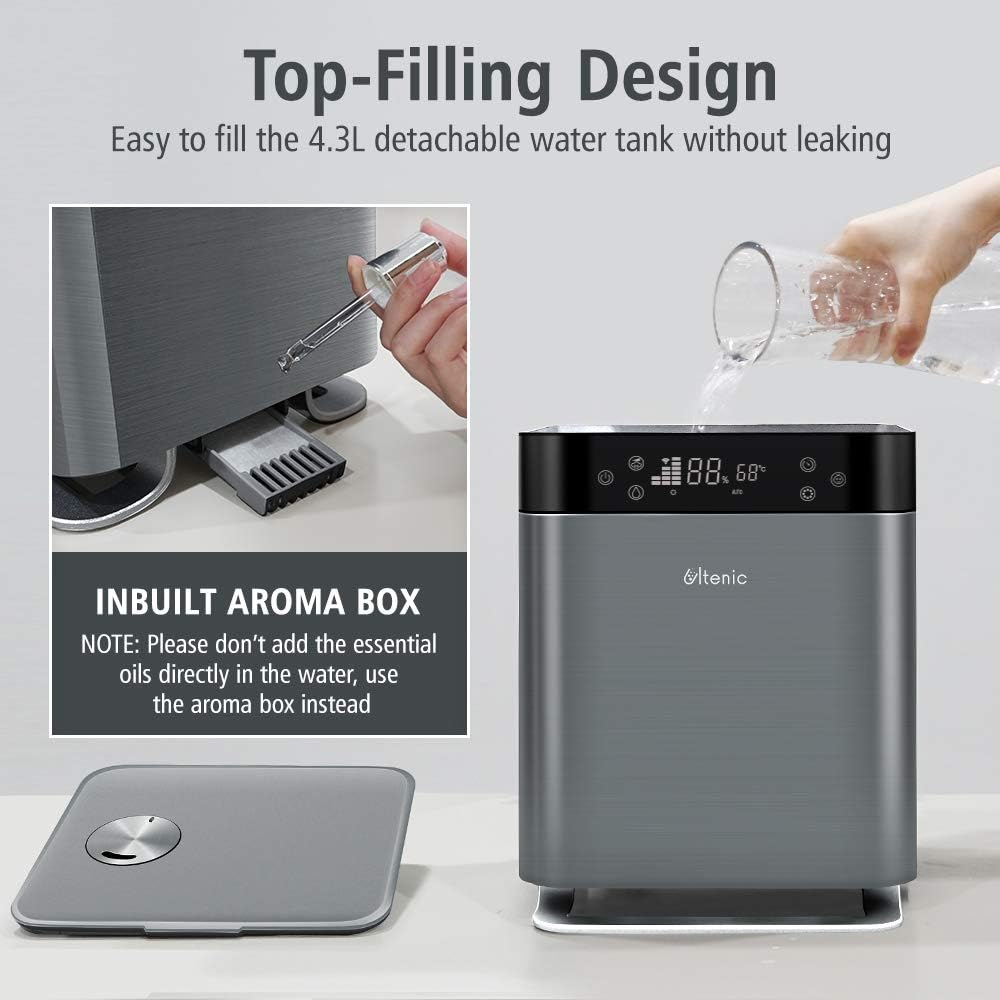
Aworan: The Ultenic H8 humidifier showcasing its top-filling design and the integrated aroma box. The image highlights the ease of refilling the 4.3L detachable water tank without leakage and provides a note to use the aroma box for essential oils instead of adding them directly to the water.
4. Eto
4.1 Ibẹrẹ Ibẹrẹ
- Tú ohun èlò ìtura àti gbogbo àwọn ohun èlò míì sílẹ̀.
- Place the humidifier on a flat, stable surface at least 6 inches (15 cm) away from walls and other objects.
- Rí i dájú pé okùn agbára náà rọrùn láti wọ̀lé àti pé kò dí.
4.2 Kikun Omi Omi
- Yọ ideri oke ti ọriniinitutu kuro.
- Fill the 4.3L water tank directly from the top opening with clean, cool tap water. For best results and to prevent mineral buildup, use distilled or demineralized water.
- Do not fill past the MAX water level indicator.
- Rọpo ideri oke ni aabo.
4.3 Asopọ agbara
Plug the power cord into a standard electrical outlet. The humidifier will enter standby mode.
5. Awọn ilana Iṣiṣẹ
5.1 Iṣakoso Panel isẹ
The LED touch screen allows for easy adjustment of settings and displays real-time humidity levels.
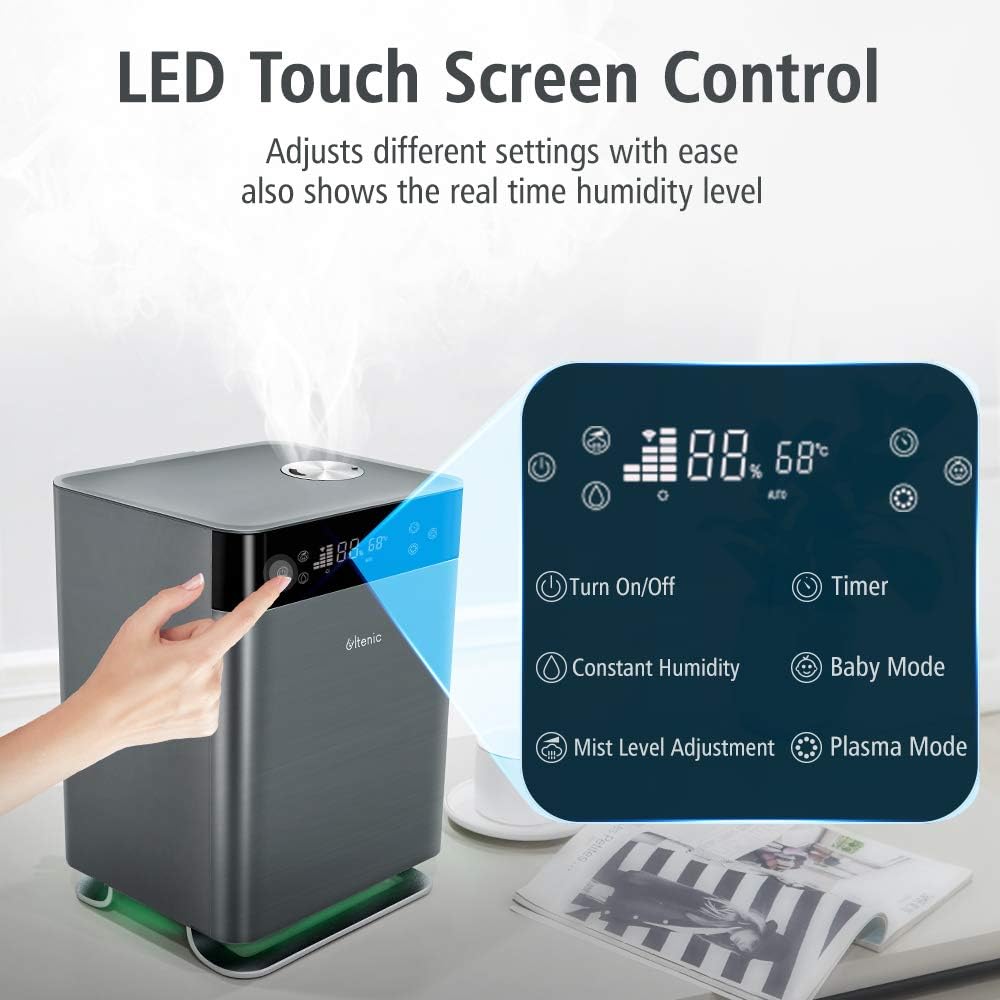
Aworan: Close-up of the Ultenic H8 humidifier's LED touch screen control panel. The image illustrates various touch buttons for functions such as Turn On/Off, Timer, Constant Humidity, Baby Mode, Mist Level Adjustment, and Plasma Mode, along with the digital display showing humidity and temperature.
- Bọtini agbara: Press to turn the humidifier On/Off.
- Àtúnṣe Ìpele Àìsàn: Cycle through different mist output levels.
- Constant Humidity Mode: Set a desired humidity level; the humidifier will automatically adjust output to maintain it.
- Warm Mist/Cool Mist: Yan laarin ifihan owusu gbona tabi tutu.
- Ipo Ọmọde: Optimized settings for a baby's room.
- Plasma Mode: Activates the plasma function for air purification.
- Imọlẹ alẹ: Turn the integrated night light On/Off.
- Aago: Set an operating duration (e.g., 1-12 hours).
5.2 Iṣakoso APP ọlọgbọn
Download the Ultenic app from your smartphone's app store to control your humidifier remotely and access additional features.

Aworan: The Ultenic H8 humidifier with a smartphone displaying the smart app interface and an Amazon Echo device. The image highlights features like Alexa & Google Home voice control, Baby Mode, Warm Mist, 3-Levels Mist, Timer, Night Light, and Schedule, all controllable via the app.
- Ṣe igbasilẹ ohun elo naa: Wa fun "Ultenic" in the App Store (iOS) or Google Play Store (Android).
- Forukọsilẹ/Wọle: Ṣẹda akọọlẹ kan tabi wọle ti o ba ti ni ọkan tẹlẹ.
- Fi ẹrọ kun: Follow the in-app instructions to add your H8 humidifier. Ensure your phone is connected to a 2.4GHz Wi-Fi network during setup.
- Awọn ẹya Iṣakoso:
- Latọna / Paa
- Adjust mist levels and modes (Warm/Cool, Baby Mode, Constant Humidity, Plasma)
- Ṣeto awọn iṣeto ati awọn aago
- Control night light
- Monitor indoor temperature and humidity
- Voice control integration with Alexa and Google Home (requires separate setup within their respective apps).
5.3 Mist Output and Coverage

Aworan: The Ultenic H8 humidifier demonstrating its 360° effective coverage, providing continuous mist for rooms up to 50m² (323 ft²). The image visually separates warm mist (balancing heated air in winter) and cool mist (keeping skin hydrated in hot & dry weather) functions.
The H8 humidifier offers 360° effective coverage, suitable for rooms up to 50m² (323 ft²), providing up to 30 hours of continuous mist. Choose between warm mist to balance heated air in winter or cool mist for hydration in hot and dry weather.
6. Itọju
Ìmọ́tótó àti ìtọ́jú déédéé ṣe pàtàkì fún iṣẹ́ tó dára jùlọ àti pípẹ́ tí ẹ̀rọ ìtura rẹ ń ṣe.
6.1 Daily Itọju
- Empty any remaining water from the tank and base unit daily.
- Rinse the water tank and base unit with fresh water.
- Refill with fresh, clean water before each use.
6.2 osẹ Cleaning
- Yọọ: Máa yọ ohun èlò ìfọwọ́sí omi kúrò kí o tó sọ ọ́ di mímọ́.
- Omi Sofo: Empty all water from the tank and base unit.
- Omi omi mimọ:
- Yọ ojò omi kuro.
- Wipe the inside of the tank with a soft cloth.
- For mineral buildup, fill the tank with a mixture of 1 teaspoon of white vinegar and 1 gallon of water. Let it stand for 30 minutes, then rinse thoroughly.
- Ẹka Mimọ mimọ:
- Gently wipe the surface of the ultrasonic transducer (the small disc in the center of the base) with a soft brush or cloth. Do not scrape.
- Clean the heating element (if applicable) and other internal surfaces with a soft, damp asọ.
- Ma ṣe fi omi si ipilẹ ipilẹ.
- Fi omi ṣan ati Gbẹ: Rinse all parts thoroughly with clean water and allow them to air dry completely before reassembling.
6.3 Ibi ipamọ
If the humidifier will not be used for an extended period, clean it thoroughly as described above, ensure all parts are dry, and store it in a cool, dry place.
7. Laasigbotitusita
| Isoro | Owun to le Fa | Ojutu |
|---|---|---|
| Ko si owusuwusu tabi iṣẹjade owusuwusu kekere |
|
|
| Òórùn asán |
|
|
| "EF" error message on display |
|
|
| Humidifier not connecting to Wi-Fi/App |
|
|
8. Awọn pato
| Brand | Proscenic |
| Orukọ awoṣe | H8 (Cool Mist Ultrasonic) |
| Ipo Isẹ | Ultrasonic |
| Agbara | 4.3 liters |
| Pataki Awọn ẹya ara ẹrọ | Night Light, Quiet Operation (less than 30dB), Remote Control, Smart APP Control (Warm and Cool Mist) |
| Yara Iru | Bedroom (suitable for up to 50m² / 323 ft²) |
| Ọja Mefa | 9.84 x 9.45 x 13.78 inches |
| Iwọn Nkan | 8.33 iwon |
| Awọn irinše to wa | Cleaning Brush, Instruction Manual |

Aworan: The Ultenic H8 humidifier operating quietly in a bedroom setting, with a person sleeping peacefully. The image emphasizes its ultra-quiet operation (less than 30dB) and the presence of a night light that can be turned off.
9. Atilẹyin ọja ati Support
Proscenic products are manufactured to the highest quality standards. For detailed warranty information, please refer to the warranty card included with your purchase or visit the official Proscenic webojula.
If you encounter any issues or have questions regarding your Ultenic H8 humidifier, please contact Proscenic Customer Support for assistance. Contact details can typically be found on the product packaging, warranty card, or the official webojula.