
1. Ifihan
1.1 Ọja Loriview
The Renkforce RF-HC-100 is a compact 16-megapixel trail camera designed for outdoor monitoring. It features a time-lapse function, night vision capabilities, and a durable, camouflage brown housing. This camera is suitable for wildlife observation, property surveillance, and other outdoor recording needs.
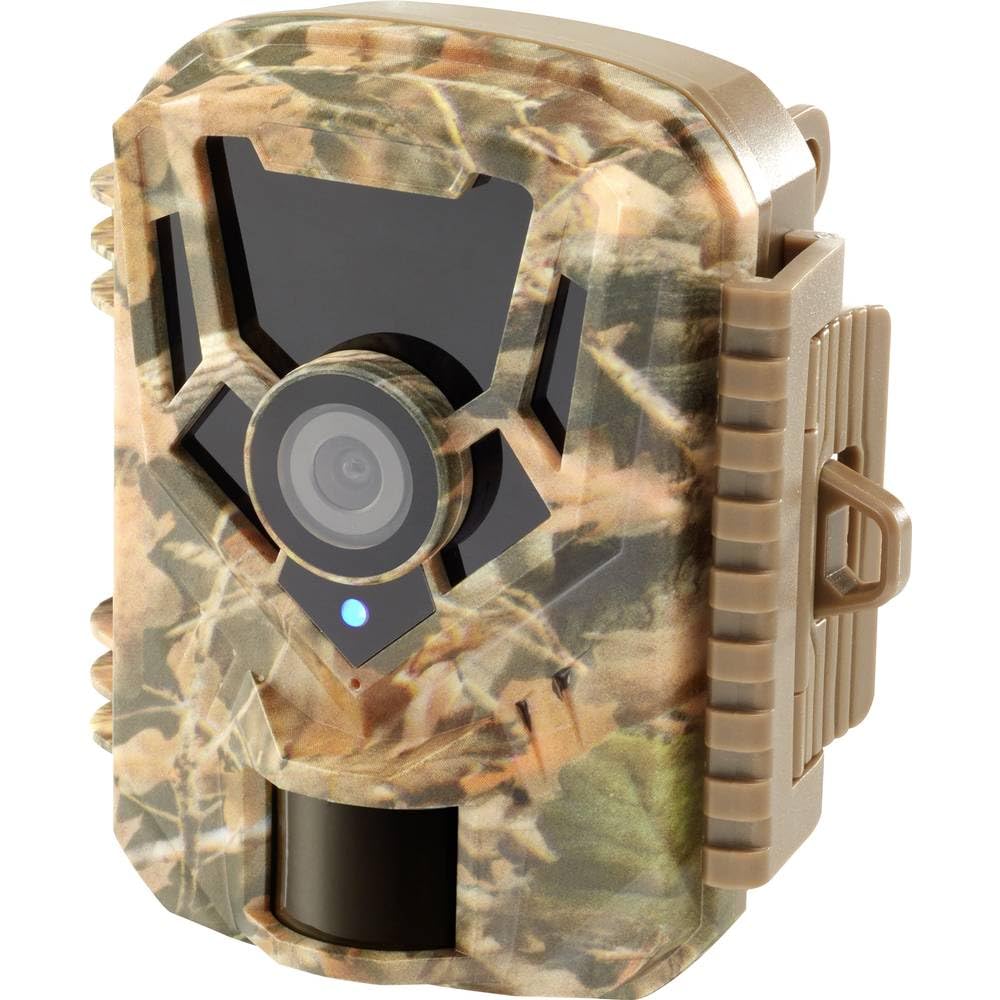
Aworan: Iwaju-ẹgbẹ view of the Renkforce RF-HC-100 Trail Camera, showcasing its compact design and camouflage pattern.

Aworan: Iwaju view of the Renkforce RF-HC-100 Trail Camera, highlighting the main lens and motion sensor.
1.2 Package Awọn akoonu
- 1 x Renkforce RF-HC-100 Trail Camera Unit
- Note: Additional accessories such as mounting straps, USB cables, or user manuals may be included depending on the specific package.
2. Alaye Aabo
- Ka gbogbo awọn ilana ni pẹkipẹki ṣaaju ṣiṣe ẹrọ naa.
- Do not expose the camera to extreme temperatures, direct sunlight for prolonged periods, or corrosive liquids.
- Ensure the battery compartment is properly sealed to maintain the IP65 weather resistance.
- Sọ awọn batiri nu gẹgẹ bi ofin agbegbe. Maṣe da awọn batiri atijọ ati tuntun tabi awọn oriṣi awọn batiri pọ.
- Jeki ẹrọ naa kuro ni arọwọto awọn ọmọde.
- Má ṣe gbìyànjú láti tú ká tàbí yí kámẹ́rà padà, nítorí èyí yóò sọ àtìlẹ́yìn náà di òfo, ó sì lè fa ìbàjẹ́.
3. Awọn ẹya Ọja
The Renkforce RF-HC-100 Trail Camera offers the following key features:
- Aworan Ipinnu Giga: 16 Megapixel effective capture resolution for clear photos and 1080p video recording.
- Iran Alẹ: Equipped with color night vision for monitoring in low-light conditions.
- Time-Lapse Function: Capture images at set intervals to observe long-term events.
- Iho kaadi SD: Supports external SD cards for ample storage of photos and videos.
- Atako oju ojo: IP65 international protection rating ensures durability in various outdoor environments.
- Apẹrẹ Iwapọ: Miniature form factor with a camouflage brown finish for discreet placement.
- Igun gbooro View: 90-degree angle of view to cover a broad area.
- Asopọmọra: Features wired connectivity (USB, AV ports) and Wi-Fi protocol for data transfer and control via application.
- Awọn aṣayan iṣagbesori: Includes support for wall mounting.
4. Eto
4.1 Fifi sori batiri
- Ṣí ilé kámẹ́rà náà nípa ṣíṣí àwọn fíìmù ẹ̀gbẹ́ rẹ̀.
- Wa yara batiri naa.
- Insert the required number of AA batteries (not included) according to the polarity markings (+/-).
- Pa yara batiri naa ni aabo.
4.2 SD kaadi sori
- Pẹlu ṣiṣi ile kamẹra, wa iho kaadi SD.
- Insert a compatible SD card (up to 32GB, Class 10 recommended) into the slot with the metal contacts facing down until it clicks into place.
- To remove, push the SD card in again until it springs out.

Image: The Renkforce RF-HC-100 Trail Camera with its housing open, revealing the control panel, USB, AV, and DC ports, and the ON/SETUP/OFF switch.
4.3 Iṣagbesori Kamẹra
The camera can be mounted using a strap or a wall mount bracket (if included or purchased separately).
- Fifi sori okun: Thread a mounting strap through the slots on the back of the camera and secure it to a tree or pole.
- Iṣagbede ogiri: Use the integrated mounting points or a compatible wall mount bracket to attach the camera to a flat surface. Ensure the camera is stable and pointed in the desired direction.
5. Awọn ilana Iṣiṣẹ
5.1 Agbara Tan / Pa ati Aṣayan Ipo
Locate the ON/SETUP/OFF switch inside the camera housing.
- PA: Powers off the camera.
- ṢETO: Enters setup mode, allowing you to configure settings via the internal display.
- LATI: Activates the camera for recording based on the configured settings.
5.2 Eto atunto
In SETUP mode, use the navigation buttons (if available) to access the menu and adjust parameters such as:
- Fọto/Ipinnu fidio
- Ifamọ sensọ PIR
- Idaduro Wiwa
- Aago-Lapse Aarin
- Ọjọ ati Aago
- Recording Mode (Photo, Video, Photo+Video, Time-Lapse)
5.3 Data igbapada
Lati wọle si igbasilẹ files:
- Nipasẹ USB: Connect the camera to a computer using a USB cable. The camera will appear as a removable disk.
- Via SD Card: Remove the SD card from the camera and insert it into a computer's card reader.
6. Itọju
- Ninu: Use a soft, dry cloth to clean the camera lens and housing. For stubborn dirt, a slightly damp asọ le ṣee lo, ṣugbọn rii daju pe ko si ọrinrin ti o wọ inu ẹrọ naa.
- Rirọpo Batiri: Rọpo awọn batiri nigbati itọka batiri kekere ba han tabi nigbati iṣẹ ṣiṣe dinku.
- Iṣakoso Kaadi SD: Regularly format the SD card (after backing up important data) to maintain optimal performance and prevent errors.
- Ibi ipamọ: Nigbati o ko ba wa ni lilo fun awọn akoko ti o gbooro sii, yọ awọn batiri kuro ki o fi kamẹra pamọ si ibi ti o tutu, ibi gbigbẹ kuro lati orun taara.
7. Laasigbotitusita
| Isoro | Owun to le Fa | Ojutu |
|---|---|---|
| Kamẹra ko ṣiṣẹ. | Low or dead batteries; incorrect battery installation; power switch in OFF position. | Replace batteries; ensure correct polarity; set switch to ON or SETUP. |
| Aworan ti ko dara / didara fidio. | Idọti lẹnsi; awọn ipo ina kekere; eto ipinnu ti ko tọ. | Clean the lens; ensure adequate lighting or use night vision; adjust resolution settings. |
| Kámẹ́rà kò gba sílẹ̀. | SD card full or faulty; incorrect mode selected; PIR sensor blocked. | Format or replace SD card; select appropriate recording mode; clear sensor path. |
| Ko le sopọ si kọmputa. | Faulty USB cable; camera not in correct mode; driver issues. | Try a different USB cable; ensure camera is in connection mode (if applicable); try another computer or card reader. |
8. Awọn pato
| Orukọ awoṣe | RF-HC-100 (RF-4466574) |
| Effective Capture Resolution | 16 Megapiksẹli |
| Ipinnu fidio | 1080p |
| Awọn iwọn (L x W x H) | 21 x 12 x 9 cm (8.27 x 4.72 x 3.54 inches) |
| Iwọn | 186 Giramu (0.41 lbs) |
| Asopọmọra Technology | Wired (USB, AV), Wi-Fi Protocol (for control/transfer) |
| Pataki Awọn ẹya ara ẹrọ | Local Recording, Night Vision (Color Night Vision) |
| Ayika Lilo | Ita gbangba |
| International Idaabobo Rating | IP65 |
| Orisun agbara | Manual Operation (Battery-powered, batteries not included) |
| Wattage | 1.5 Wattis |
| View Igun | Awọn iwọn 90 |
| Àwọ̀ | Camouflage Brown |
| Ohun elo | Metal (internal) |
| Oke Iru | Odi Oke Support |
9. Atilẹyin ọja ati Support
Renkforce provides support for its products. Spare parts availability is indicated for 1 year from the date of purchase. For technical assistance, troubleshooting beyond this manual, or warranty claims, please refer to the contact information provided with your product packaging or visit the official Renkforce webojula.