
Ọrọ Iṣaaju
This manual provides essential information for the safe and efficient operation of your QFX SBX-213 12-inch Portable Bluetooth Speaker. Please read it thoroughly before using the product and retain it for future reference.
Awọn Itọsọna Aabo
Lati rii daju iṣẹ ailewu ati yago fun ibajẹ, jọwọ ṣe akiyesi awọn iṣọra ailewu atẹle:
- Ma ṣe fi ẹrọ naa han si ojo, ọrinrin, tabi awọn iwọn otutu to gaju.
- Má ṣe ṣí agbọ́hùnsọ̀rọ casing. Tọkasi gbogbo iṣẹ si oṣiṣẹ oṣiṣẹ.
- Keep the speaker away from heat sources, direct sunlight, and open flames.
- Use only the specified power adapter and charging cable provided with the unit.
- Rí i dájú pé afẹ́fẹ́ ń fẹ́ sí afẹ́fẹ́ tó yẹ ní àyíká agbọ́hùnsọ̀ náà kí ó má baà gbóná jù.
- Yago fun gbigbe awọn nkan ti o wuwo sori agbọrọsọ.
Package Awọn akoonu
Nigbati o ba ṣii, jọwọ rii daju pe gbogbo awọn nkan ti o wa ni isalẹ wa ati ni ipo to dara:
- QFX SBX-213 Portable Bluetooth Speaker
- Okun agbara
- Isakoṣo latọna jijin
- Afowoyi Olumulo (iwe-ipamọ yii)
Ọja Pariview
The QFX SBX-213 is a 12-inch portable speaker designed for versatile audio playback. It features Bluetooth connectivity for wireless streaming, an FM radio tuner, and a USB input for playing audio files lati kan filasi drive.
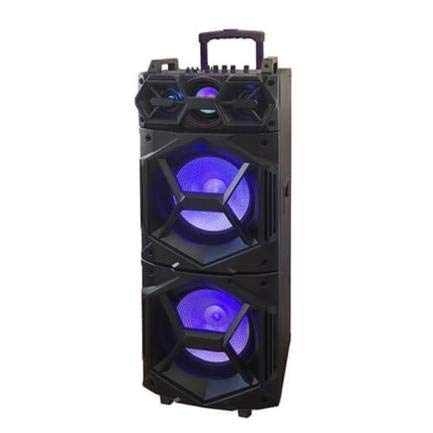
Aworan: Iwaju view of the QFX SBX-213 Portable Bluetooth Speaker, showcasing its 12-inch driver and robust design. The speaker features a black finish and a protective grille over the main driver.
The speaker's control panel and ports typically include:
- Agbara Titan/Pa Yipada
- Mode Button (to switch between Bluetooth, FM, USB inputs)
- Volume Control Knobs or Buttons
- Play/Pause, Previous/Next Track Buttons
- USB Port for media playback
- Charging Port for power cable connection
- LED Indicator Lights for power, charging, and Bluetooth status
Ṣeto
- Gbigba agbara si Agbọrọsọ: Before first use, connect the provided power cable to the speaker's charging port and plug it into a standard electrical outlet. Allow the speaker to fully charge. The charging indicator light will typically change color or turn off when charging is complete.
- Ibi: Place the speaker on a stable, flat surface. For optimal sound dispersion, avoid placing it in enclosed spaces or directly against walls.
Awọn ilana Iṣiṣẹ
1. Agbara Tan / Paa
To power on the speaker, locate the power switch, usually on the back or side panel, and slide it to the "ON" position. To power off, slide the switch to the "OFF" position.
2. Sisopọ Bluetooth
- Turn on the speaker. It will typically enter Bluetooth pairing mode automatically, indicated by a flashing LED light and an audible prompt.
- Mu Bluetooth ṣiṣẹ lori ẹrọ alagbeka rẹ (foonuiyara, tabulẹti, ati bẹbẹ lọ).
- Wa fun available Bluetooth devices. You should see "QFX SBX-213" or a similar name in the list.
- Select the speaker to pair. Once connected, you will hear a confirmation sound, and the LED indicator will stop flashing.
- O le mu ohun ṣiṣẹ bayi lati ẹrọ rẹ nipasẹ agbọrọsọ.
3. FM Radio isẹ
- Press the "MODE" button on the speaker or remote control until "FM" mode is selected.
- Press the "Play/Pause" button to initiate an automatic scan for FM stations. The speaker will save all found stations.
- Use the "Previous/Next Track" buttons to navigate between saved FM stations.
4. USB Sisisẹsẹhin
- Fi kọnputa USB ti o ni ohun MP3 sii files sinu USB ibudo lori agbọrọsọ.
- Press the "MODE" button until "USB" mode is selected. The speaker will automatically begin playing audio files lati USB drive.
- Use the "Play/Pause" and "Previous/Next Track" buttons to control playback.
5. Iṣakoso iwọn didun
Adjust the master volume using the dedicated volume knob or buttons on the speaker. You can also control the volume from your connected Bluetooth device or the remote control.
Itoju
- Ninu: Use a soft, dry cloth to clean the speaker's exterior. Do not use abrasive cleaners, waxes, or solvents, as these may damage the finish.
- Ibi ipamọ: Nigbati o ko ba wa ni lilo fun awọn akoko ti o gbooro sii, tọju agbohunsoke si tutu, ibi gbigbẹ, kuro lati orun taara ati awọn iwọn otutu to gaju.
- Itọju Batiri: To prolong battery life, avoid fully discharging the battery frequently. Charge the speaker regularly, even if not in use for long periods, to maintain battery health.
Laasigbotitusita
If you encounter any issues with your QFX SBX-213 speaker, please refer to the following table for common problems and solutions:
| Isoro | Owun to le Fa | Ojutu |
|---|---|---|
| Ko si agbara | Battery discharged; Power cable not connected securely | Charge the speaker fully; Ensure power cable is securely connected to both the speaker and the power outlet. |
| Ko si asopọ Bluetooth | Bluetooth not enabled on device; Speaker not in pairing mode; Device too far from speaker | Enable Bluetooth on your device; Put the speaker into Bluetooth pairing mode; Move your device closer to the speaker (within 10 meters). |
| Ko si ohun jade | Volume too low; Incorrect mode selected; Device or speaker is muted | Increase the volume on both the speaker and your connected device; Press the MODE button to select the correct input (Bluetooth, USB, FM); Check if the speaker or device is muted. |
| FM radio static or poor reception | Àmì tí kò lágbára; Ìdènà | Relocate the speaker to an area with better reception; Perform an auto-scan for stations again; Avoid placing near other electronic devices that may cause interference. |
Awọn pato
- Brand: QFX
- Awoṣe: SBX-213
- Iwọn Agbọrọsọ: 12 inches
- Imọ-ẹrọ Asopọmọra: USB, Bluetooth
- Awọn ẹya pataki: Lightweight, Portable, FM Radio
- Iru fifi sori: Floor, Table Mount
- Iru Adari: Isakoṣo latọna jijin
- Orisun Agbara: Cable ina
- Awọn iwọn (H x W x D): Isunmọ 113 x 42 x 42 cm
- Ìwúwo: O to 4 kg
- UPC: 606540036341
- ASIN: B08GL3SHQP
Atilẹyin ọja ati Support
QFX products are designed for reliability and performance. For detailed warranty information or technical support, please refer to the warranty card included with your purchase or visit the official QFX webojula. Jeki ẹri rira rẹ fun eyikeyi awọn ibeere atilẹyin ọja.
For further assistance, please contact QFX customer service through their official channels.