
Sharp B08H3STVWG
Sharp Digital Clock with Alarm and Dual USB FastCharge Charging Ports
Model: B08H3STVWG
Brand: Sharp
1. Ọja Ipariview
The Sharp Digital Clock is designed for simplicity and convenience, featuring a clear green LED display and dual USB FastCharge ports for charging your devices. It includes an alarm function and a battery backup system to retain settings during power outages.

olusin 1: Iwaju view of the Sharp Digital Clock, highlighting the large green LED display and dual USB charging ports.
2. Eto Itọsọna
2.1 Asopọ agbara
Connect the provided power adapter to the DC IN jack located at the back of the clock. Plug the other end into a standard electrical outlet. The display will illuminate, and the clock will be ready for time setting.
2.2 Afẹyinti Batiri (Iyan)
For battery backup functionality, which retains time and alarm settings during a power outage, install two (2) AAA batteries (not included) into the battery compartment located on the bottom of the unit. During battery backup, the display will go blank to conserve power, but settings will be preserved.
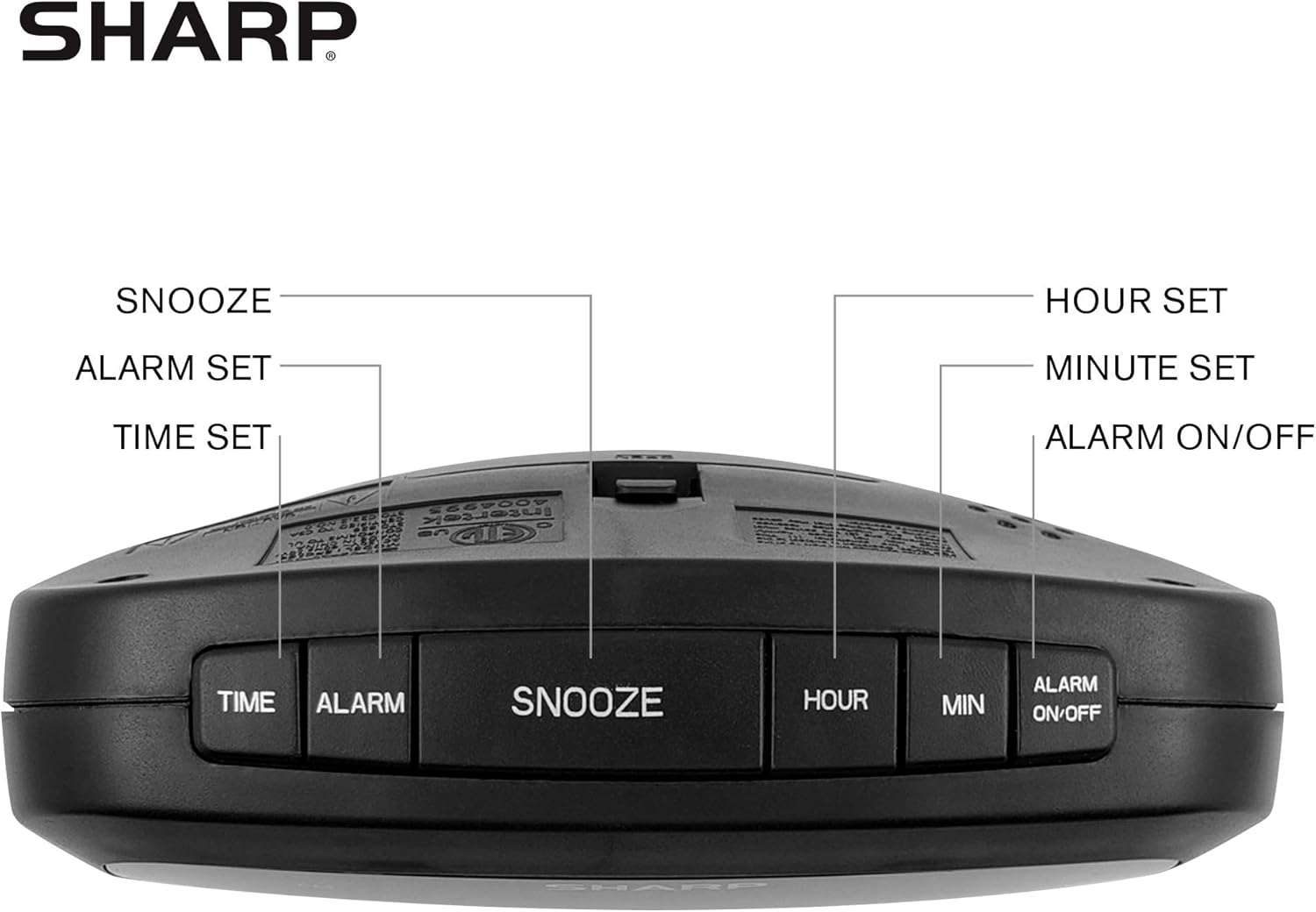
Figure 2: Underside of the clock with the battery compartment visible, requiring 2 AAA batteries for backup.
3. Awọn ilana Iṣiṣẹ
The clock features intuitive top-mounted buttons for easy operation.

Figure 3: Top panel of the clock with clearly labeled buttons for time, alarm, snooze/dimmer, hour, minute, and alarm on/off.
3.1 Ṣiṣeto Aago naa
- Tẹ mọlẹ AKOKO bọtini titi awọn nọmba wakati yoo bẹrẹ si tan imọlẹ.
- Tẹ awọn WAKATI button to adjust the hour. Pay attention to the PM indicator if setting a PM time.
- Tẹ awọn MIN bọtini lati ṣatunṣe awọn iṣẹju.
- Tẹ awọn AKOKO bọtini lẹẹkansi lati jẹrisi ati fi akoko pamọ.
3.2 Eto Itaniji
- Tẹ mọlẹ Itaniji Bọtini titi awọn nọmba wakati itaniji yoo bẹrẹ lati filasi.
- Tẹ awọn WAKATI bọtini lati ṣatunṣe wakati itaniji.
- Tẹ awọn MIN bọtini lati ṣatunṣe awọn iṣẹju itaniji.
- Tẹ awọn Itaniji button again to confirm and save the alarm time.
- Lati muu ṣiṣẹ tabi mu maṣiṣẹ itaniji, tẹ awọn IKỌ NIPA / PA button. An alarm indicator light will appear on the display when the alarm is active.
3.3 Snooze and Dimmer Function
- Nigbati itaniji ba ndun, tẹ tobi SNOOZE / DIMMER button to temporarily silence the alarm for a few minutes.
- To adjust the brightness of the green LED display, repeatedly press the SNOOZE / DIMMER button when the alarm is not sounding. Cycle through bright, medium, and low brightness settings.
3.4 Using the USB Charging Ports
The clock is equipped with two 2 AMP USB charging ports on the front, allowing you to conveniently charge your smartphone or other USB-powered devices directly from the clock.

Figure 4: The clock demonstrating its dual USB charging capability with two smartphones connected.
- Simply connect your device's USB charging cable to one of the USB ports on the front of the clock.
- Ensure your device is compatible with 2 AMP charging for optimal speed.
4. Itọju
To ensure the longevity and proper functioning of your Sharp Digital Clock, follow these simple maintenance guidelines:
- Ninu: Wipe the clock with a soft, dry cloth. Do not use abrasive cleaners, waxes, or solvents as they may damage the finish.
- Ibi: Gbe aago sori iduro, dada alapin kuro lati orun taara, awọn orisun ooru, ati ọrinrin pupọ.
- Rirọpo Batiri: If using the battery backup, replace the AAA batteries annually or when the clock consistently loses time during power interruptions.
5. Laasigbotitusita
| Isoro | Owun to le Fa | Ojutu |
|---|---|---|
| Ifihan aago ko ṣofo. | Ko si agbara tabi agbara rẹtage. | Ensure the power adapter is securely plugged into the clock and a working electrical outlet. If there was a power outage, check if backup batteries are installed and functional. |
| Itaniji ko dun. | Alarm not set or not activated. | Verify that the alarm time is correctly set and that the alarm indicator light is visible on the display (press ALARM ON/OFF). |
| Awọn ebute oko USB kii ṣe awọn ẹrọ gbigba agbara. | Device incompatibility or faulty cable. | Ensure your device is compatible with USB charging. Try a different USB cable. Confirm the clock is powered on. |
| Ifihan jẹ imọlẹ pupọ/baibai. | Eto imọlẹ nilo atunṣe. | Press the SNOOZE/DIMMER button repeatedly to cycle through brightness levels (bright, medium, low). |
6. Awọn alaye ọja
- Brand: Dinku
- Awoṣe: B08H3STVWG
- Iru ifihan: Digital Green LED
- Orisun Agbara: Okun Itanna
- Batiri Afẹyinti: Awọn batiri 2 x AAA (kii ṣe pẹlu)
- Awọn ibudo USB: 2 x 2 AMP USB FastCharge Ports
- Awọn iwọn ọja: 5.95"W x 2.3"H
- Ìwọ̀n Nkan: 9.59 iwon
- Àwọ̀: Ti alawọ ewe
- Ohun elo: Ṣiṣu
- UPC: 049353005089
7. Atilẹyin ọja ati Support
This Sharp Digital Clock comes with a limited warranty. For detailed warranty information, product support, or to purchase accessories, please visit the official Sharp webojula tabi kan si wọn onibara iṣẹ. O tun le ṣàbẹwò awọn Ile itaja Sharp lori Amazon.
Jọwọ ṣe idaduro iwe rira rẹ fun awọn iṣeduro atilẹyin ọja.
Ask a question about this manual
Ask about setup, troubleshooting, compatibility, parts, safety, or missing instructions. Manuals+ will review the question and use this page’s manual context to help answer it.