
Ọrọ Iṣaaju
Thank you for choosing the Docooler HXSJ A876 Wired Gaming Mouse. This manual provides detailed instructions for setting up, operating, and maintaining your new gaming mouse. Please read this manual carefully before use to ensure optimal performance and longevity of your device.
Ọja Awọn ẹya ara ẹrọ
- DPI ti o le ṣatunṣe: Supports 800, 1600, 3200, and 6400 DPI settings for precise control.
- 7-Color Breathing Light: Synchronized lighting provides a dynamic visual effect.
- Apẹrẹ Ergonomic: Engineered for comfort during extended use, fitting naturally in the palm.
- Awọn Yipada ti o tọ: Equipped with high-performance mechanical micro-switches rated for 10 million clicks.
- Anti-slip Scroll Wheel: Designed for smooth and precise scrolling.
- Wired USB Connectivity: Ṣe idaniloju iṣẹ ṣiṣe iduroṣinṣin ati igbẹkẹle.
Package Awọn akoonu
- 1 x Docooler HXSJ A876 Wired Gaming Mouse
- 1 x Itọsọna olumulo
Ṣeto
- Unpack the Docooler HXSJ A876 Wired Gaming Mouse and its accessories from the packaging.
- Wa ibudo USB ti o wa lori kọnputa rẹ (PC tabi kọǹpútà alágbèéká).
- So asopọ USB ti Asin sinu ibudo USB.
- The mouse is plug-and-play and should be automatically recognized by your operating system. No additional drivers are typically required.
Awọn ilana Iṣiṣẹ
DPI Atunṣe
The HXSJ A876 mouse features adjustable DPI settings, allowing you to switch sensitivity on the fly. Use the dedicated DPI buttons (DPI Loop + and DPI Loop -) located near the scroll wheel to cycle through the available DPI levels.
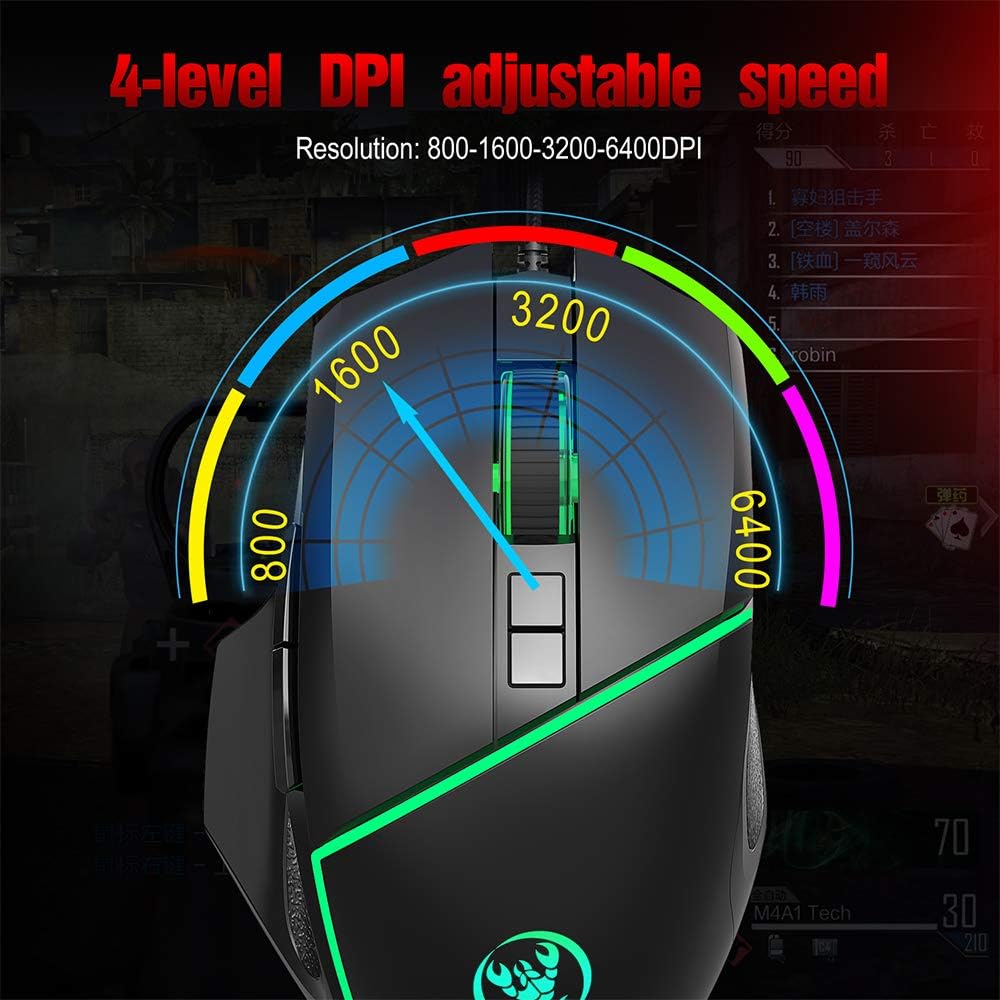
Visual representation of the 4-level adjustable DPI settings on the HXSJ A876 gaming mouse. The graphic indicates how the DPI can be cycled through different resolutions for varied gaming and work needs.
- 800 DPI: Suitable for precise tasks.
- 1600 DPI: A balanced setting for general use.
- 3200 DPI: Increased sensitivity for faster cursor movement.
- 6400 DPI: High sensitivity for rapid movements in gaming.
DPI Indicator Feedback
The mouse provides visual feedback for the current DPI setting:

This image demonstrates the HXSJ A876 gaming mouse on a desk, detailing how to turn the lights on and off by pressing the Mid button + DPI +. It also explains the DPI indicator feedback: red light flashes once for 800 DPI, twice for 1600 DPI, three times for 3200 DPI, and four times for 6400 DPI.
- When 800 DPI is selected, the DPI indicator flashes red once.
- When 1600 DPI is selected, the DPI indicator blinks red twice.
- When 3200 DPI is selected, the DPI indicator blinks red three times.
- When 6400 DPI is selected, the DPI indicator flashes red four times.
Awọn iṣẹ bọtini
The HXSJ A876 mouse features a seven-button design for enhanced functionality:

A clear diagram labeling the seven buttons on the HXSJ A876 gaming mouse: Left Button, Right Button, Mid Button (scroll wheel), DPI Loop +, DPI Loop -, Forward Button, Backward Button, and Fire Key. This helps users identify each control.
- Bọtini osi: Iṣẹ titẹ akọkọ.
- Bọtini Ọtun: Iṣẹ́ tẹlé kejì (àkójọ àṣàyàn).
- Mid Button (Scroll Wheel): Scrolls pages up/down; click for middle-click function.
- DPI Loop +: O mu ki ifamọ DPI pọ si.
- DPI Loop -: Dín ìfàmọ́ra DPI kù.
- Bọtini Siwaju: Lilọ siwaju sinu web aṣàwákiri tabi file oluwadi.
- Bọtini sẹhin: Lilọ kiri sẹhin sinu web aṣàwákiri tabi file oluwadi.
- Bọtini ina: Programmable button, often used for rapid firing in games.
Iṣakoso ina
To toggle the synchronized 7-color breathing light on or off, press the Bọtini aarin ati awọn DPI + bọtini nigbakanna.

This image displays the HXSJ A876 wired gaming mouse, emphasizing its 6400 DPI high precision capability for stable transmission and accurate analysis. The mouse features a sleek black design with red accents.
Itoju
- Ninu: Use a soft, dry cloth to clean the surface of the mouse. For stubborn dirt, slightly dampen aṣọ pẹlu omi. Yago fun lilo awọn kẹmika lile tabi awọn ohun elo abrasive.
- Ibi ipamọ: Tọju Asin ni agbegbe ti o mọ, ti o gbẹ kuro ni iwọn otutu ti o ga julọ ati oorun taara.
- Itọju USB: Yago fun atunse tabi yiyi okun USB pọ ju lati yago fun ibajẹ.
Laasigbotitusita
- Asin ko dahun:
- Rii daju pe okun USB ti wa ni edidi ni aabo sinu ibudo USB ti n ṣiṣẹ.
- Gbiyanju yiyi asin sinu ibudo USB ti o yatọ lori kọnputa rẹ.
- Tun kọmputa rẹ bẹrẹ.
- DPI ko yipada:
- Rii daju pe o n tẹ awọn bọtini atunṣe DPI to tọ.
- Check if the DPI indicator light provides feedback when buttons are pressed.
- Awọn imọlẹ ko ṣiṣẹ:
- Rí i dájú pé àsín náà so mọ́ kọ̀ǹpútà rẹ dáadáa.
- Try toggling the lights using the Mid button + DPI + combination.
Awọn pato
| Brand | Olutọju ẹrọ |
| Awoṣe | A876 |
| Iru | Ti firanṣẹ Awọn ere Awọn Asin |
| Ohun elo | ABS |
| Ipo Itanna | 7-color synchronized breathing light |
| Awọn Eto DPI | 800-1600-3200-6400DPI (Adjustable) |
| Yipada Igbesi aye | 10 million iyipo |
| USB Ipari | O fẹrẹ to 150 cm |
| Awọn ọna Voltage/lọwọlọwọ | DC 5V / 100mA |
| Awọn iwọn (L x W x H) | 12.5 x 8 x 4 cm |
| Iwọn Nkan | O fẹrẹ to 138g |
| Asopọmọra Technology | USB |
| Imọ-ẹrọ Iwari išipopada | Opitika |
| Ọwọ Iṣalaye | Ambidextrous |
| Iṣeduro Lilo | Office, Video Gaming |
| Awọn ẹrọ ibaramu | Kọmputa ti ara ẹni, Kọǹpútà alágbèéká |

This image shows a hand comfortably gripping the HXSJ A876 gaming mouse, highlighting its ergonomic design. The text indicates that the design is made for a better fit in the palm, ensuring comfort and reducing fatigue during long-term use.

An image depicting the HXSJ A876 gaming mouse in use on a desk, with an overlay indicating a '10,000,000 Times Click Test'. This illustrates the mouse's durability and the longevity of its mechanical switches.
Atilẹyin ọja ati Support
For warranty information or technical support, please refer to the documentation provided at the time of purchase or contact your retailer. Keep your proof of purchase for any warranty claims.