
1. Ọja Ipariview
The VENTION Cat 6 Ethernet Extension Cable is designed to extend the reach of your existing Cat 6 Ethernet cable. This 3-foot (0.91 meter) shielded RJ45 male-to-female connector cable provides a reliable solution for situations where your original Ethernet cable is too short, eliminating the need to purchase a new, longer cable. It also helps protect your device's network ports from wear caused by frequent plugging and unplugging.
This extension cable supports high-speed data transmission, ensuring your network performance remains consistent. Its robust construction and high-quality materials contribute to its durability and signal integrity.

Image 1.1: VENTION Cat 6 Ethernet Extension Cable highlighting 1000Mbps speed and 250MHz bandwidth.
2. Awọn ilana iṣeto
The VENTION Cat 6 Ethernet Extension Cable is designed for straightforward installation. Follow these steps to extend your network connection:
- Ṣe idanimọ Awọn aaye Asopọmọra: Locate the Ethernet port on your device (e.g., PC, laptop, router, smart TV) and the male RJ45 connector of your existing Ethernet cable.
- Connect Existing Cable: Insert the male RJ45 connector of your existing Ethernet cable into the female RJ45 port of the VENTION extension cable. Ensure it clicks securely into place.
- Sopọ si Ẹrọ: Insert the male RJ45 connector of the VENTION extension cable into the Ethernet port of your target device. Ensure it clicks securely into place.
- Jẹrisi Asopọmọra: Check the network indicator lights on your device or router to confirm a successful connection.
The cable can be used in two primary ways:
- Extension for Network Cable: Connect the extension cable to an existing network cable to increase its length.
- Extension for Network Port: Connect the extension cable directly to a device's network port to provide an easily accessible extension point, protecting the device's original port.

Image 2.1: Illustrates connecting the extension cable to an existing network cable or directly to a device's network port.

Image 2.2: A VENTION Cat 6 Ethernet Extension Cable connected to a laptop, demonstrating a typical setup.
3. Awọn ilana Iṣiṣẹ
Once properly connected, the VENTION Cat 6 Ethernet Extension Cable operates seamlessly to maintain your network connection. It is designed to support high-speed data transfer without degradation.
- Gbigbe Iyara Giga: The cable supports a maximum data transfer speed of 1000 Mbps (1 Gigabit per second) and a bandwidth of up to 250MHz. This ensures that extending your cable does not compromise your network speed for most home and office applications.
- Ibamu Agbaye: This RJ45 extension cable is fully compatible with all Cat 6 Ethernet cables and is backward compatible with Cat 5 and Cat 5e cables. It can connect various LAN network components, including PCs, laptops, computer servers, switches, routers, modems, network media players, smart TVs, network printers, and gaming consoles like PS5 and PS4.

Image 3.1: Illustration of fast data transfer speed with VENTION Cat 6 RJ45 Extension cable compared to Cat 5.

Aworan 3.2: Examples of compatible devices for the VENTION Ethernet extension cable.
4. Itọju ati Itọju
The VENTION Cat 6 Extension Cable is built for durability and requires minimal maintenance. Adhering to these guidelines will ensure its longevity and optimal performance:
- Iduroṣinṣin: The cable is designed to withstand at least 10,000 bends, making it highly resistant to damage from flexing.
- Iwọn otutu: It operates effectively in temperatures ranging from -15 to 65 degrees Celsius, suitable for both indoor and outdoor wiring.
- Ibi ipamọ: Store the cable in a cool, dry place away from direct sunlight and extreme temperatures when not in use.
- Ninu: If necessary, gently wipe the cable and connectors with a dry, soft cloth. Avoid using harsh chemicals or abrasive materials.
- Mimu: Avoid excessive pulling or bending of the connectors to prevent damage to the internal wiring or the RJ45 clips.
5. Laasigbotitusita
If you encounter issues with your VENTION Cat 6 Ethernet Extension Cable, consider the following troubleshooting steps:
- Ko si Isopọ Nẹtiwọọki:
- Ensure both ends of the extension cable are securely plugged into the existing Ethernet cable and the device's network port. Listen for a click when inserting the RJ45 connectors.
- Test the original Ethernet cable without the extension to confirm it is functioning correctly.
- Try connecting the extension cable to a different device or port to rule out a port-specific issue.
- Restart your network devices (router, modem, computer).
- Iyara Nẹtiwọọki o lọra:
- While the extension cable is designed not to diminish speed, ensure all components in your network chain (router, modem, original cable) are rated for Cat 6 or higher speeds to achieve optimal performance.
- Ṣàyẹ̀wò fún ìṣòro míràn tó wà láàárín nẹ́tíwọ́ọ̀kì tàbí àwọn ìṣòro tó wà láàárín olùpèsè iṣẹ́ ìkànnì ayélujára rẹ.
- Ensure the cable is not excessively bent or kinked, which can affect signal quality.
- Asopọmọra Laarin:
- Verify that the connectors are clean and free from dust or debris.
- Ensure the cable is not near strong electromagnetic interference sources. The double shielding helps minimize interference, but extreme sources can still cause issues.
- Ayewo okun fun eyikeyi han bibajẹ.
6. Imọ ni pato
| Ẹya ara ẹrọ | Sipesifikesonu |
|---|---|
| Brand | IGBAGBÜ |
| Orukọ awoṣe | IBL |
| Asopọmọra Iru | RJ45 |
| USB Iru | Àjọlò |
| Asopọmọra Iwa | Okunrin-to-Obirin |
| Ẹ̀ka Okun Ethernet | Ologbo 6 |
| Data Gbigbe Oṣuwọn | 1 Gigabits Ni iṣẹju-aaya (1000 Mbps) |
| Igbohunsafẹfẹ | 250 MHz |
| Pataki Ẹya | Braided, Data Transfer, High Speed, Shielded (SSTP) |
| Awọn ẹrọ ibaramu | Laptop, Modem, PC, Router, Smart TV, Gaming Consoles |
| Àwọ̀ | DUDU |
| Ohun elo ita | Textile (PVC jacket) |
| Idabobo | Double shielding (Aluminum foil + braided mesh) |
| Ohun elo adari | Ejò ti ko ni atẹgun |
| inu ile / ita gbangba Lilo | Ninu ile, ita gbangba |
| Iwọn Nkan | 2.08 iwon |
| Awọn iwọn (Apapọ) | 8.5 x 5.71 x 0.87 inches |
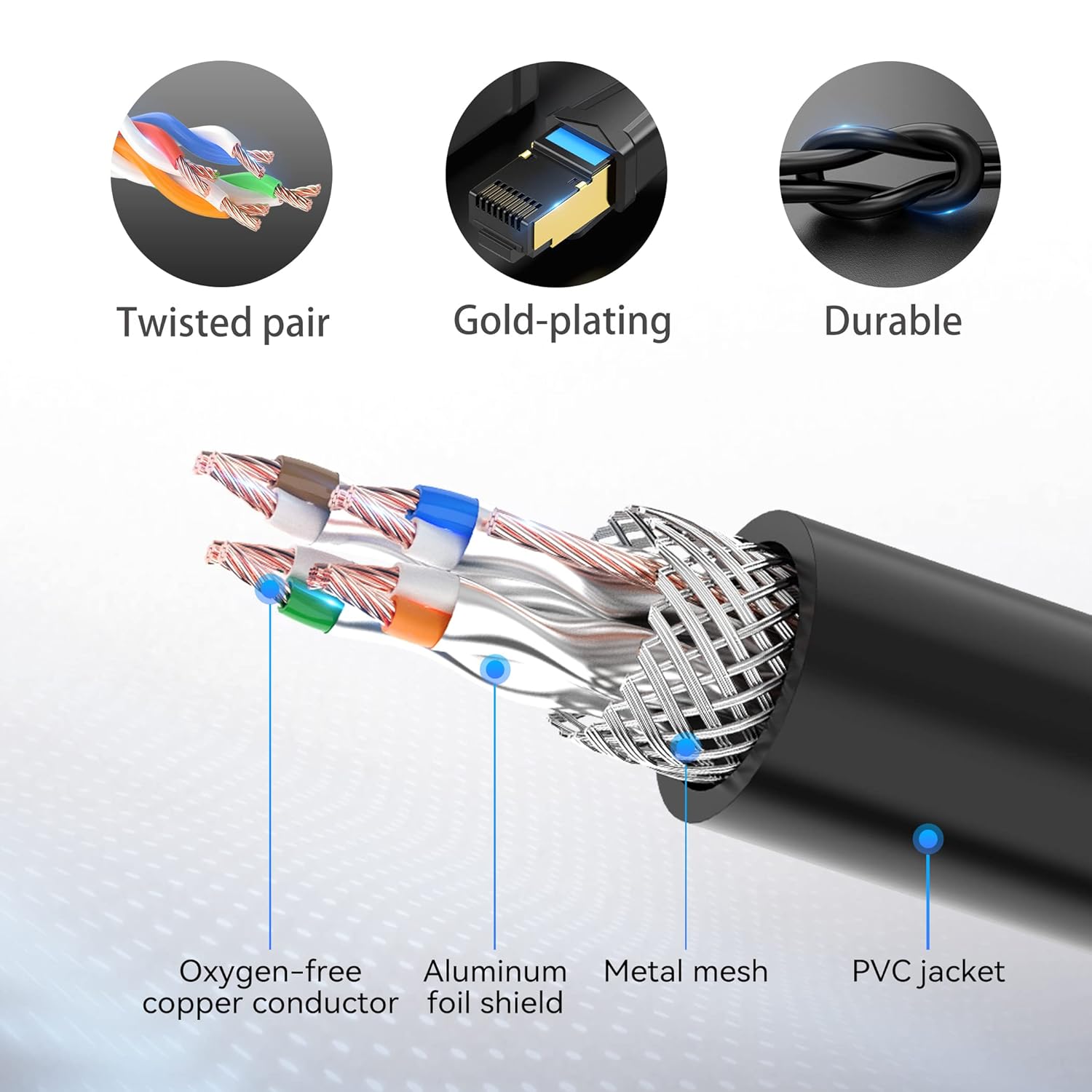
Image 6.1: Internal structure of the VENTION Cat 6 Ethernet Extension Cable, highlighting its shielded design.

Image 6.2: Dimensions of the VENTION Cat 6 Ethernet Extension Cable connectors.

Image 6.3: FLUKE Networks Test report confirming compliance with Cat 6 standards.
7. Atilẹyin ọja ati Onibara Support
VENTION products are designed for reliability and performance. This Ethernet Extension Cable has undergone rigorous quality tests and holds CE, FCC, and RoHS certifications, ensuring it meets international standards for safety and environmental compliance.
For any questions regarding your product, technical assistance, or warranty claims, please contact VENTION customer service. Our team is committed to providing reliable support and will respond to your inquiries within 24 hours.
Please refer to the product packaging or the official VENTION webAaye fun pato awọn ofin atilẹyin ọja ati alaye olubasọrọ.

Image 7.1: Product certifications for quality and compliance.