
Candy CST 06LE/1-11
Ìwé Ìtọ́sọ́nà fún Ẹ̀rọ Fọ Ẹ̀rọ Candy Smart CST 06LE/1-11 Top-Load
Model: CST 06LE/1-11 | Brand: Candy
1. Ifihan
Thank you for choosing the Candy Smart CST 06LE/1-11 Top-Load Washing Machine. This appliance is designed to provide efficient and convenient laundry care with its advanced features, including NFC connectivity for smart control and optimized washing programs. Please read this manual carefully before using the appliance to ensure safe and proper operation, and keep it for future reference.

Olusin 1.1: Pariview of the Candy Smart CST 06LE/1-11 Top-Load Washing Machine. This image shows the compact, white top-load washing machine from an angled perspective, highlighting its sleek design and the top-mounted control panel.
2. Awọn ilana aabo
For your safety and to ensure proper operation, please observe the following precautions:
- Rii daju pe ohun elo ti wa ni ilẹ daradara ṣaaju lilo.
- Má ṣe jẹ́ kí àwọn ọmọdé máa fi ẹ̀rọ ìfọṣọ ṣeré tàbí kí wọ́n máa ṣiṣẹ́.
- Do not wash items that have been cleaned in, washed in, soaked in, or spotted with combustible or explosive substances such as wax, oil, paint, gasoline, degreasers, dry-cleaning solvents, kerosene, etc.
- Always unplug the appliance from the power supply before cleaning or performing maintenance.
- Do not open the detergent dispenser or the drum door during a wash cycle, especially when the water level is high or the temperature is hot.
- Jẹ́ kí agbègbè tí ó yí ẹ̀rọ ìfọṣọ náà ká má ṣe sí àwọn ohun èlò tí ó lè jóná.
- Ti okun agbara ba bajẹ, o gbọdọ paarọ rẹ nipasẹ olupese, aṣoju iṣẹ rẹ, tabi awọn eniyan ti o ni oye kanna lati yago fun ewu kan.
3. Eto ati fifi sori
3.1 Ṣiṣii silẹ
Carefully remove all packaging materials. It is crucial to remove the transit bolts located at the rear of the machine before operation. These bolts secure the drum during transport and must be removed to prevent damage to the appliance.
3.2 Ipo ipo
Place the washing machine on a firm, level surface. Ensure there is adequate space around the appliance for ventilation and access. The dimensions of the unit are approximately 41 cm (width) x 60 cm (depth) x 86 cm (height). Use the adjustable feet to level the machine, preventing excessive vibration during operation.
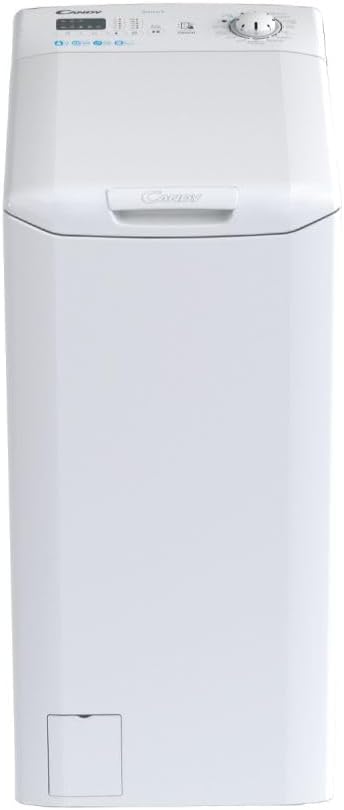
olusin 3.1: Iwaju view of the washing machine, illustrating its compact design suitable for various spaces. This image shows the washing machine from a direct front perspective, emphasizing its narrow width and top-loading access.
3.3 Omi Asopọ
Connect the water inlet hose to a cold water tap with a 3/4" thread. Ensure the connection is tight to prevent leaks. Position the drain hose into a suitable drain pipe or sink, ensuring it is securely fastened and not kinked.
3.4 Itanna Asopọ
Plug the power cord into a grounded electrical outlet. The appliance operates on 2.4E+2 Volts. Do not use extension cords or adapters.
4. Awọn ilana Iṣiṣẹ
4.1 Iṣakoso igbimo Loriview
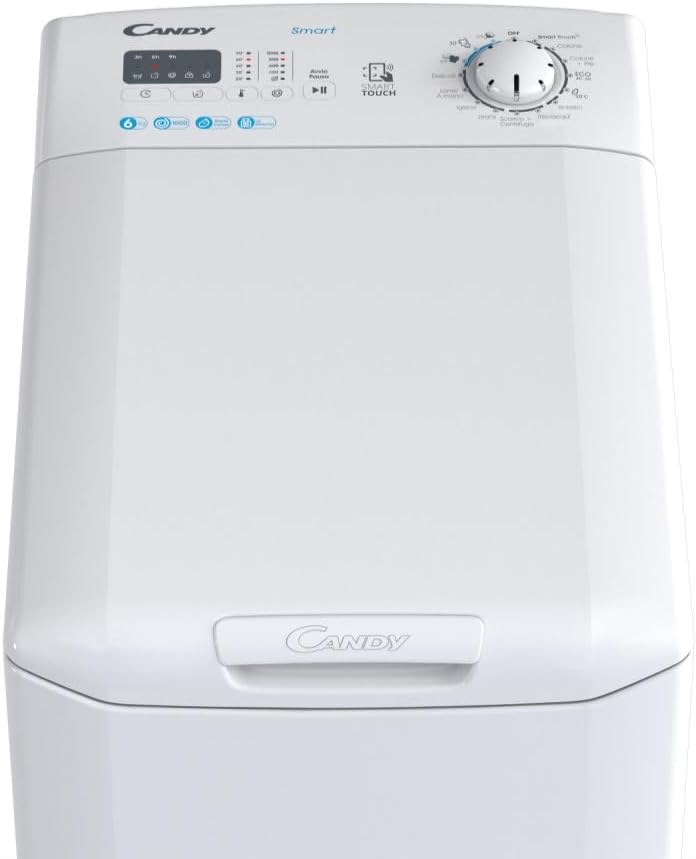
olusin 4.1: Isunmọ view of the control panel, showing the program selector dial, digital display, and touch buttons. This image provides a detailed look at the top surface of the washing machine, focusing on the user interface with its clear labels and intuitive layout.
The control panel features a program selector dial, a digital display, and various touch buttons for functions like temperature, spin speed, and special options.
4.2 ikojọpọ ifọṣọ
Open the top lid and the drum door. Load laundry evenly into the drum, ensuring not to overload. The maximum capacity is 6 kg.
4.3 Fifi Detergent
Ṣafikun iye ti o yẹ fun ifọṣọ ati asọ asọ si awọn yara ti a yan ninu apoti ififunni.
4.4 Eto Aṣayan
Turn the program selector dial to choose the desired wash program. The machine offers 17 standard programs, including:
- Quick Programs: 14, 30, 44, and 59 minutes for lightly soiled items.
- Eto Irun: Approved by Woolmark, ideal for delicate woolens (max 2 kg).
- Smart Cycles: Download additional programs via the Smart Touch app.
Adjust temperature and spin speed (up to 1000 rpm) using the corresponding buttons if needed.
4.5 Bibẹrẹ Ayika
Tẹ bọtini Ibẹrẹ/Duro lati bẹrẹ iyipo fifọ ti a yan.
4.6 Smart Touch NFC Connectivity
The Candy Smart CST 06LE/1-11 features NFC (Near Field Communication) technology, allowing you to connect your smartphone to the washing machine for enhanced functionality.
- Download the "Candy simply-Fi" app on your smartphone.
- Mu NFC ṣiṣẹ lori foonuiyara rẹ.
- Select the "Smart Touch" option on the washing machine's control panel.
- Place your smartphone near the "Smart Touch" logo on the control panel to establish a connection.
- Through the app, you can download new wash cycles (Smart Cycles), receive usage tips, and perform diagnostics (Smart Check-up).
4.7 idaduro Bẹrẹ
Utilize the delayed start function to program the machine to begin a cycle at a later time, up to 24 hours. This allows you to take advantage of off-peak electricity rates or have laundry ready when you arrive home.
5. Itọju
Itọju deede ṣe idaniloju gigun ati iṣẹ ti o dara julọ ti ẹrọ fifọ rẹ.
5.1 Ninu Dispenser Detergent
Máa yọ àpótí ìfọṣọ kúrò lẹ́ẹ̀kọ̀ọ̀kan kí o sì máa nu ibi tí ó ń gbé ìfọṣọ sí láti má ṣe kó àwọn ohun tí ó kù jọ. Fi omi tó ń ṣàn fọ̀ ọ́, kí o sì tún fi sínú rẹ̀.
5.2 Ninu Ajọ
The filter, usually located at the bottom front of the machine, should be cleaned regularly to remove lint and small objects. Refer to the diagram in the full manual for exact location and procedure. Ensure the machine is unplugged and drain any residual water before opening the filter cover.
5.3 Ninu ilu
Run a maintenance wash cycle (e.g., a hot wash with no laundry and a descaling agent or white vinegar) occasionally to clean the drum and remove any odors or detergent residues.
5.4 Ita Cleaning
Mu ese ita ẹrọ naa pẹlu asọ, damp asọ. Ma ṣe lo abrasive ose tabi epo.
5.5 Smart Check-up
Use the Smart Check-up function via the Candy simply-Fi app to monitor the appliance's status and receive practical advice for self-troubleshooting, helping to prolong the life of your washing machine.
6. Laasigbotitusita
Ṣaaju ki o to kan si iṣẹ alabara, jọwọ tọka si awọn ọran ti o wọpọ wọnyi ati awọn ojutu wọn:
| Isoro | Owun to le Fa | Ojutu |
|---|---|---|
| Ẹrọ ko bẹrẹ | Okun agbara ko ṣafọ sinu; ẹnu-ọna ko ni pipade daradara; eto ko yan. | Check power connection; ensure door is securely latched; select a program and press Start. |
| Omi ti ko ṣan | Drain hose kinked or blocked; filter clogged. | Check and straighten drain hose; clean the filter. |
| Gbigbọn ti o pọju | Awọn boluti irekọja ko yọ kuro; ẹrọ kii ṣe ipele; kojọpọ fifuye. | Remove transit bolts; adjust leveling feet; redistribute laundry inside the drum. |
| Iyoku Detergent ni apanirun | Insufficient omi titẹ; dispenser clogged. | Ṣàyẹ̀wò omi tó wà nílẹ̀; nu ẹ̀rọ ìfọṣọ tó wà nílẹ̀. |
For more detailed troubleshooting or issues not listed here, please consult the full user manual available on the manufacturer's website or use the Smart Check-up feature in the Candy simply-Fi app.
7. Awọn pato
| Ẹya ara ẹrọ | Ẹ̀kúnrẹ́rẹ́ |
|---|---|
| Brand | Suwiti |
| Awoṣe | CST 06LE/1-11 (Manufacturer Model: 31011137) |
| Iru | Top-Load Fifọ Machine |
| Agbara | 6 kilo |
| Iyara Spin | 1000 rpm (awọn iyipada fun iṣẹju kan) |
| Awọn iwọn (L x W x H) | 41 x 60 x 86 cm |
| Iwọn | 57.5 kilo |
| Voltage | 2.4E + 2 folti |
| Nọmba ti Awọn eto | 17 (boṣewa) |
| Pataki Awọn ẹya ara ẹrọ | Smart Connectivity (NFC), Weight Detector, Quick Programs, Wool Program, Delayed Start |
| Àwọ̀ | Funfun |
8. Atilẹyin ọja ati Support
This product comes with a manufacturer's warranty. Please refer to the warranty card included with your purchase for specific terms and conditions, including warranty period and coverage details.
For technical support, spare parts, or service requests, please contact Candy customer service. Contact information can typically be found on the manufacturer's official website or in the documentation provided with your appliance. When contacting support, please have your model number (CST 06LE/1-11 or 31011137) and serial number ready.
Ask a question about this manual
Ask about setup, troubleshooting, compatibility, parts, safety, or missing instructions. Manuals+ will review the question and use this page’s manual context to help answer it.